Phased rebuild plan: start with the critical path first
Learn a phased rebuild plan that starts with the critical path, proves stability, then adds secondary features without breaking production.
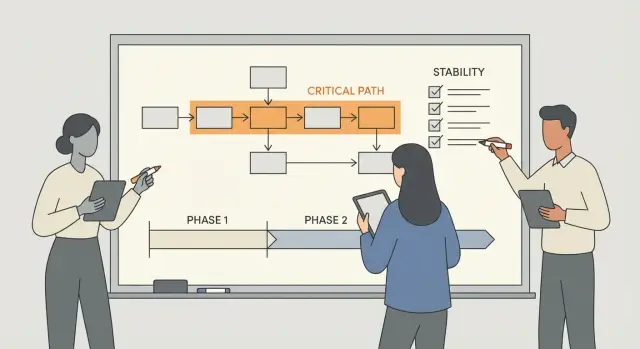
What a phased rebuild is and why it matters
A phased rebuild plan means rebuilding your app in small, planned chunks instead of trying to fix everything at once. You start with what must work for the product to be usable, then add the rest only after the core is stable.
Shipping every feature in one big push usually fails for a simple reason: you can’t tell what change caused what problem. Bugs multiply, timelines slip, and the team ends up firefighting instead of moving forward.
AI-generated prototypes raise the stakes. They often look complete, but the inside can be messy: unclear data flow, copy-pasted logic, missing error handling, and risky defaults like exposed secrets or weak authentication. If you pile new features on top of that, you can end up rebuilding the same parts over and over.
The key idea is the critical path. It’s the shortest set of steps a real user must complete to get the main value from your product, without workarounds.
A simple way to spot it is to describe the app in one sentence, then list the steps a first-time user takes to reach that outcome. For many products, the critical path includes a few predictable pieces: sign up or sign in, perform the core action (create a booking, upload a file, place an order), complete the “value moment” (pay, submit, confirm), then see the result and return later without losing data.
Everything else is secondary until this path is safe and reliable. If a small app lets users book an appointment, the critical path is account access, available slots, booking creation, confirmation, and a saved record. Fancy filters, admin dashboards, and email templates can wait until the booking flow works every time.
Teams that repair AI-built apps often find that focusing on the critical path first reduces rework, makes testing simpler, and turns a broken prototype into something you can trust in production.
Find your critical path before you touch code
A phased rebuild plan starts with one simple question: what is the one user goal that must always work?
Write the goal from the user’s point of view. Examples: “Sign up and create my first project,” “Book and pay for an appointment,” or “Import a file and get a report.” Pick the one that drives the business. Everything else is optional until this path is solid.
Next, map the minimum steps from first touch to success. Keep it boring and direct. You’re not designing the perfect experience yet, you’re choosing what must not break. Typically, that means: entry point to first action, account creation or sign-in, the core action, the irreversible step (payment or data write), then confirmation.
Then list the dependencies under those steps. This is where AI-built prototypes often hide the real risk: auth glued together with placeholders, payments stuck in “test mode,” data writes without validation, and emails that leak secrets or never send.
Finally, agree on what’s out of scope for phase 1 and write it down. For a small app, that might mean social login, admin dashboards, analytics, exports, team roles, and fancy onboarding.
Concrete example: if your app’s main value is “users pay, then generate a document,” the critical path isn’t “make the dashboard pretty.” It’s payment, document generation, and saving the result. If those are stable, phase 2 features have a safe place to land.
Set a stability baseline you can measure
Before you rebuild anything, write down what “broken” means today. If you skip this, phase 1 can feel better while still failing in the same places.
Start by listing failures you already see in real use. Common ones in AI-built apps are logins that randomly fail, crashes on certain inputs, payments that don’t complete, data that disappears after refresh, and pages that take so long users give up.
Next, capture user pain in plain language. Look for the moments where people drop off: the screen they abandon, the action they retry, or the step where support requests pile up. A quick approach is to collect 10 to 20 recent messages or bug reports, then tag each one by where it happened (sign up, checkout, upload, dashboard).
Now define “stable” using a small set of signals you can check every day. Keep it to 3 to 5, and make them measurable. For example: sign-in success rate, crash-free sessions, data integrity for key actions, performance on critical screens, and support load tied to core failures.
Pick a short time window to measure your baseline, usually 3 to 7 days. Long enough to avoid a “good day” illusion, short enough that you don’t stall.
Phase 1 scope: make the core safe and reliable
Phase 1 isn’t about making the app impressive. It’s about making the core dependable. If your plan starts by polishing secondary screens, you can end up with a nicer-looking app that still fails when real users sign in, pay, or save data.
A good rule is to pick the smallest set of features the business needs to function, then make that path safe. Everything else waits.
What belongs in Phase 1
Start with security basics that can quietly break everything later. Remove exposed secrets, tighten authentication, and validate every user-controlled input before it hits your database or APIs. Many AI-generated prototypes leak keys, skip checks, or accept unsafe input.
Next, stabilize the data model and the workflows that touch it most. If the app can’t reliably create, read, update, and delete the key records, adding features just piles on confusion. Keep the rules simple and consistent so the same action always produces the same result.
Make problems visible. Add clear logs for the critical path and capture errors with enough detail to reproduce them. Without this, you’ll keep guessing when something breaks.
Finally, make shipping boring. You want one clear way to deploy, with the same steps every time, so fixes don’t get lost between machines or environments.
A quick Phase 1 checklist
“Safe and reliable” usually means:
- Secrets are removed from code and rotated where needed
- Auth is correct for the main roles, and sessions behave predictably
- Critical inputs are validated, and common injection paths are blocked
- Core workflows pass repeatable tests and are easy to observe in logs
- Deployments are repeatable and produce the same result every time
Step-by-step: rebuild the critical path
Rebuild the main user flow as a single, simple path from start to finish. This keeps your phased rebuild plan from getting swallowed by nice-to-haves.
1) Recreate the flow end to end (the simplest version)
Pick one success outcome and build only what it needs. If a screen, setting, or integration isn’t required for that outcome, leave it out for now.
Write the flow as 5 to 8 steps in plain language (what the user does, what the system saves, what they see next). Implement the smallest working version with basic UI, basic API, and basic database actions. Stub non-critical integrations (use a sandbox payment, send a test email, or log the event), and make failures obvious with clear errors and loading states. Then run the flow manually multiple times with real-looking data to catch obvious breaks.
2) Add tests only where breakage would hurt
You don’t need full coverage yet. Add a small set of tests that protect the core path from regressions: one that signs in, one that completes the main action, and one that confirms data was saved correctly. Even these basics can prevent “it worked yesterday” surprises after a quick fix.
3) Fix one failure class at a time
Bugs come in clusters. Group issues by type and solve them in batches so you don’t thrash. Common batches are authentication (sessions, redirects), data integrity (constraints, migrations), and payments (webhooks, idempotency). Keep each change small enough to review, and ship fixes frequently.
Example: a realistic phased rebuild for a small app
Imagine a tiny SaaS app that helps a marketing manager upload a CSV, tag leads, and generate a simple first report (top segments and counts). The current AI-built prototype looks fine, but signups fail randomly, permissions are inconsistent, and data sometimes disappears after refresh.
Here’s a phased rebuild plan that keeps the business moving while you reduce risk.
Phase 1: make the core safe and boring (in a good way)
Start from signup to the first report, and treat everything else as optional.
- Signup and login you can trust (consistent sessions, password reset works, no exposed secrets)
- Permissions that match reality (users can’t see other people’s data, demo data is separated)
- Save and load data reliably (upload, tags, and report inputs persist every time)
- Basic UI only (simple, stable screens with no half-working buttons)
A good test is: can five different people go from “create account” to “first report” without help, twice in a row?
Phase 2: add features that help teams use it daily
Build on the stable base: team invites, exports, and one or two integrations (for example, pushing tagged leads to a CRM). Each addition should avoid rewriting the core flow.
Phase 3: polish and power-user features
Once the app is steady in real use, add analytics dashboards, more roles, advanced settings, and other nice-to-haves.
Common traps that slow a phased rebuild
A phased rebuild only works when each phase has a clear finish line. Most delays happen when the team stays busy instead of making the app reliably do one thing end to end.
One common mistake is cleaning everything before the app runs. Refactors can be useful, but if login, checkout, or data saving still break, you have no solid base to build on. Tidy code is a bonus, not the first milestone.
Another trap is rebuilding the UI while the core logic is still broken. A prettier screen can hide the fact that the system underneath is failing. If users can’t complete the main flow without errors, visual polish just increases rework later.
Progress also gets derailed by adding features to prove momentum. A new filter, a dashboard, or an integration looks great in a demo, but it adds states and edge cases. That makes stability harder to confirm, which defeats the point of rebuilding in phases.
The most expensive trap is keeping the same tangled architecture and hoping it scales. If the AI-generated code mixes UI, business rules, and database calls in one place, every change breaks something else. A small, targeted restructure early can save weeks later.
Watch for these warning signs:
- Pull requests keep touching unrelated files “while we’re here”
- Bugs reappear after being marked fixed
- You can’t explain the main flow in 5 steps
- Testing is skipped because it “takes too long”
Quick checks before you add secondary features
Secondary features feel safe because they’re “just UI” or “nice to have.” But if you add them before the core is truly stable, they often reopen the same bugs you just fixed. Treat the end of Phase 1 like a gate you must pass.
The Phase 1 exit checklist
Run these checks on the critical path only (signup, login, payment, core workflow, whatever your app can’t live without):
- Performance: Measure page load and the slowest steps in the core flow. Look for obvious waste like repeated queries, big payloads, or endpoints doing extra work “just in case.”
- Security: Confirm no secrets are in the repo or frontend. Verify access control with a few real tests. Re-check common injection risks and unsafe uploads.
- Reliability: Add timeouts on external calls, set sensible retries (not infinite), and make failures graceful (clear errors, no blank screens).
- Release readiness: Make sure you can deploy safely, monitor key errors, and roll back.
- Decision gate: Write down pass criteria you’ll accept (for example, “login works 100 times in a row” and “no high-severity security findings”). If you can’t say it in one sentence, you’re not ready.
If your AI-built app logs users out randomly, don’t add a new dashboard widget yet. First prove sessions are stable under real use, then move on.
Keep phase 2+ from re-breaking phase 1
Phase 1 is where you earn trust: the app runs, the core flow works, and the scary bugs stop showing up. Phase 2 is where teams often undo that progress by adding “just one more feature” that sneaks into the core.
A practical guardrail is a clear boundary between the core domain (the critical path) and optional features. Treat the core like a small product inside your product. Features can call it, but they shouldn’t rewrite it.
Put a hard boundary around the core
Make it obvious in the codebase what is core and what is optional. If a new feature needs something from the core, add it through a small interface instead of reaching into internal logic.
For example, if your critical path is signup -> login -> checkout, a promo code feature shouldn’t edit checkout rules all over the place. It should pass a promo request to a checkout interface that validates inputs and applies discounts in one controlled spot.
A quick boundary check:
- Core flow has its own module or folder, with tests
- Feature code can’t import core internals directly
- Shared code stays small (validation, types, utilities)
- Data changes go through one core service, not scattered queries
Keep decisions visible and keep standards strict
Write down decisions briefly while they’re fresh: what changed, why, and what not to do. A short note can save hours later, especially when intent is unclear.
Set rules for new work so the mess doesn’t return:
- No feature merges without passing the phase 1 tests
- New database fields include a rollback plan
- Secrets never go in the repo, even “temporarily”
- Any core change needs a second set of eyes
- If a feature needs 3+ core edits, stop and redesign the interface
Plan secondary features once stability is proven
A phased rebuild plan only works if phase 1 stays protected. Before you add anything new, make sure the core flow is boring in the best way: it runs the same every time, errors are predictable, and fixes don’t create new surprises.
When deciding what belongs in phase 2 or later, separate “nice to have” from “needed to keep the lights on.” If a feature isn’t required for the critical path, it should compete for space in phase 2.
A simple way to order features is to score each one by user value vs. risk to stability. Consider how many users need it now, whether it touches auth/payments/permissions/data models, how big the change is, how many unknowns are left, and what support burden it creates.
Ship secondary features in small releases, then listen. One tight batch plus feedback beats five features nobody uses.
After each batch, reserve hardening time so phase 1 doesn’t get re-broken: run a short regression pass on the critical path, fix performance and error handling before the next feature, remove temporary flags, review security basics, and update monitoring so issues show up early.
Next steps: get a clear phased plan for your AI-built app
If your app was generated with tools like Lovable, Bolt, v0, Cursor, or Replit, the fastest path forward is usually a phased rebuild plan that protects the core user journey first and avoids stacking features on shaky code.
Before you ask for help, bring a small starter pack so someone can see what’s real quickly: repo access (or a zipped copy) plus environment details, the critical-path steps a user must complete, recent logs or screenshots of failures, any keys that may have been exposed, and your phase 1 success target.
Sometimes a focused repair is enough. Other times, rebuilding is faster than patching. Repairs tend to win when the core structure is sound and the bugs are isolated. Rebuilds tend to win when you see repeated issues like tangled modules, inconsistent data models, or security problems that keep resurfacing.
If you inherited an AI-generated codebase that won’t hold up in production, FixMyMess (fixmymess.ai) can start with a free code audit to identify what’s breaking the critical path, then focus repairs on logic, security hardening, refactoring the worst hotspots, and deployment preparation. That gives you a concrete phase 1 scope you can trust before you invest in phase 2 features.
FAQ
What exactly is a phased rebuild?
A phased rebuild means rebuilding your app in small, planned chunks, starting with the one user journey that must work every time. It helps you avoid “everything changed at once” chaos, so you can ship fixes, see what improved, and keep the product usable while you stabilize it.
What do you mean by “critical path”?
The critical path is the shortest set of steps a real user must complete to get the main value from your product without workarounds. If that path is stable, you can safely add secondary features later without constantly re-breaking the app.
How do I find my app’s critical path quickly?
Write your app’s value in one sentence, then list what a first-time user does to get that outcome. Keep it to the minimum steps from entry to success, and include the irreversible moment like a payment or a database write, plus a confirmation that proves it worked.
Why do AI-generated prototypes break so often when you try to ship them?
AI prototypes often look finished but hide fragile internals like copy-pasted logic, missing validation, and unclear data flow. If you add features on top, you can end up rebuilding the same parts repeatedly because the core isn’t trustworthy yet.
How do I set a stability baseline before rebuilding?
Define “broken” in plain terms based on what users actually experience, then measure it for a short window like 3–7 days. Pick a few signals you can check daily, such as whether sign-in works reliably, whether key records persist after refresh, and whether critical screens crash or time out.
What should be in Phase 1 scope (and what should wait)?
Phase 1 should include only what makes the core journey safe and reliable: basic security cleanup, dependable authentication, correct permissions, validated inputs, consistent data saves, and enough logging to see failures clearly. If it doesn’t help a user complete the main flow end to end, it usually belongs later.
What’s the safest way to rebuild the critical path without getting distracted?
Start by implementing the simplest end-to-end version of the critical flow, even if the UI is basic. Then add a small number of tests that protect the flow, and fix issues in batches by type (auth, data integrity, payments) so you don’t thrash between unrelated bugs.
How do I keep Phase 2 features from re-breaking Phase 1?
Treat Phase 1 like a protected core and add new features through a small interface instead of editing core logic everywhere. Keep core tests as a gate for merges, and re-run a short regression on the critical path after every feature batch so stability doesn’t quietly slip.
What are the most common mistakes that slow down a phased rebuild?
Clean refactors and UI polish can feel productive, but they don’t matter if users still can’t sign in, pay, or save data reliably. Another common trap is “just one more feature” to show momentum, which adds states and edge cases before you can confirm the core is stable.
I inherited an AI-built app that won’t hold up in production—what should I do first?
If you’re non-technical, start by writing the critical-path steps, gathering a few recent failure examples (screenshots or logs), and listing any keys that might have been exposed. FixMyMess can run a free code audit on an AI-generated app to pinpoint what’s breaking the critical path, then typically deliver focused repairs and deployment readiness in 48–72 hours, or advise when a rebuild is faster than patching.