Prevent client-side waterfall fetches to speed up your app
Prevent client-side waterfall fetches by running requests in parallel or aggregating them on the server, reducing load time and time-to-interactive.
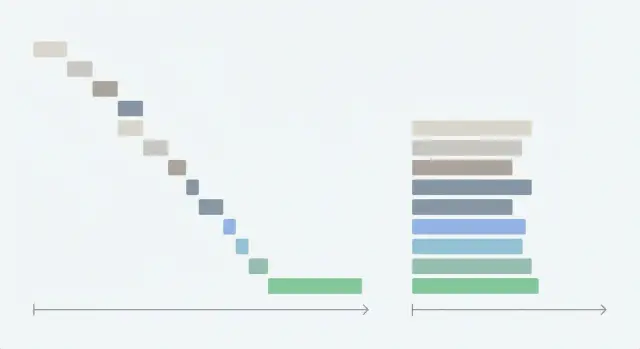
What waterfall fetches are and why they slow your app
A “waterfall” fetch happens when your app makes one network request, waits for it to finish, then starts the next. Each request adds its own delay, so the total wait time becomes the sum of all waits instead of roughly the longest wait.
This hurts time-to-interactive because the screen often can’t show anything useful until the last request returns. Users experience this as a blank page, a spinner that drags on, or a UI that appears but stays half-empty and keeps shifting.
Waterfalls usually show up in a few repeat patterns:
- Chained fetches where request B only starts inside the success handler of request A.
- Rendering that’s tied to data arrival, so deeper parts of the page don’t even mount until earlier data returns.
- Nested components that each “fetch on mount,” which forces child requests to wait for parent components.
- “Convenience” code that turns one screen into five endpoints, even when the data is always needed together.
This is especially common in AI-generated prototypes. They often feel fine on a fast local machine, then become sluggish in production because sequential calls pile up.
The good news is that you can usually prevent client-side waterfall fetches without rewriting everything. Many fixes are straightforward: run independent requests in parallel, start loading earlier, and move coordination work off the client when it’s doing too much.
How to spot a client-side waterfall quickly
Start by watching the screen like a user would. Waterfalls often look “busy” but don’t feel responsive.
A strong clue is the loading experience. If a spinner appears, disappears, then appears again, the app is probably waiting on a chain. Another sign is UI that arrives in stages: header first, then sidebar, then the table, then filters. That staggered feeling usually means data is arriving one request at a time.
Focus on the screens people complain about most. Waterfalls love dashboards, settings pages, and any view with lots of “small” data needs.
What to look for in the browser
Open DevTools and go to the Network tab. Reload the page and look for:
- A long chain where each request starts only after the previous finishes
- Idle gaps between requests (nothing happens while the UI waits)
- Many similar calls that differ only slightly
- Requests that block the first meaningful content
- A “fan-out” that happens late (one call returns, then triggers several more)
After you spot a suspicious chain, click the first request and check what triggered it (Initiator or stack trace, depending on the browser). If a fetch in one component triggers another fetch in a child component, you’ve found the waterfall shape.
Cross-check with your backend logs
A waterfall can also appear as repeated calls for the same data. A dashboard might fetch the current user in three different components because each one “plays it safe” and requests it again.
In AI-generated codebases, this is common: components copy-paste fetch logic, then accidentally create chains and duplicates.
Example: a dashboard screen that waits on five endpoints
A common real-world waterfall is a dashboard built from a prototype that loads data one step at a time. Every request waits for the previous one, so the page can’t settle.
Imagine the page does this on mount: fetch the user, then fetch the team, then fetch permissions, then fetch the widgets list, then fetch each widget’s data. If each call takes 200-400 ms, users can easily wait 1.5-3 seconds before the screen feels usable, even on a decent connection.
Here’s a typical set of endpoints (names vary, the behavior is what matters):
GET /api/me(profile basics like name, avatar)GET /api/team(team id, team name)GET /api/permissions?teamId=...(roles, feature flags)GET /api/widgets?teamId=...(which cards to show)GET /api/widgets/:id/data(numbers, charts, recent items)
What makes it a waterfall isn’t the number of requests. It’s the forced order.
Often the page waits for /api/me before it starts /api/team, even when those calls could run together. Then it waits for permissions before rendering any cards, so users stare at a blank shell. Later, cards pop in one by one and shift around as data arrives.
To prevent client-side waterfall fetches, separate what is truly dependent from what is just coded that way.
Some calls can often run in parallel (like /api/me and /api/team, and sometimes /api/widgets). Others are truly dependent (like /api/permissions, which needs a teamId, and widget data calls that need widget IDs).
The main idea: you usually only need a small set of fields up front to render a stable first view (header, layout, placeholders). Everything else can be parallelized or grouped.
Quick wins before a big refactor
You don’t always need a full rewrite to prevent client-side waterfall fetches. A few targeted changes can cut seconds off time-to-interactive and reduce the “jumpy” feel.
Start by confirming what’s actually slow. In the Network panel, sort by Duration and find the endpoint that dominates the timeline. It’s easy to refactor three “obvious” calls and miss the real problem, like one slow permissions check.
Then make the first screen usable sooner. If data isn’t needed for the first meaningful view (for example, “recommended items,” “recent activity,” or a heavy chart), load it after the user can already click around. People tolerate background loading far better than a blank page.
A short set of quick wins that usually pays off:
- Start requests earlier (on navigation or route change), not after deep components mount.
- Stop duplicate fetches by fetching shared data once and reusing it.
- Cache results in memory for a short time so a back-and-forth navigation doesn’t repeat the same calls.
- Prefetch the likely next screen when the app is idle, but only if it’s safe and not sensitive.
- Move non-critical calls to “after paint,” so the page becomes interactive first.
Example: dashboards often re-fetch "/me" in each tile because every widget asks for the user separately. A simple fix is to fetch the user once at the screen level and pass it down.
Step by step: refactor sequential requests into parallel calls
Start by listing every request a screen makes and why it needs it. Mark each as either independent (can load right away) or dependent (needs an ID or value from another response).
A common chain is: load user, then load team using user.teamId, then load projects using team.id. Only the team and projects calls are truly dependent. Anything else that doesn’t need those IDs shouldn’t be stuck in the chain.
1) Map what can run together
Group requests into two buckets: “can fetch now” and “must wait for X.” Plan two waves:
- Wave 1: start everything independent at the same time.
- Wave 2: once you have the needed IDs, start the dependent calls in parallel too.
2) Replace chained awaits with parallel calls
If you see await after await for unrelated calls, that’s your first refactor target.
async function loadScreenData() {
  const [me, flags, notifications] = await Promise.all([
    api.get("/me"),
    api.get("/feature-flags"),
    api.get("/notifications"),
  ]);

  const [team, projects] = await Promise.all([
    api.get(`/teams/${me.teamId}`),
    api.get(`/teams/${me.teamId}/projects`),
  ]);

  return { me, flags, notifications, team, projects };
}
Keep parallel groups small and meaningful. If one call is optional (like “tips” or “news”), load it after the first paint.
3) Centralize data loading per screen
Instead of sprinkling fetches across widgets, create one “load screen data” function (or one route-level hook) that owns the screen’s data.
This makes dependencies easier to reason about. It also makes retries and caching more predictable, and it helps you avoid “five spinners” everywhere.
Aim for one loading state per screen when possible. Users usually prefer “the dashboard is loading” over five separate spinners that finish at different times.
Measure before and after. Track time to first content (when something useful appears) and time-to-interactive (when controls respond).
When to aggregate on the server instead of the client
Server aggregation means one request returns everything a screen needs, instead of the browser making many small calls.
If you want to prevent client-side waterfall fetches, this can be the cleanest fix because the client stops coordinating a chain of dependent requests.
Aggregation helps most when:
- The screen needs lots of small endpoints.
- Latency is noticeable (mobile users, far-away regions).
- Each endpoint repeats the same work (auth checks, permission checks, database lookups).
Five requests that each take 150-300 ms can quickly turn into a full second or more before the UI settles.
A simple contract keeps it predictable. For example, a dashboard might call one endpoint and get the basics in one response:
GET /dashboard->{ profile, team, widgets }
Keep an eye on scope. Avoid aggregation when it creates a huge payload, pulls in rarely-used data “just in case,” or mixes data with different privacy rules. Another red flag is when the response becomes so broad that one small change breaks many unrelated parts of the UI.
A safe migration plan is to add the aggregated endpoint while keeping the old endpoints working. Ship the client change behind a feature flag, compare results, then gradually move traffic over. Once the new path is stable, retire the old calls.
Reduce payload size and redundant calls
Don’t only look at request order. Look at how big each response is and how often you ask for the same data. Even perfectly parallel requests can feel slow if every response is heavy or repeated.
Trim API responses to only what the screen uses. If a card needs name, status, and updatedAt, don’t ship the full record with logs, comments, and long descriptions.
Batch similar queries where you can. A common pattern is fetching a list, then fetching details for each item one by one. That N+1 behavior adds hidden delays and extra server load. Prefer one endpoint that accepts IDs and returns matching items in one response.
Redundant calls often come from multiple components requesting the same thing independently. A dashboard header, sidebar, and main panel might each fetch the current user, plan, and feature flags. Put shared data behind one request layer (or one store) so it’s fetched once and reused.
Practical checks that usually pay off:
- Add pagination or limits so the first load stays small.
- Request only needed fields (avoid “include everything” expansions).
- Batch “fetch by ID” calls into one “fetch by IDs” call.
- Deduplicate in-flight requests so two components don’t trigger two identical calls.
- Watch for N+1 patterns inside the backend too (one API call causing many database queries).
Example: if your dashboard loads 200 projects on first render but only shows 20, request 20 and load more on scroll or search.
Loading states, errors, and caching without new bugs
After you refactor to prevent client-side waterfall fetches, the next risk is UX bugs: blank screens, spinners that never stop, and data that flashes or changes unexpectedly.
Decide what truly blocks interaction and what can arrive later.
Split data into two groups:
- Blocking data: needed to render the page structure or allow the first meaningful action.
- Non-blocking data: nice to have, but safe to load after the page becomes usable.
Show partial UI without lying
Skeletons work best when they match the final layout. Use them to reserve space and show structure, then fill in real values.
For heavy widgets (charts, editors, maps), render a light placeholder and load the widget after the main content is ready.
A simple pattern:
- Render layout immediately with safe defaults
- Show skeletons only where data will appear
- Load heavy widgets after primary content
- Disable buttons only if they truly need missing data
- Prefer “last updated” text over an endless spinner
Errors: fail small, not loud
Parallel calls mean some requests may succeed while one fails. Handle failures per section, not as “the whole page is broken.” Show a small error message with a retry for that part, and keep the rest interactive.
Avoid auto-retrying in a tight loop. Use backoff and a max retry count so you don’t create retry storms.
Caching helps, but only with clear rules. Decide how long data is “fresh” (for example, 30 seconds for notifications, 5 minutes for profile info). When it’s stale, you can show cached data instantly and refresh in the background, but label it if accuracy matters.
Finally, guard against race conditions when users move fast. If a user navigates away, cancel in-flight requests and ignore late responses. Otherwise, an old response can overwrite newer state.
Common mistakes that bring waterfalls back
Waterfalls often return after a “successful” refactor because data fetching is allowed in too many places. The goal isn’t just parallel calls once. It’s keeping the app shaped so it stays parallel over time.
1) Hidden fetches inside nested components
A common trap is moving the main screen to parallel requests, but leaving child components that still fetch on mount. The page seems fine locally, then a new widget is added and the client quietly starts waiting on it.
A simple rule helps: fetch at one level (route or screen), then pass data down. If a component truly needs to own its own data, make that decision explicit and measurable.
2) “Dependent” requests that aren’t really dependent
Teams sometimes chain calls because it feels safer. But often request B only needs a small piece of A (like an ID) that you already have, or could get earlier.
A quick test: “If A fails, can B still run?” If yes, they’re not truly dependent.
3) Over-parallelizing and overloading the backend
Parallel is good until it becomes a burst. Launching 20 requests at once can trigger rate limits, slow the database, or cause retries that add even more delay.
Keep parallelism controlled:
- Cap concurrency (for example, 4-6 at a time)
- Deduplicate identical calls across components
- Cache stable data (like the current user)
- Add backoff for retries
4) The mega endpoint that returns too much
Server aggregation can help, but a single endpoint that returns “everything” tends to grow until it becomes the new bottleneck. The client makes one call, but that call becomes heavy, slow to compute, and hard to cache.
5) Extra round trips from auth checks
If authentication is checked late, you can end up with: load page, get 401, refresh token, retry all requests.
Make auth state available early, and avoid firing requests until you know the session is valid.
Quick checklist before you ship the refactor
Do a last pass that focuses on user time, not just cleaner code. Waterfalls can sneak back in through small changes like a new feature flag call or an extra “just in case” fetch.
Walk through the main screen like a first-time user on a cold load (empty cache). If the page can’t show anything useful until many calls finish, you probably still have a hidden chain.
A short pre-ship checklist:
- Start with one or two “must-have” requests, then load the rest after the first content is visible.
- Start independent calls at the same moment (same tick), not after another promise resolves.
- Make one clear owner for loading the screen’s data (a single function or hook).
- Remove duplicates by design (shared client cache, memoized loaders, or one aggregated response).
- Re-check Network timing and time-to-interactive after the refactor using the same throttling.
A quick reality check: if your dashboard fires profile, permissions, and workspace data in parallel, then shows header and nav quickly, it should stay that way. If a new “billing status” badge later waits for permissions to resolve before it starts loading, you’ve introduced a new mini-waterfall.
Next steps: get your app back to fast, reliable loading
If your app still feels slow after refactoring, assume there are more waterfalls hiding. This is common in codebases generated by AI tools, where a screen component looks clean but a hook underneath is chaining requests, repeating calls on every render, or re-fetching the same data for each row.
Pick one real screen users care about (often a dashboard or home view) and measure one thing: how long until the first usable screen appears. Then plan the smallest change that moves that number.
A focused audit helps you avoid “speed fixes” that create new bugs. Look for:
- Chained fetches triggered by state updates (fetch A sets state, which triggers fetch B)
- N+1 requests (one list request plus one request per item)
- Repeated calls caused by missing memoization or unstable dependencies
- Server endpoints that return too much data, forcing slow parsing and rendering
- Risky shortcuts that show up during refactors (like secrets in the client or unsafe query building)
If you inherited messy AI-generated code and want a second set of eyes, FixMyMess (fixmymess.ai) does codebase diagnosis and repairs for broken AI-built apps, including untangling sequential fetch chains and tightening API calls so screens load predictably in production.
FAQ
What is a client-side waterfall fetch in plain terms?
A waterfall fetch is when your app starts request B only after request A finishes, even if they could run at the same time. That forced order makes total load time add up, which usually shows up as a long spinner, a blank shell, or UI that fills in piece by piece.
How can I quickly confirm I have a waterfall in the browser?
Open DevTools → Network, reload the page, and look for a chain where each request starts after the previous one ends. Also watch for idle gaps and “fan-out” where one response triggers several later requests; that timing pattern usually means your code is coordinating requests too late.
What’s the fastest fix for sequential `await` calls?
If the requests are independent, replace sequential await calls with Promise.all so they start together. If some requests depend on IDs, start everything you can in “wave 1,” then once you have the IDs, start the dependent ones together in “wave 2.”
How do I stop multiple components from re-fetching the same data?
Fetch once at the screen or route level and pass the result down, instead of letting multiple nested components fetch the same thing on mount. This reduces duplicate calls and prevents hidden chains where child components only start loading after parents finish rendering.
What data should load first versus in the background?
Load the smallest “blocking” data first so the layout and main interactions can render, then load non-blocking data after the first paint. For example, keep charts, recommendations, and heavy tables out of the critical path so users can click around sooner.
How do I make loading feel smooth after parallelizing requests?
Use skeletons that match the final layout so the page doesn’t jump around when data arrives. Avoid stacking spinners; aim for one clear loading state per screen and smaller placeholders per section, so partial content can appear without feeling broken.
What’s the right way to handle errors when requests run in parallel?
Handle failures per section and keep the rest of the screen usable, since parallel calls can fail independently. Offer a small retry for the failed part and avoid aggressive auto-retry loops that can keep the UI stuck or overload your backend.
When should I aggregate data on the server instead of the client?
When the screen needs many small endpoints, latency is noticeable, or each endpoint repeats the same auth/permission work. A single endpoint that returns the screen’s core data removes client coordination, but keep it scoped so you don’t create one huge payload or a fragile “everything endpoint.”
How do I avoid N+1 requests on a dashboard or list view?
It’s when you fetch a list and then fetch details for each item one by one, which creates many extra round trips. Fix it by adding a batched endpoint (fetch by IDs) or returning the needed fields in the original list response so the client doesn’t trigger a cascade.
Why do AI-generated codebases get waterfall fetches so often, and what can I do if I inherited one?
AI-generated prototypes often sprinkle fetches across many components, copy-paste request logic, and accidentally chain calls via state updates. If you inherited an AI-built app (Lovable, Bolt, v0, Cursor, Replit) and it feels fast locally but slow in production, FixMyMess can audit the code and untangle fetch chains, duplicates, and risky API patterns with a free code audit and most fixes done in 48–72 hours.