Prevent accidental data loss in updates with PATCH semantics
Prevent accidental data loss in updates by using PATCH semantics, field allowlists, and clear defaults so missing fields never get wiped.
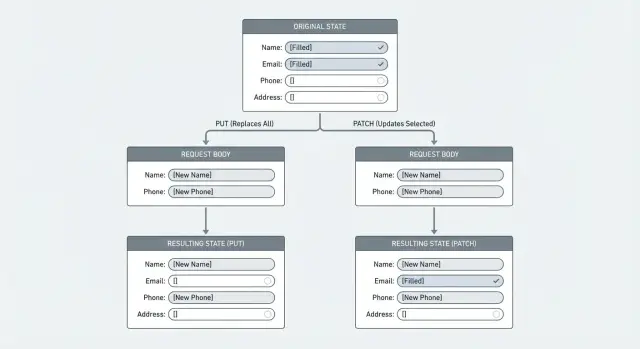
Why replace-style updates accidentally delete data
A replace update tells the server: “treat this request body as the entire new record.” Whatever you send becomes the new truth, and anything you don’t include is treated as no longer present. That’s how fields get wiped.
This usually happens when an endpoint behaves like PUT (full replacement) even if everyone calls it an “update.” The client sends a partial payload, the backend maps it onto the model, and then saves it. If a field is missing, some code paths set it to an empty value (""), null, or a default. The result looks like a quiet deletion.
Example: a user edits their profile and only changes the display name. The form submits { "displayName": "Sam" }. If your server replaces the whole profile, fields like phone, address, or marketingOptIn can suddenly become null or false, even though the user never touched them.
This often shows up when clients don’t (or can’t) submit the full record, like:
- Web forms that only submit visible inputs
- Mobile apps that send “changed fields only” to save bandwidth
- Admin panels where some fields are hidden behind tabs or permissions
It’s easy to miss in testing. A test updates one field and checks that it changed, but doesn’t confirm every other field stayed the same. Users discover the problem later when an address disappears, a notification setting resets, or an integration stops working.
The first step is spotting endpoints where “update” is really “replace.”
PUT vs PATCH: what changes and what stays
PUT and PATCH answer different questions.
PUT means: “Here is the whole resource. Replace what you have with this.” If the server treats PUT as a true replace, anything the client doesn’t include can be removed or reset.
PATCH means: “Here are specific changes. Apply them on top of what you already have.” It’s built for partial edits, where the client sends only the fields it wants to change.
This matters because many clients behave like edit forms. A mobile app might send just { "displayName": "Mina" }. If your endpoint expects a complete object (PUT) but receives a partial one, you can wipe fields like bio, photoUrl, or timezone.
A simple rule that prevents most surprises is to define what “missing” means:
- Missing field: leave the stored value as-is.
- Present with a value: update it.
- Present with
null: clear it, but only if clearing is explicitly allowed.
If you use PUT, don’t treat missing fields as “delete them.” Treat missing fields as an error so clients must send a complete representation.
When full replace (PUT) is still useful
Full replacement can work when the client truly owns the entire document and can reliably send all fields every time. For example, an internal admin tool editing a small settings record, or a sync process that always has a complete snapshot.
If you can’t guarantee that (most public APIs can’t), use PATCH for edits and write down the rules so clients don’t guess.
Pick and document your update rules
Most wiped-field bugs are a team mismatch: the server thinks “replace,” while the client sends “changed fields only.” Before changing code, decide what each endpoint means.
For each update endpoint, define:
- Update mode: replace or patch
- Missing fields: ignored or rejected
- Explicit
null: allowed to clear or rejected - Ownership: which fields the client can edit vs server-owned fields
- Validation: what’s checked on every update
The “missing vs null” distinction is where teams get burned. If the client omits phone, you usually want to leave it unchanged. If the client sends "phone": null, that can mean “clear it,” but only if you want to allow that.
Consistency across web, mobile, and admin tools matters. Different clients often send different payload shapes, and one replace-style client can erase data created by another.
A quick gut check: pick one field (like timezone) and describe what happens for (1) missing, (2) null, and (3) an empty string. If the team can’t answer quickly, the rules aren’t clear enough.
Use field allowlists to control what can be updated
A field allowlist means the server accepts changes only to specific, named fields. Everything else is blocked or rejected.
This helps in two ways:
- It prevents accidental writes to fields the UI never intended to change.
- It stops clients from updating sensitive, server-owned fields.
Server-owned fields should almost never be writable from a normal “update profile/settings” endpoint, for example:
- role or permissions
- account status flags
- billing totals
createdAt/updatedAt- internal flags like
isAdminorriskScore
Reject unknown fields rather than silently storing them. Silent acceptance hides typos, outdated clients, and unexpected payload shapes.
Nested allowlists for complex objects
If you accept nested objects like address or settings, apply the same rule inside them. Allowlist the top-level key, then allowlist the nested keys. That lets settings.theme be editable while blocking something unsafe like settings.isAdmin.
Step by step: implement safe partial updates
A safe partial update is “apply these changes,” not “replace the record.” The most reliable pattern is: load what exists, apply only what the client sent (and is allowed to change), validate, then save.
A practical implementation flow
A repeatable sequence looks like this:
- Fetch the current record from the database (and verify user/tenant ownership).
- Build a
changesobject from the request body using an allowlist. - Validate the changes (types, formats, length limits, enums).
- Apply only fields that are present in the request. Don’t write defaults for missing fields.
- Save, then return the updated record so the client can re-sync.
This avoids the common failure mode where the client submits two fields and the server overwrites ten others with empty values.
Logging without leaking data
When something goes wrong, you want visibility without storing sensitive values. Log metadata like:
- record id (and user/tenant id)
- which field names changed
- validation failures
Log “updated: displayName, avatarUrl,” not the actual display name.
Handle missing, null, and defaults without surprises
Most “my data got wiped” bugs come down to one confusion: the server can’t tell the difference between “user didn’t touch this” and “user wants to clear this.”
Treat the payload like instructions:
- Missing means “leave it as is.”
nullmeans “clear it,” but only for fields where clearing makes sense.
Also decide how to handle empty values. An empty string isn’t the same as missing, and an empty array isn’t the same as null. If a user deletes all tags, "tags": [] should set tags to none. If the client sends "tags": null, decide whether that means “remove tags” or “invalid input,” then stick to it.
Avoid applying create-time defaults during updates. Defaults belong in create flows. In update flows, defaults often become destructive.
Protect against lost updates and race conditions
Even with PATCH semantics, two edits can still overwrite each other. The risk is timing.
Example: a user opens “Edit profile” on a laptop and phone. The phone updates displayName and saves. The laptop, still showing old data, updates bio later. Without a freshness check, the second save can undo parts of the first.
Use optimistic concurrency control so the server can reject stale edits:
- Version field: store an integer like
profileVersion; only update if it matches. updatedAtcheck: client sends last seen timestamp; server updates only if unchanged.- ETag + If-Match: client proves it’s editing the latest version.
On conflict, return a clear error (often HTTP 409 or 412) and tell the client to reload.
Common mistakes that wipe fields
Most data loss in updates isn’t a database issue. It’s an API contract issue: the server treats missing fields as “please remove.”
Common causes:
- Using PUT semantics with a client that sends only changed fields
- Saving a full object built from stale client state
- Updating nested objects as a whole instead of patching children (replacing
addresswipesaddress.line2if the client only sentaddress.city) - Filling missing fields with defaults during validation or normalization
A safer mindset is simple:
- Missing: leave it alone
- Null: clear it (only when allowed)
- Unknown: reject it
Quick checks before you ship
Before releasing an update endpoint, do a pass focused on one risk: does updating one field accidentally change others?
A short checklist:
- Confirm every update path follows the same missing/null rules.
- Enforce allowlists on the server (not only in the UI).
- Test that missing fields don’t change stored data (update only
displayName, verifyemail,phone,addressstay identical). - Test that
nullclears only fields you explicitly allow. - Add one concurrency check so two edits don’t overwrite each other.
A quick scenario that catches a lot: take a real record from staging with many fields set, send an update with only one field, then re-fetch and diff. Any unexpected change is a red flag.
Example: a profile edit that wipes unsubmitted fields
A common bug looks harmless: a user updates their profile photo, hits Save, and later notices their phone number is gone. Nothing intentionally deleted it. It was overwritten.
Here’s how it happens. The profile screen only lets the user change a photo, so the client sends just that one field. The server treats the request as a full replacement and writes a new record using only what was submitted.
Before: replace-style update (wipes fields)
Existing record in the database:
{
  "id": "u_123",
  "displayName": "Sam",
  "phone": "+1-555-0100",
  "photoUrl": "https://cdn.example/old.png"
}
Client sends:
{ "photoUrl": "https://cdn.example/new.png" }
Server does (conceptually):
profile = request.body
save(profile)
Result: phone disappears because it wasn’t included.
After: PATCH semantics + field allowlist (keeps fields)
Instead of replacing the whole record, treat the payload as changes, and accept only the fields that endpoint is meant to edit.
allowed = ["photoUrl"]
changes = pick(request.body, allowed)
profile = loadProfile(userId)
profile = merge(profile, changes)
save(profile)
Now only photoUrl changes. Everything else stays as-is.
Next steps: audit your updates and fix risky endpoints
Find every endpoint that can change saved data (profiles, settings, billing, “update status”). For each one, compare what exists in storage, what the client sends, and what the server writes. If the server can write more fields than the request contains, you have a risk.
A practical audit checklist:
- Search for handlers that overwrite entire records from request bodies.
- Make each endpoint either true replace (and reject partial payloads) or true patch (apply only allowed, present fields).
- Add an allowlist per endpoint and reject unexpected fields.
- Standardize missing vs null rules so clients behave consistently.
- Audit background jobs and admin tools too, not just public APIs.
If you inherited an AI-generated codebase, update endpoints are a common failure point because generated handlers often default to “replace” behavior. FixMyMess (fixmymess.ai) focuses on diagnosing and repairing these kinds of production issues, including tightening update semantics, adding allowlists, and hardening validation so real user data doesn’t get wiped.
FAQ
Should I use PUT or PATCH for updates?
Use PATCH for partial edits so missing fields stay unchanged. Keep PUT only for true full replacements where the client can reliably send the entire resource every time.
Why do fields get wiped when I “update” only one field?
Because a replace-style update treats the request body as the whole new record. Any field you don’t send can get overwritten with null, an empty value, or a default, which looks like a silent deletion.
What’s the safest way to treat missing fields vs null?
Pick one clear rule and enforce it server-side: missing means “leave as-is,” while null means “clear it” only for fields where clearing is allowed. If you can’t safely support clearing, reject null for that field.
Can web forms cause accidental data loss even if the user didn’t touch those fields?
Yes, and it’s common. Many forms only submit visible inputs, so hidden or tabbed fields won’t be included in the payload. If your backend replaces the record, those unsubmitted fields can get reset.
How do I prevent clients from updating fields they shouldn’t touch?
Use a field allowlist per endpoint and only apply changes for keys that are both allowed and present in the request. Unknown fields should be rejected so typos and unexpected payloads don’t quietly change data.
What’s a safe server-side pattern for partial updates?
Load the existing record, build a changes object by picking only allowed keys from the request, validate the changes, then merge and save. Avoid constructing a full model purely from the request body.
How do I handle nested objects like address without wiping subfields?
Don’t treat nested objects as all-or-nothing replacements unless that’s the contract. Patch nested keys individually (for example address.city) so sending one nested field doesn’t wipe siblings like address.line2.
Why are defaults dangerous in update endpoints?
Defaults belong in create flows, not update flows. If you apply defaults during updates, missing fields can get “helpfully” filled with default values and overwrite real stored data.
How do I stop two edits from overwriting each other (race conditions)?
Use optimistic concurrency control so stale clients can’t overwrite newer changes. A version number, an updatedAt check, or ETag/If-Match can let the server reject outdated edits with a clear conflict response.
What’s the quickest test to catch “wiped field” bugs before shipping?
Test with a real record that has many fields set, send an update that changes only one field, then re-fetch and diff the full record. If anything else changed, your update path is doing replacement or applying defaults incorrectly.