Prevent Duplicate User Records with Unique Constraints and Safe Backfills
Learn how to prevent duplicate user records using unique constraints, input normalization, and a safe backfill plan that avoids downtime and data loss.
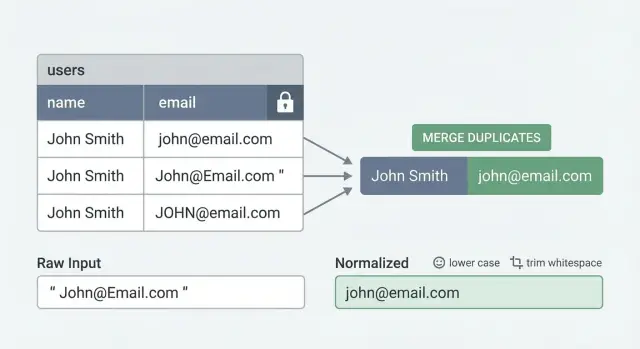
The real problem: why duplicate users keep happening
Duplicate users rarely look like the same email typed twice. They usually show up as tiny differences that humans treat as the same person, but the database treats as different values.
Common examples:
- Same email, different casing:
[email protected]vs[email protected] - Hidden whitespace:
[email protected]vs[email protected] - Multiple sign-in methods: one account created with password, another later with Google or GitHub using the same email
- Different creation points: a user record created during checkout, then another created during onboarding
- Provider quirks:
[email protected]used once,[email protected]used another time (some apps want these to be one user, others do not)
The result feels random to customers. Someone signs in with “the other” method and lands in “the other” account. Billing can split, so a paid user looks unpaid. Support tickets turn into detective work because “I can’t see my projects” is really “you have two accounts and your data is in the other one.” Analytics gets noisy too, so retention and conversion stop being trustworthy.
Teams often try to prevent duplicates in the UI: disable the submit button, show “email already exists,” or add a check before creating a user. That helps, but it’s not enough. Your database can be written to by mobile apps, backend APIs, admin panels, imports, background jobs, webhooks, and retries after timeouts. Two requests can also race each other: both check “does this email exist?” at the same time, both see “no,” and both insert.
Database-level protection is different. The database enforces the rule every time, no matter where the write comes from. You define what must be unique (often a normalized email, or a combination like provider + provider_user_id), and the database rejects inserts or updates that would create a second record with the same identity. That guardrail is what turns “we try not to duplicate users” into “duplicates can’t happen again.”
Common ways duplicates get created
Duplicate user records appear when the app assumes the database will “just handle it.” If the database isn’t enforcing uniqueness, edge cases turn into lots of rows for the same person, and you end up trying to prevent duplicates with application code alone.
One frequent cause is a race condition during sign-up. Two requests can hit your server at nearly the same time (double tap, flaky connection, two browser tabs). If both requests run “check if user exists” before either inserts, they both decide the user is new.
Another common source is multiple entry points that create users: web app, mobile app, admin panel, CSV import, invite flow, support tool. Each path grows its own rules over time. One trims emails, another doesn’t. One checks for existing users, another skips the check “just for this feature.”
OAuth can split identities too. A user signs up with email and password, then later clicks “Continue with Google” using the same email. If the OAuth callback creates a new user row instead of linking to the existing one, you now have two accounts that both look valid.
Input formatting differences create sneaky duplicates:
- Email case and whitespace differences ("[email protected]" vs "[email protected] ")
- Phone formatting differences ("+1 555 123 4567" vs "5551234567")
- Optional fields that arrive later (user starts with phone, adds email later)
- International variations (country codes, leading zeros)
- Unicode lookalikes (rare, but real)
Retries and timeouts can do it too. If a client doesn’t get a response (network hiccup, gateway timeout), it may retry automatically. If your server treats every retry as a brand-new sign-up instead of the same intent, you get duplicates. This is especially common in prototypes where sign-up logic gets copied across routes without idempotency or database constraints.
Define what “unique user” means for your product
Before you add constraints, decide what a “unique user” means in your system. Most duplicates happen because the product has more than one idea of identity.
Start with the identifiers you trust: email, phone number, and external provider IDs (Google subject, GitHub id, enterprise SSO subject). If you support multiple sign-in methods, decide whether they all point to a single user row, or whether each method can create its own row that later gets linked.
Then handle the messy cases explicitly:
- What if email is empty, unverified, or hidden (Apple private relay)?
- Do you allow guest users who never sign up?
- If email can be
NULL, are multipleNULLemails allowed (often yes), and how does a guest become a real account?
Tenant or workspace scope matters just as much. Is uniqueness global, or per tenant? In many B2B apps, the same email can exist in different workspaces, but must be unique within one workspace. In a consumer app, you usually want global uniqueness.
A concrete scenario to decide up front: someone signs up with Google on Monday, then signs up with email and password on Tuesday using the same email. If your definition is “one person equals one row,” you need a merge rule and you need it written down.
A simple merge policy:
- Pick a “primary” record (verified email wins; otherwise most recent login).
- Keep security-sensitive fields from the primary (password hash, MFA settings).
- Merge profile fields (name, avatar) only if missing on the primary.
- Repoint related data (orders, memberships, API keys) to the primary.
- Leave an audit note so you can explain what happened later.
Write these rules in plain language before touching the database. It keeps engineering, support, and product aligned when real edge cases show up.
Normalize inputs so the database can enforce uniqueness
Unique constraints only work if the values you store are consistent. If one person can sign up as [email protected], [email protected], and [email protected], the database sees three different strings.
Normalization means choosing one storage format for “the same” identity and always writing that format to the database. This is the quiet step that makes a unique constraint actually do its job.
What to normalize (and what to be careful about)
For email, start simple: trim spaces and lowercase before saving. Decide how you want to treat plus-addressing ([email protected]). Some teams strip the +... part to reduce duplicates, but that’s provider-specific and not always safe. A safer default is lowercase + trim, and only add plus-address handling if you’re sure it matches your product rules.
For phone numbers, store a consistent format, ideally with country code and digits only. Otherwise +1 (415) 555-0123 and 4155550123 can slip past “uniqueness.”
For usernames, match your product behavior. If your UI treats Jane and jane as the same, your backend should normalize the same way before insert.
A practical pattern is storing both:
- Raw input (what the user typed, useful for display and support)
- Normalized value (what you enforce uniqueness on)
Backend enforcement beats frontend hints
Normalize in the backend every time you create or update a user. Frontend checks help UX, but they’re easy to bypass (old clients, multiple apps, direct API calls).
A common failure mode: a founder imports users from a CSV while signups are happening. The import keeps original casing, the signup form lowercases, and now you have two accounts for the same email. Backend normalization plus a normalized unique constraint prevents that split.
Choose the right unique constraint for your schema
A unique constraint is a rule the database enforces: no two rows can share the same “unique” value. A unique index is the machinery that makes the check fast. Many databases create a unique index under the hood when you add a unique constraint, so the practical difference is mostly intent and tooling.
The hard part is choosing the right columns. “Email must be unique” sounds simple, but it breaks quickly once you add teams, multiple sign-in providers, optional emails, or soft deletes.
When to use composite uniqueness
If users belong to a workspace or tenant, you often want uniqueness inside that tenant, not globally. That becomes a composite rule, such as:
tenant_id + normalized_email(same email can exist in different tenants)provider + provider_user_id(the true unique identity for OAuth logins)tenant_id + provider + provider_user_id(common when the same provider identity can join multiple tenants)
Composite uniqueness also helps when you support both password login and OAuth. You can enforce a strong rule for each identity type without forcing one field (like email) to do all the work.
Partial uniqueness and soft deletes
Real data is messy. Some users don’t have an email yet, or you allow phone-only accounts. In that case, enforce uniqueness only when the value exists (a partial rule). A common example is “email must be unique, but only for rows where email is present.”
Soft deletes add another decision. If you mark users as deleted instead of removing them, pick one rule and encode it:
- Unique among active users only (allow re-signup with the same email)
- Unique across all users, including deleted (prevents reuse and keeps the audit trail simple)
Plan for today’s duplicates before enforcement
Turning on uniqueness when duplicates already exist will fail, or it will block signups at the worst moment. Before enforcing anything, inventory duplicates, decide which record “wins,” and make sure references (sessions, orders, memberships) can be moved safely.
Step-by-step: roll out uniqueness without downtime
The goal is to prevent duplicate user records without freezing sign-ups or blocking logins. The safest approach is to add the pieces first, fill them in gradually, fix messy cases, and only then ask the database to enforce uniqueness.
A safe rollout sequence
Start by adding a normalized key the database can reliably compare. For email, that usually means a lowercased, trimmed version (plus any extra rules your product uses).
A practical rollout:
- Add a new column for the normalized value (example:
email_normalized) and update your app so every new sign-up writes bothemailandemail_normalized. - Backfill
email_normalizedfor existing users in small batches (ID ranges or time windows) so each batch finishes quickly. - Run duplicate detection using the normalized key and group collisions (for example, all rows where
email_normalized = "[email protected]"). - Resolve each group before enforcing uniqueness: pick a winner, merge data you need, and mark the others as merged/disabled.
- Add the unique index/constraint only after duplicates are gone, using an online option where your database supports it.
Concrete example: a prototype might store [email protected], [email protected], and [email protected] as three different users. Once you backfill email_normalized = "[email protected]", those collide and become a single group you can merge.
Minimizing locks and surprises
Most downtime happens when a change forces long table locks. Keep each operation quick and predictable.
A few rules that help:
- Backfill with a strict batch size and a timeout. If a batch can’t finish fast, make it smaller.
- Keep the app writing normalized values before you start the backfill. Otherwise new rows keep arriving with nulls and you never catch up.
- Monitor “new duplicates per hour” during the rollout. If it spikes, something still writes inconsistent keys.
- Create the unique index in a way that avoids blocking writes (for example, “concurrent/online” creation, depending on your database).
Backfill plan: find and merge duplicates safely
Backfilling is less about fancy SQL and more about being careful with identity. The goal is simple: pick one record to keep, move everything to it, and leave a clear trail.
Start by listing duplicates using the same normalized key you plan to enforce later (for example, lowercased and trimmed email). Do this in read-only mode first, then export the groups for review.
-- Example: find duplicate emails by normalized value
SELECT
  LOWER(TRIM(email)) AS email_norm,
  COUNT(*) AS user_count,
  ARRAY_AGG(id ORDER BY created_at) AS user_ids
FROM users
WHERE email IS NOT NULL
GROUP BY LOWER(TRIM(email))
HAVING COUNT(*) > 1
ORDER BY user_count DESC;
For each duplicate group, choose a “primary” user. A practical rule is to keep the account that’s most likely real and active. Useful tie-breakers: verified email, most recent activity, and paid plan status.
Then merge in a predictable order so you don’t lose data:
- Lock the duplicate group (or run the merge in a transaction) to stop new writes during the move.
- Repoint related records (orders, projects, memberships, API keys, tickets) from duplicate_user_id to primary_user_id.
- Resolve conflicts field by field (keep verified email, keep newest profile details, keep highest-privilege role).
- Write an audit row: duplicate_user_id -> primary_user_id, when it happened, who/what ran it.
- Disable the non-primary user (soft-delete), and only hard-delete later if you’re sure nothing depends on it.
Credentials and emails need special handling. If the primary user keeps the email, remove or null the email on the non-primary record so it can’t be used to sign in. For passwords, sessions, and OAuth identities, migrate only if you’re sure they belong to the same person; otherwise revoke sessions on the non-primary accounts and require a fresh sign-in.
Don’t break sign-in: handling auth and sessions during merges
A merge isn’t just moving profile data. Sign-in often depends on user IDs that are baked into sessions, refresh tokens, password reset links, and third-party webhooks. Merge two accounts and ignore those references, and people hit login loops or “account not found” errors.
A safe pattern is to keep one primary account and treat every duplicate as an alias that points to it. When someone logs in through a merged-away account, you resolve it to the primary and continue without changing what the user typed.
Redirect duplicates to the primary user
Keep a small lookup (even a table) like merged_user_id -> primary_user_id. On every auth read, check this mapping and rewrite the user ID to the primary before you create a new session. That prevents loops because the system never creates sessions for accounts that no longer “exist.”
This alias approach also buys you time to migrate old callers without outages.
Tokens, resets, and integrations: what must be updated
Before you flip the switch, decide what you will invalidate vs migrate:
- Sessions and refresh tokens: either repoint them to the primary user ID or revoke them and force a fresh login.
- “Remember me” tokens: rotate them during the next login to avoid silent failures.
- Password resets and email verification: generate new links tied to the primary account; don’t leave old links pointing at a merged-away ID.
- External integrations: if a partner system stores your old user ID, keep alias resolution so incoming events attach to the primary user.
- Audit logs: keep historical user IDs, but display the primary identity in your admin UI to reduce confusion.
Example: if Anna accidentally created two accounts with the same email (one via Google sign-in and one via password), the merge should keep her current session working, and any future password reset should target the primary account only.
Common mistakes that cause outages or lost data
Most outages happen when the database is asked to enforce a rule your data doesn’t meet yet. A unique constraint is unforgiving: if even one duplicate exists, writes start failing, queues back up, and sign-ups can go dark.
A common example: a team adds a unique index on users.email on Friday, assuming “we don’t have duplicates.” Overnight, an old import job re-runs and inserts the same email with different casing. Monday morning, sign-up throws 500s and support gets flooded.
Mistakes that cause trouble:
- Turning on a unique constraint before cleaning existing duplicates.
- Normalizing in one code path but not others (web app lowercases, admin/import doesn’t).
- Assuming email is always present or verified (phone-only and social logins exist; users change emails).
- Merging users without updating foreign keys everywhere (orders, memberships, audit logs, API keys, sessions, “created_by” fields).
- Dropping data silently during merges with no rollback plan.
Treat deduplication like a reversible data migration, not a cleanup script. Keep both records, record what changed, and only delete once you can prove nothing depends on the old row.
A simple safety approach that works well:
- Log every merge decision (winner id, loser id, fields chosen, timestamp).
- Move references in batches and verify counts before and after.
- Add a canonical user mapping so old ids still resolve during the transition.
- Test all write paths (app, admin, imports, workers) using the same normalization function.
Quick checklist and next steps
Start with consistency. Your database can only protect you if every write path produces the same “unique key.”
Checklist:
- Confirm normalization rules are applied on every write path (sign-up, invite, admin create, OAuth, imports, background jobs).
- Run a duplicate scan using the normalized key and review the results with the team.
- Test merge logic on a small, real sample first and confirm what happens to profiles, memberships, subscriptions, and audit logs.
- Clean up duplicates fully, then enable database enforcement (unique index/constraint) only after the data is safe.
- Add monitoring for new conflicts (constraint violations) so you learn about problems from logs, not from users.
Pick one owner and one timeline. “Dedupe” stays stuck when it’s vague. Make it concrete: define the canonical record, define how you repoint foreign keys, and define what you do when two records disagree (name, phone, billing info, last login).
A simple dry run helps: take 50 duplicate clusters from production, run your merge in a staging copy, and verify users can still sign in, see the right workspace, and complete password resets.
If you inherited an AI-generated app and duplicates keep appearing because constraints and normalization were never wired through end-to-end, FixMyMess (fixmymess.ai) can help by diagnosing every user-creation path, repairing auth and merge logic, and getting you to a database-enforced uniqueness setup without breaking sign-in.
FAQ
Why do duplicate user accounts keep appearing even though we check in the UI?
Because duplicates are usually created by multiple write paths and timing issues, not a simple “same email entered twice.” Two requests can race, imports can skip checks, OAuth callbacks can create new rows, or a retry after a timeout can run the signup logic again. Only a database rule blocks duplicates no matter where the write comes from.
What’s the simplest way to stop duplicate emails caused by casing or whitespace?
Normalize the value you enforce uniqueness on. For email, a solid default is trim + lowercase in the backend every time you create or update a user, then enforce uniqueness on the normalized column. Keep the original email too if you want to display exactly what the user typed.
Should we enforce uniqueness by email or by OAuth provider user ID?
Usually yes, for OAuth you should enforce uniqueness on the provider identity, not just email. Store and enforce something like provider + provider_user_id so one Google identity can’t create multiple rows, then link that identity to your existing user record if the email matches your merge rules.
Should we treat Gmail plus-addressing as the same user?
Default to not stripping plus-addressing unless you’re sure it matches your product rules. Some teams want [email protected] and [email protected] to be the same person, but that behavior is provider-specific and can surprise users on non-Gmail domains. You can start with lowercase+trim, then add provider-specific rules later if needed.
How do we handle uniqueness in a multi-tenant app?
If your product has workspaces/tenants, uniqueness is often scoped to the tenant. That means enforcing tenant_id + email_normalized so the same email can exist in two different workspaces, but never twice inside one workspace. Consumer apps usually enforce global uniqueness instead.
What about soft-deleted users—can someone reuse the same email later?
Decide the policy first, then encode it in the constraint. A common choice is “unique among active users,” which lets someone re-sign up after deletion, but it requires a partial constraint keyed on an active or deleted_at flag. If you need strict audit history and want to prevent reuse, enforce uniqueness across both active and deleted users.
How can we roll out a unique constraint without downtime?
Add the normalized column and start writing it for all new signups first, then backfill existing users in small batches. After that, detect collisions using the normalized key, merge or disable duplicates, and only then add the unique index/constraint using an online/concurrent option where supported. This sequencing avoids the “turn on constraint and signups start failing” outage.
How do we merge duplicate users without breaking sign-in or subscriptions?
Pick a primary user, repoint every related record to that primary, and keep an explicit “merged-to” mapping so old user IDs still resolve during the transition. Sessions, refresh tokens, password resets, and verification links need special care; the safest default is to redirect or re-issue them for the primary account so users don’t get stuck in login loops.
How do we stop duplicates caused by retries, timeouts, or double-click signups?
Create an idempotency key for the signup intent and treat retries as the same operation, not a new account creation. Even with idempotency, keep the database unique constraint, because race conditions and parallel requests can still happen. The combination prevents both accidental repeats and true concurrency issues.
We inherited an AI-generated app and duplicates are everywhere—what’s the fastest way to fix it?
You can get it fixed fast if you treat it as both a data problem and an auth/data-model problem. FixMyMess can audit every user-creation path, implement backend normalization, add the right unique constraints, and run a safe backfill/merge plan so duplicates stop happening without breaking logins. If you inherited AI-generated code that keeps creating inconsistent users, it’s often quicker to have us repair the flows end-to-end than to patch one route at a time.