Prompt versioning: a simple way to track changes and revert
Prompt versioning made simple: log what you asked, what changed, and why, so you can compare outputs, roll back fast, and reduce regressions.
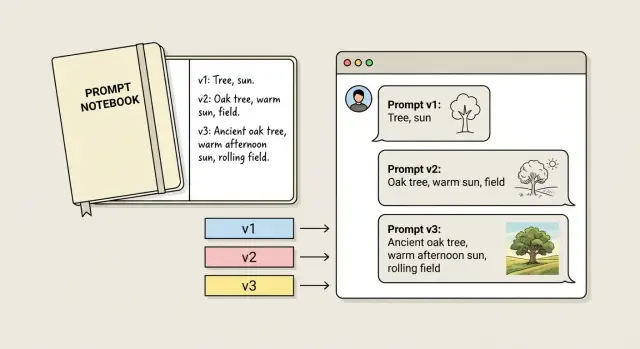
Why outputs regress after you “improve” a prompt
Output regression is when a prompt that used to give you good results starts giving worse results after a change that seemed harmless. Sometimes it’s subtle (a few more errors). Sometimes it’s obvious (the model ignores your main rule).
Regression often shows up as:
- Tone drift (too formal, too salesy, too casual).
- Structure breaks (missing headings, wrong format, extra sections).
- Weaker accuracy (more guessing, contradictions, fewer caveats).
- Forgotten constraints (word count, banned phrases, required items).
- Less consistency (two runs give very different answers).
Small prompt tweaks can cause big shifts because a prompt isn’t a checklist the model follows line by line. It’s a set of signals that compete for attention. Add one sentence, remove an example, or reorder instructions and you change what the model treats as “most important.”
Common triggers include conflicting rules, burying a key constraint lower in the prompt, swapping a concrete example for a vague one, making the prompt longer so details get less attention, or changing a single word that shifts meaning (for example, “brief” vs “minimal”).
The expensive part usually isn’t the bad output. It’s losing the context of what changed and why. A week later you remember “Version B was better,” but you can’t explain what “better” meant, what test input you used, or what you changed.
That’s why prompt versioning matters. The goal isn’t perfection. It’s repeatable results and easy rollbacks. If you can say, “v1.3 added a stricter format rule and killed the friendly tone,” you can revert in minutes instead of trying ten random edits.
This matters even more when prompts touch real work: onboarding emails, support replies, internal docs, or code snippets. A tiny wording change can quietly produce code that drops input validation or exposes secrets, and you might not notice until later.
Treat prompts like product changes: record each edit, keep a known-good version, and make every change easy to undo.
What you need to track (and what you can ignore)
Good prompt versioning captures a few details that explain most regressions. The goal is simple: future you (or a teammate) should be able to rerun the same request and understand why results look different.
Track these (they cause real regressions)
For each version, keep a small record that includes:
- The exact prompt text, copied as-is (including any system message or “hidden” instructions).
- The model name and key settings (especially temperature). If tools or function calls are enabled, note that too.
- The input you fed it (reference text, example snippets, files, constraints, formatting rules).
- One “golden” output you considered good, plus 1-2 sentences on what made it good.
- The test case you used to judge it (the same user request or the same sample data).
That’s usually just a few lines. The biggest time saver is writing down the success criteria. People remember the prompt, but forget what they were trying to preserve.
You can ignore these (they rarely help)
Some details feel useful, but rarely explain regressions:
- Tiny formatting edits that don’t change meaning.
- Long essays about intent (beyond a short “why this changed” note).
- Cosmetic metadata unless it affects routing or behavior.
- Dozens of output samples. One representative golden output beats ten random ones.
A common pattern: you lower temperature to get more consistent answers. A week later outputs feel stiff and miss key details. If you tracked the temperature change and saved a prior golden output, you can revert confidently instead of guessing.
A simple versioning scheme you’ll actually use
Prompt versioning only works if it stays lightweight. If it turns into a ceremony, you’ll stop doing it when you need it most.
Use short version IDs you can reference anywhere: v1, v1.1, v2.
- Major versions (v1, v2, v3): the goal changed (new audience, new format, new constraints, new scoring rules). Expect different outputs.
- Minor versions (v1.1, v1.2): the goal is the same, but you adjusted wording, order, one example, or one rule.
- Hotfixes (v1.1a): a fast patch or revert to restore behavior.
Keep one goal sentence per version. If you can’t describe the prompt’s job in one line, the change is probably bigger than you think.
Try to make one meaningful change per version. If you change tone, add constraints, and rewrite examples all at once, you won’t know what caused the improvement (or the break).
The lowest-effort setup: one file, same structure every time
If you do only one thing, store prompt versions in one place. One doc, one note, or one file in your repo is enough. The point is answering, in 30 seconds: “What changed, and when did the output get worse?”
Pick a file name you’ll remember (for example: prompts.md or prompt_versions.md). Then use the same structure for every version.
A simple template you can copy
Use the same blocks every time: the prompt, the change log for that version, a golden output example, and a short “known issues” line.
# Prompt: Support Reply Writer

## v1.3 (2026-01-21)

### Prompt
[Paste the full prompt here. No snippets.]

### Change log
- Why: Reduce overly formal tone.
- What changed: Added "Write like a helpful human" and removed "Use professional language".

### Golden output
[Paste the exact best output you want to preserve.]

### Known issues
Sometimes forgets to ask one follow-up question.
A few rules make this hold up over time:
- Paste the full prompt every time. Partial prompts are where confusion starts.
- Write the “why” in plain words. “Improve quality” isn’t a why. “Stops using bullet points in short emails” is.
- Keep one golden output per version. Pick the example you’d hate to lose.
What “golden output” should look like
Golden output isn’t “the best output ever.” It’s a snapshot you can compare against later.
Use a real input, then paste the exact output you approved, including formatting, tone, and required sections. If a new version starts adding hypey claims or skipping key details, you’ll notice immediately.
Add a “Known issues” line even if it feels minor. It stops you (or a teammate) from “fixing” the same thing twice and breaking something else.
Step-by-step: how to change a prompt without losing the good output
The goal is simple: keep one known-good result you can always return to.
Start with one baseline task that matters and is easy to rerun, like: “Summarize this customer email into 3 bullets and a polite reply.” Run your current prompt once, save the prompt text as v1, and save the exact input and output.
Then write a plain-language check for what “good” means. Avoid vague goals like “better” or “more helpful.” Make it something you can judge quickly.
A practical flow:
- Freeze a baseline: save v1 prompt + baseline input + output.
- Write a pass/fail rule: 2-4 lines (for example: “No invented facts. Uses the customer’s name. Includes a clear next step. Under 120 words.”).
- Change one thing: edit one instruction, constraint, or example and save as v1.1.
- Rerun the same baseline: same input, same settings.
- Decide fast: if it passes, keep v1.1. If it fails, revert and try a different single change.
If you add “be more creative” and the model starts inventing details, that’s a regression against “no invented facts.” Keep v1 as your safe copy. Try a tighter change like “use a warmer tone” without inviting new information.
Only after v1.1 passes should you expand the goal (new output format, more edge cases). That’s when a v2 makes sense.
How to test a prompt change quickly (without overthinking it)
Fast testing is mostly consistency. If you change the prompt and the inputs at the same time, you won’t know what caused the shift.
Pick a tiny set of real examples you actually run each week. Include one slightly messy input.
A repeatable routine:
- Choose 3-5 test inputs.
- Freeze everything else (model, temperature, tools, system message).
- Run Version A and Version B with the same inputs.
- Compare side by side and write a one-line note per test.
- If B is better overall, promote it and record the change.
Keep scoring simple:
- Correct: did it do the task without missing key details?
- Safe: did it avoid leaking secrets, risky claims, or following bad instructions?
- On-format: did it match the structure you need (headings, JSON, tone, length)?
Example: you add “be concise” to a support reply prompt. Two tests look better. On the third (an angry refund request), it stops asking for the order number and gives a vague apology. That’s a regression in correctness, even if it reads nicer.
Example scenario: a small tweak that quietly breaks results
A founder uses a prompt to draft support emails. The job is simple: reply fast, stay calm, and never promise something the product doesn’t do.
Version 1 works well. It tells the model to quote only what the customer said, offer two next steps, and ask one clarifying question.
After a few weeks, the founder wants a warmer tone and slightly shorter emails. They create v2. The emails sound nicer, but a new problem appears: the model starts inventing details like “I checked your account” or “I can see your last payment failed.” That’s risky if support can’t actually see those details.
The change log shows one new line in v2:
v2 change: “Be helpful by filling in missing context when it seems obvious.”
That single instruction encourages guessing. Because the change log is specific, the founder can point to the trigger and fix it quickly.
They roll back to v1.1 (the last known-good version) and reapply only the safe parts of v2: warmer greeting, shorter closing, and the “two next steps” structure. They remove anything that allows guessing and add a hard rule: “If you’re not sure, ask a question instead of assuming.”
Common mistakes that make regressions hard to debug
Prompt regressions are usually self-inflicted, not because the idea was bad, but because the change hid the cause.
The biggest mistake is changing too much at once. If you edit the goal, tone, format rules, and examples in one commit, you can’t tell what broke the result. The fix becomes guesswork, and people often pile on even more instructions to compensate.
Another mistake is failing to save a known-good output. Without a before/after, you end up arguing from memory.
The failures that waste the most time:
- Multiple edits at once, so there’s no clear cause.
- No saved “good” output and no saved input that produced it.
- Changed test data and blamed the prompt.
- Settings drifted between runs (model version, temperature, system message, tool config).
- Tracked only the final prompt text, not why you changed it or what you expected.
Discipline beats cleverness: change one thing, keep test inputs fixed, and write the reason for each edit in one sentence.
Quick checklist before you ship a new prompt version
Before you ship a new prompt, do a quick check that you can reproduce the last good result, and that you can back out if quality drops.
The 5-minute ship check
- Can you reproduce the last good output? Use saved inputs and confirm you can still get the baseline result.
- Did you change only one variable? One meaningful edit per version keeps cause and effect clear.
- Do you have a pass/fail test? Pick 2-3 checks you can judge fast (required fields, exact format, no invented facts).
- What kind of failure is it? Label it: format, facts, safety, or tone.
- Is rollback faster than patching? If you’re stacking fixes on a shaky change, revert and redo the edit cleanly.
If your prompts generate code or change app behavior, take this even more seriously. Reproduce, isolate one change, test pass/fail, and roll back early.
Next steps: make it a habit (and when to get help)
The easiest way to keep prompt versioning going is to stop treating your best prompt as a one-off. Turn it into a reusable template with clear placeholders (goal, audience, constraints, examples). When you start from the same shape every time, you notice what changed and rollbacks stay easy.
Make the habit so small you can’t skip it:
- Use a short ID plus a date (for example:
support_reply_v07_2026-01-21). - Add one plain note line describing the change.
- Save the known-good output with the version, not in chat history.
- Record what you expected to improve, and what got worse (if it happens).
Sometimes the issue isn’t the prompt. If you’re seeing inconsistent behavior across users, missing data, broken auth, or failures that only happen in production, it may be an app issue.
If you inherited an AI-generated app from tools like Lovable, Bolt, v0, Cursor, or Replit and prompt tweaks aren’t enough, a remediation team like FixMyMess (fixmymess.ai) can run a free code audit to identify problems like broken authentication, exposed secrets, and security holes before you decide whether to repair or rebuild.
FAQ
What does “output regression” mean in prompts?
It’s when a prompt that used to produce good results starts producing worse results after you change it. The output might drift in tone, miss required structure, ignore constraints, or become less consistent between runs.
Why can a tiny prompt edit cause a big change in output?
Because the model is reacting to the overall mix of signals, not following instructions like a strict checklist. A small wording change, reordering, or a longer prompt can shift what the model treats as most important.
What’s the fastest way to debug a regression?
Start by rerunning the exact same input with the old version and the new version under the same settings. If you can’t reproduce the “good” result from before, you’re debugging in the dark, so lock down the prompt text, model, and settings first.
What should I track for each prompt version?
Save the full prompt text, the model name, and key settings like temperature. Also save the exact input you tested, plus one “golden output” you approved and a short note describing what made it good.
When should I use a major vs minor version (and hotfix)?
Major versions are for when the goal changes, like a new audience, new format, or new scoring rules. Minor versions are for small edits while keeping the same goal, and hotfixes are quick patches or rollbacks to restore behavior fast.
Why is “one meaningful change per version” so important?
Because it makes cause and effect clear. If you change tone, format rules, and examples at once, you won’t know which change helped or hurt, so you can’t confidently keep the good part and revert the bad part.
What should a “golden output” include?
It should be a real output produced from a real input you care about, pasted exactly as generated, including formatting and tone. It’s not meant to be perfect; it’s a reference point so you can quickly spot when a new version starts skipping requirements or inventing details.
How do I test prompt changes without overthinking it?
Use a small, repeatable set of real inputs and run both versions with the same model and settings. Judge them with a simple pass/fail check like “no invented facts,” “stays on-format,” and “includes the required next step,” so you can decide quickly.
Why do prompts start inventing details after I try to make them nicer or shorter?
“Be more creative” or “fill in missing context” can push the model to guess, which often increases inaccuracies. If accuracy matters, prefer rules like “If you’re not sure, ask a question instead of assuming,” and keep “no invented facts” as a hard constraint.
When is it not a prompt problem, and what should I do instead?
A prompt rollback won’t fix issues that come from the application itself, like broken authentication, exposed secrets, or unsafe code paths that show up only in production. If you inherited an AI-generated app from tools like Lovable, Bolt, v0, Cursor, or Replit, FixMyMess can run a free code audit and then repair or rebuild the codebase quickly when prompt tweaks aren’t enough.