RCE risk scan for Node apps: spot dangerous code fast
RCE risk scan for Node apps to spot eval, unsafe child_process calls, template injection, and risky dynamic imports often found in AI-generated code.
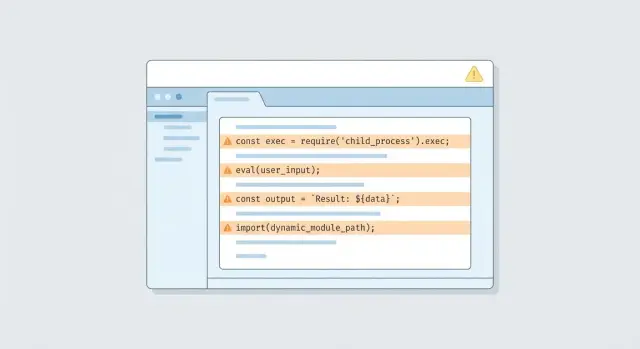
What RCE looks like in a real Node app
Remote code execution (RCE) means an attacker can make your server run code you did not intend. Not just read a file or steal a token, but actually execute commands or load code in a way that gives them control. If your app is reachable over the internet, RCE is one of the fastest paths from a small bug to a full takeover.
In Node apps, RCE often shows up when untrusted input gets treated like instructions. A classic example is a "run a tool for me" feature: a user submits text, the server builds a shell command, and child_process runs it. If the code does not strictly control what is allowed, a crafted request can turn that command into something else entirely.
AI-generated code is more likely to include risky shortcuts because it tries to be helpful. It might add eval to "parse" data, build shell commands with string templates, or dynamically load modules based on a request parameter. Those patterns can work in a demo, but they are dangerous in production.
A risk scan is a fast way to spot code that looks like it could execute input. It tells you where to look first, not whether you are 100% safe. Each finding still needs a human check to confirm whether user input can actually reach the risky line.
Attackers typically reach RCE through everyday entry points:
- HTTP requests (query, body, headers)
- File uploads (names, paths, contents)
- Webhooks (third-party "events" you trust too much)
- Admin panels (lower scrutiny, powerful actions)
- Background jobs (messages from queues or cron inputs)
Where untrusted input enters your code
Most RCE bugs start the same way: your app treats someone else’s data as if it were safe. When scanning for RCE risks in a Node app, start by mapping every place data can enter, even if it "usually" comes from your own team.
The obvious entry points are HTTP requests. Anything a user can change is untrusted: query strings, route params, JSON bodies, form posts, headers (especially ones used for feature flags or debug modes), cookies, session data, and uploaded files (including filenames).
Not all input arrives over the web. Quick prototypes often include helper scripts and admin features that bypass normal checks, then later get wired into production. Pay attention to background jobs and cron tasks pulling data from a database, message queues, webhook payloads from third parties, admin panels and "internal-only" endpoints, and CLI scripts that accept arguments or read environment variables.
"Internal tools" still matter. Tokens get stolen, VPNs get misused, and a single leaked admin cookie can turn an internal endpoint into an internet-facing one.
A useful mental model is:
input -> parsing -> execution
Parsing is where types change (string to JSON, JSON to object, object to template). Execution is where danger spikes (building commands, evaluating code, loading modules). A support-only endpoint that accepts JSON like { "report": "weekly" } can become RCE later if someone adds child_process or a template render step that uses the same field.
A simple plan for scanning RCE risks
You do not need fancy tools for an RCE risk scan to be useful. Start by finding the code shapes that most often lead to "execute what the user sent," especially in AI-generated code where unsafe shortcuts sneak in.
Begin with a keyword sweep to build a short list of files to review:
rg -n "\\beval\\b|new Function|child_process|exec\\(|execSync\\(|spawn\\(|spawnSync\\(|fork\\(|vm\\.run|ejs|pug|handlebars|nunjucks|import\\(|require\\(\" .
Then turn the hits into an input flow map. For each match, answer two questions:
- What data can reach this line?
- Who controls that data?
Track common sources like request params, headers, cookies, webhook payloads, and anything read from a database that originally came from users.
For triage, focus on the risky combination of reachability and power: internet-accessible routes (including webhooks), any use of OS command execution or code loading (child_process, vm, dynamic import/require), and places where strings are built from input with no allowlist. Confirm what is actually live in production, because dead code and dev-only scripts are lower priority than code hit by real requests.
Find eval and Function usage that can execute input
Start by hunting for places where code gets built from strings. The usual suspects are eval() and new Function(). They turn a text value into something the server executes. If an attacker can influence that text, they can potentially run their own code.
Flag patterns like:
eval(userInput)oreval(someVar)new Function("return " + expr)()setTimeout("doThing(" + x + ")", 0)andsetInterval("...", 1000)- "expression evaluators" that concatenate strings before running them
"It only evaluates small expressions" is still dangerous. A harmless-looking calculator can become process.env access, file reads, network calls, or worse if the string can be shaped by an attacker.
Also, input does not have to come straight from a request body. It often sneaks in through config files, database fields, CMS content, feature flags, or templates that store user-editable rules. In fast prototypes you will sometimes find a quick rule engine like eval(dbRow.rule) that worked in a demo and then shipped.
Safer replacements depend on what you are trying to do. In general, prefer a fixed set of operations mapped to real functions, or store rules as data (like JSON) and interpret them with strict validation. If you truly need an expression language, use a real parser and only evaluate supported nodes.
Check child_process for command injection
If your app uses Node’s child_process to run system commands, treat it as a top RCE risk. The danger is not "using a shell" by itself. The danger is letting any user-controlled text become part of the command.
The highest-risk calls are exec and execSync, and spawn when shell: true is set. They are easy to misuse because they accept a single command string. Once you build that string with + or template strings, a user can sneak in extra operators (like ;, &&, |) and run something you never intended.
A common real-world slip is a "convert file" endpoint that does exec(convert ${req.body.path} -resize 200x200 out.png). If path contains image.png; cat /etc/passwd, the shell reads it as two commands.
A safer pattern is to avoid a shell and pass an argument array. For example: spawn('convert', [inputPath, '-resize', '200x200', outPath], { shell: false }). You still must validate inputPath, but you remove most shell parsing tricks.
When scanning, look for red flags like command strings built from request fields, shell: true, manual argument joining (args.join(' ')), and "escape" helpers that only replace a few characters.
If you add logging to help triage, log what matters (carefully): the command name, the args array (or the full string if you must), and exactly where the input came from (route and field name). Do not dump secrets into logs.
Spot server-side template injection paths
Server-side template injection (SSTI) happens when your app builds a template from user input and renders it on the server. If the template engine can run expressions, an attacker can turn a "custom message" feature into code execution.
A simple example: you let users save an email template, then you compile or render whatever they typed. If the engine supports {{ someExpression }} or helper calls, the user may be able to read secrets, call functions, or chain into other dangerous APIs.
In a quick scan, look for places where user-controlled strings become templates, partials, layouts, or helper names. Common patterns include compiling or rendering user input directly, passing request data as locals with no allowlist (for example res.render("view", req.body)), letting users pick a partial/layout by name and concatenating paths, registering helpers dynamically from request data, or rendering stored "markdown"/"handlebars"/"ejs" from a form field without a safety layer.
Mitigations that usually hold up:
- Do not compile templates from raw user text. Store content, but render it as plain text or a safe markup subset.
- Keep a strict variable map for templates. Do not pass whole objects like
req,res, orprocess. - Treat template names like file paths: allowlist known templates and reject everything else.
Review risky dynamic imports and module loading
Dynamic module loading is convenient, but it is also a common way RCE sneaks into Node apps, especially when code was generated quickly. If any part of the module name or file path comes from a user, treat it as untrusted input.
The most dangerous patterns look harmless at first: import(userInput), require(userInput), or building a path like require('./plugins/' + name). People often assume "it only loads local files," but attackers can abuse path tricks, unexpected file locations, or reach code you did not mean to expose.
Scan for:
import(something)wheresomethingis not a string literalrequire(something)wheresomethingis built from variablesrequire(path.join(base, userValue))and any traversal risk like../- "plugin" features that load modules by name
- reading a filename from a request, database, or config and then loading it
If you truly need dynamic loading, keep it explicit. Use a hardcoded allowlist that maps names to exact paths, reject anything not in the map, and never pass raw input into require() or import().
Don’t miss the supporting issues that enable RCE
Even if you find an obvious execution bug, attackers usually need a little help to turn it into a real incident. A good scan includes the supporting problems that make exploitation easy and cleanup hard.
Start with secrets. Quick prototypes often leave API keys, JWT secrets, database URLs, and cloud tokens in plain text, sample env files, or logs. If an attacker gets any code execution at all, exposed secrets let them jump to your data and other systems fast.
Permissions matter just as much. If the app runs as a user that can read and write too much, an RCE becomes "modify the server." Watch for broad file permissions, writable app directories, and overpowered cloud roles.
Also check production settings that quietly open doors: development mode in production, debug flags enabled (verbose errors, stack traces, hot reload), hidden admin routes left in place, unsafe CORS, and file upload or temp directories that are writable and exposed.
Finally, dependencies can be the weakest link. Outdated packages with known RCE CVEs can turn a harmless route into a compromise. A quick pass through your lockfile and advisories is part of the job.
Common mistakes when trying to fix RCE risks
The fastest way to lose time on RCE is to fix what you can see without proving how the code is reached. A clean-looking helper can still be dangerous if it sits behind a route, middleware, cron job, or webhook that accepts outside input.
One common trap is assuming "it’s not reachable" because you do not see a button in the UI. Trace the path anyway: request -> router -> middleware -> controller -> helper. Do the same for background workers and webhook handlers. Many real incidents start in code paths people rarely test, like a payment webhook, an OAuth callback, or an internal job queue.
Another mistake is treating the symptom instead of the cause. Escaping output or adding encoding does not make eval, Function, exec, or spawn safe if untrusted input can reach them. If your scan finds dynamic execution, the goal is usually to delete it, not "sanitize" it.
Regex-based "sanitizers" are another dead end. If a fix depends on "block these characters," assume someone will bypass it with whitespace, quotes, shell metacharacters, or encoding tricks.
Habits that prevent repeat findings:
- Prove reachability by tracing routes, middleware, workers, and webhooks
- Replace dynamic execution with fixed commands, fixed templates, or vetted libraries
- Validate input by type and intent (IDs, enums, strict schemas), not by regex guessing
- Add tests for bad payloads so the issue does not return
Quick checklist before you ship
Use this after your scan and again before release. The goal is simple: nothing in your server should be able to turn user input into code, a shell command, or a module path.
- No
eval,new Function, or string-basedsetTimeout/setIntervalin server code. - No
execorexecSync. Forspawn/execFile, pass args as an array and do not enableshell: true. - Do not compile server-side templates from user-provided text.
- Any dynamic import/module loading is allowlisted and does not accept user-built paths.
- Input validation happens at boundaries (HTTP handlers, queue consumers, webhooks), with clear rules per field.
A quick sanity test: pretend an attacker controls one query param, one header, and one JSON field. Can any of those values reach a code executor (eval), a command runner (child_process), a template compiler, or an import path without being rejected?
Example: a small feature that accidentally becomes RCE
A common real-world mess is an AI-built internal admin page with a "Run maintenance" box. The idea is harmless: type something like reindex-users or clear-cache, click Run, and the server executes it.
The first problem is how the feature is wired. The endpoint often takes req.body.command and passes it into child_process.exec(), or it builds a script path from it and import()s the file. If an attacker can hit that endpoint (weak auth, leaked admin cookie, missing role check), they can try inputs like reindex-users && cat .env or ../../../../tmp/payload and you have remote code execution.
A scan will typically flag a few things quickly: child_process.exec() fed by request data (even after "sanitizing"), dynamic imports or require() built from strings, template rendering that compiles user input, and helper functions like eval() or new Function() left in by generators.
After the scan, confirm the details manually: is the route reachable without a strict admin check, are the inputs truly controlled, and what runs on the server (shell, node, or a script runner)? The dangerous code is often tucked behind "temporary" feature flags.
What you fix first is what removes the execution primitives:
- Delete the free-text command box and replace it with an allowlist of named actions.
- Swap
execfor safer APIs (or do the work in-process with normal functions). - Lock the route to a real admin role, and log every action.
- Run the service with least privileges and remove secrets from the runtime environment.
The end result is simple: fewer paths to reach the code, and no direct way to execute input.
Next steps: turn findings into safe, production-ready code
Treat each finding as a product decision, not just a bug. Some risky patterns are worth patching, but others are better removed because they will keep reappearing during future changes.
A practical way to decide is to label each issue:
- Patch: you can make the current approach safe with strict validation, allowlists, and safer APIs.
- Refactor: the feature is needed, but the design invites mistakes.
- Remove/replace: the feature exists mostly because a generator added it.
After fixes, write a short security note in your repo. Keep it plain and specific: no eval/Function with request data, no user-controlled strings in child_process, templates must not compile user input, dynamic imports must come from an allowlist. It helps future you and makes code review faster.
Add lightweight guardrails so the same issues do not sneak back in. A saved search or review checklist for eval, new Function, child_process.exec, template compilation, and dynamic import() from variables catches a lot.
If you inherited a prototype generated by tools like Lovable, Bolt, v0, Cursor, or Replit and you want a fast second set of eyes, FixMyMess (fixmymess.ai) focuses on diagnosing and repairing risky patterns like these, then verifying the fixes with expert human review so the app holds up in production.
FAQ
What exactly counts as RCE in a Node app?
RCE (remote code execution) is when someone can make your server run code or commands you didn’t intend. It’s usually worse than data leaks because it can lead to full control of the app, the machine it runs on, and any secrets the app can access.
What’s the fastest way to do an RCE risk scan without fancy tools?
Start by identifying where untrusted data enters: HTTP requests, webhooks, file uploads, admin tools, and background jobs. Then search for “execution primitives” like eval, new Function, child_process, template compilation, and dynamic import()/require() and trace whether user-controlled data can reach them.
Will a keyword scan tell me if I’m definitely vulnerable?
No. A grep-style scan finds suspicious code shapes, not confirmed exploits. You still need to trace data flow and confirm reachability in production, because some hits are dead code or only run with trusted inputs.
Why are internal admin endpoints such a common RCE problem?
Even “internal” endpoints can become reachable when tokens get stolen, cookies leak, or a misconfig exposes the route. Treat internal tools like real attack surfaces and apply the same checks: strict auth, strict input validation, and no free-form execution.
Is `eval()` always a security bug, or can it be safe?
It’s dangerous whenever the evaluated string can be influenced by users, even indirectly through database fields, config, CMS content, or feature flags. Most safe fixes remove string evaluation entirely and replace it with a small allowlist of supported operations implemented as real functions.
What’s the real risk with `child_process.exec()` and command strings?
exec and execSync are high-risk because they run a command string through a shell, making it easy to inject extra operators. Prefer non-shell execution with argument arrays (like spawn or execFile), and still validate inputs like filenames and IDs so attackers can’t point the tool at unexpected files.
How do I know if my template engine usage can become RCE?
SSTI happens when you compile or render a template built from user input, and the template engine supports expressions or helpers. A safe default is to store user text as content and render it as plain text (or a restricted markup), rather than treating it as a server-side template.
Why are dynamic `import()` or `require()` patterns considered RCE risks?
It becomes risky when any part of the module name or path comes from user-controlled data, even if it “should only be local.” The practical fix is to map allowed names to exact modules in code and reject anything not in that allowlist, instead of passing raw input into require() or import().
Can I just “sanitize” input to make RCE issues go away?
Not reliably. Blocking characters like ; or && is easy to bypass with encoding tricks, whitespace, or different shell parsing rules, and it doesn’t address template injection or dynamic code execution at all. The safer approach is to remove the execution primitive or limit it to fixed, allowlisted actions.
What should I fix first if a scan finds multiple risky spots?
Prioritize anything reachable from the internet (including webhooks) that can execute code, run OS commands, compile templates, or load modules dynamically. If you inherited AI-generated code and need a fast, practical review, teams like FixMyMess focus on diagnosing these patterns, repairing them, and verifying fixes with human checks so the app is safe to ship.