Readiness and liveness checks that catch real failures
Learn how to design readiness and liveness checks that validate your database, queue, and key APIs so outages show up before users notice.
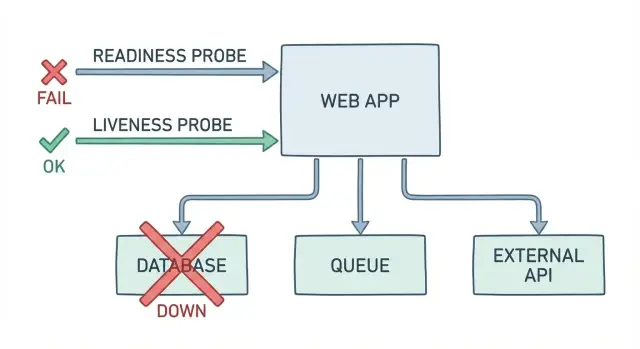
Why “OK” health checks still leave users broken
A basic /health endpoint usually answers one question: is the process running? That’s not the same as: can a user log in, pay, or finish their work right now. When your health check returns “OK” while the app is failing its real job, you get false-green alerts and a slower, messier incident.
This is how it shows up in real life. The pod is up, CPU looks normal, and the health endpoint says “OK”. But login fails because the database is locked during a migration. Payments fail because a secret rotated and credentials expired. Background jobs pile up because the queue connection is stuck, so order confirmations never send.
False-green checks cost time and trust. On-call chases “it looks fine” signals. Support hears about it before monitoring does. Users retry, abandon, and remember the bad day.
Readiness and liveness checks should reflect what users need to succeed. A good probe isn’t a vanity “OK”. It’s a small, fast test of the critical path.
A dependency-aware probe should answer questions like:
- Can we connect to the database and run a tiny query?
- Can we authenticate to the queue and publish a message (or at least verify the connection is alive)?
- Are required credentials valid and not expired?
- Are the few external services we truly depend on reachable?
If you inherited an AI-generated app that “runs” but breaks in production (often around auth, secrets, and job queues), better probes stop bad deployments from quietly hurting users.
Readiness vs liveness in plain language
Readiness answers: can this specific instance safely receive traffic right now? If the answer is no, it should stay running but be taken out of rotation so users aren’t routed to a broken copy.
Liveness answers: is the process alive and making progress, or is it stuck in a way that a restart would fix? If the answer is no, the platform should restart it.
A plain readiness example: your app boots, but the database is down or credentials are wrong. The process is running, yet every sign-in and page load fails. A good readiness probe fails here so requests stop hitting that instance until the database works again.
A plain liveness example: a bug causes a deadlock and the app stops responding even though the container is still running. Readiness might also fail, but it won’t fix the root problem. A liveness probe detects that the app isn’t making progress and triggers a restart to recover.
A simple way to remember it:
- Readiness protects users from bad instances.
- Liveness helps the system recover from stuck instances.
These checks are not full end-to-end tests. They shouldn’t replay complete user flows or call every dependency on every probe. Keep them small and focused on the few things that must be true for the app to serve traffic safely.
Start with what must work for users
A health check is only useful if it matches what users actually do. Before you write readiness and liveness checks, write down the few actions that define “the app works” for your product. If those actions fail, users are broken even if your endpoint returns 200.
Keep the list small and real: sign in and load the dashboard, create a project or order, upload a file and see it appear, trigger a job or send a message, complete checkout (if you have payments).
Now map each action to what it needs. “Create a project” usually means the database is writable and migrations are applied. “Upload a file” might need object storage plus a background worker to process it. “Send a message” might depend on a queue being reachable and consumers running.
From that map, pick the minimum checks that best represent “users can complete the path.” A database ping is not enough if writes are blocked. A queue connection is not enough if publishing fails. Aim for one or two checks per critical path, using the dependencies that most often break the experience.
Finally, decide what “degraded but usable” means. Can users browse but not create? Can they sign in but uploads are temporarily disabled? Make that choice on purpose, because it controls readiness behavior (should the app receive traffic or not).
A simple scenario: your app loads fine, but new projects never appear because the worker can’t enqueue jobs. Your UI health endpoint still says “OK.” A readiness check that includes a lightweight enqueue (or publish check) catches the failure users feel.
What to verify: DB, queue, and your critical dependencies
A useful health endpoint should answer one question: if you send a real user request right now, will it work? That means readiness (and any dependency health endpoint you add) needs to touch the same dependencies your app needs to do its job, not just return “OK” because the web server is running.
Database
Start simple and safe. Verify you can connect with the same credentials your app uses, and run a tiny read-only query like SELECT 1. This catches broken networking, expired passwords, and misconfigured connection strings. Keep it fast, and don’t lock tables or run migrations from a probe.
Queue and background work
If your app relies on background jobs, checking only the API isn’t enough. Your probe should confirm you can publish a test message (or at least authenticate to the broker), and that workers are actually consuming. Also watch for a backlog that keeps growing, because a queue can be “up” while work is effectively stuck.
A practical starting set is:
- DB connect + one lightweight query
- Queue publish (and ideally a consume signal from a worker)
- One critical internal service call you can’t operate without
- One external API call your core flow depends on
- Config sanity: required env vars present and secrets wired correctly
External APIs deserve extra care. You’re not testing the whole internet, but you should know if credentials are invalid, DNS is broken, or responses have slowed to a crawl.
A concrete example: a signup request writes a user row, then enqueues a “send welcome email” job. If the database check passes but the queue can’t accept messages, users might “sign up” and then never get verification emails. A readiness check that includes the queue blocks traffic until that path works, instead of letting you ship silent failures.
Step-by-step: build a readiness check that blocks traffic
A readiness check should answer: can this instance handle real user requests right now? If not, it should fail so new traffic is held back.
1) Prove the minimum that matters
Start with the smallest database operation that still proves the app can function. A TCP connection isn’t enough. Prefer a tiny query that uses the same credentials, schema, and network path your app uses.
A common pattern is an endpoint like /ready that runs a fast query and checks one or two critical dependencies.
- Run one lightweight DB query (for example,
SELECT 1) using the normal app connection. - Set strict timeouts (hundreds of milliseconds, not seconds) so failures show up quickly.
- If the DB is unreachable or times out, return “not ready” so the load balancer keeps traffic away.
- Include a human-readable reason in the response body, but never include secrets, connection strings, or full error dumps.
- Add a short startup grace period so cold starts don’t flap while the app warms up.
2) Make failures obvious (but safe)
Return a clear status code (like 503) and a small, safe payload:
{ "ready": false, "reason": "db_timeout" }
That reason field saves time during incidents because it points people to the failing dependency without exposing private data.
3) Wire it so it actually blocks traffic
In Kubernetes health checks, readiness is what controls whether a pod receives traffic. Make sure your app only reports ready after it can complete that real operation.
Step-by-step: build a liveness check that triggers restarts
A liveness check answers: is this process still making progress, or is it stuck? If it’s stuck, a restart is often the fastest path back for users.
- Choose a “progress signal” that proves the app isn’t wedged. Good signals are local and simple: an internal watchdog timestamp updated by the main loop, or “time since last request finished.”
- Keep it lightweight and local. A liveness probe shouldn’t call your database, queue, or external services. Network hiccups would cause pointless restarts.
- Add thresholds to avoid restart loops. Probe regularly, but require multiple failures before declaring the container dead. Also add a startup grace period.
- Log the reason right before you fail. Write one clear line with the stuck signal and a few key counters (pending tasks, busy threads, memory).
- Test under real stress, not just in dev. Simulate high load, slow downstream calls, and big payloads. Many apps look fine until thread pools fill up and the process stops responding.
Example: a service accepts HTTP requests but all worker threads are blocked on a deadlocked lock. Requests hang, users see spinning, and readiness may still be green. A liveness check that watches “time since last request completed” can detect the freeze and trigger a restart.
Done well, readiness and liveness checks work together: readiness protects users from broken dependencies, and liveness rescues you from stuck code.
Timeouts, retries, and thresholds that behave well in production
Health probes should be fast and boring. If a probe takes too long, requests pile up, your app does extra work, and the probe itself can become the outage. For most apps, aim for a short timeout (often 1-2 seconds) and a small, fixed amount of work per probe.
Avoid heavy retries inside the probe. Retries can hide real failures and add load when systems are already struggling. If the database is timing out, a probe that retries three times might still return success sometimes, but it also hits the database harder at the worst moment.
Simple thresholds that separate blips from outages
Instead of retrying inside the probe, use simple thresholds at the orchestrator level. In Kubernetes health checks, that usually means allowing a few failures before taking action.
A practical starting point:
- Readiness timeout: 1-2s, failureThreshold: 2-3
- Liveness timeout: 1-2s, failureThreshold: 3-5
- periodSeconds: 5-10 (don’t probe every second unless you must)
- successThreshold: 1
Think of this as a small failure budget: one slow response shouldn’t cause chaos, but repeated failures should.
Unready vs dead: choose the least disruptive action
Readiness and liveness aren’t the same lever. If a dependency is down, the safest move is usually to mark the app unready so it stops receiving traffic. Restarting often won’t fix a broken database or queue, and it can slow recovery.
Use readiness to say: “I can’t serve users correctly right now.” Use liveness to say: “I’m stuck and need a restart.”
Common mistakes that create false greens (or constant flapping)
Most health checks fail for one of two reasons: they’re too shallow (everything is “OK” while users can’t log in), or too deep (they fail on normal hiccups and trigger restarts).
A classic false green is a probe that only proves the web server is up. If your app can accept HTTP but can’t read from the database, publish to the queue, or load essential config, users are still broken.
The mistakes that show up most often:
- Using an end-to-end flow as liveness (login + DB + queue + external API). When any dependency blips, the orchestrator kills a healthy process and causes self-inflicted downtime.
- Making readiness depend on unstable third parties. If a payment or email API is slow for 30 seconds, you can flap between ready and not-ready and drop traffic. Prefer softer signals (cached last-success, circuit breaker state) instead of hard-failing every time.
- Logging or returning raw error dumps. Health endpoints are tempting places to print stack traces, connection strings, and tokens. Keep responses minimal and scrubbed.
- Saying “ready” before the app is usable. Common culprits: migrations still running, caches not warmed, workers not connected, or the queue consumer is down.
- Ignoring timeouts and thresholds. A probe without tight timeouts can pile up requests. A probe with no failure threshold can oscillate constantly.
Keep liveness shallow (is the process wedged?) and readiness honest (can it serve users safely?).
Make failures easy to see and act on
A probe that fails silently is almost as bad as one that always returns OK. When readiness and liveness checks fail, you want an operator to know what broke, how widespread it is, and what the system is doing about it.
Log probe failures with a short, stable error code. Keep the code set small and consistent so it can be searched and graphed. Include one sentence of context, and avoid dumping stack traces on every failed probe.
Useful probe output usually includes a stable code (like DB_CONN_TIMEOUT or QUEUE_AUTH_FAILED), the dependency name plus the operation that failed (connect, query, publish, consume), and a basic status like ready or not-ready. If you use degraded, be clear what that means and what traffic is still safe.
Make sure “not-ready” has teeth. Test it by forcing a real dependency failure (for example, revoke queue credentials in staging). Confirm the instance is removed from traffic and stops receiving requests. If users still hit it, your readiness signal isn’t connected to routing the way you think it is.
Be equally strict about restarts. A liveness failure should trigger restarts only when the process is truly wedged. If a temporary database blip causes repeated restarts, you’ve turned a dependency issue into an outage.
A concrete example: sign-ins fail because the database is reachable but migrations didn’t run. The app returns HTTP 200 on /health, yet every login throws an error. A better readiness check would report not-ready with MIGRATION_PENDING, keeping broken instances out of traffic.
Quick checklist before you ship health checks
Before you rely on readiness and liveness checks in production, make sure your probes fail for the same reasons real users fail. If a dependency is down, the probe should say so fast and clearly.
Readiness should block traffic when core dependencies break: unreachable DB, wrong credentials, or a simple query timing out. Queue checks should reflect real message flow, not just “can I reach the server.” Every probe needs a hard timeout. Failure responses must be safe to expose (codes and short reasons, no stack traces or secrets). And deploys shouldn’t flap, so add a startup grace period for warm-up work.
One staging test worth running
Simulate a real outage: block database access for a few minutes, or stop your queue workers. Confirm readiness turns red quickly, traffic stops, and the app recovers cleanly when the dependency returns.
Example: the app looks fine, but the queue is broken
A common failure looks like this: users can place an order, checkout returns 200, and your “health” endpoint answers “OK”. But customers never receive order confirmations, and support tickets start piling up.
What happened? The web app is still serving requests, but the message queue path is broken. Maybe the app can’t publish due to bad credentials. Maybe the queue is up but badly backlogged, so messages won’t be processed for hours. From the outside, the app looks fine.
This is where readiness and liveness checks matter. The old probe only proves one thing: the web server can respond. A better readiness check behaves more like a dependency health probe and verifies what must work for real users.
A simple readiness check for this case:
- Try a lightweight queue publish (or a permission-only API call) with a short timeout.
- Optionally check queue lag (like oldest message age) and fail readiness if it crosses a threshold.
- Return “not ready” so traffic stops going to this instance until the queue path is healthy again.
Liveness is different. If the queue worker is stuck (deadlock, memory leak, poisoned message loop), you usually want the worker process restarted while the web process can stay up. That often means separate probes: keep the web container live, and let the worker container fail liveness when it stops making progress.
Treat the follow-up as an investigation, not guesswork. Log the exact failure (publish timeout, auth error, backlog spike), then isolate the cause: queue service, credentials, network policy, or consumer code.
Next steps: improve probes, then fix the root causes
If your health endpoints exist, the next move is to make them useful. Good readiness and liveness checks don’t just report that the process is running. They catch real breakages early and stop broken pods from serving users.
Write down what must work for a user to complete the main action in your app (log in, pay, upload, send a message). Pick the top three dependencies that must be healthy for that action to succeed. For each one, add a single check that proves the app can actually use it, not just reach a hostname.
After that, fix what the probes expose. If readiness fails because DB connections leak, the probe is doing its job. The work is to close connections, set pool limits, handle timeouts, and fail with clear errors. If queue checks fail because messages pile up, look at consumers, retry logic, and dead-letter handling.
If you inherited an AI-generated prototype that behaves “green” in basic checks but breaks under real traffic, a focused audit helps. FixMyMess (fixmymess.ai) specializes in taking AI-generated apps and fixing issues like broken auth, exposed secrets, and unreliable background jobs, often starting with a free code audit to surface what’s actually failing in production.
FAQ
Why does my /health endpoint say OK when users can’t log in or pay?
A basic /health endpoint usually only proves the web process can return a response. Users can still be blocked if the database is locked, credentials expired, migrations are pending, or the queue is stuck. A useful check should reflect whether the app can complete the minimum real work users depend on.
What’s the simplest way to explain readiness vs liveness?
Readiness means “should this instance receive traffic right now?” and it should fail when key dependencies needed for real requests aren’t usable. Liveness means “is the process stuck in a way a restart can fix?” and it should fail only when the app stops making progress, not when a dependency is briefly down.
What should a readiness check do for the database?
Start with one tiny operation that uses the same path as your app, like running SELECT 1 with the normal connection and a strict timeout. That catches broken networking, wrong credentials, and many DB outages. If your core flow requires writes, consider a safe write-adjacent signal (like checking migrations are applied) rather than only a read.
How do I include the queue in readiness without making probes heavy?
If users rely on background jobs, your readiness probe should verify the app can publish to the queue (or perform a permission/handshake check) with a short timeout. That’s often where “everything looks up” but confirmations, emails, or async processing quietly fail. Keep it lightweight so you don’t create extra load during incidents.
Should my liveness check call the database or external APIs?
Avoid calling external services from liveness because a third-party blip can trigger restart loops and make the outage worse. Liveness should be local: a watchdog timestamp, event loop heartbeat, or “time since last request completed” is usually enough. Use readiness to reflect external dependency health instead.
How should I set timeouts and retries for readiness and liveness probes?
Use tight timeouts so probes fail fast, then let the orchestrator handle brief hiccups with failure thresholds. This reduces probe traffic during partial outages and avoids hiding real problems with internal retries. If a dependency is slow, you generally want to go unready quickly rather than keep half-working pods in rotation.
How do I stop readiness checks from flapping when a third-party API is unstable?
A common mistake is making readiness depend on a flaky third party, which can cause constant ready/unready flipping and dropped traffic. Another is having probes do too much work, turning health checks into mini load tests. Keep readiness focused on what must be true to safely serve users, and treat optional integrations as “degraded” rather than immediate not-ready when possible.
What should my health endpoints return when something is wrong?
Return a clear status code (often 503) and a short, stable reason string like db_timeout or queue_auth_failed. Log the same code once per probe failure window so it’s searchable without spamming logs. Never include stack traces, tokens, connection strings, or raw exception dumps in probe responses.
Can my app be “degraded but usable,” and how should readiness handle that?
Yes, if it’s the right tradeoff for your product. You can stay ready for read-only browsing while disabling create actions, but that requires the app to enforce the same rules so users don’t hit broken paths. If you can’t reliably separate “safe” from “unsafe,” fail readiness and stop taking traffic until the core path works again.
My app was generated by an AI tool and breaks in production—can you help?
They often “run” but fail on auth, secrets, migrations, and background jobs, which basic health checks don’t catch. FixMyMess focuses on diagnosing and repairing these production breakages, including hardening probes so bad deployments don’t silently hurt users. If you’re not sure what to check first, a free code audit can quickly surface the real failure points.