Redact PII in logs: masking emails, tokens, and IDs
Redact PII in logs with practical masking patterns for emails, tokens, and IDs so you can debug issues without exposing user data.
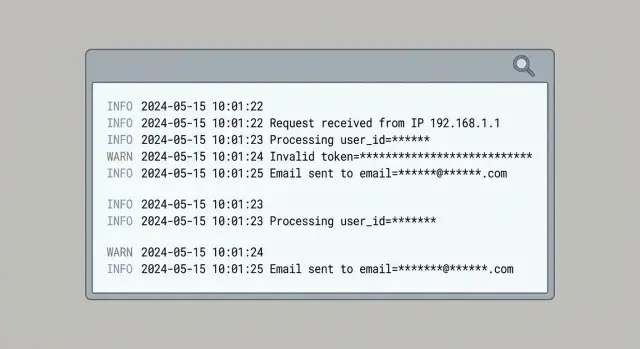
What counts as PII in logs (and why it keeps appearing)
PII (personally identifiable information) is any data that can identify a person on its own, or becomes identifying when combined with other data you already have. In logs and analytics, that usually means email addresses, phone numbers, names, home or billing addresses, and IP addresses. It also includes “technical” identifiers that often point to a single person in practice: user IDs, device IDs, advertising IDs, session IDs, cookies, and precise location.
PII shows up because logging is often added under pressure, especially when something is broken. The common shortcut is “log the whole object” and clean it up later. That “whole object” tends to include fields you never intended to store.
Typical entry points are request bodies (signup, password reset, support messages), headers (Authorization tokens, cookies, and sometimes email in custom headers), error objects (they may include the original request or serialized user data), query strings (tracking params, emails pasted into URLs), and third-party SDK payloads that auto-capture device and network info.
Analytics events repeat the same risk. Teams copy fields from server logs into events like user_email, session, or “debug” properties to make charts easier. Those events then spread to multiple vendors and dashboards, increasing the blast radius of a single mistake.
Redaction beats “just be careful” because the failure mode is predictable: a new endpoint ships, someone adds a debug log, or a library changes what it serializes. Treat redaction as a default safety layer, not a developer preference.
Decide what you actually need to keep for debugging
Before you redact anything, get clear on what your logs are for. Most teams collect far more than they use, and that extra detail is where email addresses, tokens, and raw headers sneak in.
Write down the specific questions you expect logs to answer during an incident. If a log line can’t help answer one of those questions, it’s a good candidate to remove or reduce.
Most debugging needs boil down to a few basics: what failed and when, which endpoint/version was hit, whether the failure happened before or after auth, whether a dependency caused the error, and whether multiple failures belong to the same request or session.
From there, define a safe “minimum useful” log shape you can rely on everywhere: timestamp, a request ID (or trace ID), route name, status code, and an internal error code. Add small, controlled context like feature flags or a short component name. Avoid dumping entire objects.
Keep user support needs separate from engineering needs. Support often needs to find a user and understand impact, but that doesn’t require storing a user’s email in every event. A cleaner pattern is to store a stable internal user key in logs and keep user lookup inside a secured admin system.
Some things should never be logged, even “temporarily”: passwords and one-time codes, full tokens and API keys, session cookies, raw Authorization headers, and full request/response bodies.
Example: if users report “Login failed,” you can log request_id=abc123, route=/login, status=401, error=AUTH_INVALID_TOKEN, auth_stage=post-parse. That’s enough to debug without recording the token.
Masking patterns for email addresses
Email addresses show up in logs because they’re easy to grab: signup forms, password resets, invites, support tickets, and “user not found” errors. If you want to redact PII in logs without losing debugging value, keep just enough to spot patterns (like the domain) without exposing the full address.
A safe default is to keep the domain and only a small hint of the local part, for example j***@example.com or jo***@example.com. That’s usually enough to notice “failures cluster on example.com” without leaking identities.
Plus addressing needs care. [email protected] and [email protected] are often the same mailbox. If you mask naively, you can treat one person as multiple users. Normalize before masking: lower-case the address, drop the +tag, then apply your mask.
If you need stable correlation across events, prefer a keyed hash rather than partial reveal: hash(email) + "@" + domain. Use an application secret (a pepper) so the hash can’t be reverse-guessed from a list of common emails. Never log the raw email alongside the hash.
Free text is the biggest leak source: exception messages, debug prints, and copied request bodies. Add a scan-and-replace step to your logger so emails get scrubbed even when they appear inside sentences.
Common options that stay useful:
- Domain + first 1-2 local characters:
ma***@gmail.com - Domain + local length only:
[email protected] - Keyed hash + domain:
a9f3c1…@example.com - Full replacement when risk is high:
[REDACTED_EMAIL]
Whatever you choose, enforce it in one place (a shared logging helper) so it’s consistent across services and analytics.
Masking patterns for tokens, API keys, and session IDs
Secrets leak because they sit in “boring” places engineers log without thinking: the Authorization header, cookies, query strings, and JSON fields like token, apiKey, sessionId, or csrf. The rule is simple: never log raw secrets, even on errors.
Different secrets need different handling. API keys are usually long-lived and should be treated like passwords. JWTs can contain readable claims, so logging them can leak emails or user IDs. Session IDs and CSRF tokens may be short-lived, but they can still enable session hijacking.
A practical pattern is to keep just enough to correlate events:
- Prefix + suffix: keep the first 4 and last 4 characters
- Length only: log
len=32when correlation isn’t needed - Type tags:
kind=jwtorkind=api_keyfor parsing/debugging - Stable hash: a one-way hash when you need consistent matching
Make your redactor resilient to real-world strings. Secrets appear as Bearer <token>, but also inside concatenated messages, missing spaces, and odd casing. Redact by pattern, not by “nice formatting.”
Here’s a simple before/after example:
BEFORE  error="upstream 401" Authorization="Bearer eyJhbGciOi..." cookie="sid=s%3A0f1a9..." query="?api_key=sk_live_ABC123..."
AFTER   error="upstream 401" Authorization="Bearer eyJh...9Q2w" cookie="sid=<redacted len=48>" query="?api_key=sk_l...8xKQ"
Handling user IDs, device IDs, and other identifiers
Not all IDs are harmless. If an identifier can be tied back to a real person (directly, or by combining it with other data), treat it as personal data. That includes many “internal” fields like user_id, account_id, device_id, ip_address, and “anonymous” cookie IDs if they persist over time.
A useful rule: if you can use it to find a person in your database, assume it’s sensitive.
Prefer stable, non-reversible IDs for debugging
You still need to connect events during an incident. The safest pattern is a stable but non-reversible representation, like a salted hash. You get repeatable correlation without exposing the original value.
For example, instead of logging user_id=483920, log user_key=hash(tenant_salt + user_id). Keep the salt out of logs, rotate it if needed, and use separate salts per environment.
To keep logs useful, include correlation fields that aren’t tied to a person: request_id for a single request, trace_id to follow a call across services, a short-lived session_key that expires quickly, and tenant_id when it identifies an organization rather than an individual.
Multi-tenant apps need extra care. A tenant_id is often safe to keep if it represents a company or workspace, not a single user. Don’t hash user IDs globally across all tenants. Use hash(tenant_id + user_id) so identifiers can’t be matched across tenants.
Structured vs unstructured logs (and how to redact each)
Unstructured logs are where PII sneaks in most often. A quick console.log(user) or an error that includes request headers can dump emails, tokens, and IDs into one messy line. Once it’s shipped to a log tool, it’s hard to clean up later.
Structured logging (usually JSON) makes redaction predictable. Instead of guessing with regex across a whole line, you can target specific fields like user.email, auth.token, or request.headers.authorization.
Redact at the field level first, then use regex as a backstop for free text. Regex-only redaction on full lines misses edge cases and can also over-redact, which makes debugging harder.
A practical approach is to log stable metadata (endpoint, status, feature flag, short error code), keep “shape” without content (token length, email domain, last 4 characters), and split free text into message plus structured context. Then add a final scrub step for any remaining email-like or token-like strings.
Make this easy by having one redact() utility and using it everywhere (logging, error reporting, analytics). If different teams implement their own rules, you’ll miss something.
export function redact(value) {
  if (value == null) return value;
  const s = String(value);

  // emails
  const email = s.replace(/[A-Z0-9._%+-]+@([A-Z0-9.-]+\.[A-Z]{2,})/gi, "<redacted:@$1>");

  // bearer tokens / api keys (best-effort)
  return email.replace(/\b(Bearer\s+)?[A-Za-z0-9-_]{20,}\b/g, "<redacted:token>");
}
Step by step: add redaction to your logging pipeline
Redaction works best when it’s automatic. The goal is to remove sensitive values before anything leaves the running app, so you’re not relying on a vendor setting or a later cleanup job.
Start by listing every place logs and events are created. Teams remember the API server, then forget the worker, the reverse proxy, the mobile client, or a browser error reporter.
Next, define a “redaction map”: field names you never want to ship (like email, authorization, cookie, set-cookie, password, token) plus pattern-based rules for messy free text.
Then add a redaction layer right before export, ideally in one shared function so it’s hard to bypass. Keep the rollout controlled: add tests, ship gradually, and verify debugging still works.
Prove it with tests, not hope
Use messy fixtures: a request with Authorization: Bearer ..., a JSON body containing email, and a URL that includes a reset token. Your tests should confirm the sensitive bits are replaced while the remaining context still explains what happened.
Redacting PII in analytics events without losing insight
Analytics leaks the same kinds of data as logs: URLs, referrers, form values, and error messages. The difference is where it ends up. Analytics data is copied into more places and often kept longer.
A solid default is: send less, but send it consistently. Replace user properties with a pseudonymous ID, then add only coarse attributes you actually use (plan tier, app version, country, device type). You can still answer product questions without shipping raw identifiers.
The patterns are familiar: avoid email/phone/full name as identifiers, summarize sensitive strings (present/not present, length, or category), strip query strings and fragments from URLs, and for errors send an error code and category rather than full payloads that may include user input. If you must correlate, hash with a secret salt and never send the raw value.
Raw URLs are a common leak. Password reset links can include token=..., invite links can include an email in the query string, and those values can get captured as page-view properties.
A signup event usually doesn’t need [email protected]. It typically needs signup_method=email, optionally email_domain=company.com, and whether confirmation succeeded.
Common mistakes that still leak PII
Most leaks aren’t caused by a “bad” redaction rule. They happen because someone needed more detail during an incident, or because one code path logs differently than the rest.
Incident mode that never turns off
A classic failure is turning on full request logging during an outage (bodies, headers, query strings), fixing the bug, and forgetting to remove the extra logging. Weeks later, logs contain passwords in payloads, bearer tokens in headers, and emails in query params.
Redaction helps, but it can’t save you if you keep collecting far more than you need.
Redaction that’s too narrow or inconsistent
Masking only an email field isn’t enough. PII shows up under different keys and nested shapes, and it leaks from places people forget: workers, background jobs, client-side logging, and error reporting.
If you want an end-to-end promise, the same rules need to run everywhere logs are produced, and they need tests that include real, messy inputs.
Quick checklist before you ship
Do a last-mile pass with a simple goal: keep enough detail to debug what happened and where, without storing secrets or direct identifiers.
- Search for the worst offenders: passwords, Authorization headers, cookies, and full tokens. If you need proof a token exists, log only a short fingerprint (first 6 and last 4) or a one-way hash.
- Make sure email addresses and phone numbers are masked everywhere, including free text and stack traces.
- Replace user identifiers with anonymous IDs (or hash them with a stable salt) so you can follow a single journey without exposing the original value.
- Check analytics events for raw identifiers and full URLs. Query strings often carry reset tokens, invite codes, or session hints.
- Add automated tests that run common payloads (signup, login, password reset, webhook failures) through your logger and assert the output contains no secrets.
A simple spot check: trigger a failed login in staging, then look at the exact log line. If it contains an email, a cookie, or an auth header, you’re not done.
Next steps: verify what is leaking and fix it fast
Start with proof. Scan recent logs and analytics payloads to find what actually shows up: email patterns, token-like strings, full names, addresses, IPs, and debug dumps that became permanent.
Once you see repeats, treat them as a small backlog. Fix the highest-risk sources first (auth, password reset, signup, billing, support forms), then work outward. Stop new leaks before you worry about cleaning up old data.
If you inherited an AI-generated codebase, this work often moves fast because the leak points repeat across files (full request dumps, headers, cookies, environment variables). Fix it once at the logging boundary and you remove whole classes of mistakes.
If you need outside help, FixMyMess (fixmymess.ai) focuses on diagnosing and repairing AI-generated apps, including tightening logging, fixing broken auth flows, and security hardening so prototypes are safe to run in production.