Release freeze and hotfix rules for fast, safe prototype fixes
Release freeze and hotfix rules that keep prototype fixes fast while preventing new breakage, with clear branching, approvals, and simple checks your team can follow.
Why prototypes keep breaking during last minute fixes
Last minute fixes fail for a simple reason: they happen under pressure, with little time to see what else the change touches. A “tiny” tweak to fix one bug can change shared code paths, data shapes, or permissions. Then a different screen stops working.
Prototypes are riskier because they often have gaps real products depend on. Tests are missing or stale, requirements change daily, and the code can be a patchwork of quick edits plus AI-generated chunks that look fine but hide edge cases. Hardcoded values, copied components, and inconsistent validation rules are common too, so a fix in one place quietly conflicts with another.
A lightweight process isn’t about slowing you down. It should do three things: keep changes small, make it clear what’s safe to ship, and give you a fast way to undo or isolate a mistake. That’s the point of a short release freeze and clear hotfix rules.
This is for small teams, founders, and agencies shipping fast without dedicated QA. If you’re juggling a demo, a pilot customer, or a deadline, you need guardrails that fit in a chat thread and a pull request.
When a “quick fix” goes wrong, it’s usually one of these:
- A shared login/auth helper changes and locks users out
- A database query shifts and breaks data somewhere else
- A UI tweak changes a shared component used across multiple flows
- A secret/config value is edited and deploys fail
- A one-off workaround becomes permanent and creates a later bug
Example: you patch a login error message an hour before a demo, but the change also alters redirect logic. Login “works,” but users land on a blank page because the app now redirects incorrectly.
Simple definitions: release freeze, release candidate, hotfix
A release freeze is a short pause on new work so you can ship what you already have without surprises. During the freeze, you stop adding features and only allow changes that reduce risk. It’s a way to protect a demo, launch, or handoff from last-minute tweaks.
A release candidate (RC) is the exact build you plan to ship. For a prototype, it can be as simple as “the version currently on the demo environment that passes basic smoke checks.” Once you call it an RC, treat it like it’s going out the door: small changes only, tracked and verified.
A hotfix is a small, urgent fix made after the RC is chosen or while a freeze is active. What makes it different from normal work is urgency and scope. A hotfix should fix one clear problem, touch as little code as possible, be easy to review quickly, and include a quick check that proves it worked.
You don’t need heavy change management for this. No committees, long forms, or extra meetings. You just need shared language and a few guardrails so “one last fix” doesn’t turn into five new bugs.
When to call a release freeze (and how long it should last)
Call a freeze when the cost of a surprise bug is higher than the value of one more improvement. With prototypes, that moment shows up sooner than people expect.
Signals it’s time to freeze
A freeze makes sense when any of these are true:
- A demo is within 24 to 72 hours and you need predictable behavior
- You’re about to launch to real users or paying customers
- You found a security issue (exposed secret, weak auth, unsafe input handling)
- “Tiny changes” keep breaking other things
- You need time to verify deployment, data, and access are correct
Keep it short. Many teams do a same-day freeze (4 to 8 hours) before a demo, or 1 to 3 days before a small launch. If you freeze for a week, you’ll either ignore the rules or pile up risky changes that land all at once.
During the freeze, only hotfixes are allowed: bug fixes and safety fixes. No new features, no “while we’re here” refactors, and no UI polish unless it fixes a user-blocking problem.
How to announce the freeze so people follow it
Make the announcement specific:
- Start time and end time (with timezone)
- What’s allowed (hotfix only) and what’s blocked (features, refactors)
- Who approves hotfixes and how fast they respond
- Where changes must be recorded (ticket, message thread, or a simple log)
A lightweight branching model that fits small teams
You don’t need a complex Git setup. The goal is to keep daily work moving while making it hard to accidentally ship new changes during a freeze.
Start with one branch that always reflects what you’d deploy. Many teams call this main. Treat it like a clean room: only changes that are ready to ship land there.
If you want a shared place for work-in-progress, add an optional integration branch (often develop). It can help when multiple people merge daily, but it’s not required. If it creates confusion, skip it.
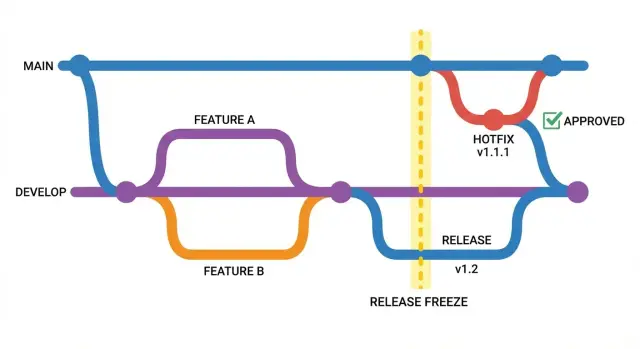
When you declare a freeze, create a dedicated release branch named by date or version, like release/2026-01-18. From that moment on, the release branch is the only place fixes for that frozen release go. New work continues elsewhere without touching what you’re about to ship.
A simple model that stays readable:
main: production-ready code onlydevelop(optional): merges for the next batch of changesrelease/YYYY-MM-DD: created only during a freeze, deleted after shippingfeature/*: short-lived branches for normal work
Two rules keep it fast:
-
During a freeze, no feature branches merge into the release branch.
-
Every change into the release branch must be a focused fix with a clear reason (bug, security issue, or demo blocker).
Hotfix branches: small, focused, and easy to review
A hotfix branch is a short-lived branch to fix one production-blocking issue while everything else is frozen. It’s the “surgical path” that lets you ship a fix without pulling in half-finished features.
Create one when the bug is real, urgent, and worth the risk of changing code during a freeze. Typical triggers: broken login, payment failure, security leak, or a demo-stopper that affects most users.
Keep hotfixes single-issue changes. One branch per issue keeps the diff small, the intent clear, and rollback straightforward.
Naming helps:
hotfix/login-redirecthotfix/auth-token-expiredhotfix/sql-injection-users
One rule matters more than the rest: cut hotfix branches from the frozen release branch (or the RC), not from ongoing work. If you branch off your main dev branch, you’ll accidentally include unrelated commits.
If the fix needs broad refactors, new dependencies, or “cleanup while we’re here,” it’s not a hotfix. Park it for after the freeze.
Approval rules that are fast but still real
A freeze only works if approvals are clear and quick. The goal isn’t more meetings. It’s preventing “one more tiny change” from becoming a new fire.
Pick one person as the final go/no-go owner for the RC: founder, PM, or tech lead. Everyone can raise concerns, but one person decides. That stops last-minute debates from dragging on.
Reviews should stay practical. The reviewer isn’t redesigning anything. They’re confirming the change is small enough, safe enough, and reversible.
What the reviewer should check
- Scope: is this only the hotfix, or did extra refactors sneak in?
- Risk: what else could break (auth, payments, data writes, config)?
- Rollback path: how do we undo it fast (revert, toggle, previous build)?
- Evidence: a short note or screenshot of before/after, plus the key test run
- Release notes: one sentence describing what changed and who needs to know
If you’re solo, add a little friction anyway. Do a self-review with the same checklist, then pause before merging (even 15 minutes). That break catches “obvious in hindsight” mistakes.
Timebox approvals so fixes don’t stall. Set a response window (for example, 30 to 60 minutes during a freeze) and decide what happens if nobody responds.
Step by step: how to ship a hotfix during a freeze
A freeze doesn’t mean “no changes.” It means every change has a clear purpose, a small blast radius, and a quick check before it goes out.
Use this flow:
- Write the smallest possible problem statement. One sentence is enough: what is broken, for whom, and what “fixed” looks like.
- Reproduce it the same way every time. Capture the exact clicks and inputs, plus the environment (device, browser, account type).
- Make the smallest change that works. Avoid refactors, “quick cleanups,” or dependency upgrades.
- Check critical flows and basic security. Confirm the bug is gone, then sanity-check login/logout and any payment or data-write path you might touch. Make sure you didn’t expose secrets or loosen auth checks.
- Merge into the release branch, then back-merge to main. This prevents drift, where the release has fixes your main branch never gets.
Minimum testing gates to avoid shipping new breakage
During a freeze, you don’t need a huge test plan. You need a small set of gates that catch the most common breakages fast.
Pick 5 to 10 critical user actions that must work every time. Keep them consistent so nobody debates what to test when the clock is ticking.
- Sign up or log in (including password reset if you use it)
- Create the core item (project, post, order, ticket)
- Edit and save that item
- Delete or cancel it (if your product supports it)
- Log out and log back in
Add one security sanity check. Prototypes often fail here: a hotfix “works” on the happy path but exposes data or bypasses permissions. Do a quick pass: confirm secrets aren’t in the client, auth checks still block private pages, and at least one untrusted input is rejected or safely handled.
If you ship both web and mobile, run the same smoke test once on each surface.
A practical minimum gate looks like this:
- Manual: the key actions + one security sanity check
- Automated (if you have it): run the fastest test suite and lint/build
- Required: one reviewer reproduces the bug before and after
If you keep missing these gates, it’s often a code health problem, not a process problem.
Example: a demo-eve login bug and a safe hotfix
It’s 6pm, the demo is tomorrow, and your prototype was generated in an AI tool. A few testers can log in, but others get stuck in a loop back to the login screen. You suspect a cookie or session issue, but you don’t have time for a rewrite.
Declare a freeze for anything that isn’t the login fix. No new features, no UI tweaks, no refactors, no dependency upgrades. One person owns the hotfix, and everyone else either pauses or helps by reproducing the bug and writing down exact steps.
Cut a single hotfix branch from the current RC and keep the change narrow. For example: fix the auth callback to store the session token in one place, stop double-setting cookies, and add a clear error when the token is missing.
Before merging, run checks that match the risk:
- Reproduce the original login failure on the same browser and device
- Confirm login works for at least two test accounts (one new, one existing)
- Smoke-test logout, refresh, and a protected page
- Check logs for auth errors and make sure no secrets are printed
Once it passes, merge the hotfix into the release branch, deploy, and re-test the same steps in the deployed build. Then back-merge the hotfix into your main branch so it doesn’t disappear the next time you ship.
Common mistakes that make freezes painful
Most freezes fail because the team treats the freeze like “normal work, but urgent.” The hard part is saying no to anything that isn’t the fix.
The first trap is feature creep hiding inside a hotfix. Someone notices a small UX annoyance and tries to tidy things up while they’re in the file. That’s how a one-line fix turns into a risky change set.
Another common issue is fixing the symptom only. For example, you patch a crash by adding a null check, but the real bug is a bad request shape from the client. During a freeze, ship the safe patch, but leave a clear follow-up note that names the root cause and what needs refactoring later.
Operational mistakes also make freezes slow:
- Hotfix merged only into the release branch and never back-merged, so the bug returns
- “It’s a tiny change” becomes an excuse to skip auth checks and secrets hygiene
- No owner for the release branch, so approvals turn into group chat debates
- Multiple fixes bundled together, so review and rollback are harder
Small changes can still open big holes. A quick auth regression check and a scan for exposed keys should be non-negotiable.
Quick checklist you can copy into your team workflow
Paste this into your tracker and treat it like a contract for the next 24 to 72 hours.
Before anyone touches code, make the freeze visible. Post one message with the start time, what qualifies as a hotfix, and who the decision maker is. If someone is unsure, the default is “no.”
Release freeze + hotfix checklist
- Freeze is declared and acknowledged by everyone who can merge or deploy.
- Hotfix branches are created from the release branch, and each hotfix fixes one issue (no “while I’m here” edits).
- One owner approves the change, and a different person runs quick checks (even if it’s just 10 minutes).
- The hotfix is merged into the release branch, and the same change is back-merged into the main/dev branch.
- Release notes are updated, and deployment is verified with a short post-release smoke test.
After the deploy, capture what happened in two lines: what broke, what you changed, and what you checked. That small note makes the next hotfix faster.
If you don’t have a second verifier, borrow one. Even a non-technical teammate can follow a smoke-test script.
Next steps: keep the process light, then improve the codebase
A freeze and hotfix flow only works if it stays simple. After you ship, do a short reset: capture what broke, what was confusing, and what you had to skip. Turn those notes into a small follow-up plan for the next few days.
Focus on root causes, not just symptoms. If the same bug type keeps returning (auth edge cases, config drift, missing env vars), fix the underlying pattern so you don’t need stricter rules every time.
Small upgrades that pay off without slowing the team:
- Add 1 to 2 basic tests for the top user flows (login, checkout, save, upload)
- Turn on linting and formatting so reviews focus on logic
- Add secrets scanning so keys don’t end up in commits
- Keep a one-page “how to run locally” note updated
- Track three recurring failure points and tackle one per cycle
If you inherited an AI-generated prototype that keeps breaking under pressure, a fast diagnosis can be the quickest way out. FixMyMess (fixmymess.ai) helps teams turn fragile AI-built code into production-ready software by finding the real failure points, repairing logic, and hardening security before the next release window.
FAQ
What is a release freeze, in plain terms?
A release freeze is a short pause on new features so you can ship what you already have without surprises. During the freeze, only changes that reduce risk should go in, like bug fixes or security fixes.
How long should a release freeze last for a prototype?
Keep it short and tied to the risk window: often 4 to 8 hours before a demo, or 1 to 3 days before a small launch. If it drags on too long, people either ignore it or end up bundling risky changes at the end.
When should we call a freeze instead of pushing one more change?
Call a freeze when a surprise bug would cost more than the value of another improvement. Common triggers are a demo within 24–72 hours, first real users coming in, repeated “tiny changes” breaking other flows, or a security concern like exposed secrets or weak auth.
What counts as a real hotfix vs. normal work?
A hotfix is a small, urgent change that fixes one clear problem with minimal code touched. If it needs broad refactors, dependency upgrades, or “while I’m here” cleanups, it’s not a hotfix and should wait until after the freeze.
Where should a hotfix branch be created from?
Cut hotfix branches from the frozen release branch (or the release candidate), not from ongoing development. That prevents unrelated commits from sneaking into what you’re about to ship.
What is a release candidate (RC), and how should we treat it?
A release candidate is the exact build you plan to ship. Once you declare an RC, treat it as if it’s going out the door: small changes only, tracked, and re-checked after each change.
How do we make approvals fast without turning it into meetings?
Pick one person as the final go/no-go owner and timebox reviews so decisions don’t stall. The reviewer’s job is to confirm the change is small, the risk is understood, and there’s a fast rollback path.
What’s the minimum testing we should do during a freeze?
Do a small, consistent smoke test that covers the core user actions your app can’t break, then add a quick security sanity check. Even without automation, repeating the same short script catches most last-minute regressions.
Why do we need to back-merge hotfixes after shipping?
Merge the hotfix into the release branch and then back-merge the same change into your main or develop branch. If you skip the back-merge, the bug often returns later because your day-to-day branch never got the fix.
What if our prototype is AI-generated and keeps breaking at the worst time?
Treat auth, config, and secrets as high-risk areas and re-check them every time, because small edits there can break deploys or expose data. If you inherited an AI-generated prototype that keeps failing under pressure, FixMyMess can diagnose the real failure points, repair the logic, and harden security so you stop playing whack-a-bug before every demo.