Remove Magic Constants from AI-Generated Code (Safely)
Remove magic constants from AI-generated code by centralizing limits, URLs, and toggles in one place so updates are safer, faster, and easier to review.
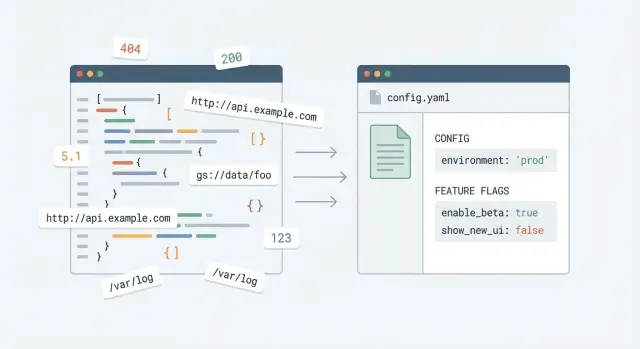
Why magic constants cause trouble in AI-generated code
Magic constants are values sprinkled through code without names or explanations. They look like hard-coded numbers (like 7 or 10000), pasted URLs (like an API endpoint), or strings that quietly control behavior (like "beta", "admin", or "enabled"). When you see them later, you can’t tell why that value exists or what breaks if it changes.
AI-generated prototypes make this worse because the code is often produced in small, separate chunks. One component gets a timeout, another gets a different timeout, and a third copies a URL with a slightly different path. The app works well enough to demo, but the same rule ends up implemented in multiple places with tiny differences.
That’s why removing magic constants can feel risky. A simple request like “increase upload limit from 10MB to 25MB” turns into a hunt across controllers, UI components, validation helpers, and background jobs. Miss one spot and you ship a bug that only shows up in production.
You’ll usually see the symptoms quickly:
- Inconsistent behavior between pages (one screen allows 25MB, another blocks at 10MB)
- Fixes that work in one flow but fail elsewhere
- Tests that are painful to write because rules are scattered
- Hotfixes that create new edge cases as values drift over time
- Confusing support reports (“it works sometimes”) with no clear pattern
A realistic example: your app has a hard-coded "https://api.example.com" in the login flow, but another file uses "https://api.example.com/" and a third points to "https://staging-api.example.com" left over from a prior prompt. You change one, auth still fails for some users, and now you’re chasing ghosts.
This is one of the most common problems we see in broken AI-built apps at FixMyMess. The fastest path to safer changes is making important values boring: one name, one place, one source of truth.
What counts as a magic constant (and what doesn’t)
A magic constant is any value baked into the code where the meaning isn’t obvious, and changing it later means searching through files and guessing what else it affects. In AI-generated prototypes, that risk goes up because the same values are often repeated across many files.
What is a magic constant?
Magic constants usually show up as magic numbers, magic strings, and hardcoded URLs. They’re often “important defaults” that quietly control behavior.
Common examples:
- Timeouts like
3000or30(milliseconds or seconds?) - Pagination sizes like
10,20,50 - Retry counts like
3or5 - API base URLs like
https://api.example.com/v1 - Feature toggles hidden as strings like
"enableNewCheckout" = true
The problem isn’t that these values exist. The problem is the code doesn’t explain what they mean. Six weeks later, 3000 looks like a guess, not a decision.
Why “one quick edit” backfires
In AI-generated prototypes, the same constant is often copy-pasted across components, routes, and helper files. You change it in one place, tests pass, and then a different screen breaks because it was using a slightly different copy.
Hidden duplicates are especially nasty: timeout = 3000 in one file, timeout = 3500 in another, and timeoutMs = 3000 somewhere else. That difference might be intentional, or it might be accidental drift. Either way, you now have behavior that depends on which path a user hits.
What does NOT count as a magic constant?
Not every literal value needs to become configuration. Some values are fine inline because they’re self-explanatory and unlikely to change.
Good non-magic examples:
0or1as a simple loop counter404when returning an HTTP status in a handler- A small UI spacing value that’s clearly local to one component
A useful rule: if changing the value should be a deliberate product decision (limits, URLs, retries, gating), it belongs in one named place.
A simple way to find and prioritize what to fix
The hard part isn’t the change itself. It’s choosing what to tackle first so you don’t create new bugs.
Start with a quick inventory. Use your editor search to look for repeated values: the same URL, the same timeout, the same 10 or 1000, the same status string. If a value shows up in 5+ places, it’s a strong candidate. If it shows up in only 2 places but touches money or login, it’s still a candidate.
Focus on risk, not perfection. The constants that hurt most are the ones that can break production or create security problems when they’re wrong.
A fast triage rule
Sort what you find into “fix now” and “fix later.” “Fix now” usually includes:
- Auth and identity: OAuth URLs, callback URLs, token lifetimes, cookie settings
- Payments and webhooks: provider endpoints, signing secret names, retry delays
- Rate limits and quotas: max requests, max uploads, pagination sizes
- Timeouts and retries: API timeout values, background job intervals
- External base URLs: anything pointing to staging, localhost, or a personal server
Then pick one item and create a single source of truth before touching a bunch of files. AI-generated code often has the same value in slightly different forms, and quick edits turn into half-finished refactors.
Name it so anyone can guess it
Use names that explain intent. Avoid CONST_1 or DEFAULT_VALUE. Prefer AUTH_TOKEN_TTL_SECONDS or PAYMENTS_WEBHOOK_BASE_URL. Put units in the name (seconds vs milliseconds) so nobody has to guess.
Example: if you find three different Stripe webhook URLs and two timeout values across handlers, create PAYMENTS_WEBHOOK_URL and PAYMENTS_API_TIMEOUT_MS in one place. Then update call sites one by one, checking behavior as you go.
If you inherited a broken prototype from tools like Bolt, v0, Cursor, Lovable, or Replit, this is often the first cleanup step we do at FixMyMess: centralize the risky values, then make the rest of the repairs on top of something stable.
Step-by-step: centralize limits, URLs, and timeouts
The goal is simple: put “things that change” in one place with clear names, so you can update them without hunting through the codebase.
A practical way to do it
Treat this as a series of small, safe edits, not a big rewrite.
-
Pick one obvious home for configuration. Create a single module (or file) the whole app can import, like
configorsettings. -
Add readable names and defaults. Prefer names that explain purpose, not type:
API_BASE_URL,REQUEST_TIMEOUT_MS,MAX_UPLOAD_MB,PASSWORD_MIN_LENGTH. Use safe defaults so local runs don’t break. -
Replace literals gradually. Choose one folder or feature, swap literals for config values, commit, and move on. Small steps are easier to review and undo.
-
Do a lightweight check after each chunk. Run the app and click through what you touched (login, upload, checkout). If you have tests, run them. The goal is fast feedback.
-
Keep commits focused. One commit for “centralize timeouts,” another for “centralize API URLs.” This makes it easier to spot unit mistakes (seconds vs milliseconds).
A tiny example that prevents future bugs
Say your app calls https://api.example.com in five files, and each one uses a different timeout: 2000, 5000, 15_000. After centralizing, you set API_BASE_URL and REQUEST_TIMEOUT_MS once. Next time you switch to a staging server or need longer timeouts during peak traffic, you change one file, not five.
Where to store config: env vars, config files, and defaults
Once you pull values out of the code, you need a clear home for them. The goal: one source of truth that’s easy to change and safe to ship.
What goes in env vars vs code defaults
Environment variables are best for values that change between environments or shouldn’t live in the repo. Code defaults are best for safe, non-sensitive values that make local setup painless.
A practical split:
- Environment variables: API keys, auth secrets, database URLs, private service endpoints, third-party webhook secrets
- Config files (checked in): non-secret settings like feature availability, known public URLs, pagination defaults, retry counts
- Code defaults: fallback values that keep the app running if a setting is missing (never for secrets)
If a value can break production or expose data, prefer env vars. If it’s just a sensible default (like PAGE_SIZE=20), a code default is fine.
Handling local, staging, and production without surprises
Many AI-built prototypes accidentally hardcode “the one environment” the builder tested. Instead, make config environment-aware: local uses local shell vars (or a local env file), staging uses its own deployment settings, production uses locked-down secrets.
Keep the rules predictable:
- Same config keys everywhere (only values change)
- Fail fast on missing required secrets in staging/production
- Allow defaults only for non-sensitive values
For example, you might allow a default REQUEST_TIMEOUT_MS=8000 locally, but require DATABASE_URL and JWT_SECRET before the app boots in staging or production.
Don’t mix config loading with app logic
A common pitfall is sprinkling process.env... reads all over the code. That turns config into hidden app logic.
Instead, load and validate config once at startup (in one module), then pass the config into the parts of the app that need it.
Feature toggles that don’t turn into a mess
Feature toggles are simple on/off switches that let you ship code without forcing every user to see it right away. In AI-generated code, toggles often show up as random booleans scattered across files, which is just another kind of magic constant.
A good toggle answers one question in plain language: “Should users see X?” For risky rollouts, this is useful. You can release a new signup flow to a small slice of users, or keep a new pricing page hidden until it’s approved. The key is that flipping the toggle changes behavior without editing multiple files under pressure.
Naming and structure that stays readable
Pick a consistent naming style and stick to it. Descriptive beats short. enableNewSignupFlow is better than flag2 because anyone can guess what it does during a hotfix.
Keep toggles in one place (your config module or settings file). If the value needs to vary by environment, map it to an environment variable, but still expose it through the same config object so the rest of the app doesn’t care where it came from.
A few rules that prevent toggle sprawl:
- Prefer
enableXoruseXnames that match user-facing behavior - One toggle per feature, not per file
- Add an expiry date or removal note for temporary toggles
- Default to “off” for risky changes
Decide who can flip the switch
Toggles can cause real damage if anyone can change them casually. Decide who can change them and how changes are reviewed.
Example: your AI-built app has a new checkout page behind a toggle. A stakeholder asks to turn it off after a spike in support tickets. If the toggle is centralized, you can flip one value and be confident you didn’t miss a hidden copy of the same boolean.
A realistic example: one change, one place
Picture a startup that shipped an AI-generated prototype fast. It works in demos, but the code has the same values copied all over the place: API URLs, timeouts, limits, and a “new checkout” switch.
Before: small change, many risky edits
You need to point the app from a staging API to production. You search for https://api-staging... and find it in six files: frontend fetch calls, a backend client, a webhook handler, and a background job. You change them all, ship, and later discover one file still points to staging. Half the app quietly reads old data.
Then real traffic hits. Your rate limit needs to go from 10 to 50 requests per minute, and a timeout needs to go from 2s to 8s. Those numbers are scattered, and one place uses milliseconds while another uses seconds. A simple tweak becomes a guessing game.
Finally, errors spike in a brand new feature. The AI code added ENABLE_NEW_CHECKOUT = true in two different modules. You set one to false, but users still see the broken path because the other constant is still true.
Here’s what that messy pattern often looks like:
// auth.js
const API_BASE_URL = "https://api-staging.example.com";

// orders.js
fetch("https://api-staging.example.com/orders", { timeout: 2000 });

// worker.js
const TIMEOUT_MS = 2000;
const RATE_LIMIT = 10;

// checkout.js
const ENABLE_NEW_CHECKOUT = true;
After: one config update
After centralizing, the rest of the app imports from one config module (and uses environment variables where it makes sense).
// config.js
export const config = {
  apiBaseUrl: process.env.API_BASE_URL ?? "https://api.example.com",
  timeoutMs: Number(process.env.TIMEOUT_MS ?? 8000),
  rateLimitPerMin: Number(process.env.RATE_LIMIT ?? 50),
  features: {
    newCheckout: process.env.FEATURE_NEW_CHECKOUT === "true",
  },
};

// orders.js
fetch(`${config.apiBaseUrl}/orders`, { timeout: config.timeoutMs });
Now “change the API base URL” means updating one environment variable, not editing half the codebase. “Raise the timeout” means changing one number with one unit. “Disable the new feature” means flipping a single flag quickly when something breaks.
Common mistakes and traps to avoid
The goal is safety: fewer risky edits, fewer surprises, easier changes later. Most problems happen when the refactor looks tidy, but behavior changes quietly.
A common slip is renaming a constant and missing a few usages. This shows up a lot in AI-written projects where the same value is duplicated under slightly different names. The app still builds, but a limit, URL, or timeout becomes inconsistent.
Multiple config files are another trap. It starts as “one for server, one for client,” then grows into three or four files that drift apart. When a value changes, half the team updates file A and forgets file B.
Also watch out for “helpful” fallback values that quietly override environment variables. Defaults are fine, but only when they’re obvious and safe. If your code does “use ENV if present, otherwise use this hardcoded production URL,” you can ship a build that talks to the wrong backend.
Mistakes that tend to bite hardest:
- Renaming constants but not updating every import and usage, leaving split behavior
- Creating several config sources (multiple files, multiple patterns) that drift over time
- Hardcoding fallback values that quietly win over env vars, especially in production builds
- Treating secrets like normal constants (API keys in constants files, or committing
.envvalues) - Over-abstracting early with config layers no one can follow during an outage
If you inherited an AI-built prototype and you’re unsure whether your refactor changed behavior, this is exactly what FixMyMess audits for: hidden duplicates, unsafe defaults, and secrets mixed into constants files.
Quick checklist before you ship the refactor
After centralizing constants, the app can look cleaner but still hide risky gaps. Use this quick check before you merge.
Configuration sanity check
Do one “single-change” test. Pick a value you expect to change later (like an API base URL), update it once, and confirm the app uses the new value everywhere. If you still have to hunt through multiple files, you didn’t truly centralize it.
Also make sure secrets aren’t mixed in with normal settings. Your config can include safe defaults, but anything sensitive (API keys, database passwords, JWT secrets) should only come from environment variables. If a secret is in the repo, assume it will leak sooner or later.
A quick pre-ship checklist:
- Change a key setting (API base URL, webhook URL, or CDN host) in one place and verify the whole app follows it.
- Search for leftover literals that should be named (timeouts like
30000, limits like50, retry counts like3). - Confirm limits and timeouts are named clearly and explained with a short comment (what it protects, and why that number).
- Confirm feature toggles have an owner, a safe default, and a removal plan if they’re temporary.
- Run a smoke test: sign in, hit the main screens, and trigger at least one error path (bad password, missing record, offline mode).
Final “break glass” check
During the smoke test, glance at logs or console output. If you see a missing env var, an unexpected fallback URL, or a toggle defaulting the wrong way, fix it before shipping.
If you inherited a fragile AI-generated prototype and you’re not sure what else is hard-coded or unsafe, FixMyMess (fixmymess.ai) can start with a free code audit to pinpoint risky constants, exposed secrets, and config patterns that tend to fail in production.
Next steps: keep it clean as the app grows
The real win is keeping magic constants from sneaking back in. Small teams move fast, and “just one more hardcoded number” is how you end up with scattered, risky edits again.
A practical next step is a short cleanup sprint focused on the constants that actually hurt you. Don’t try to fix everything. Pick the 10-20 values that change often or can break production when wrong (timeouts, rate limits, API base URLs, pricing thresholds, upload sizes), centralize them, and ship in small chunks.
Make one lightweight team rule: new important values need a name and a home. If it isn’t clearly a one-off (like a loop index), it belongs in your config or constants module.
If your codebase is AI-generated and feels fragile, an expert audit before deeper refactors can save a lot of time. These projects often hide risky constants alongside bigger problems like exposed secrets, broken auth flows, or unsafe database queries.
FAQ
What is a “magic constant” in an AI-generated app?
A magic constant is a hard-coded value with unclear meaning or impact, like 3000, "enabled", or a pasted API URL. If changing it later means searching the whole codebase and guessing what will break, it’s a magic constant.
Why do AI-generated prototypes end up with so many duplicated constants?
AI tools often generate code in separate chunks that don’t share a single config source. The same rule (timeouts, limits, URLs) gets copy-pasted into multiple files with small differences, so a “simple change” turns into inconsistent behavior.
When should I leave a value inline instead of turning it into config?
If the value is a stable, obvious literal that’s local to one spot, leave it inline. If it controls product behavior across flows (limits, base URLs, retries, auth settings, feature switches), centralize it so you can change it safely.
What’s the fastest way to find which constants are worth fixing first?
Start by searching for repeated literals: the same URL, the same timeout number, the same limit, or the same magic string. Prioritize anything tied to login, payments, webhooks, uploads, rate limits, and environment endpoints, even if it appears only a couple of times.
How do I centralize constants without breaking everything?
Create one obvious configuration module (or file) and move values there in small batches. Replace literals feature-by-feature, run a quick smoke test after each batch, and keep each change easy to review and revert.
How should I name constants so they don’t become confusing later?
Put intent and units in the name so nobody has to guess later. Names like REQUEST_TIMEOUT_MS, MAX_UPLOAD_MB, and AUTH_TOKEN_TTL_SECONDS prevent the most common errors, especially milliseconds vs seconds.
What should go into environment variables vs code defaults?
Use environment variables for secrets and values that differ by environment, like database URLs, API keys, JWT secrets, and private endpoints. Keep safe, non-sensitive defaults in code so local setup works without surprises.
Why is it a bad idea to read environment variables all over the code?
Read and validate environment variables once at startup, then export a single config object. If you sprinkle process.env throughout the app, you’ll create hidden behavior differences and make it harder to test and reason about changes.
How do I handle feature toggles without creating another mess?
Keep toggles in the same centralized config and name them by user-visible behavior, like enableNewCheckout. Default risky toggles to off, and avoid duplicating the same boolean in multiple modules, which makes rollbacks unreliable.
What should I check before shipping a “remove magic constants” refactor?
Change one key setting (like the API base URL) once and confirm every flow uses it. Then search for leftover hard-coded duplicates, confirm no secrets are committed, and click through critical paths like sign-in, upload, and checkout to catch mismatches early.