Reproducible builds for inherited codebases: stop drift
Learn how to get reproducible builds for inherited codebases by pinning Node versions, enforcing lockfiles, and aligning dev, CI, and prod.
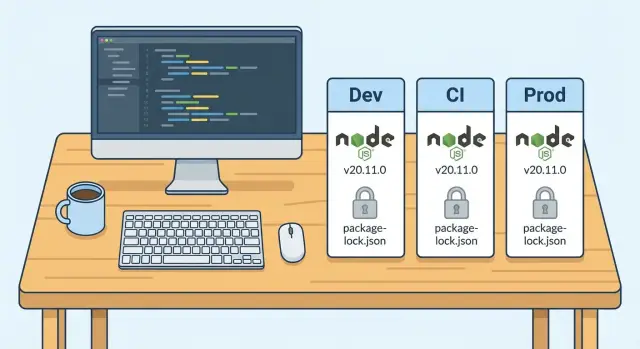
Why inherited projects keep breaking across machines
Inherited codebases often fail in the most annoying way: not consistently. One developer can run the app fine, another gets a cryptic error. CI passes in the morning and fails in the afternoon. A small change that looks harmless ships, and production behaves differently.
That "works on my machine" drift means the code isn't the only thing deciding whether your build succeeds. Hidden differences between laptops, CI runners, and production servers change what gets installed, how it runs, and what actually gets deployed.
The worst part is the randomness. You stop trusting tests because they're flaky. You lose time chasing bugs you can't reproduce. And you start making risky band-aid fixes (like pinning a dependency by hand) just to get unstuck, which can create new surprises later.
Most causes are simple and fixable:
- Different Node.js versions (even minor differences can break native modules or tooling)
- Missing or ignored lockfiles, so installs pull slightly different dependency trees
- Global tools (npm, yarn, pnpm, TypeScript, ESLint) that differ per machine
- Postinstall scripts that behave differently across OSes or shells
- CI caching that hides problems a clean install would reveal
The goal is straightforward: the same inputs should produce the same output everywhere. Same Node version, same package manager, same dependency graph, same build steps, same artifacts.
Once you remove drift, failures stop feeling random. When something breaks, it breaks for everyone, in the same place, with the same error. That’s when an inherited project becomes maintainable again.
What a reproducible build means in Node projects
A reproducible build means you can take the same codebase, run the same commands, and get the same result every time. In Node projects, that "result" isn't just "it runs on my laptop". It should behave the same for anyone on the team, in CI, and in production.
If one machine uses Node 18 and another uses Node 20, or one install pulls newer packages than another, you don't really have the same project.
In a healthy Node repo, these should be consistent:
- Install: a fresh clone installs without manual fixes
- Build output: the same sources produce functionally identical artifacts
- Tests: the same test run passes or fails for the same reasons
- Scripts:
npm run build(or similar) behaves the same everywhere - Errors: when something breaks, it breaks the same way, not randomly
Some things won't be identical by design. Timestamps in bundles, machine-specific paths, environment variables, and calls to external services can add noise. The fix isn't to pretend those don't exist. It's to make dependencies, tool versions, and build steps deterministic, then keep runtime configuration separate.
You can usually tell reproducibility is missing when a clean install fails, or when CI fails but laptops pass. Another strong signal is when deleting node_modules changes behavior, or when two teammates get different versions of the same dependency after running install.
If you can't clone the repo on a brand-new machine and get to a passing build with a small, documented set of commands, drift has already started.
Choose a single source of truth for versions and scripts
Inherited projects break because the rules live in people’s heads. One dev uses Node 18, CI uses Node 20, production is still on 16, and nobody notices until a dependency changes behavior. Pick one place in the repo where the truth is written down and enforced.
Start by deciding where versions are declared. Put them in files that travel with the code, not in a README line that goes stale. Common choices are a repo-managed Node version file, a package manager version setting, and (if you use containers) a base image tag that never floats.
Next, agree on the build entry points. Everyone should run the same commands for install, build, and test. If there are multiple ways to build (custom scripts, ad-hoc flags, different folders), drift keeps coming back.
A rule that works well: if CI can’t run it from a clean checkout using the project scripts, it’s not part of the build.
Before changing anything, capture a baseline from a clean state and write it down: the command used, the Node version, the package manager, and whether tests pass. That gives you a reference when something breaks after you tighten rules.
Pin Node and package manager versions
Most "works on my machine" bugs start before your app code runs. If one person is on Node 18, CI uses Node 20, and production is still on Node 16, you're testing three different apps.
Pin Node in a place developers will actually follow. A simple .nvmrc or .node-version in the repo makes the expected version visible the moment someone opens the project. Back it up in package.json so tooling can warn (or fail) when the version is wrong.
Then pin the package manager version. Relying on whatever npm/yarn/pnpm happens to be installed globally invites silent changes in dependency resolution. Lock it to the project so everyone installs the same way, in every environment.
{
  "engines": {
    "node": ">=20 <21"
  },
  "packageManager": "[email protected]"
}
Add a fast version check that runs before installs or tests. It should fail with a clear message, not a mysterious build error 10 minutes later. Keep it strict:
- Check
node -vmatches your pinned major version - Check the package manager version matches
packageManager - Fail CI immediately if either one is off
Enforce lockfiles and deterministic installs
Lockfiles are the difference between "we all installed dependencies" and "we all installed the same dependencies." That sameness is what stops random breakage when a transitive package releases a new patch.
First, pick one package manager and commit to it. Mixed tooling creates silent drift: one person runs npm, another runs Yarn, CI runs pnpm, and you end up with different dependency trees even if package.json didn't change.
Clean up the repo so there is only one lockfile that matches your chosen tool (package-lock.json, yarn.lock, or pnpm-lock.yaml). If you see more than one, treat that as a bug, not a preference.
Use install commands that refuse surprises
Deterministic installs fail fast when the lockfile and package.json disagree. That's what you want.
# npm
npm ci

# Yarn (Berry)
yarn install --immutable

# pnpm
pnpm install --frozen-lockfile
If the install fails, fix the lockfile properly instead of loosening rules. The point is to stop hidden changes.
Make the lockfile non-optional
Treat lockfile changes like code changes: review them, and block merges that forget them.
- CI fails if
package.jsonchanged but the lockfile did not - CI fails if the repo contains multiple lockfiles
- Reviewers reject "I ran install and it updated a bunch of stuff" without a clear reason
- Dependency bumps are grouped and explained, not mixed into feature PRs
Make CI behave like a clean local machine
A lot of drift survives because laptops carry hidden state. CI should be the opposite: a fresh machine, every time, using the exact same install and build steps your team uses locally.
Treat every CI run like a brand-new checkout. Don’t rely on leftover node_modules, generated files, or global tools. If the build only passes when something already exists, it isn't a real build.
Keep one script as the source of truth. If developers run npm run build, CI should run that exact script, not a custom chain of commands.
A practical CI approach:
- Check out into a clean workspace every run
- Install from the lockfile only (no "best effort" installs)
- Run the same scripts as local:
lint,test,build - Fail when something important is off (peer dependency conflicts, missing env vars, type errors)
- Save artifacts only after the build succeeds
Caching can help, but it can also hide problems. Cache only what is safe to reuse, and invalidate it when dependencies change.
- Cache the package manager download cache (not
node_modules) - Key the cache on the lockfile hash
- Bust the cache when Node.js or the package manager version changes
Align production with what CI actually built
Many "works on my machine" bugs show up after deploy because production isn't running the same thing CI tested. Treat CI as the place where reality is decided, and make production match it.
First, choose where builds happen and stick to it:
- Build in CI and deploy the finished artifact (or container image), or
- Build in production, but then production must use the exact same Node version, package manager, and install commands as CI
Mixing these two is how you get surprise dependency changes.
If you use Docker, pin the base image tag instead of a floating tag. A small base image change can change Node, OpenSSL, or system libs and create a "same code, different behavior" deploy. Update the base image on purpose, then let CI test it.
Keep environment variables separate from the build output. Secrets and environment-specific values should be injected at runtime, not baked into a compiled bundle or committed into config files. That's both a security issue and a reproducibility issue.
Finally, verify the deployed runtime really matches what you pinned. If CI uses Node 20, production shouldn't silently run Node 18.
Step-by-step: remove drift without breaking the team
Drift usually starts small: one person upgrades Node, another deletes the lockfile, CI uses a different install command, and production pulls a slightly different dependency tree. Fix it in phases so you don't block day-to-day work.
Start with a baseline, then tighten rules gradually:
- Capture the current reality: Node version, package manager, install command, and whether a lockfile is present and actually used
- Pick and pin expected versions: add a Node version file and lock the package manager version so everyone runs the same tools
- Make installs deterministic everywhere: update CI to use clean installs and build from a clean workspace each run
- Prove it works from scratch: do a "fresh clone" test on a new machine or clean folder, then build using production-like settings
- Enforce after validation: add fail-fast checks (Node mismatch, missing lockfile changes) and protect the lockfile from casual edits
A common pattern with inherited, AI-generated prototypes is that pinning Node and forcing frozen installs turns a random failure into a consistent, readable one (missing dependency, incompatible engine requirement, or a script that only worked on one laptop). Once it's consistent, it's fixable.
Common mistakes that recreate "works on my machine"
Most teams start with good intentions, then small shortcuts bring drift back. The goal is simple: the same code should build the same way on a laptop, in CI, and in production.
One common trap is using a "best effort" install in CI. npm install can update the lockfile, pull slightly different dependency trees, or behave differently across npm versions. That's how you get a green build locally and a red build in CI the next day.
Another mistake is treating node_modules as part of the project. Committing it, caching it too aggressively, or assuming it's already present hides real dependency problems. Then a fresh machine (or a clean CI runner) becomes the first place where issues show up.
Also: pick one package manager. When a repo mixes npm, Yarn, and pnpm artifacts, people will "fix" a problem by switching commands. That often works once, then silently changes the dependency graph.
The drift-makers that show up again and again:
- CI uses a non-deterministic install (for example, updating the lockfile during the build)
- The repo relies on existing
node_modulesinstead of a clean install - Multiple package managers are used in the same repo, with multiple lockfiles
- Builds depend on global CLIs (installed on someone’s machine, missing in CI)
- Docker or runtime images are unpinned (for example, using
latest)
Quick checklist before you trust the build
Before spending another day "fixing CI", prove the project can build from scratch on a clean machine. If it fails there, it will fail in production sooner or later.
The 5 checks that catch most drift
Start with a fresh clone test. On a new laptop or a clean temp folder (no old node_modules), run install, build, and tests exactly as written in the repo. If you need extra steps that aren't documented, you don't have a reliable build yet.
Confirm versions. The Node.js version and the package manager version should match what the repo expects, not whatever is installed globally.
Check the lockfile. There should be exactly one lockfile, it should be committed, and it should change only when you intentionally update dependencies.
Make sure CI installs deterministically. CI should use the clean-install command for your tool (for example npm ci instead of npm install) so it can't silently rewrite the lockfile or pull newer transitive packages.
Verify production matches what CI built. The runtime Node version in production should match the pinned version, and your deploy should ship the same build output CI created (not rebuild from scratch with a different environment).
Example: stabilizing an inherited AI-generated prototype
A founder inherits a Node app generated by an AI tool. It runs on the original developer’s laptop, but CI fails with vague errors like "Cannot find module", "Unsupported engine", or tests that pass locally and fail in CI.
After a quick check, the pattern is familiar:
- Local dev is on Node 20, CI is on Node 18, and production is still on Node 16
- There's no lockfile (or it’s ignored), so every install pulls slightly different dependency versions
- CI restores cached dependencies, so it never behaves like a clean machine
The fix is not fancy. It's making the build deterministic, then forcing every environment to follow it.
Pin Node.js (and the package manager), add or restore the lockfile, switch CI installs to strict mode, and run at least one cold install locally (delete node_modules, install fresh) to prove your laptop isn't masking problems.
The outcome you're aiming for is boring: the same commit produces the same dependency tree and the same build result everywhere.
Next steps if your inherited build is still unstable
If you still see "works on my machine" bugs after the basics, stop changing five things at once. Standardize in a strict order: versions first, lockfiles second, then CI rules. Each step should remove variables.
Write down what you'll treat as the truth for this repo: the Node.js version, the package manager and its version, and the one install command everyone must use. Keep the rule set small and visible.
If the codebase itself is messy (especially AI-generated prototypes), reproducible builds are the first repair task, not a nice-to-have. Until builds are predictable, every other fix is harder to verify.
If you need help quickly, FixMyMess (fixmymess.ai) focuses on taking broken AI-generated apps and making them production-ready. A free code audit can spot where drift is coming from (versions, lockfiles, hidden scripts), then the team can fix the build and the underlying issues in one pass.
FAQ
Why does the app work on one laptop but fail on another?
Start by confirming everyone is running the same Node major version and the same package manager version. Then delete node_modules, reinstall from the lockfile using a strict install command, and rerun the failing script.
If it still differs, compare the exact error output and the environment variables used in each place (local, CI, production) to find what’s changing.
What does “reproducible build” actually mean for a Node repo?
In Node projects, reproducible builds mean a clean clone of the repo can install, build, and test with the same commands and get the same outcome across machines. The key is that dependencies and tooling resolve the same way every time.
You’re not trying to make timestamps or machine paths identical; you’re trying to remove version and install drift so failures stop being random.
How do we pin the Node.js version so people actually follow it?
Pin Node in the repo so it’s visible and enforceable, like using .nvmrc or .node-version, and also declare it in package.json under engines. Then make CI fail early if the Node version doesn’t match.
The fastest win is consistency: one pinned major version used by developers, CI, and production.
How do we stop different npm/yarn/pnpm versions from changing installs?
Set the package manager version in package.json using the packageManager field and make CI use that exact tool. This prevents “same code, different dependency tree” issues that happen when different npm/yarn/pnpm versions resolve dependencies differently.
If someone upgrades their global tooling, the project still installs the same way because the repo defines the expected version.
What’s the simplest way to enforce lockfiles and deterministic installs?
Use the strict install command for your package manager and treat lockfile mismatches as errors, not warnings. Strict installs force the install to match what was previously resolved, instead of silently pulling newer transitive dependencies.
If strict install fails, update the lockfile on purpose and commit it, rather than loosening rules to “get it green.”
How should we cache dependencies in CI without hiding problems?
Avoid caching node_modules and cache only the package manager’s download cache, keyed on the lockfile. That keeps builds fast without preserving broken state.
If you do cache aggressively and CI “mysteriously” passes, you can end up shipping a build that only works because of leftovers. A clean install in CI is the reality check.
Should we build in CI or build in production?
Pick one: either build in CI and deploy the built artifact/container, or build in production but then production must match CI’s Node version, package manager, and install mode. Mixing approaches is a common source of surprise changes.
Also make sure production isn’t using an unpinned runtime or base image that can change underneath you.
How do we handle environment variables and secrets without breaking reproducibility?
Keep secrets and environment-specific values out of build outputs and out of the repo. Inject them at runtime via environment variables or your deployment platform’s config.
This improves both security and predictability because the same build artifact can be used across environments without baking in machine-specific settings.
Our CI is flaky—what changes usually fix it fastest?
Make CI run the exact same scripts developers run, from a clean checkout, using strict installs. Then remove alternate build paths so there’s one official way to install, test, and build.
If the repo relies on global CLIs, move them into devDependencies and call them via project scripts so every environment uses the same versions.
Can FixMyMess help stabilize an inherited AI-generated Node app quickly?
When inherited or AI-generated projects keep drifting, the fastest path is often a focused audit that pins versions, restores a single lockfile, and makes CI install and build from scratch the same way every time. Once failures are consistent, the underlying code issues are much easier to fix.
If you want it handled end-to-end, FixMyMess can audit the repo for drift sources and typically stabilize builds quickly so the app becomes maintainable again.