Restaurant ordering MVP with AI tools: happy path + edge cases
Plan a restaurant ordering MVP with AI tools by mapping menu to checkout, then pressure test with edge cases like modifiers, outages, and payment failures.
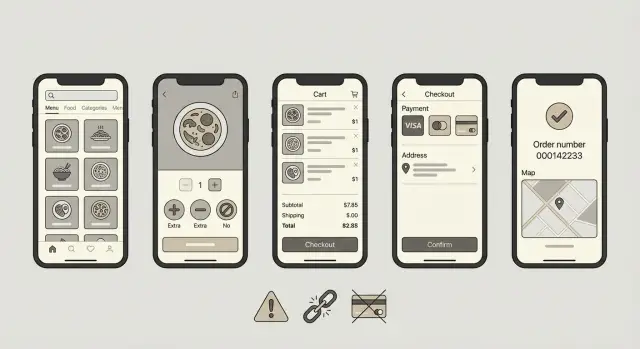
What a restaurant ordering MVP really needs
A restaurant ordering MVP only works if a real customer can place a real order without getting stuck. That means the app has to do more than show a nice menu. It must turn taps into a clear ticket the kitchen can fulfill, and a confirmation the customer can trust.
The happy path is the simplest, most common journey: pick items, choose modifiers, enter details, pay (or choose pay in store), and get a confirmation. Keep that happy path small and boring on purpose. Fewer choices means fewer chances to misprice or lose an order.
Your MVP has to handle this end to end:
- Show current menu items with accurate prices and availability
- Support required modifiers (like size) and optional add-ons
- Collect the minimum checkout info (name, phone, pickup or delivery details)
- Keep one source of truth for the order total (items, tax, fees, tip)
- Confirm the order with an order number and clear next steps
Ordering apps often break even when the UI looks done because the hard parts are mostly invisible: totals change, items sell out, modifiers are required, payment can fail, and the system still has to stay consistent across menu, cart, and checkout.
Before you generate any code, decide the basics so you don’t rebuild later:
- Pickup, delivery, or both (and what data each one needs)
- Hours, lead times, and what happens outside operating hours
- How you model modifiers (required vs optional, max selections)
- Payment rules (pay now vs pay later, refunds, failed payments)
- Who receives the order (printer, tablet, email) and what confirmed means
Map the happy path from menu to checkout
Start by writing the single simplest order you want to support: 1 item, no modifiers, quantity 1, one payment method. If that works every time, you have a base you can trust.
A clean happy path is not just a set of screens. It’s also a set of facts your system stores at each step so the order can be recovered, refunded, and fulfilled.
Here’s a simple end-to-end flow, written as what the user sees and what the system should record.
-
Menu opens. User: categories and items. System: restaurant_id, menu_version, session_id, location context (pickup vs delivery).
-
Add to cart. User: taps Add. System: line_item_id, item_id, name snapshot, base_price snapshot, quantity=1, tax rules reference.
-
Review cart. User: sees subtotal and can remove items. System: cart_id, line_items list, calculated totals, validation warnings (sold out, minimum order).
-
Checkout details. User: enters name, phone, time, address if delivery. System: customer contact, fulfillment type, requested time, delivery zone check result.
-
Pay and confirm. User: sees Order confirmed with an order number. System: order_id created, payment intent/authorization status, final totals, status="confirmed", timestamped audit log of key events.
Define success in one sentence, and keep it strict. For most MVPs, success means: the system creates an order with final totals, payment is authorized (or marked pay-later), and the user gets a confirmation they can screenshot. If any of those are missing, treat it as a failed order and show a clear next step.
Step by step: the simplest flow you can ship
Keep the first version boring on purpose. Your goal is one clean order from menu to confirmation, with as few decisions as possible.
A flow that holds up in real life:
- Start on the menu. Let people open an item to see the price, description, and photo (optional).
- On the item screen, let them set quantity and pick modifiers only if they exist (size, milk type, add-ons). Preselect sensible defaults.
- After Add to cart, show the cart with clear line items: item name, chosen modifiers, quantity, and total. Make it easy to edit or remove.
- Collect fulfillment details next: pickup vs delivery, name, phone, and a single instruction box. Don’t ask for more than you’ll use.
- Take payment, then show a confirmation screen with an order number and what happens next (estimated time, pickup instructions, or delivery address).
A small detail that matters: every screen should have one primary action. On the cart page, the main action is Checkout, not Apply coupon, Add note, and Schedule later competing for attention.
Concrete example: someone orders a burger, picks no onions and add cheese, sets quantity to 2, then switches from delivery to pickup after seeing the fee. If your MVP can handle that change without losing modifiers or miscalculating totals, you’re in good shape.
Save advanced features (accounts, promos, split payments, scheduling) for later. They add risk fast, and they don’t prove the core ordering loop works.
Data you must model early (or you will rewrite later)
Most ordering MVP bugs aren’t UI bugs. They come from missing fields and unclear rules in your data. Model a few core concepts up front and edge cases become predictable.
Start with the menu: categories, items, and prices. Every item needs an availability flag (and ideally a reason), because sold out and not offered today behave differently at checkout. Also decide whether prices are per store, per location, or global. Even for a single-store MVP, making that choice explicit saves pain later.
Modifiers are the next rewrite trap. Model them as groups with clear rules: required vs optional, min/max selections, and whether choices can repeat (for example, extra cheese twice). A common structure is: an item has modifier groups, each group has options, and each option can change the price. If you skip max selections now, you end up patching validation all over the app.
Totals need one source of truth. Decide how you calculate subtotal, tax, fees, and tip, and when you round. If you calculate totals in three places (client, server, receipt), they will disagree. Write down the order of operations, even if it’s simple.
Store hours matter earlier than most teams expect. Model weekly hours plus one-off overrides, lead time or pickup windows, and delivery zones (even if your MVP is pickup-only, record the choice).
Discounts and promos are optional, but be explicit. Either model basic rules (one code per order, expiry, minimum spend) or state no promos yet. Half-implemented promo logic is a common cause of broken totals and support tickets.
Checkout and confirmation: where most MVPs break
Checkout is where money and real operations touch your MVP. The UI can look finished while small gaps here lead to angry customers, double charges, or "we never got the order" moments.
Reserve vs capture: decide it on purpose
Many teams capture payment too early. A safer default is to authorize the charge when the customer taps Pay, then capture only after the order is successfully saved and accepted for fulfillment. If you capture immediately, you need a clear plan for fast refunds when something goes wrong.
The failure you should design for: payment succeeds, but the order fails to save (database error, timeout, crash). Treat that as a normal risk, not a rare edge case. Put the order into a recovery queue so staff or support can recreate the order or refund quickly.
Retries are another silent killer. Mobile networks drop, users tap Pay twice, or the browser retries a request. Use an idempotency key per checkout attempt so the server can safely return the same result without charging twice.
When payment is done, confirmation must be unmissable and useful. Include the order number, what was ordered (including modifiers), an estimated ready or delivery time, how to contact the restaurant or support, and the payment status (paid, authorized, cash on pickup).
Decide where confirmation appears. At minimum, show it on screen. Email or SMS can help, but only if you can deliver reliably and handle typos.
Example: a customer pays, sees a spinner, then loses signal. If they reopen the app, they should see the same confirmed order, not a second charge or an empty cart.
Top edge cases that break orders
Most ordering MVPs look fine on the happy path, then fall apart when menu or payment state changes mid-order. Treat these as must-test cases.
Menu changes after the cart is built
Prices and availability move. The simplest failure is when an item price changes between menu view and checkout, but your cart total still uses the old price. The user feels tricked, and staff sees a different total.
A close second: an item sells out after it’s already in the cart. If you let checkout succeed anyway, the kitchen can’t fulfill it. If you block checkout, you need a clear message and an easy way to replace the item.
Modifiers cause quiet breakage too. If a modifier is required (like cooking temp or choice of side) and the cart allows an empty value, you’ll get invalid orders. This should block checkout, not fail later.
Totals, payments, and retries
Even when items are correct, totals can mismatch because of rounding, tax, service fees, delivery fees, or discounts. A one-cent difference between what the customer saw and what you charge can trigger payment failures and support tickets.
Payment flows create the nastiest duplicates. Common triggers are refresh, the back button, and slow networks. If the user refreshes during payment, they may create two orders. If the network drops and payment status is unknown, many users retry and you can end up with a paid order plus a second pending one.
Test these before launch:
- Re-price the cart at checkout and show what changed
- Validate sold-out items and required modifiers before payment
- Calculate totals in one place with consistent rounding rules
- Use idempotency for place order so refresh can’t duplicate
- Handle unknown payment with one safe retry path
Operational edge cases people forget until launch day
The fastest way to embarrass an ordering MVP isn’t a fancy bug. It’s a simple operational moment your app didn’t plan for. These happen daily in real restaurants, and they decide whether staff trusts the system.
The restaurant closes while someone is paying
People browse slowly. If checkout starts at 9:58 and closing is 10:00, you need a clear rule. Don’t accept an order the kitchen will reject, and don’t charge a card if you can’t fulfill it.
A practical approach is to re-check store status right before payment and again before creating the order. If the store is closed, show a short message and keep the cart so the customer can try tomorrow.
"We’re out of that" modifiers and substitutions
Modifiers are where orders become real: no onions, gluten-free bun, extra spicy. The hard part is when a modifier choice becomes unavailable. If the customer already paid, staff needs a safe way to resolve it.
Decide upfront what your MVP supports. For example, you might auto-cancel with a full refund, pause the order and request customer approval for a substitution, or mark the order as needs attention so the kitchen doesn’t start.
When the printer or POS is down
Even if you don’t integrate with a POS yet, your MVP still depends on a handoff: a tablet screen, email, receipt printer, or kitchen display. Devices go offline, paper runs out, Wi-Fi drops.
You need a fallback: the order should be visible in one reliable place, and staff should be able to confirm they saw it.
Pickup slots fill up and prep time changes
If you offer pickup times, you need capacity limits. Otherwise you’ll sell 25 pickups for 6:15 and guarantee late orders. Prep time also changes mid-shift (staffing, a large party, equipment issues). Make pickup time a promise you calculate at checkout, not a static dropdown.
Staff edits or cancels after payment
This is common: wrong address, customer calls, kitchen can’t make it. Give staff a clear cancel with reason and edit with audit note flow, and make sure totals, taxes, and refunds stay consistent.
Common traps when building with AI code generators
AI code generators can get you off the ground fast, but they also guess. The biggest failures happen when the code invents rules you never wrote down.
Write your business rules in plain English before you generate anything: how modifiers work, when tax applies, whether tips are allowed, and what sold out means. If you don’t, the app will still behave somehow, and you’ll only notice once real orders come in.
Traps that show up again and again:
- Letting the generator invent business rules (rounding, discounts, modifier limits) instead of implementing your written rules
- No single source of truth for totals (frontend vs backend vs receipt disagree)
- Hardcoded menu data that forces a rewrite as soon as you need edits
- Exposed secrets (API keys, database URLs, payment tokens) in the repo or shipped to the browser
- Weak input validation (bad phone numbers, incomplete addresses, unexpected characters)
A quick example: the UI total includes a $2 extra cheese modifier, but the server total does not. The customer sees $18.50, gets charged $16.50, and the kitchen ticket prints the wrong items. That’s not just a bug, it’s a trust problem.
Quick checklist before you share the MVP
Before you send your MVP to a friend (or a real customer), do one tight pass that checks the few things that most often cause embarrassing failures.
Use one real menu item with modifiers (like Burger + medium + no onion) and place the same order twice: once on a phone, once on a laptop. If anything feels inconsistent, users will notice quickly.
Checklist:
- Happy path works on mobile and desktop: browse menu, pick modifiers, add to cart, edit quantity, checkout, and see a clear success screen
- Totals never change unexpectedly: line totals, cart total, checkout total, and final receipt match exactly (including tax, fees, tip, discounts)
- Sold-out behavior blocks bad orders: unavailable items can’t be added; if they sell out in-cart, the user gets a clear message and can’t pay
- Retries are safe: refresh, double-click Pay, or slow networks don’t create duplicate charges or orders
- Staff can actually see it: the order appears quickly with an obvious status and the key details (name, items, notes)
Example scenario: a normal order with realistic wrinkles
Jordan opens your MVP on their phone at 6:10 pm. They want something quick: a burger. They tap the Burger combo and hit Customize.
The UI shows a required choice: Side. Jordan picks Fries. Then they add two optional add-ons: Extra cheese and Bacon. Everything looks fine, so they add it to the cart.
Two minutes later, the kitchen marks Bacon as sold out. Jordan is already in the cart and taps Checkout. Your MVP should catch this before payment. A simple approach is to re-check availability when the cart loads and again right before charging.
Jordan sees a clear message: "Bacon is no longer available. Remove it or choose another add-on." The cart updates the price and keeps the rest of the order intact. Jordan removes Bacon and continues.
On the delivery screen, Jordan switches from Pickup to Delivery because it’s raining. The address is within range, so the app adds a delivery fee and updates tax. The total changes immediately, and the final amount is repeated on the payment step so there are no surprises.
Jordan pays with a card. The first attempt is declined. Instead of creating a new order, your system keeps a single pending order and lets Jordan retry payment. On the second try, the payment succeeds.
What good looks like at the end:
- One paid order ID, not two
- One receipt total that matches the final cart total
- One kitchen ticket with the correct modifiers (Fries, Extra cheese)
- Clear status: Paid, preparing
- An audit trail that shows the sold-out change and the payment retry
Next steps: harden an AI-built ordering MVP for production
The next step is reliability: real customers do unpredictable things. You don’t need a huge test suite on day one, but you do need a repeatable way to catch failures that cost orders.
Turn your happy path and edge cases into a test script
Write one short script your team runs every time you change code:
- Place one pickup order with a modifier and a note
- Place one delivery order with tax + fee + tip
- Try an out-of-stock item and confirm the UI responds clearly
- Trigger a payment failure and confirm the cart survives
- Verify the confirmation screen matches what the kitchen should make
Decide what you support today versus what you block. Blocking is fine in an MVP if you explain it clearly (for example, delivery not available for this address, or max 12 items per order).
Add basic logging so you can diagnose failed orders fast
When an order fails, you need answers in minutes. Log a single order ID through the whole flow (cart, checkout, payment, confirmation), and record the reason when something is rejected. Capture key events like payment authorized vs payment captured, and when inventory was checked.
If you inherited an AI-generated prototype that looks finished but drops orders in edge cases, a short diagnosis pass can save weeks of patching. FixMyMess (fixmymess.ai) focuses on auditing and repairing AI-built codebases, especially around order logic, security hardening, and deployment readiness.
FAQ
What is the bare minimum a restaurant ordering MVP must do?
Aim for one complete loop: a customer can pick an item, select any required modifiers, enter minimal details, pay (or choose pay at pickup), and see a confirmation with an order number. If any step can fail silently, it’s not ready for real orders.
What’s the simplest “happy path” flow I should build first?
Start with one item, quantity 1, no modifiers, and one fulfillment type. Once that works every time, add modifiers, then delivery, then payment retries; expanding the scope earlier usually creates pricing and validation bugs you’ll chase later.
How should I handle required modifiers like size or sides?
Treat modifiers as groups with rules: required vs optional, and min/max selections. Block checkout if a required choice is missing, and store a snapshot of what the user picked so the kitchen sees the exact selections even if the menu changes later.
How do I stop totals from changing or mismatching across screens?
Pick one source of truth, usually the server, and make everything else display what the server calculates. Write down the order of operations for subtotal, tax, fees, tip, and rounding, then enforce it the same way at cart, checkout, and receipt.
What should happen if the menu changes after someone adds items to the cart?
Re-check price and availability at checkout and tell the user exactly what changed before charging. If something is sold out, block payment, keep the rest of the cart intact, and make the fix obvious so they can continue quickly.
Should I capture payment immediately or authorize first?
Authorize first, then create and save the order, then capture only after the order is safely stored and marked confirmed. This reduces “charged but no order” situations and makes refunds less frequent when something breaks mid-checkout.
How do I prevent duplicate charges when users tap Pay twice or the network drops?
Use an idempotency key for each checkout attempt so a refresh, back button, or double tap returns the same result instead of creating a second order or charge. Also show a single clear status so the user doesn’t guess and retry blindly.
What do I do if the restaurant closes while someone is checking out?
Check store status right before payment and again before confirming the order, then block checkout if you can’t fulfill it. Keep the cart saved so the customer can try later without rebuilding their order.
How should orders reach the kitchen if the POS or printer goes down?
Put the order somewhere staff can always see it, even if a printer, tablet, or email fails, and require an explicit “seen/accepted” action if you need operational certainty. “Confirmed” should mean the order is stored, totals are final, and the handoff path is reliable.
What goes wrong most often with AI-generated ordering app code, and how can FixMyMess help?
The common failures are invented business rules, totals calculated in multiple places, hardcoded menu data, and exposed secrets in the repo or browser. If you inherited an AI-built prototype that looks finished but drops orders in edge cases, FixMyMess can run a free code audit and typically repair core ordering logic, security, and deployment readiness in 48–72 hours.