Retry strategy for background jobs: backoff, limits, alerts
Retry strategy for background jobs that makes failures visible: add backoff, max attempts, dead-letter queues, and alerting so jobs recover safely.
Why "it didn’t run" is a risky way to find failures
Background jobs are the small tasks your app runs behind the scenes so the main product stays fast. They send emails, import CSVs, sync data, process payments, and deliver webhooks. Users rarely see the job itself. They only notice the result.
That’s why the most common failure looks like this: it worked during testing, then quietly stopped in production. No one sees an error page. Nothing obviously crashes. You only find out days later when a customer says, "I never got the email," or an export is missing.
Silent failures are worse than visible failures because they damage trust while hiding the cause. Visible failures force a response. Silent ones create a backlog of broken promises: emails not sent, data not synced, onboarding stuck, refunds not processed. By the time you notice, you’re fixing the job and cleaning up the mess it left behind.
A good retry plan is not "try again forever." It should do four things:
- Recover from temporary issues (timeouts, brief outages, rate limits).
- Back off under pressure so you don’t hammer your database or an external API.
- Stop after a reasonable number of attempts.
- Make failures obvious so a human can step in.
If an email provider returns a temporary 503, retrying later is sensible. But if the job is failing because of a bad template variable or broken authentication, retries will just burn time and money while nothing gets fixed.
This shows up a lot in AI-generated prototypes. The app "mostly works," then background work fails quietly because secrets are missing, error handling is shaky, or job logic is tangled. The first step is making failures loud, bounded, and recoverable.
Core pieces: retries, backoff, max attempts, dead-letter, alerts
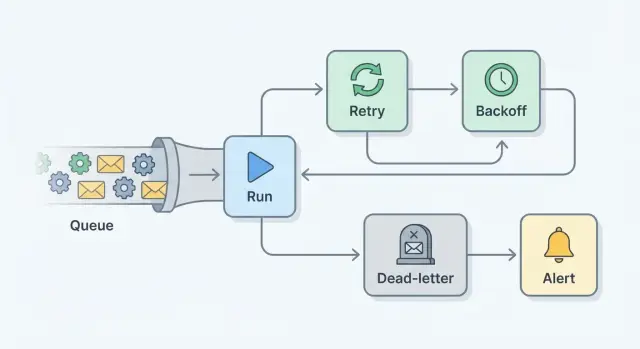
A retry plan is really a set of small guardrails that turns silent failures into visible, recoverable work.
A retry runs the same job again after it fails. It helps when the failure is temporary, like a flaky network call.
Backoff is the pause between attempts. Instead of retrying instantly (and creating a thundering herd), you wait longer each time, often with some randomness.
Max attempts is the hard limit. After N tries, you stop so one bad job doesn’t loop forever.
A dead-letter queue (DLQ) (or failed-jobs table) is where jobs go after you give up. Nothing is lost. You can inspect what happened, fix the root cause, then rerun the job intentionally.
Alerting is how humans find out. The goal isn’t to notify on every retry. It’s to notify when something needs attention, like when a job hits max attempts or DLQ volume starts climbing.
One idea that saves a lot of pain: idempotency
A job is idempotent if it’s safe to run twice.
"Set invoice status to PAID" is safer than "charge the card." When you can’t make an action fully idempotent, add a guard: a unique key, an "already processed" flag, or a provider idempotency token.
Transient vs permanent failures
Transient failures usually clear up on their own: timeouts, brief outages, locked rows. Permanent failures don’t: missing records, invalid email addresses, a wrong API key.
Retries reduce incidents, but they don’t remove all failures. The point is to contain the blast radius, surface real problems fast, and give you a safe place (DLQ) to recover.
Know what you’re retrying: transient vs permanent errors
A retry plan starts with one decision: is this failure likely to go away on its own, or will it fail every time until someone changes something? If you retry everything, you get noisy queues, higher bills, and delays that hide the real issue.
Transient errors are temporary. Retrying (with backoff) usually helps because the world around your job changes: the network settles, the service recovers, the lock clears, or the rate limit window resets.
Permanent errors won’t fix themselves. Retrying them just burns time while users wait. These are usually data problems, permission issues, missing migrations, or plain bugs.
Mislabeling matters. Treat a permanent error as retryable and you can build a backlog that blocks healthy work. It also makes incidents harder to spot because the system looks "busy" instead of "broken."
A simple rule: retry only when you can name a realistic condition that will change without human action. If the job would probably succeed when rerun in 1 to 10 minutes, it’s likely retryable. If it would fail the same way tomorrow, stop retrying, dead-letter it, and alert.
Backoff that behaves well under pressure
When a job fails, the worst thing you can do is retry instantly in a tight loop. If the failure comes from a partial outage, a rate limit, or a slow database, immediate retries add load right when the system is already struggling.
Exponential backoff is a healthier default: each retry waits longer than the last one. A simple pattern might be 5 seconds, 15 seconds, 45 seconds, 2 minutes, then 5 minutes.
Add jitter (a little randomness) to each delay. Without it, workers that failed together will retry together, creating spikes. With jitter, a planned 2 minute wait might become 1 minute 30 seconds to 2 minutes 30 seconds. That small spread makes retries smoother.
Backoff should match the job. A password reset email and a nightly report don’t need the same pacing. As a starting point, user-facing jobs can retry quickly with a short cap, while heavy jobs and strict external APIs need longer caps and jitter every time.
Set max attempts and clear stop conditions
Unlimited retries feel safe, but they can turn one failure into an endless loop. The job keeps running, racks up queue time and API costs, and hides a real bug because nothing ever becomes a "final" failure.
There’s also a practical risk: repeated retries can cause damage. You might send the same email many times, double-create records, or charge a card again if the job isn’t idempotent.
Choose max attempts based on impact. High-risk actions like payments should fail fast (often 1 to 3 tries). Safer user notifications might allow a few more attempts. For slow third-party APIs, more attempts can be fine as long as backoff is conservative.
Also add a total time limit, not just a count. For example: "Retry up to 5 times, but stop after 2 hours." That prevents a job from dragging on for days.
When a job hits max attempts, treat it as a real event. Record enough to debug and replay safely: the last error, the error type, timestamps for attempts, and the payload (or a redacted version). Capture external IDs (user_id, order_id) that help you trace what was affected.
Use a dead-letter queue so failures are recoverable
Retries are for temporary issues. Some jobs will never succeed without a change. A DLQ is the safe place to put those jobs after they hit max attempts, so they stop burning resources and become visible to a human.
Think of the DLQ as a "needs attention" inbox. Instead of losing work or looping forever, you capture enough detail to diagnose, fix, and rerun intentionally.
What to store in a dead-letter record
A DLQ entry should answer two questions: what was the job trying to do, and why did it fail?
Keep it small but complete: job name (and version if you have one), input payload (or a reference if it’s large), error message and type (plus stack trace if available), attempt count with timestamps, and correlation IDs (user ID, order ID, request ID) to tie it back to logs.
Be careful with secrets. If payloads can include tokens or passwords, redact them before saving.
How to requeue safely
Requeue should be deliberate, not an automatic loop. Fix the root cause, then retry the job from an admin screen or a small script.
Add a minimal audit trail: when you requeue, reset the attempt count and record who requeued it and why. If the failure is bad input that will never validate, allow marking it as "won’t retry" with a short note.
Retention matters too. Keep DLQ items long enough to spot patterns and handle slow-moving fixes, but not so long that sensitive data lingers.
Alerting that is useful, not noisy
Alerts should answer one question quickly: "What broke, who is affected, and what should I do next?" If failures stay hidden for hours, you’ll only learn about them from a customer.
Start with triggers that represent real pain, not every single failed attempt. Useful signals include repeated failures of the same job type, new or rising DLQ messages, long queue time (jobs waiting longer than your user promise), sudden drops in throughput, and error spikes for a specific job.
Route alerts to whoever can act. For early teams, that’s often the on-call engineer or the founder. Include enough context so they don’t spend 20 minutes hunting: job name, environment, first failure time, last error message, how many jobs are affected, and whether messages are hitting the DLQ.
To avoid noise, use three controls: thresholds (alert after N failures), grouping (one alert per job type per time window), and a cooldown window (don’t re-alert for 15 minutes unless it’s getting worse).
If you need escalation, keep it simple: notify primary on-call, then a backup after a short delay, then a wider channel with an impact summary if it keeps growing.
Make failures visible with logs and basic metrics
A retry plan only works if you can see what’s happening. Otherwise you end up with the same report every time: "the job didn’t run." The goal is simple: every attempt leaves a clear trail, and a few basic numbers tell you if things are getting worse.
For logs, stick to consistent fields so a single failure is easy to trace across retries. Each attempt should include a job ID (or correlation ID), attempt number, start and end time, and outcome. On failure, log an error class (timeout, auth, validation) plus a short message. It also helps to include the queue and worker name.
Keep logs safe. Don’t log tokens, passwords, API keys, full request headers, or raw personal data. Use internal IDs or masked values.
For metrics, you don’t need much to get value. Track success rate per job type, retries per job (average and p95), DLQ count and rate, and time to succeed (how long jobs spend retrying).
During an incident, a small dashboard should answer: is DLQ rising, is one job type driving most retries, and did failures start at a specific time (hinting at a deploy or an external outage)?
Example: an email job that fails, then recovers safely
A common job is sending an onboarding email after signup. It works for weeks, then support reports: "some users never got the email." If you only look for "it didn’t run," you’ll miss the real story: it ran, failed, and disappeared.
What happens when failures start
At 9:02, the job tries to send an email, but the provider times out. That’s transient, so the worker retries with exponential backoff. It waits 30 seconds, then 2 minutes, then 10 minutes. Backoff keeps pressure off the provider and your own system.
On the 5th attempt it still fails. The job hits max attempts and stops. Instead of being lost, it moves to the DLQ with useful details: user ID, email type (onboarding), last error, attempt count, and when the failures began.
An alert fires once, not 50 times: "OnboardingEmailJob: 12 messages in DLQ in the last 15 minutes. Top error: timeout." The on-call person can see it’s real, growing, and needs action.
How you fix and safely requeue
You investigate and find the root cause: the API key was rotated, but the worker still uses the old secret. This is common in early codebases where secrets are hard-coded or loaded inconsistently.
After updating the secret and redeploying, you requeue the DLQ messages. Before closing the incident, you confirm the DLQ count is dropping, new signups get emails within the normal time, alerts clear and stay quiet for a full retry window, and logs show successful sends with no repeating timeouts.
The failure becomes visible, contained, and recoverable, and no user is silently skipped.
Common mistakes that cause repeated incidents
Repeat incidents usually aren’t "bad luck." They come from a few patterns that turn a small failure into a backlog.
One of the biggest is retrying a job that isn’t idempotent. If "run twice" means "charge twice" or "send two emails," retries can create a customer problem even when the original error was minor. Add a unique request key, check current state before acting, and write results so a second run becomes a no-op.
Another trap is catching every error and retrying forever. It feels safe, but it hides real bugs (bad data, broken logic, missing permissions) and burns capacity.
The most common sources of repeat pain are:
- No max attempts or stop condition, so failures loop until someone notices.
- No DLQ (or equivalent), so you can’t review and recover failed jobs.
- Alerts that nobody owns, or alerts so noisy they get muted.
- Secrets or personal data in payloads and logs, turning debugging into a security issue.
- Manual reruns without knowing what already succeeded, creating duplicates.
A realistic example: a payment receipt job times out after the charge succeeds, then retries and sends two receipts. Weeks later, someone reruns a batch "just in case" and customers get spammed again.
Quick checklist before you ship
Before you turn on a new worker or queue in production, decide what "safe failure" looks like.
- Define what’s retryable (timeouts, 503s, rate limits) vs what should fail fast (bad input, missing record, permission errors).
- Use backoff with jitter, with a sensible cap so an outage doesn’t create a giant retry pile.
- Set max attempts and a time limit (for example, "stop after 10 minutes total"), then mark failed.
- Enable a DLQ (or failed-jobs table) and confirm you can requeue safely without duplicates.
- Make failures observable: log job ID, attempt number, queue name, error message, and safe context (internal IDs, not secrets).
Then test the whole loop once. Pick a job (like sending a receipt email), force one transient failure (return a fake 502 once), and confirm it retries with the expected delay, succeeds on the next attempt, and produces exactly one email.
Next steps: improve one job, then scale the pattern
Pick one job that matters every day and hurts when it fails. Good starters are sending receipts, syncing payments, or generating invoices. If you can make one job fail safely, recover automatically, and tell you when it can’t, you’ve built a template you can reuse.
Start small: classify errors and retry only transient ones. Add backoff, a max attempt limit, and a DLQ path for anything that still fails. Add one actionable alert when a job hits max attempts or lands in the DLQ. Keep one clear log line per attempt with job ID, attempt number, and the last error.
If you inherited an AI-generated codebase where workers "sometimes fail," avoid big refactors first. Wrap jobs with guardrails (attempt tracking, backoff, stop conditions), then clean up the logic once failures are visible.
If you’re not confident changing the code safely, FixMyMess (fixmymess.ai) can run a free code audit to spot issues in job logic, retries, secrets handling, and production readiness, then ship verified fixes that are ready to deploy, often within 48 to 72 hours.
FAQ
What’s a “silent failure” in a background job?
Silent failures happen when a job runs in the background, fails, and nobody sees it. Users only notice the missing outcome later, like no receipt email or an export that never arrives.
What’s a good default retry plan for most background jobs?
Don’t retry forever by default. Retry only errors that are likely to clear up soon, add backoff so you don’t overload systems, stop after a fixed limit, and make the final failure visible so a human can fix the cause.
How do I tell transient errors from permanent errors?
Transient errors are things that can resolve without code or data changes, like timeouts, brief outages, rate limits, or temporary database locks. Permanent errors are usually bad input, missing records, invalid credentials, or bugs, and retries just delay the real fix.
Why use exponential backoff and jitter instead of retrying immediately?
Exponential backoff spaces out retries more each time, which reduces load when something is already struggling. Add jitter so many workers don’t retry at the exact same moment and create spikes again.
Why are unlimited retries a bad idea?
Unlimited retries hide real bugs and can rack up queue time, API costs, and duplicate side effects. A max attempt limit forces a clear “this needs attention” moment and prevents one broken job from clogging healthy work.
How many retries should I allow, and how long should I keep retrying?
Start with impact and risk. High-risk actions like payments should stop quickly, while low-risk notifications can try a bit more, but still with a time cap so you don’t retry for days and forget the failure.
What is a dead-letter queue, and why do I need one?
A dead-letter queue (or failed-jobs table) is where a job goes after it hits max attempts. It keeps the work from being lost, captures the context for debugging, and lets you rerun the job intentionally after fixing the root cause.
How do I requeue failed jobs safely without causing duplicates?
Requeue only after you fix what caused the failure, and make sure the job won’t produce duplicates if it runs twice. Record who requeued it and why, and avoid requeueing jobs with inputs that will never validate.
What does “idempotent job” mean, and when does it matter?
Idempotency means running the job twice won’t create a second charge, a second email, or duplicate records. Use “set state” operations where possible, and when you can’t, add a unique key or provider idempotency token so repeats become no-ops.
What should I alert on, and what should I log for background jobs?
Alert on the moment a job becomes actionable, like when it hits max attempts or lands in the DLQ, not on every retry. Also log each attempt with a job ID and error type, and track simple metrics like DLQ growth and retry rate so you notice issues before customers do.