Right to be forgotten workflow: delete, anonymize, audit
Build a right to be forgotten workflow that deletes or anonymizes data, keeps audit trails, and preserves accurate reporting without exposing personal info.
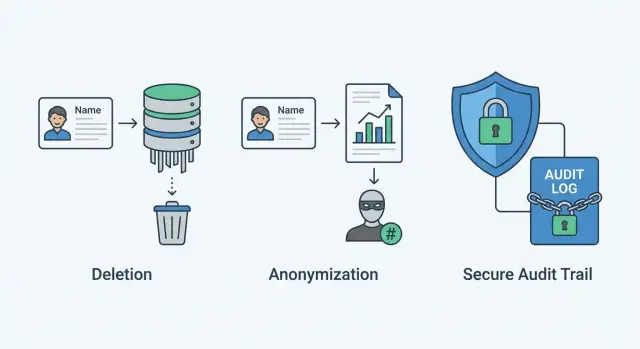
Why privacy requests can break reporting
A privacy request is supposed to remove a person from your systems. Reporting is supposed to keep telling the truth about what happened. Mix the two without a plan, and you can satisfy the request while making dashboards and finance reports look wrong.
“Reporting breaks” often shows up as sudden drops or jumps nobody can explain. The problem isn’t just missing data. It’s inconsistency: one system deletes rows while another keeps totals, or one pipeline recalculates history after identities disappear.
Common symptoms:
- Monthly active users drops overnight because deleted users were counted in the past.
- Cohorts stop adding up because signup data is gone but later events remain.
- Revenue reports change because deleting a customer also deleted invoices or line items.
- A/B test results skew because one variant lost more deleted users than the other.
- Support metrics look better than reality because tickets vanished.
The goal is simple: remove personal data while keeping business metrics usable and comparable over time. That usually means not treating every record the same way. Some data should be deleted, some should be anonymized, and some should be kept only as non-identifying proof that an action occurred.
The non-goals matter, too. This isn’t about hiding misconduct or quietly rewriting history. It also isn’t “silent deletion” where nobody can tell what changed. You want a clear, privacy-safe trail that shows what action was taken and when.
Example: a SaaS app deletes a user row and cascades deletes to orders. Finance suddenly sees last quarter revenue drop. A better design removes the person but preserves the transaction in a form that no longer identifies them.
Map your data before you design the workflow
A right to be forgotten workflow only works if you know where a person’s data can hide. Most failures aren’t about the delete button. They happen because one copy was missed (a log, a backup, a vendor export) and the request quietly reappears in reports.
Start by listing every place personal data might exist, including systems you rarely open:
- Primary databases (production, staging, replicas)
- Application logs and error tracking
- Data warehouse, BI extracts, CSV exports
- Backups and long-lived snapshots
- Third parties (email, payments, analytics, support tools)
Then separate identifiers into two buckets:
- Direct identifiers point to a person by themselves (email, phone, an account-tied user ID).
- Indirect identifiers become identifying when combined (ZIP code, birthdate, device fingerprint, rare job title).
This distinction matters because deleting direct identifiers isn’t enough if indirect identifiers still allow re-identification.
Create a small inventory you can actually keep current. One page is usually enough: dataset name, which fields contain personal data, why you collect them, retention, who owns the dataset, and which dashboards or jobs depend on it.
Also note which datasets feed metrics. If “new signups” is built directly from user rows, deleting users will change historical charts. If it’s built from daily aggregates, reporting can stay stable while you still honor requests.
Decide what gets deleted vs anonymized
A good workflow starts with a clear rule: some data must disappear, and some can stay only if it can no longer point to a person.
Hard deletion is the right call when keeping the record would keep personal data alive (names, emails, phone numbers, addresses, IPs tied to a user, message content, uploaded files). It’s also safer when you can’t confidently anonymize without leaving a path back to the person.
Anonymization can work when you need the record for legal, financial, or product reporting, and you can remove anything that could identify someone directly or indirectly. “Indirectly” matters: a row with no name but with exact birth date, a rare job title, and a ZIP code can still identify someone.
Practical guidance:
- Delete: authentication records, contact details, message bodies, attachments, device IDs, session logs tied to a user.
- Anonymize: transactions where totals are needed, product usage events, billing line items (where allowed), support ticket metadata.
- Keep as-is: fully aggregated reports (for example, daily totals by product) that never store user-level rows.
Derived data is where teams get stuck. Aggregates and summaries are usually fine if they can’t be traced to one person (“10 purchases today”). But user-level ML features, cohorts, and “lifetime value per user” tables often act like copies of personal data. If they’re keyed to a user, they should be deleted or anonymized in the same sweep.
Write the decision down in plain terms: which fields are personal, what action to take (delete/anonymize/keep), and why. That keeps future requests consistent, even when the team changes.
Choose identifiers that let you remove a person safely
The workflow succeeds or fails on one boring detail: which identifier you use to find someone everywhere. Emails change, names collide, and device IDs are messy. You usually need an internal “subject key” (a single ID for the person) that your systems treat as the source of truth.
Make that subject key retirable. When a request is approved, mark the key as retired and block new writes that attach fresh data to it. This prevents a common bug: you delete today, then a background job recreates the profile tomorrow.
For analytics and events, separate “counts” from “identity.” Events can keep timestamps, event types, and totals while removing the ability to tie them back to a person. In practice, that often means avoiding direct identifiers in event streams and using a temporary join key that can be removed.
Also distinguish between:
- Stable pseudonyms (like a hashed subject key): still let you group a person across sessions. Depending on your setup, that can still be personal data if it can be linked back.
- Irreversible anonymization: breaks the link permanently, but you lose user-level history.
Watch out for join risks. Even if one dataset looks anonymous, combining it with another can re-identify someone (support tickets + rare purchase time + location).
Design audit entries that prove action without storing personal data
An audit log should prove you acted on a request, but it shouldn’t become a second database of personal data. It’s proof for regulators and your internal team, not a dumping ground for raw inputs.
An audit entry should answer four questions: who asked, what you did, when you did it, and how it ended.
What to record (and what to avoid)
Record only what you need to reconstruct the event:
- Request ID (generated), request channel, timestamp
- Actor (system user ID or staff role) and approval step (if required)
- Scope (systems touched and action type: delete, anonymize, suppress)
- Outcome (completed, partial, failed) plus error code and retry count
- Evidence pointer (job run ID, script version, counts of rows affected)
Avoid storing personal data in the audit log: full names, full email addresses, phone numbers, raw request text, screenshots, and full payloads copied from your app.
Proving identity without keeping it
If you must tie the log to a person for verification, store a non-reversible reference instead: a salted hash of a stable identifier, or an internal subject key that’s useless outside your system. Prefer minimal notes like “identity verified via account login” over pasted messages.
Set retention rules up front. Keep audit entries long enough to defend compliance, but lock them down: read access only for a small group (privacy, security, legal), write access only for the workflow service, and changes should be append-only with tamper alerts.
Keep reporting accurate after deletion or anonymization
You can protect people without turning dashboards into a pile of zeros. The trick is to keep totals you truly need while removing any path that lets someone drill down to a person.
Separate personal data from reporting data
Keep personal tables (users, emails, IPs, device IDs, support tickets) separate from reporting tables. Personal tables are the ones you delete or anonymize. Reporting tables should contain only aggregated facts that don’t point back to a person.
A practical pattern: raw events come in, you build daily or weekly aggregates, then you purge or anonymize raw records tied to a person. Reports use the aggregates, not raw joins.
Rules that usually keep reporting stable:
- Don’t join standard reports to the user table. If a report needs that join, treat it as a special case.
- Store aggregates by time and product dimensions (day, plan, feature), not by user identifiers.
- Set a clear cutoff: raw personal data has a short retention window; aggregates can live longer.
- Freeze historical cohorts or snapshot them so old reports don’t re-run and change when user rows are gone.
- Suppress very small counts to reduce re-identification risk.
Handle historical reports without broken joins
A common failure is recalculating an old cohort report after deletions, causing conversions to shift because missing joins drop rows. Fix this by reporting from snapshots or aggregates that don’t depend on user rows. If you must keep a cohort view, store cohort assignment in a non-identifying form that can’t be traced back to a person.
Example: if 1 out of 3 users in a tiny team requests deletion, totals can stay, but avoid showing a breakdown by that team if it reveals the individual’s actions.
Step-by-step workflow you can implement
Treat a right to be forgotten workflow like a small incident response: confirm the request, pause changes, apply actions in a safe order, then prove what you did without keeping extra personal data.
-
Verify identity and scope. Confirm the requester controls the account (or is an admin for a workspace). Write down what “subject” means in your system (user, workspace member, device ID, email, billing contact). If the request is partial, record the limits so you don’t erase the wrong data.
-
Stop new data from sneaking back in. Put a short processing hold on ingestion for that subject (events, imports, background syncs). Freeze scheduled jobs that would recreate profiles (enrichment, CRM sync, marketing exports). Use a work-order ID so teams can coordinate without sharing the person’s details.
-
Execute in a safe order. Revoke access first, then delete direct identifiers, then anonymize what must remain for finance or analytics. Work from the edge inward: sessions/tokens, then user rows, then references in other tables.
-
Rebuild derived data. Update search indexes, aggregates, and ML features so reports don’t include the subject.
-
Write the audit record. Capture what ran and what happened, without storing deleted identifiers.
-
Post-checks. Try to query by old identifiers, verify exports don’t include the subject, and lift the ingestion hold.
Edge cases that usually cause compliance gaps
Most privacy failures happen in the messy corners of real products, not in the happy-path diagram.
Shared accounts and team workspaces are the first trap. If one login is used by several people, you usually can’t delete the whole account when one person asks to be forgotten. Instead, remove that person’s profile fields, access, and personal artifacts (like their name on comments) while keeping team-owned records.
Multiple identifiers are next. People change emails, add social login later, or you merge duplicates. If your deletion job keys only off the current email, you’ll miss older rows. Treat deletion as identity resolution first, then action.
Edge cases to handle explicitly:
- Shared workspaces: remove membership and personal profile data, keep team-owned records.
- Duplicates and merges: map all known IDs before deleting.
- Backups and disaster recovery: define how restores avoid resurrecting deleted data, and document timelines.
- Logs and error trackers: stop logging raw payloads, strip PII fields, and handle what’s already stored.
- Third-party processors: send requests to each vendor, retry failures, and record confirmations.
A common scenario: a founder asks to be forgotten, but their email exists in billing, support tickets, server logs, and a third-party chat widget. Deleting only the users table row isn’t complete.
Common mistakes and traps
The easiest way to break a privacy program is to treat deletion as “remove one row.” The workflow usually fails in places that feel invisible: event logs, exports, and the joins that glue reporting together.
Two classic failures:
- Deleting the user record while leaving events that still contain direct identifiers (email, phone, IP, device ID). Reports look fine, but the person is still there.
- Writing “helpful” audit notes like “Deleted user [email protected] on request.” That single line turns your audit trail into a new source of personal data.
Other traps:
- Anonymizing in the app database but not in the warehouse, extracts, or restore paths.
- Broken foreign keys that make metrics drift (orders no longer map to a segment).
- Re-identification by join, where two harmless columns together point back to one person.
Example: you replace user_id with a random token in the orders table, but the events table still has user_email. Your dashboard joins orders to events by email for attribution. One join brings the person back.
Security and access controls for the workflow
A right to be forgotten workflow can remove or change data across many systems quickly. Treat it like production access, not a support button.
Start with permissions and approval. Only a small group should submit requests, and an even smaller group should execute them. For higher-risk actions (like full deletion), require a second person to approve before the job runs. Make approvals visible in internal records so you can prove who authorized what, and when.
Your audit storage matters as much as the workflow itself. Use append-only audit entries. Limit write access to the service account that runs the job and read access to people who actually need it. Store request IDs, timestamps, systems touched, and outcomes, not raw emails, names, or tokens.
Monitoring is what turns “we support privacy” into “we can prove it worked.” Alert on failed steps, repeated retries, and jobs stuck mid-run.
A simple access checklist:
- Separate roles: requestor, approver, executor
- Two-person approval for destructive actions
- Append-only audit log with restricted access
- Alerts for failures, retries, and long-running jobs
- Periodic load tests using realistic data volumes
Be strict about secrets during remediation and debugging. Don’t paste tokens into tickets, don’t log headers or cookies, and mask credentials in error traces.
Quick checklist before you ship
Before you turn on the workflow, do one final pass. Small gaps are what turn a clean privacy request into broken dashboards, missed systems, or an audit log that stores personal data.
- Data map is current and owned: inventory covers databases, logs, files, and third-party tools, with a named owner per system.
- Request is verified and scoped: identity verification, request date, and agreed scope (which accounts, products, time ranges).
- Deletion/anonymization ran everywhere: completion status is visible per system, including indexes, caches, pipelines, and backup/restore handling.
- Reporting still reconciles: key totals match expectations; user-level views no longer show the person.
- Audit proves action without personal data: timestamps, operator/service, action type, and request reference exist, without raw identifiers.
Next steps and when to get help
Start small and finish one complete loop before you try to cover every corner of your product. Pick one user type (for example, a paying customer) and one data domain (like billing), then implement intake, verification, delete/anonymize, audit entry, and a report that still reconciles.
Write a short internal policy in plain language: what you delete, what you anonymize, and why. Keep it close to the code. When someone asks “Can we keep this for analytics?”, you should have a clear rule to point to.
Schedule a recurring review whenever your data model changes: check new tables and events for personal data, re-check vendor exports, scan logs for identifiers, and re-test the workflow after major releases.
If your app was built quickly, especially from an AI-generated prototype, it’s worth doing a targeted pass for delete cascades, leaky identifiers in logs, and reporting pipelines that depend on user-table joins. FixMyMess (fixmymess.ai) focuses on diagnosing and repairing these kinds of inherited code paths so privacy requests don’t break authentication, security, or reporting.
FAQ
Why do privacy deletions make my dashboards suddenly change?
Reporting often depends on user rows and join keys. If you delete a user record (or cascade-delete related records), historical counts, cohorts, and revenue joins can change when dashboards recompute. The fix is to remove personal identifiers while preserving non-identifying business facts like time, totals, and product dimensions.
What’s the first thing to do before building a right-to-be-forgotten workflow?
Start with a compact inventory of where personal data lives: app databases, logs, warehouse tables, exports, backups, and third-party tools. Include which fields are direct identifiers (like email) versus indirect identifiers (like combinations of ZIP and job title). Keep it small enough that someone actually updates it after schema changes.
What should I delete versus anonymize?
Default to hard delete for data that is inherently personal or risky to retain, like contact details, message content, uploads, and auth/session records. Use anonymization when you must keep the record for accounting or product reporting and you can remove all identifying fields and join paths. If you can’t confidently prevent re-identification, delete instead of “half-anonymizing.”
What identifier should I use to find and remove a person everywhere?
Use a single internal subject key as the source of truth, not email or name. Make it “retirable” so once a request is approved, new writes tied to that subject are blocked and background jobs can’t recreate the profile. This prevents the common bug where data reappears a day later through syncs or ingestion.
What should an audit entry include without storing personal data?
Store proof that an action happened without storing the person’s details. Keep a request ID, timestamps, which systems were touched, what action ran (delete/anonymize/suppress), the outcome, and job run metadata like row counts and script version. Avoid putting full emails, names, raw request text, or copied payloads into the audit log.
How do I keep finance and analytics reports accurate after deletions?
Keep reporting tables separate from personal tables, and report from aggregates or snapshots that don’t require joining back to users. If you must keep user-level event history for a short window, purge or anonymize it after aggregates are built. Also avoid re-running old cohort logic against deleted user tables; snapshot cohort assignments in a non-identifying way if you need historical consistency.
What’s a practical step-by-step order to process a request?
Verify identity and scope, then put a temporary hold on new ingestion for that subject so data can’t reattach mid-process. Revoke access first, delete direct identifiers next, anonymize what must remain, and then rebuild derived data like indexes and features. Finish with post-checks that old identifiers no longer return results and that exports/warehouse tables reflect the change.
How do I handle shared accounts, workspaces, or duplicate identities?
Shared workspaces and merged accounts are common failure points. If a workspace is team-owned, remove the person’s membership and personal artifacts while keeping team records intact. For duplicates, resolve all known identifiers (old emails, merged IDs, social logins) before running deletion, or you’ll miss copies scattered across systems.
What are the most common mistakes that cause compliance gaps?
Two frequent mistakes are deleting the user row but leaving identifiers in events/logs, and writing personal data into the audit trail “for convenience.” Another common trap is anonymizing only the app database while the warehouse, extracts, and restore paths keep the original values. Treat the warehouse and exports as first-class copies that need the same rules.
When should I get help implementing this, and what can FixMyMess do?
If your product was built quickly and privacy requests are causing broken auth, leaky logs, or drifting revenue reports, get a focused codebase diagnosis. FixMyMess specializes in repairing AI-generated or inherited prototypes so deletion/anonymization workflows actually complete across databases, pipelines, and third parties without wrecking reporting. You can start with a free code audit to identify what will break before you flip the switch.