Safe large CSV imports for production without app crashes
Learn safe large CSV imports for production: stream parsing, validate each row, allow partial failures, and generate clear error reports without crashing the app.
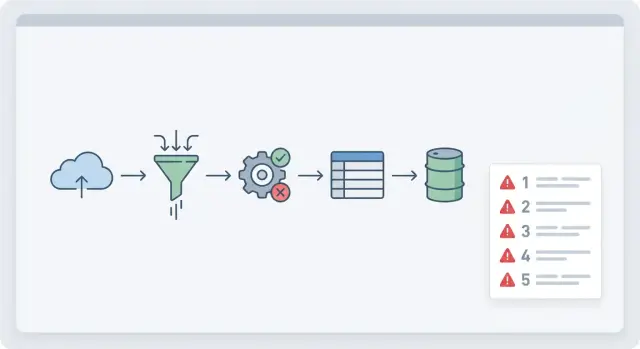
Why large CSV imports fail in production
A CSV import can look fine with a small test file, then fall apart the first time a real customer uploads 300,000 rows. Production has slower networks, stricter time limits, and messy data. If the import was built as a quick feature, it usually assumes everything is clean and small.
The most common failure is memory. Many imports read the entire file into RAM, then parse it into objects, validate it, and keep it in arrays until the end. A file that feels "not that big" can still blow up memory once expanded into in-app structures. Add a few concurrent uploads and the server starts swapping, stalling, or restarting.
The second big failure is time. Web requests and serverless jobs often have hard execution limits. Even if an import would finish in 10 minutes, it can get killed at 60 seconds and leave you with half-written data.
Other common breakpoints:
- Memory spikes from loading the whole file or buffering too much
- Timeouts from doing validation and database writes inside the request
- One bad row crashing the entire import
- Duplicates from retries, double-clicks, or re-uploading the same file
- Partial writes that leave data inconsistent
What users experience is simple: the page freezes, the spinner never ends, or they get a vague "Import failed" message with no clue what to fix. Worse, they might not notice missing rows until days later.
What your team needs is the opposite: predictable outcomes and proof. You want to know how many rows were accepted, rejected, and skipped, plus the exact reasons. That clarity is what turns a scary operation into a routine one.
A small example: a customer uploads a sales list with an empty email column in row 18,237. If your importer throws a single exception and stops, you lose hours and trust. If it records the row error and keeps going, you finish the job and return a report they can act on.
What “safe” means for your CSV import
A CSV import is safe when it finishes without taking your app down, and the result is predictable. Most production failures happen because the import tries to do too much at once or has unclear rules.
Start by deciding what “success” means for your users:
- All-or-nothing: if any row is wrong, nothing gets saved.
- Partial success: good rows are imported, bad rows are rejected with clear reasons.
Partial success is usually kinder to users, but it requires careful design so you don’t end up with half-created data that breaks other parts of the app.
Set expectations up front. A good import feature isn’t unlimited. Put clear limits on file size and row count, and be strict about required columns. If a column is required (like email, SKU, or user_id), fail fast before doing heavy work. If a field is optional, treat missing values as normal and document what default you apply.
Strict vs flexible rules
Be strict about structure, flexible about content.
- Structure: required headers, data types you must have, relationships your app depends on.
- Content: extra columns you ignore, optional fields, small formatting differences you can normalize (like trimming spaces).
A simple way to define safety is to answer:
- What limits will you enforce (rows, size, required headers)?
- Which errors stop the whole import, and which only reject a row?
- What will you log for support, and what will you show the user?
- How will you prevent the same file from importing twice?
That last point is idempotency. Give each import a stable key (like a file checksum plus user and a time window) and make repeated submissions safe.
Stream parsing instead of loading the whole file
Loading an entire CSV into memory works in demos, then collapses in production. A single customer file can be hundreds of MBs. If your app reads it all at once, memory spikes, requests time out, and the whole server can restart.
Streaming keeps memory flat. Instead of building one giant string or array, you read a small piece, parse a few rows, handle them, then move on. Done well, streaming is the foundation for reliable imports because it limits how much damage any bad file can do.
What streaming looks like in practice
A streaming parser reads bytes from the upload in small chunks, then emits complete rows as soon as it can. Your import code processes rows one-by-one or in small batches, so progress continues even when the file is huge.
This is also where real-world CSV quirks show up:
- Encoding: enforce UTF-8 (or detect it) and fail fast if it can’t be decoded.
- Delimiters: support commas vs semicolons when relevant, but don’t guess endlessly.
- Quoted fields: use a real CSV parser so commas inside quotes don’t split columns.
- Newlines: accept Windows and Unix line endings without miscounting rows.
Before you process thousands of rows, catch fatal file-level problems early. If headers are missing or columns don’t match what you expect, continuing just creates noise.
A simple early gate checks:
- File is not empty and has a header row
- Required columns exist
- Delimiter and quote rules parse the first N lines cleanly
- Column count is within a reasonable max (guards against broken quoting)
Row-level validation that catches problems early
Treat validation like a funnel: check the file once, then check each row as it streams in.
File-level checks answer “is this the right file?” before you touch your database. Confirm header names, file encoding, delimiter, and rough size limits. If the header is wrong, stop early with one clear message.
Row-level checks answer “is this row usable?” and should run independently for each line. One bad row shouldn’t crash the import or poison the whole batch.
A practical row validator covers:
- Required fields (missing email, empty SKU)
- Types and ranges (quantities aren’t negative, prices are within sane bounds)
- Dates and formats (invalid dates like 2025-02-30)
- Allowed values (status must be active, paused, or archived)
- Business rules (unique keys, valid relationships like customer_id exists)
Normalize inputs before validation so you don’t reject data that’s basically fine. Trim whitespace, standardize casing where it helps (like emails), and treat common nulls ("N/A", "null", "-") as empty. Apply the same normalization everywhere so duplicates don’t slip through as "ACME" vs "acme ".
Keep validation messages short and actionable. A good pattern is: row number, column, problem, and a hint.
Example: “Row 128, start_date: invalid date. Use YYYY-MM-DD.”
Idempotency and duplicate protection
A CSV import feels simple until someone clicks “Import” twice, the browser retries, or two teammates upload the same file at the same time. Without idempotency, you don’t just get duplicates. You can also get conflicting updates and broken totals.
Start by deciding how the system will recognize “this row again.” Row numbers aren’t stable if users sort or edit the file, so pair them with key fields that describe the record.
Common approaches:
- Natural keys (email for a user, SKU for a product)
- External IDs (an ID from the source system)
- A composite key (organization_id + invoice_number)
- A file-level import key plus a per-row fingerprint (hash of key fields)
Retries should be safe by design. Create an “import session” record when the upload starts, then record each row’s result against that session. Add an idempotency key per row and enforce it with a unique constraint in the database. If the same row arrives again, skip it or turn it into an update, based on your rules.
Race conditions show up when two imports touch the same records at once. Use database constraints as the final guardrail, and control concurrency. For example, process imports for the same tenant one at a time, or lock by a natural key during writes.
Partial failures without corrupting data
Partial failures are normal with customer files. The risk isn’t that a few rows are wrong. The risk is ending up with half-written data that breaks the rest of the app.
Your goal should be simple: the import finishes in a known-good state, or it leaves the database unchanged.
Choose a clear failure policy
Pick one policy and make it visible in the UI:
- All-or-nothing: any invalid row rejects the whole import
- Partial accept: valid rows are saved, invalid rows are reported
- Threshold: accept only if failures stay under a set limit (for example, 2%)
Whatever you choose, add a staging step. Parse and validate into a staging table (or temporary store) first. Only write final records after the batch passes checks. If you allow partial accept, still stage first, then commit only the good rows in controlled transactions per batch.
Track per-row outcomes so you can explain what happened without guesswork. A small set of statuses works well: success, failed, skipped (duplicate/empty), updated (matched an existing record).
Handle dependent rows carefully
Dependencies are where partial imports get dangerous.
Example: a CSV has Customers and Orders. Saving an Order without its Customer creates broken data.
Pick a rule and stick to it:
- Require parents first (fail child rows if the parent is missing)
- Two-pass import (load parents, then children)
- Quarantine dependents (hold child rows until the parent is created)
When you report “partial success,” use plain language: how many rows were saved, how many weren’t, and whether anything was skipped or updated.
User-friendly error reports people can actually fix
A CSV import can be technically correct and still feel broken if the error report is confusing. The goal is to tell people what happened, what to fix, and how to try again without guessing.
Start with a plain summary at the top: total rows, imported, skipped, failed. If you support partial success, say clearly that some rows were saved.
Then show row-level details that point to the exact problem:
- Row number (as the user sees it in the CSV)
- Column name
- The value you received
- What you expected (format or rule)
- A short message they can act on
Make messages specific. “Invalid value” is frustrating. “Date must be YYYY-MM-DD, got 3/7/24” is fixable. If a field must be one of a few options, list them.
Avoid leaking sensitive details. Don’t show stack traces, SQL errors, internal IDs, or anything that hints at security setup. Map internal failures to safe messages like: “We couldn’t save this row. Please try again, or contact support if it repeats.”
Make re-upload painless. Keep the same column mapping the user chose the first time, and offer an error file they can edit and re-upload (often the original rows plus an extra “error” column).
Step-by-step: a production-ready import workflow
A workflow that survives real data starts by assuming something will go wrong: a bad date, a missing required field, a duplicate key, or a file that’s larger than expected.
The workflow
-
Create an import session first. When the user uploads a file, create an import session record with who uploaded it, when, the expected schema/version, and a status (queued/running/complete). Store the raw file in durable storage and save its checksum so you can prove what was processed.
-
Stream-parse and stage in batches. Parse the CSV as a stream and write rows into a staging table (or temporary store) in small batches (for example, 500-2,000 rows). This keeps memory stable and gives you safe checkpoints.
-
Validate per row, record errors, keep going. For each row, normalize values (trim, parse dates, map enums), then run row-level rules. Instead of throwing an exception, write a structured error record tied to the import session and row number (field, message, original value).
-
Commit only valid rows with safe upserts. Move valid staged rows into final tables inside controlled transactions. Use unique keys and upserts so duplicates don’t create extra records.
-
Generate a user-facing summary. Store totals: rows processed, rows imported, rows failed, and top error types. Produce an error report people can filter and fix.
Example: if a user imports 50,000 customers and 312 rows have invalid emails, you still import the other 49,688 and return a report showing the exact row numbers and corrections.
Retry without re-uploading
Support retry using the same import session: keep the original file, keep the same validation rules, and re-run after the user fixes their data. If you want this to feel reliable, the retry path needs the same idempotency rules as the first run.
Performance and reliability guardrails
A CSV import is a long-running task. Treat it like one. If it runs inside a normal web request, you risk timeouts, frozen screens, and half-finished writes. Put imports in a background job, and let the UI poll for progress so the app stays responsive.
Progress updates should be real, not “still working.” Track stages (upload, parse, validate, write, finalize) and include counts like rows read, rows accepted, rows rejected, and time spent.
Set limits so one bad file can’t monopolize your system:
- Max runtime per import (fail with a clear message and keep partial work isolated)
- Batch size limits (smaller batches reduce lock time and memory spikes)
- Max error count before stopping (for example, stop after 200 bad rows)
- Max file size and max columns (reject early)
- Max concurrent imports per workspace/account
Backpressure matters when the database is slower than the file read. If writes start lagging, slow the reader or pause parsing. Otherwise memory climbs until the worker crashes and you lose state.
Make it observable. Log an import ID, who started it, file metadata, and per-stage timings. Add basic metrics like rows per second and database write time. When someone says “imports are broken,” you want answers quickly.
Plan for cancellation. If someone uploads the wrong file, they should be able to stop safely. Keep writes in small transactions and stage incoming rows. On cancel or failure, delete staging data and mark the import as canceled so a retry starts clean.
Common mistakes that cause crashes or bad imports
Most production import failures aren’t “big data” problems. They’re small assumptions that only break when real customers upload real files.
One common mistake is trusting the header row. People rename columns, add spaces, or export from a different system. If you don’t verify the columns you need and map them explicitly, values can shift into the wrong fields and you might not notice until later.
Excel exports add their own traps. Leading zeros in IDs get dropped, long numbers turn into scientific notation, and dates can arrive as text, serial numbers, or mixed formats in the same column. If your importer guesses types, you get silent corruption instead of a clear “Row 42: invalid date” message.
File-format variation is another frequent source of failures: UTF-16 files, byte order marks, semicolons instead of commas, or quoted fields with embedded newlines. If your parser expects one perfect format, one odd file can hang the process or scramble rows.
A few patterns that consistently cause crashes or bad imports:
- One giant transaction for hundreds of thousands of rows (locks too long, timeouts, resource spikes)
- Treating every blank as invalid even when fields are optional
- Writing rows directly without idempotency checks (retries create duplicates)
- Returning one generic error like “Import failed” with no row numbers or field names
- Mixing validation and writes so partial failures are hard to recover from
Example: a user uploads 200k contacts, but 50 rows have bad dates. If your code rolls back everything and shows one vague error, they’ll retry, create duplicates, or give up.
Quick checklist and next steps
If you want imports that don’t crash the app, aim for something that stays predictable and never leaves your database half-wrong.
A simple production checklist:
- Set clear limits (max rows, max file size, required headers)
- Parse as a stream, not by loading the whole file into memory
- Validate each row early (types, required fields, ranges, relationship checks)
- Make it idempotent (duplicate detection and safe retries)
- Stage and commit in small batches so you control what gets written
Decide your partial-failure policy upfront and make it consistent. Many teams choose “accept valid rows, reject invalid rows,” but only if the summary is clear and writes are done safely.
A short test plan before shipping changes:
- A small clean file
- A file with known bad rows (missing values, wrong dates)
- A huge file near your max limits
- A duplicate upload (same file twice)
- A retry after interruption (stop mid-way, then resume)
If you inherited an AI-generated importer that crashes under load or produces duplicates, it’s usually fixable without rewriting the whole app. FixMyMess (fixmymess.ai) focuses on diagnosing and repairing AI-generated codebases, including import flows that need staging, idempotency, and safer validation to work in production.
FAQ
Why does my CSV import work with 1,000 rows but fail with 300,000?
Large imports usually fail because the code reads the whole file into memory, does all validation in one go, or tries to write everything inside a single web request. That causes memory spikes, timeouts, and half-written data when the process gets killed.
What is stream parsing, and why is it safer than loading the whole file?
Stream parsing reads the file a little at a time and processes rows as they arrive, so memory stays flat. It also lets you report progress, handle bad rows without crashing, and keep the app responsive during long imports.
What should I validate before I process any rows?
Do file-level checks first: confirm the file isn’t empty, the header row exists, required columns are present, and the encoding and delimiter can be parsed. If the structure is wrong, stop early with one clear message so you don’t waste time processing garbage.
How do I stop one bad row from crashing the entire import?
Run row-level validation independently for each row and record errors instead of throwing exceptions that stop the whole import. Keep messages actionable by including the row number, the column, what’s wrong, and the expected format.
Should my import be all-or-nothing or allow partial success?
Pick one policy and make it explicit: all-or-nothing, partial success, or a threshold like “fail if more than 2% are invalid.” Partial success is usually friendlier, but it requires staging and careful writes so you don’t create broken relationships or inconsistent state.
How do I prevent duplicates when users re-upload or retry an import?
Treat retries as normal: users double-click, browsers retry, and teammates upload the same file twice. Add an import session plus an idempotency key (often based on a stable record key and/or a row fingerprint) and enforce uniqueness in the database so reprocessing doesn’t create duplicates.
How do I avoid partial writes that leave my database inconsistent?
Stage data first, then commit valid rows in small, controlled transactions. Avoid one giant transaction for the whole file, and avoid writing directly to final tables while you’re still discovering errors, because that’s how you end up with half-finished imports you can’t explain or safely roll back.
Why should CSV imports run as background jobs instead of inside the web request?
Don’t run big imports inside a normal request cycle. Put the import in a background job, store progress by import session, and have the UI poll for status so the page doesn’t freeze and the work isn’t killed by request or serverless time limits.
What should a user-friendly error report include?
Give a summary first (total, imported, failed, skipped/updated), then show row-level details that match what users see in their CSV. Include the received value and the expected rule, but avoid internal stack traces or database errors so you don’t leak sensitive implementation details.
Can FixMyMess help if my AI-built CSV importer keeps failing in production?
FixMyMess specializes in fixing AI-generated apps that break in production, including CSV import flows that crash, time out, or create duplicates. If your current importer is unreliable, we can audit the code, add streaming, staging, idempotency, and clear reporting, and get it working safely without guessing.