Safe test account for troubleshooting: set up without real data
Learn how to create a safe test account for troubleshooting so you can reproduce bugs, verify fixes, and protect real customer data.
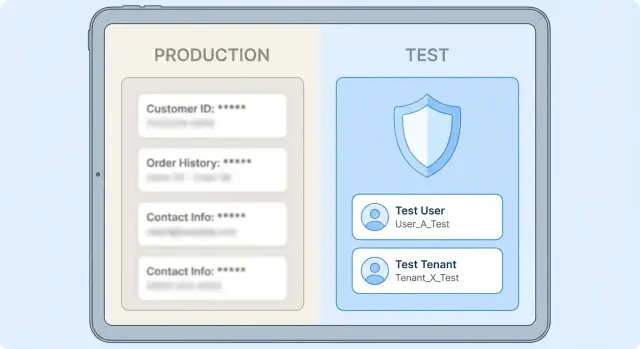
Why a dedicated test account matters
Debugging with real users and real data feels fast, but it’s also one of the easiest ways to create a bigger problem than the bug you started with. One “just testing” click can email customers, change billing, delete records, or expose private information in logs and screenshots. Even when nothing leaks, customers may notice strange activity and lose trust.
A dedicated test account gives you a place to reproduce the issue on purpose, without guessing and without fear. You can run the same steps after each change and confirm what actually fixed the problem. That repeatability matters when a bug only shows up after a certain sequence of clicks, a specific role, or a particular plan.
The goal is simple: recreate the exact conditions of the problem while keeping real customer data out of the picture. That means controlled inputs, predictable data, and clear boundaries around what the test account can touch.
A single test user is often enough for user-level bugs like profile updates, password reset, or a UI error. A separate tenant is better when the issue is tenant-wide or touches shared settings and data, such as roles, subscription limits, integrations, admin actions that affect many users, or customer data separation.
What “safe” means in practice
A safe test account is one where you can reproduce the problem and verify a fix without any chance of touching real customer data. “Safe” isn’t a feeling. It’s a set of rules you can check.
Isolation comes first. The test user or test tenant should have zero paths to real records, even by accident. No shared production tables, no access to live admin screens, and no ability to search across customers. In multi-tenant apps, a separate tenant is usually the safest default.
Use least privilege. Give the test account only the permissions needed to trigger the bug. If you’re debugging a password reset email, the account doesn’t need billing admin rights. Smaller permissions reduce the blast radius when something is misconfigured.
Make it traceable. You should be able to tell later exactly what the test account did. Use obvious naming (for example, test-troubleshoot-01), tie it to a known email, and ensure logs show tenant ID and user ID.
Make it reversible. A safe setup is easy to reset: wipe the test tenant, re-seed fake data, and start over in minutes. If resetting is hard, people reuse stale data and shortcuts creep in. That’s when accidental exposure happens.
Practical signals you’re safe:
- The account can’t view, export, or impersonate real customer records.
- Permissions are minimal and documented.
- Actions are easy to spot in logs and easy to undo.
- You can delete and recreate test data without affecting anything else.
- Secrets and integrations (email, payments, webhooks) are disabled or routed to test-only endpoints.
Pick the right setup: user, tenant, or staging
There are three common ways to test a fix safely. The right choice depends on what you’re changing and how much damage a mistake could cause.
A test user in production is the lightest option. It can be acceptable when you only need to confirm a UI change, a small validation rule, or a permission check, and you can guarantee the account cannot see real customer data. It’s not acceptable when the bug touches billing, email/SMS sending, exports, admin tools, or anything that could modify or reveal other users’ records.
If a production test user is your only option, lock it down hard: least privileges, no shared inboxes, no real payment method, and clear labeling.
A separate test tenant is the best isolation for many multi-tenant apps. It’s ideal when the bug depends on tenant settings, roles, plans, or tenant-level data. You can mimic the exact configuration that triggers the issue while keeping the blast radius contained.
A staging environment is best when the fix is risky: database migrations, schema changes, auth rewrites, background jobs, or changes that might break many users at once. Staging also helps when you need to replay a full workflow end-to-end.
A quick way to decide:
- UI or small logic tweak: start with a test user.
- Tenant-specific behavior: prefer a dedicated test tenant.
- Data model changes or migrations: use staging.
- Anything that sends money or messages: avoid production testing.
- Unclear risk: treat it as staging-first.
Step-by-step: create the test user or test tenant
Start by choosing what you need: a single test user (good for login and permissions issues) or a full test tenant/workspace (better when bugs depend on settings, billing state, or organization-level data). Either way, the goal is a test account that can’t be confused with anything real.
Create it like you’re labeling a hazardous bottle: obvious, consistent, and hard to misuse.
A simple setup you can repeat
Name and label things so nobody has to guess.
- Name it clearly:
test-troubleshootingortenant-test-do-not-use. Avoid vague names like “demo” or “temp.” Those get reused. - Use a dedicated email alias: a plus-address or a separate inbox used only for testing. Store the credentials in a password manager entry that matches the account name.
- Default to “off” for real-world side effects: payments, invoicing, outbound email, SMS, push notifications, and webhooks. If you can’t disable them, use sandbox credentials and fake endpoints.
- Start with the smallest permissions: only what you need to reproduce the bug, then add more only if required.
- Make it unmistakable in the UI: a visible banner like “TEST TENANT,” or a bright label/flag in the admin panel.
After you create it, sign in and confirm the banner is visible on every page you might visit during debugging.
Add realistic, fake data that matches the bug
A safe test account is only useful if the data resembles the conditions that trigger the problem. “Fake” shouldn’t mean “simple.” It means “not tied to a real person,” while still matching the shapes, lengths, and states your app expects.
Use clearly fictional people and details. Use made-up names, emails you control, placeholder addresses, and fake IDs that follow the same format as real ones (same number of digits, same prefixes). Avoid copying real invoice numbers from screenshots or pasting a support ticket “just for now.” Even if you delete it later, that data may already be in logs, analytics, or error reports.
Build a small set of records that recreate the bug conditions plus a couple of nearby edge cases. You usually need fewer records than you think, as long as they’re chosen well:
- One “normal” user with complete profile data.
- One user missing a required field.
- One user with long text (to test limits).
- One user in the exact state that triggers the bug (trial expired, payment failed, locked out).
- One user with unusual but valid characters (apostrophes, accents).
Write the seed data down in one place: what to create, which values matter, and why each record exists. If you can’t recreate it, you can’t reliably verify the fix later.
Plan a reset you can do in minutes. The simplest pattern is: delete the test user or test tenant, re-seed, and run the same steps again. If you’re fixing a “locked out after 3 tries” bug, include the exact counters and timestamps your app checks so you can confirm the fix without touching real accounts.
Stop test actions from hitting real systems
A test account is only safe if your actions can’t reach real customers or paid services. The worst surprises usually come from side effects: a password reset that emails a real address, a webhook that triggers a partner workflow, or a background job that retries until it finds a working production key.
Switch every outbound channel into a no-op mode for testing. If your app supports toggles, use them. If not, enforce a rule: test users and test tenants never send externally. Route messages to a sink, block them at the provider level, or reject the send at the application layer.
Payments need the same treatment. Ensure test checkout flows can’t capture charges or issue refunds. Use provider sandbox modes and non-production keys, and fail closed: if the app can’t confirm it’s in test mode, it should refuse to charge.
Background work is another common leak. A test run can still trigger scheduled jobs, retries, and queue workers that call integrations later. For testing, pause workers or configure them to run against sandbox keys and fake endpoints only.
A practical prevention checklist:
- Disable or redirect emails, SMS, webhooks, and push for test users/tenants.
- Use separate API keys and secrets for non-production services (never reuse prod keys).
- Block payment capture/refund unless a sandbox flag is explicitly true.
- Pause or isolate background jobs so they can’t reach real integrations.
- Tag logs and events with a clear marker like
TEST.
Keep data truly isolated
A safe test account only works if it can’t see or affect real customers. “Looks separate” isn’t enough. You want hard boundaries that fail closed, so one missing filter or one bad query can’t pull data from another tenant.
Tenant boundaries you can prove
Confirm tenant scoping is enforced by the database, not only by application code. If your code forgets a WHERE tenant_id = ... once, you still want a policy that blocks cross-tenant reads and writes.
One quick check: log in as the test tenant and try to access a known real tenant resource by ID. If it loads even once, the isolation isn’t real.
Be careful with copying production data to staging. If you must copy, it needs true anonymization: names, emails, phone numbers, addresses, tokens, and free-text fields that may contain personal data. If you can’t confidently anonymize, don’t copy.
Files, uploads, and events
Isolation isn’t only database rows. File uploads and analytics can leak data too, or pollute reports.
Before you verify a fix, confirm these boundaries:
- The test tenant can’t query or mutate other tenants (including by guessing IDs).
- Database policies block access even if app code is wrong.
- Test uses a separate storage bucket/container for uploads and generated files.
- Analytics events are labeled as test (or turned off) for test accounts.
- No production API keys, webhooks, or email providers are enabled in test mode.
Example: if you’re testing an invoice upload bug, a separate bucket prevents a “test” PDF from appearing in a real customer’s folder.
Common mistakes that cause accidental exposure
Most leaks during debugging aren’t dramatic hacks. They’re small shortcuts that quietly turn a “safe” environment into one that can touch real people.
Copying real customer details into a test record is a big one. A single pasted support conversation can include emails, order numbers, addresses, or private notes. Even if you clean it up later, it may remain in logs, analytics, or error reports.
Another frequent mistake is giving the test user full admin access “just in case.” Admin rights let a test click reach every tenant, export data, or change billing. Start with the least access that reproduces the bug, then add only what’s missing.
Watch for secret mixing, especially in fast-moving prototypes. It’s easy to end up with production API keys in a staging build, or a staging database pointing at production storage. Fix config first, then test.
Quick safety checklist before you verify a fix
Before you run a verification pass, take two minutes to confirm your test user or test tenant can’t touch real customers or real money. Most accidents happen because one setting still points to production.
- No real customer access: the test account can’t search, view, export, or impersonate real users. In a tenant model, the test tenant should be the only tenant visible.
- Outbound actions are in test mode: payments are sandboxed, email is suppressed or routed to a dev inbox, and webhooks point to a test endpoint. Trigger one action and confirm nothing reaches real systems.
- No production secrets loaded: verify environment variables, API keys, and database URLs are test-only.
- Fast reset: you can wipe and reseed test data (or restore a snapshot) in minutes.
- Logs can prove what happened: you can see auth events, permission checks, and key actions. Add a marker like
TEST_RUN_01so you can find it later.
If any item is unclear, pause and tighten isolation first.
Example: verifying a broken login fix without real users
Users report they can’t log in after a recent change. This is where a safe test account helps, because you can prove the fix without touching real profiles, emails, or payment data.
Create a test tenant (or a clearly labeled test workspace) and add two test users: one standard user and one admin. Give them predictable, non-sensitive credentials like [email protected] and [email protected]. Make sure these accounts are blocked from outbound actions (emails, webhooks, billing).
Reproduce the failure using the same login path customers use (web form, SSO button, or mobile app). Capture what matters: the exact error message, timestamp, and whether the failure happens before or after the password check. If your app has audit logs, confirm the login attempt is recorded for the test tenant only.
Apply the fix, then verify both roles can log in and land in the right place. Confirm the standard user sees the normal dashboard and the admin can reach admin-only pages without permission errors.
Keep the loop repeatable:
- Reset the two test accounts (password, session tokens, lockouts).
- Clear cookies or use a private browser window.
- Try login for user, then admin, using the same steps each time.
- Confirm the same results across two runs.
Next steps: document it and get help when fixes feel risky
Once you have a safe test account (or tenant), treat it like part of the product. Write down the exact steps so anyone can repeat them without guessing. Keep the notes in plain language: what you did, what you expected, and what “fixed” looks like.
A lightweight template:
- Reproduce: exact clicks/inputs that trigger the bug (with the test user/tenant).
- Verify: the one or two checks that prove the fix worked.
- Guardrails: what must stay disabled (emails, payments, webhooks, exports).
- Data: which fake records must exist for the test to be meaningful.
- Rollback: how to undo the change if something looks wrong.
Start with a manual flow you trust. Automate later, focusing on the parts that keep failing or keep getting forgotten.
If you inherited an AI-generated prototype, it’s common to find missing guardrails: overly broad permissions, mixed secrets, weak tenant isolation, or integrations that still point at production. When you want a second set of eyes, FixMyMess (fixmymess.ai) can diagnose the codebase, repair risky logic, and harden security so you can test and ship fixes without fear.
FAQ
When should I stop testing on real users and create a dedicated test account?
Use a dedicated test account when the bug could trigger side effects like emails, billing changes, exports, admin actions, or cross-tenant data access. It’s also worth it when the issue requires a specific sequence of steps and you need repeatable verification after each change.
What’s the difference between a test user and a test tenant?
A test user is one login inside an existing environment, usually used to reproduce user-level flows like profile updates or permission checks. A test tenant (or workspace) is a fully separate container of settings and data, which is safer for multi-tenant apps because it reduces the chance of touching or seeing real customer records.
How do I choose between a production test user, a test tenant, and staging?
Default to a separate test tenant if your app is multi-tenant or if the bug involves roles, plans, integrations, admin screens, or shared settings. Use a staging environment when the fix touches migrations, auth rewrites, background jobs, or anything that could break many users if you’re wrong.
What does a “safe” test account actually mean?
Make it safe by enforcing hard separation from real customer data, limiting permissions to the minimum needed, and ensuring every action is clearly traceable in logs. It should also be easy to reset quickly so people don’t reuse stale data and start taking shortcuts.
How should I name and label test accounts so they aren’t misused?
Use obvious names and labels that can’t be confused with real accounts, and make the UI show a clear test marker on every page. Use a dedicated email alias or inbox for testing, and store credentials in a password manager entry that matches the account name.
How do I prevent a test account from sending real emails, webhooks, or charges?
Turn off or redirect anything outbound for test users or test tenants, including email, SMS, push, webhooks, and payments. If something can’t confirm it’s in test mode, it should refuse to send or charge rather than guessing.
What’s the best way to create realistic fake data without risking privacy?
Use fake data that matches real formats and edge cases, not real people’s information. Make a small set of records that reproduce the bug conditions, write down what matters, and avoid copying details from support tickets or screenshots because that can end up in logs and analytics.
How can I quickly sanity-check that tenant isolation is real?
Rely on database-enforced scoping where possible, not just application code filters, so a missing query condition can’t leak data. Then try to access a known real resource by ID from the test tenant; if it ever loads, isolation isn’t strong enough.
What are the most common mistakes that lead to accidental data exposure during debugging?
Mixing production secrets into a test setup is a common cause of accidental impact, especially in prototypes. Verify environment variables, API keys, storage buckets, and webhook endpoints before you test, and treat any uncertainty as a sign to pause and fix configuration first.
What if my AI-generated prototype makes safe testing hard or risky?
If you inherited AI-generated code and you suspect weak isolation, overly broad permissions, or mixed secrets, it’s often faster to get a focused audit than to guess. FixMyMess can review the codebase, identify risky paths, and help you harden the app so you can verify fixes safely and ship with confidence.