Safer product launch sequence: go from demo to first customers
Use a safer product launch sequence to start with a small group, catch failures early, and expand access only when key metrics and support load look stable.
Why a demo launch often fails with real customers
A demo is a controlled story. You click the happy path with clean data, a stable connection, and someone there to explain every confusing moment. Real customers do the opposite: they arrive distracted, on different devices, with messy inputs, and they expect the product to work without coaching.
Demos also hide time. In a demo, everything happens in one sitting. In real life, people sign up, come back days later, reset passwords, invite teammates, and connect tools you didn’t test. Those “later” moments are where early launches crack.
What usually breaks first isn’t your core feature. It’s the supporting systems around it: authentication (password resets, magic links, OAuth edge cases), payments (failed cards, taxes, receipts, plan changes), email delivery (spam filters, missing triggers), permissions (the wrong person sees the wrong data), and data handling (duplicates, weird formats, imports, deletes).
Finding these failures in public is expensive. A small bug in a private test is a quick fix. The same bug in front of a few hundred excited signups becomes support overload, refund requests, and “I tried it and it broke” messages that are hard to undo.
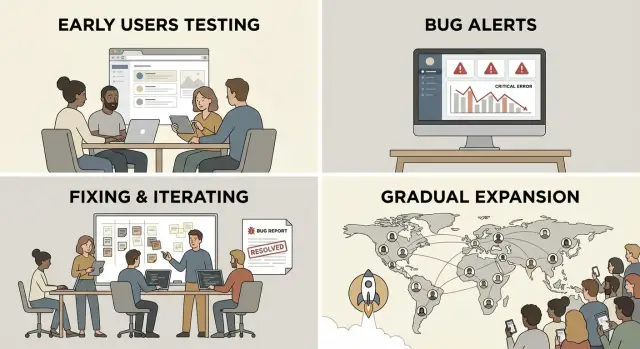
A safer rollout is mostly about controlling exposure. Start with a small group you can personally support, watch where they get stuck, and expand only after the basics hold up. “Safer” also means deciding ahead of time what you’ll do when something goes wrong: pause invites when login breaks, stop charging if payments fail, and only reopen when you’ve verified the fix.
Start with a clear launch promise (and what to postpone)
Early launches go sideways when you promise a full product but you can only support a demo. Start by writing one sentence your first users should be able to say after day one: what they can reliably do, and what you’re not offering yet.
Keep the promise small and testable. “Everything works” isn’t a promise you can protect. “You can complete X without help” is.
Pick the few actions that must work every time. For most products, it’s some version of: create an account and sign in again tomorrow, complete the main job the product exists for, and get a clear confirmation (an email, receipt, or an obvious in-app status).
Then define “must not happen” failures. These are stop-the-line issues even if they hit only one user: data loss, billing mistakes, lockouts, or any security leak. If you built on an AI-generated prototype, add “exposed secrets” and “anyone can see someone else’s data” to the list. Those show up more often than people expect.
Finally, decide what to postpone until after the first cohort. Postponing isn’t laziness. It protects your promise. Skip the fancy onboarding tour, complex roles, and integrations you can’t support yet. If a postponed item becomes necessary to keep the promise, it’s no longer postponed. It’s part of what you’re launching.
Choose a small first cohort you can actually support
A safe launch starts with a simple limit: you can only help so many people at once. Choose a cohort size where you can respond quickly, reproduce bugs, and ship fixes without burning out. For many new products that’s 10 to 30 users, but the right number is whatever your current team can support.
Recruit people who look like your real customers, not friendly fans who will tolerate anything. If your product is for busy operators, recruit busy operators. If it’s for teams, recruit a few teams.
Set expectations before they log in. Call it early access. Tell them you want bug reports and sharp feedback, and that some parts may change quickly. Give them one clear way to report issues (one channel, one inbox, or one form) so feedback doesn’t scatter.
Good early users usually share a few traits: they feel the problem weekly (not “someday”), they can explain their workflow in plain words, they agree to a short check-in, and they’re willing to send screenshots or steps when something fails.
If you offer an incentive, keep it easy: a discount, an extra month, or a simple founder plan. Avoid complex rewards that create more support work.
Design access control so you can expand (and pause) safely
Launches get messy when anyone can sign up at any time. Access control is the unglamorous piece that lets you open the door a crack, learn, and close it again without panic.
Start with one way people get in. Invite-only works best when support is hands-on. A waitlist works when you want demand without overload. Personal outreach is ideal for the first 10 to 30 users because you can match the cohort to your use case.
Keep approval manual at first. Manual approval gives you a control knob and forces you to look at each request and ask, “Will this person succeed with the product as it is today?”
When you pause invites, make the pause obvious and calm. Show a short message that says you’re temporarily limiting new access while you fix issues, and that people can request access to be notified. If you can, keep existing users working normally and freeze only new sign-ups.
Keep the mechanism simple so you can roll back quickly: one gate (invite code or approved email list), one place to switch state (open, waitlist, closed), a way to revoke a single account without breaking others, and a basic log of who was approved and when.
Preflight checks before you invite anyone
You’re not aiming for perfection. You’re aiming for “the basics work” and “we’ll hear about failures fast.”
A 15-minute preflight you can repeat
Do this with a brand new account in a private browser window on a normal connection (not your dev setup). Keep it repeatable.
Create an account, log in and log out, then log back in. Trigger a password reset and complete it end to end. Run the core workflow from start to finish. Refresh and reopen the app to make sure the state holds. If you have billing, confirm the upgrade path works and doesn’t block the main flow by accident.
Then do a quick “bad input” pass: wrong email, empty required field, too-short password, and a double click on the main action. Many early fires come from tiny edge cases that create duplicates, broken sessions, or confusing errors.
Ops basics: can you recover quickly?
Before anyone depends on the app, confirm the boring essentials.
- Backups exist and you know how to restore them.
- Error logging is on and includes enough context to debug.
- Alerts go to a real person, with a clear on-call plan.
- You can pause new access without deploying code.
Step by step: a rollout sequence you can follow
This isn’t about hype. It’s controlled learning: spot real failures, fix them fast, then widen access.
Start with 3 to 5 real users (not friends who say yes to everything). Get them into the product while you’re available. Watch the full core flow live: signup, first key action, and getting the result.
Fix the top failures first, then rerun the same tests. If three people hit the same problem, that’s the priority. After you patch it, run the exact same path again to confirm it’s gone.
Move to 10 to 30 users only when the core flow is boring. Boring is good. It means signups complete, emails arrive, and the app holds up under normal use.
Add users in timed waves (daily or weekly), then open broader access only when support stays calm and the same bugs aren’t repeating.
What to watch during the rollout (signals, not vanity metrics)
Early access isn’t about growing fast. It’s about learning fast without breaking trust.
Start with the path from sign up to first success. Track each step and note where people drop off. If 20 people sign up and only 3 finish onboarding, don’t assume they “weren’t your audience.” Look for a specific snag: a confusing permission prompt, a broken email confirmation, a required field that rejects common inputs, or a setup step that feels like work.
Keep reliability checks simple, but consistent. Watch for failed logins, password resets that never arrive, error spikes after a deploy, payment failures (if you charge), and slow pages that lead to refreshes and duplicates.
Support load matters as much as bugs. Track tickets per active user, repeated issues, and response time. If one issue creates five tickets from five different people, it isn’t “support.” It’s a product defect. If you can’t reply within a day, slow the rollout until you can.
Add one lightweight feedback moment after the first session: “What stopped you today?” One sentence is enough. “I couldn’t tell if my data saved” often points to a missing success message, not a major rebuild.
Create stop rules and recovery routines
A safe rollout isn’t just moving slowly. It’s knowing exactly when to stop, fix, and restart without panic.
Stop rules are triggers that pause new invites so your team can focus on making the product usable again. Pick them before you open the doors, while you’re calm.
Useful stop rules include: multiple people unable to sign up or log in in a short window, any report of exposed secrets or a security hole, a core workflow failing for a meaningful chunk of active users, support requests exceeding your capacity, or data being created incorrectly (wrong totals, missing records, duplicated orders).
When a stop rule triggers, shift into a fix window and keep it practical: what can you ship in 24 to 72 hours that removes the blocker? Avoid big refactors during the window. Aim for small, safe changes: tighten validation, fix broken auth, add a missing permission check, or roll back a risky release.
Before you resume invites, define “stable enough” in plain terms: signups succeed, the main task completes end to end, errors drop to a level you can tolerate, and you can support current users without falling behind.
Communication matters as much as the fix. Keep messages short: what happened (one sentence), what you’re doing now, and when you’ll update them next.
Common mistakes that make early launches messy
The fastest way to turn excitement into chaos is opening the doors to everyone because the demo looked fine. Demos hide real-world behavior: slow networks, weird data, forgotten passwords, and users doing steps in the “wrong” order.
Another painful mistake is shipping without a rollback plan. If a release breaks sign-up, checkout, or onboarding, you need a simple way to revert and restore the core flow quickly. “We’ll hotfix it” isn’t a plan when your first customers are staring at an error screen.
Feedback can also pile up and go nowhere. Comments spread across DMs, calls, and docs, but never become a clear fix list with owners and due dates. The result is you keep hearing the same complaint while the team stays busy with unrelated tweaks.
Security basics are often missed, especially with AI-generated prototypes. Exposed secrets, weak permissions, and “temporary” admin endpoints slip through because everything worked locally. That can become a real incident the moment you invite outsiders.
Quick checklist before each expansion wave
Before you invite the next group, run a quick pass that checks reality, not hope.
Core flow still works end to end
Use a fresh browser session and a new account. Confirm you can sign up, log out, and log back in. Complete the main action your product promises. If you’re charging, verify checkout and receipts; if you’re not charging, confirm the free path can’t accidentally trigger payment. Try one messy case (expired link, wrong password, invalid input) and make sure the app responds clearly. Also check that the first screen isn’t broken on mobile.
You can see failures and respond fast
Make sure errors show up in logs with enough detail to reproduce, alerts are set for the basics (app down, auth failures, payments if relevant), backups exist and you’ve tested a restore, and permissions are sane (no “everyone is admin” surprises). Have two canned replies ready and one clear escalation path.
Example: a small beta, real issues, then widening
Maya is a solo founder with a waitlist for her SaaS. Instead of opening the doors to everyone, she invites 15 people she can personally support: power users plus two friends who will be honest when something is confusing. She calls it a beta and sets the expectation that bugs will be fixed quickly.
Day 1 goes fine until three users try to reset passwords. The reset email arrives, but the link errors out because the token expires too quickly. A few hours later, a bigger problem shows up: role permissions are wrong. Viewer accounts can see admin pages, and one user can edit another user’s workspace.
Maya pauses invites immediately. She fixes the password reset flow, then locks down permissions with a simple rule: every server action checks the user’s role and workspace ID. Before reopening, she retests the exact same steps that failed using fresh accounts.
Before wave 2, she adds a few guardrails: an alert for login and password reset failures, clearer onboarding text (including known limits and where to report issues), “Are you sure?” prompts on destructive actions, and a basic roles test (viewer, editor, admin) in her preflight.
She opens to 100 users only after a full week with no repeat of the password reset bug and zero permission leaks in support reports.
Next steps: plan your first cohort and stabilize before scaling
Momentum is great, but the job is simple: earn trust with a small group before you open the doors wider.
Write down your first cohort. Pick people you can talk to directly, who match your target use case, and who will forgive rough edges if you respond fast. Draft a short invite message that says what they get, what you need from them, and where to report issues.
Before you send anything, set stop rules that protect you when something breaks. Decide what counts as a stop, and decide when you’ll expand access if things go well. Put the dates on your calendar so you don’t rush just because someone asked for a login.
If your product started as an AI-generated prototype and feels fragile, a targeted audit can save you from the predictable failures (broken authentication, exposed secrets, and permissions that leak data). FixMyMess (fixmymess.ai) focuses on diagnosing and repairing AI-generated apps so you can turn a working demo into something that holds up with real customers.
FAQ
Why does my product work in a demo but break with real customers?
Because a demo runs on the “happy path” with clean data and someone guiding the clicks. Real customers use different devices, make mistakes, leave and come back later, and expect everything to work without help. The cracks usually show up in the supporting systems, not the main feature.
What should my “launch promise” be for an early access release?
Write a one-sentence promise that a new user can reliably achieve on day one. Keep it small and testable, like completing the main job and seeing a clear confirmation. Anything you can’t support consistently yet should be explicitly postponed.
What usually breaks first during an early launch?
Authentication, payments, email delivery, permissions, and messy data handling tend to fail first. Password resets, magic links, OAuth edge cases, failed cards, missing receipts, wrong role access, and duplicate records are common early incidents. If those aren’t steady, your core feature won’t matter.
How many users should I invite in the first cohort?
Start with a cohort you can personally support without falling behind, often 10 to 30 users, but the right number is your realistic support capacity. If you can’t reply within a day, the cohort is too big. The goal is fast learning and fast fixes, not volume.
What’s the fastest preflight test I should run before inviting anyone?
Use a repeatable 15-minute test with a fresh account in a private browser window. Sign up, log out, log back in, complete a password reset end to end, run the core workflow, and confirm the state still holds after refresh and reopening. Then try one or two bad inputs to make sure errors are clear and nothing duplicates.
Should I do invite-only, a waitlist, or open sign-ups?
Invite-only is the simplest when you need tight control and hands-on support. Manual approval helps you choose users who are likely to succeed with the product as it exists today. You also want a clean “pause” switch so you can freeze new sign-ups without breaking existing users.
When should I pause the rollout, and what do I do next?
Pick stop rules in advance, such as multiple users unable to log in, any security report, billing mistakes, or the core workflow failing for a meaningful share of active users. When one triggers, pause new invites, ship the smallest safe fix you can within 24 to 72 hours, and retest the exact path that failed before reopening.
What should I watch during the rollout besides sign-ups?
Track the path from sign-up to first success and watch where people drop off. Pay close attention to failed logins, password reset delivery, error spikes after deploys, payment failures if you charge, and slow pages that cause refreshes and duplicates. Treat repeated support tickets for the same issue as a product defect, not “support.”
How do AI-generated prototypes change early-launch risk?
Assume it’s riskier until proven otherwise, especially around secrets, permissions, and server-side checks. It’s common to find exposed keys, “everyone is admin” logic, and missing workspace or role validation that leaks data. If you’re unsure, get a targeted audit before you invite outsiders so you don’t discover these in public.
How can FixMyMess help me turn my demo into something stable enough to launch?
FixMyMess repairs AI-generated apps so a working demo can survive real users, focusing on diagnosis, logic fixes, security hardening, refactoring, and deployment prep. If your app has fragile auth, permission leaks, exposed secrets, or spaghetti code, you can ask for a free code audit to see what will break first and what to fix before widening access.