Secure data export features for CSV and JSON without leaks
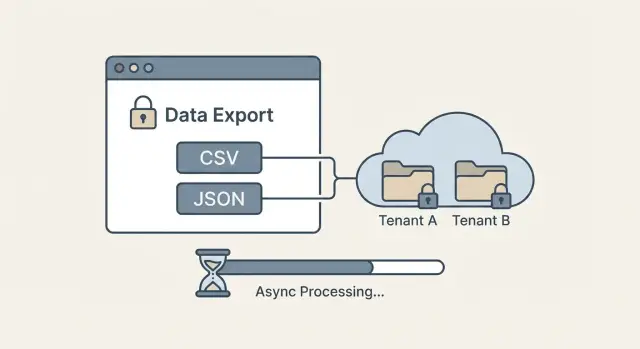
Secure data export features help you ship CSV/JSON exports with tenant-aware access checks, row limits, async jobs, and safe download links.
Why exports are a common source of data leaks
Exports are where security mistakes turn into plain files that get shared, forwarded, and stored. In a multi-tenant app, one missing filter in a CSV or JSON export can expose another customer’s records in a single click. Export features deserve the same attention as login and payments.
Most leaks happen in boring ways. An export query forgets the tenant filter. An endpoint accepts a predictable ID and fetches the wrong saved export. A background job reuses a cache key like export:123 that isn’t tied to the user and tenant. Or an old file sits in object storage with a permanent URL, so anyone who finds it can download it later.
A safe export means all of these are true:
- Correct data (the query matches what the UI shows)
- Correct user (real permissions, not just “is logged in”)
- Correct tenant (a hard boundary, not a best-effort filter)
- Correct time (expires and can’t be reused forever)
People want fast, one-click exports and shareable links. Strict controls add friction: more checks, row limits, async generation, and short-lived downloads. The goal is to keep exports convenient without turning them into a side door around your access rules.
This is also a common failure mode in AI-generated prototypes. FixMyMess often sees export endpoints that “work” in demos but skip permission checks or store files in ways that make cross-tenant leaks far too easy.
Decide what users can export (and what they cannot)
Before you build buttons and endpoints, decide what “export” means in your product. Secure exports start with clear rules, not code.
Pick formats based on real jobs. CSV is great for spreadsheets and quick analysis, but it’s a flat table. JSON is better for backups, integrations, and nested data, but it’s easier to accidentally include extra fields.
Define the scope in plain language, then enforce it in code: which records, which columns, and which time window. If you don’t set boundaries, users will ask for “everything,” and your system will eventually try to deliver it.
Write down a small set of decisions:
- Which objects are exportable (for example: invoices and customers, but not internal notes)
- Which fields are allowed (and which are never exported)
- The maximum time range per request (like “last 90 days”)
- Default filters and sort order that keep results predictable
- Who can export at all (admin only, or every user)
Sensitive fields need extra thought. Some should be excluded completely (password hashes, API keys). Some can be masked (show last 4 digits). Some may require a second step, like manager approval or re-authentication.
Example: a support agent can export tickets to CSV with customer name and subject, but not email, IP address, or internal-only tags. An admin can export JSON for integration, but only after confirming their password again.
If you inherited an AI-generated app, leaks often start here: exports mirror the database schema by accident. FixMyMess frequently finds hidden fields and secrets slipping into “quick” exports, so writing these rules first saves rework later.
Access checks that match real permissions
Export bugs often happen when the export endpoint uses simpler rules than the screens in the app. A user can see a filtered list on screen, but the export quietly skips those constraints and returns far more data. Treat export as its own “read path,” with its own risk.
Check identity before you build the query: who is the user, what roles do they have, and are they an active member of the tenant they claim to be in? If you support suspended users, expired invites, or removed members, make sure those states block exports too.
Then separate “can view in the app” from “can export out of the app.” Exporting is bulk access and often includes fields people never see on screen. Many teams add explicit permissions like can_export_billing or can_export_users and keep them off for most roles.
A simple rule set that holds up:
- Require an explicit bulk-export permission for each dataset.
- Re-check permissions when the export job runs, not only when it’s requested.
- Apply the same field-level rules as the UI (hide sensitive columns by default).
- Fail closed: if you can’t confirm a permission, return nothing.
- Keep a short, human-readable policy doc mapping roles to exportable datasets.
Example: a support agent can view a customer profile to help with tickets, but can’t export the full customer list. If you allow exporting, restrict it to Admin and Billing Admin, and document exactly which tables and fields those roles can export.
If you’re inheriting an AI-generated codebase, this is an area where small mismatches are common and worth auditing carefully.
Tenant isolation: make it impossible to export other tenants
In multi-tenant products, exports are where isolation often fails. A UI dropdown can look correct while the backend query quietly returns rows from another customer.
The most important rule: enforce tenant scoping in the query itself, not in the frontend. The backend should derive the tenant from the authenticated session, not from a request parameter. If a user can send tenant_id=other_company and your server believes it, you have a leak waiting to happen.
Use stable rules that don’t change per screen. A good baseline is: tenant must match, and the user’s role must allow the requested rows and fields. That means your export query always includes a tenant filter plus the same permission constraints you use for normal screens.
Practical checks that block cross-tenant exports:
- Take tenant ID from the auth context, not from the request body or URL
- Add
WHERE tenant_id = :tenantFromSessionto every export query - Apply role rules in the same query (for example, “agents can only export assigned accounts”)
- Reject “admin” shortcuts unless the user is truly a tenant admin
- Write a test that tries to export another tenant and must fail
If your database supports it, row-level security (RLS) adds a second lock. Even if a future code change forgets a filter, the database still blocks rows that don’t belong to that tenant.
Example: a support manager exports “all tickets.” If the backend scopes by session tenant and applies role rules, the export can never include tickets from another company, even if someone edits the request.
If you inherited an AI-generated export endpoint, FixMyMess often finds the same bug: tenant checks done in the UI while the SQL query is unscoped. Fixing that one mistake removes most cross-tenant leak risk.
Row limits, pagination, and predictable query behavior
Exports feel harmless until someone requests “all data” and the database spends minutes grinding through a huge query. A safe export has clear boundaries: how much data, in what order, and with what filters.
Start with a hard row limit per export job. Pick a number you can support (for example, 50,000 rows), enforce it on the server, and show the limit in the UI so users aren’t surprised. If someone needs more, offer a way to break it into smaller exports rather than quietly generating a massive file.
For large datasets, don’t rely on one giant query. Use pagination or date chunking (for example, one file per month). This also reduces “it failed at 99%” problems and makes retries cheaper.
Results must be predictable. Always apply a server-side order (like created_at then id) so pages don’t shuffle between requests. Without stable ordering, users can get duplicates or miss rows, which becomes a support issue and can even look like a data leak.
To keep exports from turning into a denial-of-service risk:
- Require safe filters (date range, status) and reject unbounded queries.
- Set query timeouts and cancel long-running exports.
- Make sure common filters are indexed.
- Cap page size so one request can’t pull everything.
Example: if a user exports “orders from last 30 days,” you can chunk by week, order by created_at,id, and stop at the limit, giving a consistent result every time.
Step by step: a simple export flow that stays safe
A safe export is mostly about doing the boring checks in the right order, every time. The goal is straightforward: a user can only export what they’re allowed to see, and only in a controlled amount.
A practical flow for CSV and JSON:
- Accept the request and validate inputs: file type, date ranges, filters, and the user’s permission for the underlying data.
- Build the query by scoping first (tenant, ownership rules, team membership), then apply filters. If a filter can change scope, reject it.
- Decide sync vs async: small exports can stream back quickly; larger ones should become a background job with clear progress.
- Generate the file defensively: use a fixed column allowlist, escape CSV cells that start with
=,+,-,@, and use UTF-8. - Return a status handle or a short-lived download token, not a raw file sitting at a predictable URL.
Example: a support agent exports “Tickets last 30 days.” Even if they try to change a filter to another customer, the query is still pinned to their tenant, so the export returns either their data or nothing.
If you inherited an AI-generated app, double-check that exports reuse the same permission code as the UI, not a separate “quick query” that skips rules.
Async export generation without breaking the user experience
If an export can take more than a few seconds, make it async. This is especially true for large datasets, slow queries, or exports that need heavy transforms (joins, formatting dates, masking fields). Async jobs keep your app responsive and reduce the temptation to relax security checks just to make exports faster.
A simple job model stays understandable. Most teams only need a few states:
- queued (requested, waiting for a worker)
- running (actively generating)
- completed (file ready to download)
- failed (error, safe message shown)
- expired (too old, must regenerate)
Progress updates should be useful without leaking content. Instead of showing sample rows or field values, show safe metadata like percent complete, rows processed, and estimated time.
Retries matter because exports fail for boring reasons: timeouts, database restarts, or a worker crash. Make requests idempotent so users don’t create duplicate exports by clicking twice. A practical pattern is to compute a dedupe key from (tenant_id, user_id, export_type, filters, time_window) and reuse the same job if it’s already running.
Keep the UX simple:
- Show a status badge and a refresh button, not a spinner forever
- Send a notification when the job completes
- Let users cancel a running export
- Put a clear expiry time on completed exports
If you’re fixing AI-generated prototypes, bugs often hide here: missing tenant filters inside the background worker. FixMyMess commonly finds workers that run “admin” queries by accident, which breaks isolation.
Safe delivery: downloads that do not become shared secrets
Generating an export safely is only half the job. The other half is making sure the file doesn’t turn into a permanent, shareable key that anyone can pass around.
A good default is to keep export files out of your main app database and put them in object storage (or a similar file store). Treat the storage bucket as private, and only allow downloads through short-lived, signed URLs.
What safe delivery looks like:
- Use long, random file names (not sequential IDs like
export-123.csv) so guessing is pointless. - Issue a signed download link that expires quickly (minutes, not days).
- Tie the link to the requesting user and tenant. If someone forwards it, the next request should fail unless it’s the same identity.
- Set automatic expiration on the stored file itself (hours or days, depending on your product).
- Consider one-time download tokens for sensitive exports (finance, user lists, anything regulated).
Example: a support agent exports customers for Tenant A, then pastes the link into a chat. If your link is “signed for anyone,” you created a shared secret. If it’s signed for that agent and checked again at download time, the forwarded link is useless.
Clean up aggressively. Old exports pile up and become an accident waiting to happen. If you often inherit AI-generated apps where exports are stored forever or exposed publicly, FixMyMess can audit the delivery path and lock it down without rewriting your whole product.
CSV and JSON gotchas that can turn into security issues
CSV and JSON exports look simple, but small formatting choices can turn into real security problems. Many leaks happen after the data leaves your app, when it’s opened in Excel, shared in a chat, or stored in someone’s downloads folder.
CSV: the spreadsheet is part of your threat model
CSV has a quiet risk: spreadsheet formula injection. If a cell starts with =, +, -, or @, some spreadsheet apps may treat it as a formula. A malicious user can put something like =HYPERLINK("...") into their name field, and when an admin opens the export, it runs.
A simple mitigation is to escape these values before writing the CSV. Common approaches are to prefix a single quote ' or a tab \t for any field that begins with those characters.
Also normalize formatting so exports don’t break in surprising ways. Use UTF-8, always quote fields that contain commas, quotes, or newlines, and double any quotes inside a value. If you don’t, rows can shift, filters can lie, and people may copy the wrong data.
JSON: easy to over-share
JSON makes it tempting to dump the whole object. That’s how access tokens, API keys, password reset hashes, internal IDs, and debug fields sneak into exports. Treat exports as a public contract: build an explicit allowlist of fields.
It also helps to add a small header block so the file explains itself:
- Export time (UTC)
- Applied filters (as the user set them)
- Row count (and whether it was truncated)
- Data scope (tenant or workspace name)
Example: a support manager exports Customers filtered to one workspace. If the JSON includes stripeSecretKey because it lives on the same model, you just created a portable credential leak. Explicit fields prevent that.
Audit logs and monitoring you will actually use
Audit logs are your seatbelt for exports. When something goes wrong, you need clear answers to three questions: who did it, what did they export, and where did it go.
Log the export as two events: the request and the download. The request tells you intent (and scope). The download confirms delivery (and from which user and IP). Keep it lightweight and searchable so you’ll actually open it during an incident.
Capture enough detail to investigate without storing the exported data itself:
- Who: user ID, role, tenant ID, and the auth method used
- What: dataset name, filters applied, row count, and columns included
- When/where: timestamps, IP, user agent, and export job ID
- Result: success/failure, error codes, and file size
Monitoring is about patterns, not perfection. Alert on things that rarely happen in normal work: many exports in a short time, unusually large exports, repeated failures, or downloads outside typical hours for that tenant. Tie alerts to actions, like temporarily forcing smaller row limits.
Give admins simple controls for response: revoke a specific export job, invalidate a download token, and shorten expiry during an incident. If you’re inheriting an AI-generated app with missing or noisy logs, FixMyMess can help you add reliable audit trails without reworking your whole product.
Common mistakes and traps to avoid
Most export leaks aren’t fancy hacks. They’re gaps between what the UI shows and what the server enforces. Treat every export request like a direct database read, because that’s what it becomes.
Common traps:
- Trusting UI filters (like a hidden tenantId field) instead of enforcing tenant checks on the server for every query.
- Caching generated export files and accidentally serving the same file to a different user or tenant.
- Allowing unlimited date ranges or “export all” without a hard cap, which can cause huge reads, timeouts, and accidental over-sharing.
- Returning raw errors that expose table names, SQL fragments, or internal IDs that help an attacker guess your schema.
- Copying export code from an AI-generated prototype and shipping it without a security review.
A realistic example: a support agent selects “Last 90 days” in the UI. The backend builds a query only from the date range and forgets tenant_id = currentTenant. The export still “looks right” during testing because the tester only has one tenant worth of data. In production, it silently pulls other tenants too.
Practical guardrails prevent most of this:
- Build the query from server-side context first (current user, role, tenant), then apply user filters.
- Give each export job a unique owner and tenant, and verify both when generating and when downloading.
- Set hard limits (rows, date range, file size) and require narrower filters for larger exports.
- Normalize error messages for users; keep details in logs.
If you inherited messy export code from tools like Lovable, Bolt, v0, Cursor, or Replit, FixMyMess often finds these exact issues during a quick audit and helps patch them before they turn into an incident.
Quick checklist before you ship exports
Do a quick pass with a security mindset before you ship CSV or JSON exports. Most export leaks come from one small assumption slipping through, like trusting a filter from the UI or leaving a download link usable forever.
Start with access and scope. Every export request should verify the current user, their role, and the tenant they belong to. Then check that they have a specific permission to export (not just “can view”). If a support agent can view a record but shouldn’t bulk-download it, your export has to enforce that.
Make tenant isolation impossible to bypass. The backend query must always enforce tenant scope, even if the request includes a tenantId, workspaceId, or accountId. Write at least one test that tries to export another tenant’s data and proves it returns zero rows.
Confirm predictable limits. Enforce the row limit server-side, and show the limit in the UI so users aren’t surprised by partial files.
- Server enforces a max row count (and max time) for each export.
- Sorting is stable (same filters + same time window = same order).
- Pagination isn’t user-controlled in a way that can skip the limit.
Plan for big exports. Use an async job when it might take longer than a normal request, and give clear status: queued, running, finished, failed.
Treat delivery as sensitive. Signed download links should expire quickly, files should auto-delete, and downloads should never be guessable. If you inherited an AI-generated export feature that feels “almost done” but misses these checks, FixMyMess can audit it fast and repair the risky parts before it reaches production.
A realistic example: multi-tenant SaaS exports done right
Picture a small agency that uses one SaaS app to manage billing for multiple client companies (tenants). An account manager has access to Client A and Client B, but only for the projects they’re assigned to.
They go to Invoices and click Export for Client A. Behind the scenes, the export job is created with a server-side scope like tenant_id = Client A, plus the same role and project filters the UI uses.
Now the interesting part: the user tweaks parameters. They change a request value from Client A to Client B, or they try a different invoice ID range. If your system relies on the client to send the right tenant, you lose. If your system derives tenant and permissions from the authenticated session, the request can only ever export Client A data, even if parameters are tampered with.
Async export generation keeps the experience clean. Instead of timing out or creating half-written files, the user sees “Export is being prepared” and gets a finished file only after the job completes.
A “done right” setup usually includes:
- Export job stores
user_id,tenant_id, and a permission snapshot - Query always scopes by tenant and applies the same permission filters
- Hard row cap (or windowed pages) to avoid runaway jobs
- One-time download token that expires quickly
- Audit log entry for start, finish, download, and denied attempts
If a user reports “I saw the wrong invoice,” those logs let you trace who requested the export, what scope was applied, and whether any blocked attempts happened right before it.
Next steps: harden what you have, then iterate
Treat your current export endpoints like a checklist of ways things can fail. Look for places where a missing filter, a reused query, or a “temporary” admin shortcut could let someone export data they should never see.
Write down the failure modes you actually worry about: cross-tenant access, exporting more rows than intended, exporting deleted or hidden records, and downloads that can be forwarded to anyone.
Then improve one piece at a time, in this order:
- Scope every export query by tenant and by the user’s real permissions
- Add row limits and predictable pagination (and decide what happens when users hit the limit)
- Move big exports to async jobs with clear status and expiry
- Deliver files with short-lived, user-bound downloads and revoke on permission changes
- Add audit logs for who exported what and when
Keep a small test plan you can run before every release. One good test: log in as Tenant A, start an export, then try to change the request (or reuse the download) as Tenant B. If anything works, you have a leak.
If your exports came from an AI-generated prototype, assume the guards are incomplete. If you want a fast second set of eyes, FixMyMess (fixmymess.ai) does focused audits and repairs for AI-generated codebases, including export flows, tenant isolation gaps, and unsafe file delivery.