Tenant data export: how to transfer client data safely
Learn how to design a tenant data export with encryption, access checks, and rate limits so agencies can migrate client data safely and predictably.
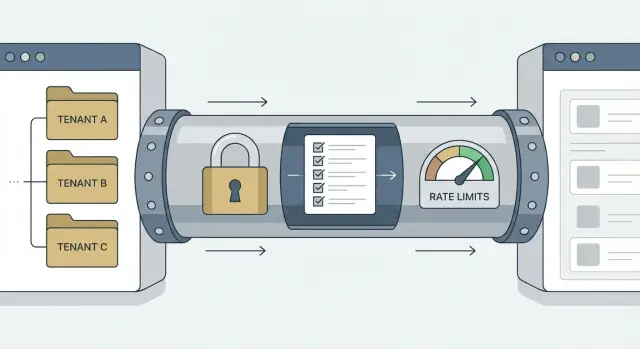
Why tenant exports are risky in real life
Tenant exports sound simple: grab a client’s data, package it, hand it over. In practice, a tenant data export is one of the easiest ways to send the wrong data to the wrong person.
Exports come up when an agency hands off a project, a startup switches vendors, or a client asks for a backup before a contract ends. They also show up during migrations, when you need a clean snapshot to test a new system without dragging everything along.
The risk is that export code often bypasses the protections you rely on in everyday screens. A normal page might be tenant-scoped automatically. An export might be a one-off script, an admin endpoint, or a background task someone wrote quickly and never revisited.
Common failure modes are predictable:
- Missing one tenant filter and quietly exporting another tenant’s rows.
- Letting a contractor or junior admin export data they shouldn’t be able to access.
- Storing the file in a shared location or sending it unencrypted.
- Hammering the database with a huge export that slows the app for everyone.
- Having no proof of what was exported, by whom, and when.
Even one mistake can trigger angry clients, breach notices, refunds, or legal trouble. Agencies feel this sharply because trust is the product.
Speed matters, but repeatability matters more. A safe export is one you can run again next week with the same rules, the same checks, and a predictable impact on your system.
Decide what counts as a tenant and what you will export
A safe tenant data export starts with a boring decision that saves you later: what is a tenant in your system? In some apps it’s a workspace. In others it’s an org, a client account, or even a single project. Pick one primary tenant ID and make everything in the export hang off it.
If you skip this, you end up with “almost tenant-scoped” data: shared users, invoices, logs, or file uploads that don’t clearly belong to one client. Those are the records that leak.
Define the export shape
Decide what kinds of exports you support and name them clearly in your UI and API. Most teams start with a full snapshot (everything for that tenant) and later add options like “selected objects” or “date range.” Keep the first version small and predictable.
When you define the shape, be explicit about four things:
- Scope (full tenant vs selected objects)
- Time window (all time vs date range)
- Format (JSON/CSV and whether files are included)
- Delivery (download vs a controlled handoff)
Decide who can request it, and where it can go
Write down exactly which roles can request an export. “Admin” is often too broad. Many teams allow only the tenant owner by default, then add a separate permission for support or an agency partner.
Make delivery rules early, too. Direct downloads are easy to understand, but they increase risk if the wrong person has access to the browser session. Email attachments are usually a bad idea. A controlled storage location with short-lived access is often safer.
A practical example: an agency migrates one client. Let them export only that client workspace, with a clear “files included or not” choice, delivered as a one-time download that expires.
Build hard tenant boundaries before you export
Most export bugs aren’t really about the export code. They come from weak tenant boundaries in the app itself. If your database and queries aren’t strict, an export can quietly include the wrong rows.
Start with a single source of truth for tenant identity on every record that should be scoped. Pick one field (like tenant_id) and make it required. Avoid “sometimes org_id, sometimes workspace_id” patterns. If a table is tenant-owned, a missing tenant_id should be an error, not a special case.
Make cross-tenant access hard by default
The safest pattern is: all reads and writes are scoped to a tenant automatically. Your query layer should add tenant filters every time, so developers can’t “forget” them.
A simple rule helps: any function that touches tenant data must accept tenant_id as an input, and it must apply it inside the function. Don’t rely on callers to add the filter.
Add another guardrail at request time: confirm the requester belongs to that tenant before the export job is created. If the user is an agency admin, check they’re assigned to that specific client tenant, not just “an admin somewhere.”
Shared resources need extra care because they blur boundaries. Templates, global settings, feature flags, and logs are common footguns. Decide what is truly global (safe to include) vs tenant-owned (must be filtered). Logs are especially tricky because they often contain emails, IDs, and tokens.
A quick boundary check before you build exports:
- Every tenant-owned table has a non-null
tenant_id. - Every query path enforces tenant scoping automatically.
- The API checks tenant membership before starting the export.
- Shared tables have clear rules (global vs tenant-owned) and tests.
- At least one test tries to export Tenant A while referencing Tenant B.
Access checks that stop the wrong person from exporting
Exports bundle lots of data into one file. Treat the action like changing a bank password: you want strong proof of who is asking, and clear proof of which tenant they mean.
Start with explicit permissions. “Logged in” isn’t a permission. Check a capability such as tenant:export and tie it to roles you control (owner, admin, billing, support). Keep the rule simple: if the role isn’t allowed, the export option shouldn’t appear, and the API should still reject it.
Re-authenticate right before the export begins. That can be a password prompt, an SSO re-check, or a 2FA step. It protects you if someone left a session open on a shared device or a token was stolen.
If an agency manages multiple tenants, force tenant selection and confirmation. Don’t rely on “current tenant” from a sticky UI state. Make the user pick the tenant, show the tenant name and identifiers, and require typed confirmation (for example, “EXPORT ACME”) for high-risk cases.
For sensitive exports (PII, billing data, large tenants), add lightweight approval: one person requests, another approves, and both actions are logged.
Encryption basics for exports, without overcomplicating it
Encryption is less about fancy crypto and more about making sure the file is useless if it ends up in the wrong hands. Think in three places: where the export is created, how it moves, and where it sits until someone downloads it.
A safe default is to encrypt at rest and in transit:
- At rest: the export file is encrypted wherever it’s stored.
- In transit: downloads use TLS, and you avoid sending export files over email.
- On the worker: the machine creating the export shouldn’t keep plain-text copies longer than needed.
Key strategy is usually one of two options: per-export keys (smaller blast radius) or per-tenant keys (simpler for repeated exports). Either way, plan for rotation so you can revoke and re-issue without rebuilding the whole system.
A quieter failure mode is secrets leaking through logs and environment variables. Treat access tokens, database URLs, and API keys as sensitive. Don’t print them in job output, and don’t embed them in the export.
For delivery, avoid “one shared password in a chat message.” Prefer a one-time retrieval flow: the requester downloads the file from your app, and separately retrieves the decryption password or key after re-authentication. If you must use a password, generate it randomly, show it once, and don’t store it in plain text.
Finally, set retention rules. Exports should expire fast (hours or days, not weeks) and be deleted automatically.
Step by step: a safe per-tenant export flow
A good export flow is boring on purpose. It makes the right action easy and the risky action hard.
- Request and scope. The user starts an export inside the product, chooses the tenant (client), and picks a clear scope (for example: “contacts + invoices, last 12 months”). Avoid free-form “export everything” unless you truly need it.
- Validate permissions. On the server, re-check identity and role every time. Confirm tenant membership and that the requested scope is allowed. Don’t trust tenant IDs or scope choices from the browser.
- Create a job and audit entry. Write an export job record (requested by, tenant, scope, time, status). Log an audit event immediately, even before data is built, so you can answer “who tried to export what?” later.
- Build the dataset safely. Generate the export with strict tenant filters in every query. Use parameterized queries, and never fetch broad data and “filter later” in code.
- Package, encrypt, expire. Create the file (often a zip), encrypt it, store it privately, and issue a short-lived download token.
- Controlled download. Notify the user it’s ready, but require a fresh permission check at download time too.
A simple rule holds up well: the same access checks must pass at request time and at download time.
Rate limits and job controls that keep exports predictable
Exports can overload your app or leak data by accident. A tenant export often pulls a lot of rows, touches multiple systems, and creates large files. Add guardrails so it behaves the same way on a quiet Tuesday and during a migration weekend.
Start with limits that match real usage: cap exports per user and per tenant, restrict concurrency, and set a file size ceiling (then split into multiple files). Add a basic IP limit if you need protection against scripted abuse.
Treat exports as background jobs, not web requests. Queue them so your main app stays responsive, and show simple statuses like “queued,” “running,” “ready,” and “failed.” Give admins a cancel button so a runaway job doesn’t keep chewing resources.
Large exports will fail sometimes. Use retries only for safe failures (temporary storage issues, timeouts). Keep retries bounded, and make jobs idempotent so restarting doesn’t duplicate data or create inconsistent snapshots.
When you split exports, do it predictably and consistently. Generate all parts from the same snapshot time, name them clearly, and avoid partial exports where the first file contains records the last file misses.
Error messages should be clear but not revealing. Tell the user what to do next (try later, reduce the date range, contact support), but never include secrets, cross-tenant IDs, or stack traces.
Audit logs and monitoring you will actually use
Exports are one of the few actions where “who did what” really matters. If something goes wrong, a good audit trail lets you answer three questions fast: who requested it, which tenant it was for, and what was included.
Log the request itself (user ID, role, tenant ID, scope). Add context that helps later: IP address, user agent, and whether the user passed extra checks like re-auth or approval.
Then track the export like a mini timeline: created, started, completed, downloaded (by whom, and how many times), and expired or deleted.
Monitoring is how you catch quiet leaks. Alert on patterns that don’t match normal behavior: bursts of exports, repeated failures, or exports targeting tenants a user rarely touches. Keep thresholds simple so the alerts remain meaningful.
Make it easy for support to answer questions without digging through raw logs. An internal view that shows recent exports per tenant, status, and who downloaded them can save hours.
Finally, protect the logs. Treat them as sensitive data, restrict who can view them, and make them hard to alter (append-only storage helps).
Common mistakes that lead to data leaks
Most export leaks aren’t “advanced hacks.” They happen because the export path is treated like a special case and the usual safety rules get skipped.
One common failure is relying on a UI tenant picker. The screen shows “Client A,” but the server accepts any tenant_id the caller sends. A safe export enforces tenant boundaries on the server every time, even for internal tools.
Another frequent problem is building exports on admin-only endpoints that bypass normal permission checks. People add a quick /admin/export route, then forget that “admin” isn’t the same as “allowed to export this tenant.” If support can view a tenant, that doesn’t automatically mean they should be able to download a full dataset.
File handling surprises teams, too. Exports end up as unencrypted archives in storage with long-lived download URLs shared in chat or email. Weeks later, those URLs still work, and nobody remembers they exist.
Also watch what you include. Exports often pull secrets from tables or logs: API keys, access tokens, session cookies, password reset links, or webhook signing secrets. If it can log someone in or call an API, it shouldn’t be exported.
Retention is the final trap. Old exports pile up, backups multiply them, and access spreads.
Quick safety checklist before you ship exports
Before you ship tenant exports, do a dry run with a realistic tenant and treat it like a security test, not a feature demo. You should be able to export the right client quickly, and you should not be able to export the wrong client at all.
Use this as a final gate:
- Every exported record is filtered by a single tenant ID, with a test that fails if any record belongs to another tenant.
- Access checks cover identity, role, tenant membership, and fresh re-auth for sensitive exports.
- Export files are encrypted at rest and in transit, and you’ve documented key creation, storage, and rotation.
- Download links expire quickly, are tied to the requesting account, and every download attempt is logged (success or fail).
- Rate limits and queueing prevent one tenant from overloading the system, and admins can pause or cancel jobs.
Then test “human failure” cases. If a support agent pastes the wrong tenant ID, do you block it? If someone shares an export link in chat, does it still work tomorrow? If an attacker guesses job IDs, can they enumerate exports?
A practical test: ask a teammate to try exporting Tenant B while logged into Tenant A, using both the UI and the API. If they can get anything, your boundaries aren’t strong enough.
Example: an agency migrating one client without exposing others
An agency manages two clients in the same app: Client A and Client B. Client B is moving to a new system, but Client A must not be touched. This is where a safe tenant export matters: you want a clean package for Client B, with proof that nothing else was included.
The agency admin opens the export screen and picks “Client B” from a tenant dropdown (not a free text field). Before anything runs, they see a confirmation panel that spells out the scope in plain language: which objects will be included, the date range (if any), and the output format. The “Start export” button stays disabled until they confirm they understand the scope.
The export runs as a background job. The app creates an export job ID tied to Client B, records who requested it, and blocks any attempt to change the tenant on that job. The worker reads data only through tenant-scoped queries, writes the export to a temporary location, encrypts it with a one-time key, and stores it privately.
What Client B receives is simple: an encrypted archive, a separate passphrase shared out of band, an expiring download window, and clear instructions on how to decrypt and verify what’s inside.
If the export fails, the admin sees a clear reason (permissions, size limit, timeout) and a safe retry option that creates a fresh file and invalidates the old one. If Client B asks for a re-run, the audit log shows exactly when each export was created and by whom.
Next steps: ship safely and reduce risk during migrations
Before you turn on tenant exports in production, write down what “done” means. Agencies and migrations bring edge cases (former team members, shared inboxes, expired contracts) that turn into messy access problems if you don’t decide upfront.
Define a short set of requirements you can point to during review: what data types are included and excluded, who can export and what extra verification is required, how long exports are kept and where they’re stored, how delivery works, and what happens on failure.
Then prove it with tests, not hope. Add a test that tries to export Tenant B while authenticated as Tenant A, and make sure it fails every time. Test global admin roles carefully too, because they’re a common path to cross-tenant leaks.
If you inherited an AI-generated codebase and exports feel risky (weak tenant scoping, missing audit logs, or inconsistent permission checks), FixMyMess (fixmymess.ai) focuses on diagnosing and repairing those production issues so exports don’t become your easiest breach path.
FAQ
Why are tenant exports riskier than normal in-app pages?
A tenant export is the fastest way to bundle a lot of data into one place, and it often bypasses the safety you get on normal screens. If you miss even one tenant filter or permission check, you can quietly ship another client’s rows in the same file.
How do I decide what “counts” as a tenant in my app?
Pick one primary tenant identifier (like tenant_id) and require it everywhere tenant-owned data exists. If a record can’t be clearly tied to that tenant ID, treat it as a separate decision (exclude it by default) instead of guessing.
What export options should I support first?
Start with one boring, predictable export type: a full snapshot for a single tenant, using one format, with a clear “files included or not” choice. Add date ranges and selective exports later, once you have tests and audit logs that prove you’re staying in-bounds.
Who should be allowed to request a tenant export?
Default to the tenant owner only, then add a specific export permission like tenant:export for trusted roles. Avoid using a broad “admin” label as the rule, because many “admins” (support, contractors, agencies) shouldn’t be able to pull a full dataset.
What access checks prevent the wrong person from exporting data?
Check permissions twice: once when the export job is created and again when the file is downloaded. Add re-authentication right before export or download (password, SSO, or 2FA) so a stale session can’t be used to grab a full archive.
What’s the simplest safe way to encrypt and deliver export files?
Encrypt the export file at rest and only allow downloads over TLS, then delete worker-side plain-text artifacts as soon as packaging finishes. Keep delivery inside your product with short-lived access instead of email attachments or long-lived shared URLs.
How do I make sure the export only includes the selected tenant’s data?
Use an export job record that locks the tenant ID and scope, then generate the dataset only through tenant-scoped queries. Don’t fetch broad data and filter later in application code, because that’s where cross-tenant rows sneak in.
How do I prevent exports from slowing down my app?
Run exports as background jobs with per-user and per-tenant limits, capped concurrency, and a file size ceiling so you can split large exports safely. Make jobs idempotent so retries don’t duplicate or drift, and provide a cancel option so one runaway export doesn’t degrade the whole app.
What should I audit and monitor for tenant exports?
Log who requested the export, which tenant it was for, what scope was selected, and a timeline of created, started, completed, downloaded, and deleted. Protect those logs like sensitive data, because they can contain identifiers that help an attacker or expose customer activity.
What’s the quickest test to catch cross-tenant export bugs before shipping?
Write a test that tries to export Tenant B while authenticated as Tenant A and ensure it fails through both UI and API paths. If you inherited AI-generated code with inconsistent tenant scoping or missing audit trails, FixMyMess can quickly diagnose the boundaries and repair the export path so it behaves safely in production.