Service boundary map: stop accidental coupling in your code
Build a service boundary map to document domains, data ownership, and dependencies so teams ship changes without accidental coupling.
Why accidental coupling keeps showing up
Accidental coupling is when parts of your app rely on each other without anyone meaning to. In practice, it looks like small changes turning into surprise outages, confusing bug reports, and long release days.
You see it when someone touches one feature and three others wobble. A tweak to pricing blocks signups. A change to email templates breaks password resets. Updating a checkout rule makes the admin dashboard crash. Nothing in the code makes those connections obvious, so people only learn them the hard way.
A common cause is shared code that keeps growing because it feels convenient. One helper module, one database table, or one "common" service becomes the place everyone adds "just one more thing." Over time, that shared spot turns into a tight knot. It's not that the team is careless - the codebase quietly trains everyone to couple things together.
It usually gets worse as more people touch the code. New contributors don't know the hidden rules, so they copy existing patterns. Under pressure, they take the shortest path: reuse a function, grab data from a table that already exists, call an internal endpoint because it works. Each quick fix adds another invisible thread between parts of the system.
Unclear ownership multiplies the problem. When nobody can say "this service owns customer emails" or "this module owns pricing rules," reviews turn into guesswork. People either approve changes they don't fully understand, or they block releases just in case. Either way, shipping becomes risky.
A few signs you're living with accidental coupling:
- Bugs show up far away from the change that caused them
- Releases require lots of manual testing "to be safe"
- Teams argue about where a piece of logic should live
- You avoid refactors because everything feels fragile
- Fixes need multiple reviewers because ownership is unclear
What a service boundary map is (in plain terms)
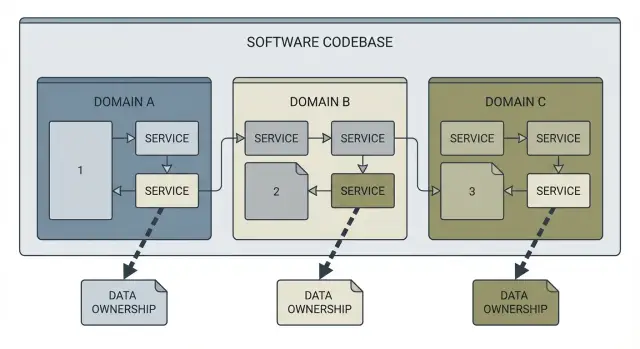
A service boundary map is a simple picture of your system that answers three questions: what the domains are (the big areas of responsibility), who owns each piece of data, and who calls what. Think of it as a labeled sketch of the codebase, not a wall of diagrams.
A good map usually includes the main domains (like Accounts, Billing, Projects), what data each domain owns (tables, documents, key entities), the dependencies between domains (API calls, events, shared libraries), and the integration points to the outside world (payments, email, storage).
What it isn't: a full architecture rewrite, or a perfect microservice plan. You can make a service boundary map for a monolith, a pile of serverless functions, or a half-finished prototype. The goal is clarity, not "ideal architecture."
The real value is the decisions it unlocks. With a map, you can answer questions like:
- Where should this new feature live?
- Who owns this data?
- If we change this, what else breaks?
- What should we isolate first to reduce risk?
That's how you stop accidental coupling: you stop letting new work cut across boundaries without noticing.
A concrete example: someone asks for "add team invites." Without a map, a single pull request might touch authentication, user profiles, email sending, and billing checks, with shared database writes everywhere. With a service boundary map, you can keep it contained: invites belong to Accounts, emails go through one integration point, and billing rules stay owned by Billing.
This isn't only for engineers. Founders use it to understand why "small changes" take longer than expected. Agencies inheriting a messy codebase use it to plan work without making the mess worse.
What to gather before you start
A service boundary map is only as good as the inputs you feed it. Before you draw boxes and arrows, collect the basic facts so you're mapping reality, not opinions.
1) Decide the scope (so the map stays useful)
Pick a boundary that matches the decisions you need to make next. If the goal is to stop new features from creating new coupling, you don't always need the whole system on day one.
Common scopes:
- One repo
- One product area
- The whole system
- A single risky flow (auth, billing, onboarding)
Write the scope down in one sentence. It keeps debates short.
2) Collect the inputs that show how the system really runs
You're looking for every way code is triggered and every place data crosses a boundary. Pull together:
- Entry points: routes, endpoints, webhooks
- Non-request work: background jobs, queues, cron tasks, schedulers
- Third-party integrations: payments, email, analytics, storage, auth providers
- Data stores: databases, caches, file buckets (high-level tables and entities)
- Current "glue": shared libraries, shared config, shared admin scripts
Keep it high level. You don't need every column in every table. You need enough to see ownership and collisions.
Format and timebox
Pick a format your team will actually update: a whiteboard photo, a doc with headings, or a simple diagram tool.
Timebox it so it doesn't drag on. A good starting point is 60 to 90 minutes to gather inputs, then one follow-up session to fill gaps.
Find the domains and the real boundaries
Start from what users can do, not what the repo looks like. A good map usually begins with capabilities someone would describe in plain language: signing up, logging in, managing billing, searching, sending messages, admin work. Those are clues to your real domains.
A simple test: if you can describe a part of the system in one sentence without technical words, it's probably a domain. If you need three sentences and a diagram, it might be two domains that got glued together.
Group by meaning, not by folders
Folder names often reflect history, not intent. Instead, scan for business nouns and verbs across code, tickets, and UI labels. Then group components, routes, jobs, and database tables by what they mean.
Write a strict one-sentence purpose for each domain:
- "Accounts handles sign-up, login, and identity settings."
- "Billing handles plans, invoices, payments, and subscription status."
- "Messaging handles conversations, delivery, and read status."
If you find yourself adding "and also," you've found a boundary problem.
Separate shared utilities from shared business logic
Sharing a date formatter is fine. Sharing "subscription rules" across three areas is how coupling spreads.
A quick check when you see shared code:
- Pure helpers (formatting, logging, HTTP client) can be shared.
- Rules (who can refund, what counts as active) should belong to one domain.
- If two domains need the same rule, expose it through an API or event, not a shared file.
Also mark hotspots: parts that change every week, break tests, or trigger "small" PRs that touch many files. Hotspots usually mean mixed responsibilities.
Document data ownership so changes stop colliding
Most coupling problems start with a simple mistake: two parts of the system write to the same data. It feels faster at first, but it turns every change into a negotiation.
Start by picking one domain (Accounts, Billing, Content) and naming the data it owns. Be specific. "User data" is vague. "users table, password_reset_tokens table, and profile_images files" is clear enough that people can follow it.
Then write one rule and stick to it: the owner writes, everyone else reads through a boundary. That boundary can be an API call, a message/event, or a read-only view that the owner controls. The tech matters less than the discipline.
A simple template for each domain:
- Owned data (tables, collections, files/buckets)
- Write access rule (who can write, and how)
- Read access path (API, event, reporting view, export job)
- Sensitive fields (PII, auth tokens, payment details, secrets)
- Clear owner (team name or a named role)
Shared tables are the coupling hotspot. If you find a table that "everyone uses" (often users, subscriptions, permissions, audit_logs), don't accept it as normal. Mark it as shared, name who becomes the real owner, and agree on a transition plan. Sometimes the plan is "move writes behind an API first, split the table later." That alone stops new coupling from piling up.
Sensitive data deserves extra attention. If auth tokens, password hashes, or payment details are stored in multiple places, you'll get security bugs and messy fixes. One owner should control storage and access, and other domains should request what they need without copying secrets.
Map dependencies and integration points
After you know the domains, the next coupling problem is usually hidden in the connections between them. A map only helps if it shows how code actually talks to other code.
Start with direct calls: HTTP routes, internal module imports that cross a boundary, SDK clients used for payments or email, and shared libraries that quietly become a "god package."
Then capture indirect calls too. A signup flow might enqueue a job, trigger a webhook, and run a scheduled task later that updates billing. Nothing crashes immediately, but the dependency is still real.
For each integration point, note:
- Direction: who depends on whom
- Contract: API schema, event name, webhook payload, boundary table/view
- Shortcuts: direct DB reads, shared env vars, shared auth middleware
- Trigger type: sync request, async job, webhook, scheduled task
- Owner: who fixes it when it breaks
Contracts are healthy coupling. Shortcuts are accidental coupling. "Just import the user model" or "just read that table" works until a refactor lands and everything fails.
Finally, flag risky chains. Look for fan-out calls where one action hits many services or modules and failures cascade. Example: a single "Create Project" request calls auth, writes to two databases, posts to Slack, starts an onboarding job, and pings analytics. That's hard to test and easy to break.
How to create the map step by step
A service boundary map only helps if it stays simple. Draw the smallest picture that helps people stop making changes that quietly tie parts of the system together.
Step 1: Draw the domains as boxes
Start with a blank page and draw 4 to 8 boxes. Name each box the way people talk about the business, not the way the repo is organized.
Under each box, write one sentence describing what outcome it owns. For example: "Billing creates invoices and records payments." If you can't say it in one sentence, the box is probably too big.
Step 2: Attach owned data to each box
For each box, list the data it owns in plain words, short and concrete: "Invoices," "Payment methods," "User profiles," "Projects," "API keys."
Owned data means this domain is the only one allowed to write to it. Others read it only through an agreed path (a call, a view, or an exported event).
Step 3: Add arrows for calls and events
Draw arrows between boxes for every interaction you know exists: API calls, message events, background jobs, scheduled tasks, anything that moves data.
If you're working on an AI-generated prototype, don't trust the folder structure. Find real interactions by scanning for internal HTTP calls, direct database access from the wrong module, scheduled jobs, and webhook handlers.
Step 4: Label each arrow with what is exchanged
On each arrow, write what is exchanged, not how it's coded. Good labels: "Create invoice," "Fetch user profile," "Payment succeeded event," "Sync project status." The meaning should stay stable even if the code changes.
Step 5: Mark red flags in the map
Mark patterns that create accidental coupling:
- Shared writes (two domains updating the same data)
- Circular calls (A calls B and B calls A)
- Hidden cron jobs that update data "from the side"
- One box that knows everything (a god service)
- Data copied in multiple places with no source of truth
Step 6: Write 3 to 5 boundary rules you'll follow
Add a small note next to the map with rules people can remember:
- Only the owning domain writes its data.
- Cross-domain reads happen through a defined API or exported view, not direct database access.
- Events describe facts ("Payment succeeded"), not commands ("Update billing").
- No circular dependencies.
- Scheduled jobs live in the domain they affect and appear on the map.
Example: turning a tangled prototype into clear domains
Picture a common prototype: sign up and login, a user profile page, a billing screen, and an admin panel. It works in demos, but every change breaks something else.
A common root problem is a single, overloaded users table that every feature touches. Login code writes to it. The admin panel edits it directly. Billing stores plan status there. Profile settings live there too. A quick "add one column" request turns into a risky migration that affects four parts of the app, plus a mess of shared helper functions.
A service boundary map makes the hidden coupling visible, then replaces it with clear ownership.
What the boundary map changes
You can keep the same database at first, but stop treating it like one shared bucket. Define a few domains and make each one responsible for its own data:
- Auth owns credentials and sessions (password hashes, OAuth links, refresh tokens).
- Profiles owns user-facing settings (display name, preferences, notification choices).
- Billing owns money and entitlements (customers, invoices, plan history, payment status).
- Admin owns moderation and internal tools (flags, audit logs, role assignments).
Then make the rule explicit: other domains don't write to tables they don't own. If Billing needs to know "is this user active?", it asks Auth or reads an explicit entitlement view controlled by Billing.
Replacing direct DB writes with a basic API boundary
In the tangled prototype, the billing page might directly update users.plan = 'pro'. After mapping boundaries, Billing calls something like Billing.createSubscription(userId, planId) and updates its own records. If Auth needs to enforce access, it queries Billing's current entitlement through a small, defined integration point.
To keep new work from reintroducing coupling, set expectations for feature requests:
- Add fields in the owning domain only.
- If you need data from another domain, add a read API, not a shared write.
- Avoid "just one more column on users" unless Auth truly owns it.
Common mistakes that keep coupling alive
Accidental coupling usually doesn't happen because people are careless. It happens because teams pick a boundary that looks neat on the surface, then keep shipping without checking whether the boundaries match reality.
One common trap is treating the folder tree as the domain model. Many codebases (especially AI-generated ones) group files by framework conventions, not by business meaning. If your map mirrors the current folders, you may end up documenting a mess instead of finding clean seams.
Another trap is going too small too early. Splitting into lots of tiny services can feel like progress, but if you haven't settled data ownership, you create more calls, more failure modes, and more debates. Get the data boundaries right first, then decide what deserves separate deployment.
Mistakes that show up again and again:
- Using package names as the boundary, even when one feature touches three "domains" in practice
- Splitting into many services before agreeing who owns which data and rules
- Letting multiple domains keep writing to the same database table indefinitely
- Mapping only request-response APIs and forgetting jobs, cron tasks, queues, and webhooks
- Treating the map as a one-time workshop artifact instead of a living document
Dependency mapping also fails when it ignores quiet paths. Example: a Billing page calls a payments API, but a nightly job updates invoices and a webhook marks payments as settled. If those aren't on the map, people ship changes that look safe in the UI but break accounting the next morning.
Quick checklist and next steps
Use this as a gut check after you've drafted your map. If you can't answer one of these in a sentence, that's usually where accidental coupling is hiding.
Quick checklist
- Each dataset has one clear owner, and everyone else reads it through an agreed interface
- There are no circular dependencies between services or modules
- Contracts are written down (even as a short note): what a call expects, what it returns, what errors mean
- Integration points are visible: queues, webhooks, cron jobs, shared libraries, direct database access
- Change impact is predictable: you can name what must change when a field or rule changes
A simple way to keep the map useful: treat it like code. When someone adds a new dependency, a new table, or a new integration, they update the map in the same pull request. If that feels heavy, keep it lightweight: a screenshot or a short paragraph update is often enough.
Next steps that actually reduce coupling
Pick one refactor target based on risk, not convenience. The best first target is usually the spot where a small change causes outages, security issues, or repeated rework.
- Choose the highest-risk coupling point (shared tables, auth logic used everywhere, or a god service)
- Write one boundary rule you'll enforce next week (for example: "no service writes to another service's tables")
- Add one small boundary check so breakages show up early (a contract test, schema validation, or a simple guard)
If your codebase was generated by AI tools and got messy fast, the boundaries on paper often don't match the real behavior in code. If you want a second set of eyes, FixMyMess (fixmymess.ai) offers a free code audit and can help identify the hidden dependencies, data ownership conflicts, and security issues before you commit to a big rebuild.
FAQ
What does accidental coupling actually look like in a real app?
Accidental coupling is when two parts of your app depend on each other in ways nobody planned or documented. The result is that a “small” change in one area causes bugs or outages somewhere else, and the connection isn’t obvious from the code or the design.
Why does shared code turn into a coupling hotspot?
It becomes a magnet for unrelated logic: everyone adds “just one more thing” because it’s already there and it works. Over time that shared spot turns into a knot where many features rely on the same functions, tables, or config, so changing it safely becomes slow and risky.
How do I decide what the “domains” are for the map?
Start with what users do and what outcomes the system must deliver, not your folder structure. If you can describe an area in one plain sentence without technical terms, it’s usually a good domain candidate; if you keep adding “and also,” it’s probably two domains glued together.
How big should the first service boundary map be?
Write down the scope in one sentence and keep it small enough to finish in a single working session. A good default is one repo or one high-risk flow like auth, billing, or onboarding, because those are where hidden dependencies tend to cause the most damage.
What does “data ownership” mean, and why is it so important?
Owned data is the data a domain is allowed to write to, while everyone else must read it through an agreed boundary. A simple default is “the owner writes; others request,” which can be done via an internal API, an event, or a read-only view controlled by the owner.
What should I do if multiple parts of the app write to the same table?
When more than one domain writes to the same table or document, every change becomes a negotiation and migrations become scary. Pick a single owner for that dataset and move new writes behind that owner’s boundary first; you can split the table later once the bleeding stops.
What dependencies do teams usually forget to map?
Include all the non-request paths: background jobs, scheduled tasks, queues, and webhook handlers. These are common sources of “it worked in the UI” failures because they change data later or from the side, and they often bypass the same checks as request handlers.
How can I tell the difference between a healthy dependency and a risky shortcut?
A healthy contract is a clearly defined interaction like “create invoice” or “payment succeeded,” with a known owner and expected inputs and outputs. A shortcut is anything that bypasses the boundary, like direct database reads from another domain or importing internal models across domains, because it silently locks teams together.
What boundary rules are worth writing next to the map?
Keep it short and actionable, usually three to five rules people can remember during reviews. The most useful defaults are: only the owning domain writes its data, cross-domain reads go through a defined interface, and no circular dependencies, because those three prevent most new coupling from being introduced.
How do we keep the map from becoming stale after the first workshop?
Update it whenever you add a new dependency, new table, or new integration, the same way you’d update code when behavior changes. If the codebase is AI-generated or feels fragile, getting an outside audit can quickly surface hidden coupling and security issues; FixMyMess can review the repo and identify ownership conflicts and risky dependency chains before you commit to a rebuild.