Small fixes take longer than new features in AI code: why
Learn why small fixes take longer than new features in AI code, with plain-language examples of hidden coupling, missing safeguards, and how to scope work honestly.
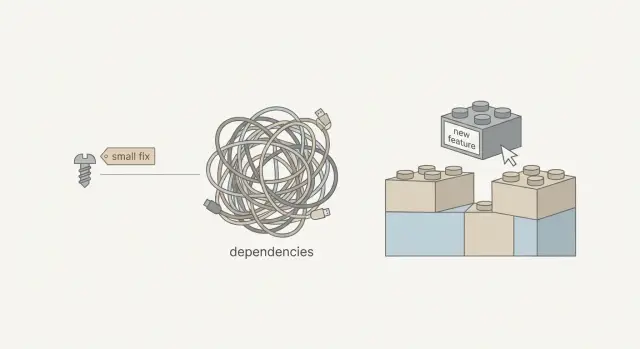
Why a “tiny change” can turn into a big job
Teams hit the same surprise with AI-built prototypes: someone points at the screen and says, “It’s just a small tweak. Ten minutes.” Then the fix takes half a day (or a few days), and the timeline starts to feel random.
When people say “small fix,” they usually mean: change one thing in one place, with low risk and quick testing.
In real code, “small” often hides extra work:
- The “one thing” is used in multiple files, screens, or services.
- The change touches data that must be saved, loaded, validated, and displayed.
- There are no tests, so you have to check everything manually.
- The safest fix includes cleaning up nearby issues you didn’t plan to touch.
That mismatch is why bug fixes can take longer than adding a new feature. New features can often be added at the edges of the app. Fixes have to go into the paths people already rely on, which means you need more care and more verification.
Two causes show up again and again: hidden coupling and missing safeguards.
Hidden coupling means parts of the app depend on each other in ways you can’t see from the UI. A “rename” might quietly depend on a database column, a validator, a login rule, and a dashboard query, held together by copied code.
Missing safeguards means the prototype skipped guardrails that make changes safe: clear error handling, sane defaults, input checks, and basic automated tests. Without them, a small edit can create a bug somewhere else.
The point isn’t to make fixes sound scary. It’s to make scope and timelines feel reasonable. When you can point to coupling and missing guardrails, the work stops looking arbitrary and starts looking like investigation, cleanup, and careful testing.
Hidden coupling, explained without jargon
Coupling is simple: two parts of the app depend on each other. If you change one part, the other part can break. Some coupling is normal. It becomes a problem when the connections are tight, unclear, and scattered.
Hidden coupling is when those connections aren’t obvious from what you see on the screen. A button looks like “just UI,” but it affects login, billing, emails, or database rules because everything is wired together behind the scenes.
Picture a brick wall where one brick also holds up a shelf, a lamp, and a pipe. From the outside, it looks like a single brick. Pull it out and three other things shift. The repair isn’t impossible; it just takes time because you have to find what else that brick supports.
AI-generated prototypes often have more hidden coupling because code is created quickly and reused by copying. Instead of one clear place that defines “signup rules,” you get several slightly different versions. Fixing a bug in one spot can leave two more spots still broken, or create a mismatch between flows.
A few signs you’re dealing with hidden coupling:
- The same logic shows up in multiple files with small differences.
- One shared variable (global state) is used everywhere, so changes ripple.
- Boundaries are unclear (UI code directly edits database data).
- A fix works in one flow but breaks another flow that “shouldn’t be related.”
- The code is full of quick patches, like extra if-statements to cover edge cases.
When that’s the reality, a “tiny fix” isn’t one edit. It’s: find the hidden connections, change them safely, then re-check the flows that were quietly relying on the old behavior.
Missing safeguards: the guardrails prototypes skip
Safeguards are the guardrails of software. They don’t add new buttons or flashy features, but they prevent small changes from turning into surprising outages.
Prototypes often skip them because the goal is speed: get a demo working. The cost shows up later, when the app meets real users, real data, and real edge cases.
Common missing guardrails include:
- Automated checks for key flows (signup, payments, saving data)
- Clear data shapes (so the code can’t silently pass the wrong kind of value)
- Input validation (so messy data doesn’t crash the app)
- Permission checks (so users can’t access things they shouldn’t)
- Safe handling for failures (timeouts, missing records, empty states)
Without these, every change becomes a guessing game. You can fix what you can see, but you can’t be confident about what you can’t.
Example: you make a “phone” field optional to reduce signup friction. The backend still assumes phone is always present. Now the app fails only for some users, and only after they reach a later step. The “small fix” turns into tracking down the assumption, adding checks, and proving it stays fixed.
Guardrails cost time up front, so teams add them later. They feel “extra” until the first real bug hits production. With AI-generated code repair, a practical approach is often: fix the immediate issue, then add the smallest guardrail around it so the same class of bug doesn’t come back next week.
Why AI-generated code makes “small” fixes riskier
AI tools can get you to a demo quickly. The downside is that the code often only handles the happy path: the one click sequence the tool “imagined” while generating it. A small change can push users onto paths that were never tested.
AI-generated code can also look more finished than it is. The screens look polished, there are lots of files, and it feels “real.” Underneath, there can be fragile assumptions like “this value is always present” or “this API always returns the same shape.” When your change breaks that assumption, the app fails somewhere else and you end up chasing a chain reaction.
Copy-paste logic is another common problem. “Change the validation rule” isn’t one edit if that logic exists in five places. If you miss one copy, users get inconsistent behavior that can take days to notice.
You also see unclear data flow: the same piece of data gets transformed multiple times, in different ways, before it reaches the database or the UI. That makes scoping hard because you can’t tell where the real source of truth is until you trace it.
Typical “small fix” requests that widen into larger repairs:
- Saving a new field, but the app has two different models for the same object.
- A UI tweak changes timing and exposes a race condition.
- A cleanup reveals exposed secrets or missing permission checks.
- An edge case appears (empty state, slow network) and errors aren’t handled.
- A change touches auth and sign-in breaks across sessions, redirects, and callbacks.
A concrete example: “Just require phone number on signup.” That can mean updating the form, validation, database schema, emails or onboarding steps, and making sure existing users aren’t locked out. Without tests and clear error handling, each step has to be verified by hand.
If you’re dealing with code generated by tools like Lovable, Bolt, v0, Cursor, or Replit, the fastest path is often: find the assumptions first, fix the root cause once, and avoid patching the same symptom in multiple places.
How to scope a “small fix” step by step
When someone says “it’s a small fix,” they’re picturing one line of code. In messy projects, a single request can touch the UI, the API, the database, and auth.
A scoping flow that stays practical
Make the problem repeatable. If you can’t trigger it on demand, you can’t estimate it. Write down the exact clicks, inputs, and expected result, plus what you actually see.
Then do a quick “where does this live?” pass. Many bugs look like UI issues but are really backend rules, database data, or auth edge cases.
A simple checklist that’s usually enough:
- Reproduce it twice and capture the exact steps (and any error message).
- Decide which layer owns the behavior: frontend, backend, database, auth, or third-party.
- Trace the data end to end: where it starts, how it changes, and where it ends.
Once you see the data flow, list the touchpoints: shared components, reused endpoints, database constraints, login state, caching, and webhook handlers.
Before changing behavior, add one small safeguard. It can be a tiny test, an assertion, or even a log that proves you’re fixing the right thing. That one step often prevents a “quick patch” from turning into a second emergency later.
Then do the work and verify nearby flows that commonly break: signup, login, payments, emails, and admin actions. Finally, write down what changed and what you verified so the next fix is faster.
What “fair scope” looks like
A defensible scope isn’t just “fix the bug.” It’s:
- steps to reproduce
- the owning layer
- touchpoints affected
- the safeguard you’ll add
- regression checks you’ll run
- a short note of what was confirmed
That gives you a timeline you can explain and defend.
A realistic example: one UI tweak that breaks signup
A founder asks for a tiny change: “On the signup form, rename the field label from ‘Company’ to ‘Business name’.” It looks like a five-minute UI edit. Then signup starts failing.
Here’s the catch: the frontend didn’t only change the label. It also changed the field name from company to businessName. The backend API still expects company. When the form submits, the server sees a missing required field and rejects the request.
The break often doesn’t stop there. Once that one value goes missing, you can get knock-on issues like validation failing with a generic “Something went wrong,” onboarding steps that crash, welcome emails that render blanks like “Hi ,” and analytics that start grouping users incorrectly.
That’s hidden coupling: one small piece is quietly depended on by many other pieces. In AI-generated prototypes, it’s common to find the same field name reused in several places: a form component, a schema validator, an API handler, a database insert, and an analytics tracker. None of those places “announce” the dependency.
Missing guardrails make it worse. If there are no signup tests, nobody notices until after deployment, when real users hit the broken path. Now the “small change” includes debugging production behavior, checking logs, and confirming what data was written (or not written) to the database.
A plan that keeps this safe usually looks like:
- Trace the field end-to-end (UI, validation, API, database, tracking).
- Patch with a stable contract (keep
company, or mapbusinessNameto it). - Add a simple safeguard (at least one test or a server-side check with a clear error).
- Verify the full flow in a clean environment (new user, onboarding, email, analytics).
- Ship and monitor briefly for surprises.
Mistakes that make fixes drag
The biggest time sink is treating a fix like it lives in one place. In AI-built prototypes, the visible problem is often just the last domino.
A common trap is fixing the symptom in the UI while the real cause sits in data handling or authentication. A button might look “broken” because the API call fails, but the real issue is a missing role, an expired session, or a record that never saved correctly.
Quick patches also add debt fast. An extra special case might work today, but it makes tomorrow’s change harder. You end up with code full of exceptions that nobody trusts.
Patterns that usually extend the work more than expected:
- Only testing the one screen you touched, not related flows like onboarding, password reset, billing, or admin roles.
- Changing what data looks like (field names, types, required fields) without updating validation and database migrations.
- Skipping security checks because it “worked locally,” then discovering exposed secrets, weak auth checks, or unsafe inputs.
- Fixing one endpoint or query without checking where else it’s reused.
- Adding “temporary” logic that never gets removed.
A checklist before you promise a timeline
A fix only stays small when everyone agrees on what’s broken, where it’s broken, and what “done” means.
Start by confirming the issue is repeatable. If it only shows up “sometimes” or only on one laptop, you’re not ready to promise a date. Aim for 2-3 clear steps that consistently trigger it.
Next, be explicit about the owning layer. The same symptom can come from different places: UI, API, database, or auth. “Login doesn’t work” could be a cookie setting, a missing session check, or a user record that never saved.
Before anyone touches the code, agree on one check that proves the fix and catches it if it returns. That might be a small automated test, a repeatable manual script, or a logging check that confirms the correct path runs.
Also call out likely side effects. Three is usually enough to keep scope honest:
- If we change this validation, could it block signup?
- If we adjust this query, could it slow the dashboard?
- If we change auth rules, could it log out existing users?
Finally, decide what rollback means if production goes sideways. It doesn’t need to be fancy, but it must be real: a quick revert, a feature flag, or a safe way to restore prior behavior.
If you’re inheriting AI-generated code and these answers are hard to get, include discovery time in the estimate. That’s not padding; it’s the work required to replace guesses with evidence.
How to explain scope so it feels fair
When someone asks for a “small fix,” they’re picturing one quick edit. A fair scope separates the visible change from the work needed to make it safe.
Explain unknowns as concrete checks, not excuses. For example: “Before we change the button behavior, we need to confirm where that behavior is defined, what else uses it, and what will catch a break.” That’s investigation, not stalling.
Time boxes help because they create a clear decision point:
- Discovery: trace where the change lives, map dependencies, spot security concerns
- Implementation: make the change with the least blast radius
- Verification: test key user flows and the risky edge cases
Then set acceptance criteria in user terms, not code terms. “Fixed” should mean something someone can observe:
- The user can sign in, complete the action, and see the right result.
- Key flows don’t throw new errors (signup, checkout, admin pages).
- Permissions still work (users can’t see other users’ data).
- No secrets are exposed and obvious security holes aren’t introduced.
When you have a choice, present it clearly: a minimal fix now (faster, higher chance of regressions) or a safer fix that adds guardrails like validation, permission checks, and basic tests.
Next steps if your AI prototype keeps fighting you
If every “small change” triggers another break, pause before adding more features. That pattern usually means the code is tangled: pull one thread and something else tightens.
Decide: quick fix, refactor, or rebuild
A “fix” turns into a refactor when the code needs cleanup just to make changes safely. Watch for signs like recurring bugs, one change breaking unrelated screens (login, checkout, admin), fear of touching the code, unclear boundaries, and missing security basics (secrets in code, weak auth, unsafe database calls).
Sometimes a rebuild is cheaper than endless patching. If every week brings a new surprise or security issues keep appearing, rebuilding the core flow can cost less than months of whack-a-mole.
Gather the right info before asking for help
You can save hours by sending a clear “bug packet” instead of a vague request:
- Repo access (or a zip) and environment notes (keys, services, where it runs)
- Exact steps to reproduce, starting from a fresh session
- Screenshots or a short screen recording
- Expected result vs. what actually happens
- Any error text you see (copy/paste it)
Add one sentence about what changed most recently. In AI-generated projects, that often points straight to the hidden coupling.
If you want an outside team to take a look, FixMyMess (fixmymess.ai) starts with a codebase diagnosis and offers a free code audit for AI-generated apps. It’s a straightforward way to identify what’s actually connected to your “tiny change” before you commit to a timeline.
FAQ
Why did my “10-minute tweak” turn into a half-day fix?
A “small” UI request often changes data names, validation rules, or API payloads behind the scenes. If that value is used in several places, you have to update all of them and then re-check the flows that depend on it.
What does “hidden coupling” actually mean?
Hidden coupling means parts of your app depend on each other in ways that aren’t obvious from the screen. You change one thing and something “unrelated” breaks because the same logic or data is quietly shared elsewhere.
Why is AI-generated code more likely to have hidden coupling?
AI-generated prototypes frequently copy similar logic into multiple files instead of creating one clear source of truth. That makes behavior inconsistent and forces you to hunt down every copy before the fix is real.
What are “safeguards,” and why do they matter for small changes?
Safeguards are basic guardrails like input validation, permission checks, clear errors, and a few automated tests for key flows. Without them, each change becomes manual investigation plus extra verification to avoid surprise breakages.
What’s the fastest way to make a bug “scopable” before someone starts coding?
Ask for exact steps to reproduce from a fresh session, the expected result, and what actually happens (including the full error text). If the bug can’t be triggered on demand, any estimate is a guess.
Why can renaming a form field break signup?
A rename can change the field key (like company to businessName), not just the label. If the backend or database still expects the old key, the request fails, and downstream steps like onboarding emails or analytics can break too.
Why can bug fixes take longer than building a new feature?
New features can sometimes be added at the edge of the app, without touching existing behavior. Bug fixes usually go into paths users already rely on, so they require more tracing, more care, and more regression checks.
How do I figure out if a bug is frontend, backend, database, or auth?
Start by identifying the owning layer: frontend, backend, database, auth, or a third-party service. Then trace the data end-to-end so you know where the value starts, where it changes, and where it’s relied on.
What’s the smallest “guardrail” worth adding during a fix?
Do the smallest safe addition: one focused test for the broken flow, a server-side check with a clear error, or a log that confirms the correct path runs. The goal is to prevent the same class of bug from returning next week.
When should we refactor versus rebuild an AI-generated prototype?
Consider a rebuild when changes keep breaking unrelated screens, security basics are missing, and nobody feels confident touching the code. If you inherited an AI-built app that won’t behave in production, FixMyMess can diagnose it quickly and help you repair or rebuild the core flows in a predictable timeframe.