SQL injection in AI-generated CRUD apps: patterns and fixes
Learn how to spot SQL injection in AI-generated CRUD apps, with concrete vulnerable query examples and safer replacements using parameters and ORM features.
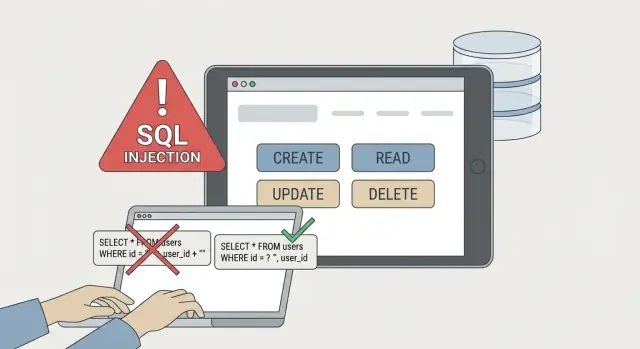
What SQL injection looks like in CRUD apps
SQL injection happens when an app lets user input change the meaning of a database query. Instead of being treated as plain data, the input becomes part of the SQL. That can expose private data, change records, or wipe tables.
CRUD endpoints are common targets because they accept input constantly: search boxes, filters, edit forms, IDs in URLs, and admin screens. Attackers don’t need anything fancy. They need one place where input gets stitched into a query.
In many AI-generated CRUD prototypes, the risky spots look “normal” at first glance. Code generators often reach for quick string concatenation, especially around search, filters, and sorting. They also tend to pack request parsing, query building, and response formatting into one long function, which makes a single unsafe line easy to miss.
Signs a CRUD route might be injectable:
- SQL strings built with
+, template strings, or string replace using request values - Search text dropped directly into
LIKE '%...%' - Dynamic
ORDER BYor column names taken from query params - Admin endpoints that trust inputs because they’re “internal”
- Errors that show raw SQL or database details
A simple rule holds up well: if the database can ever interpret user input as SQL keywords (like OR, UNION, DROP), you’re not actually patched. If the database only sees user input as values bound to parameters, you’re moving in the safe direction.
Common vulnerable patterns AI tools produce
Injection tends to show up in the same places: search, filtering, sorting, and pagination. These areas feel like harmless string handling, but they touch the database on almost every request.
One classic pattern is concatenating user input into a WHERE clause:
// Vulnerable
const q = req.query.q;
const sql = "SELECT * FROM users WHERE email = '" + q + "'";
await db.query(sql);
Another common pattern is building “optional filters” by appending raw fragments in a loop, especially LIKE '%${q}%' and status = '${status}'. The risk grows fast as soon as one field is missed or “sanitized” with a weak string replace.
Sorting and pagination are frequent leftovers. People look for injection in WHERE, then forget that ORDER BY and LIMIT often come straight from query params:
// Vulnerable
const sort = req.query.sort;     // e.g. "created_at DESC"
const limit = req.query.limit;   // e.g. "50"
const sql = `SELECT * FROM orders ORDER BY ${sort} LIMIT ${limit}`;
await db.query(sql);
You’ll also see repeated shortcuts in prototypes:
- Escaping in some places but forgetting it in one endpoint
- Allowing arbitrary column names for “flexible” sorting
- Treating IDs as safe because “they’re numbers,” then using them as strings
- Logging raw SQL with user input (which can leak sensitive data)
- Copy-pasting one unsafe query pattern across many routes
If you inherited an AI-built app from tools like Bolt, v0, Cursor, or Replit, assume these patterns exist until you prove they don’t.
Concrete example: fixing raw SQL with parameters
String interpolation often looks clean, but it mixes code and user input in the same string.
Vulnerable example:
// GET /users?email=...
const email = req.query.email;
const sql = `SELECT id, email FROM users WHERE email = '${email}'`;
const rows = await db.query(sql);
If someone passes x' OR '1'='1, the query can return every user. The fix is to keep the SQL text static and pass values separately.
Safe replacement: placeholders + separate values
PostgreSQL placeholders:
const email = req.query.email;
const sql = "SELECT id, email FROM users WHERE email = $1";
const rows = await db.query(sql, [email]);
MySQL/SQLite placeholders:
const sql = "SELECT id, email FROM users WHERE email = ?";
const rows = await db.query(sql, [email]);
The key is simple: input is not pasted into the SQL string. The driver sends it as data, not code.
Edge cases: IN (...) lists and empty values
Filters like “status in [a, b, c]” often get patched incorrectly.
Unsafe:
const statuses = req.query.statuses; // e.g. "active,paused"
const sql = `SELECT * FROM users WHERE status IN (${statuses})`;
Safer: build placeholders and still pass values separately.
const statuses = (req.query.statuses || "")
  .split(",")
  .map(s => s.trim())
  .filter(Boolean);

if (statuses.length === 0) return res.json([]); // or skip the filter

const placeholders = statuses.map((_, i) => `$${i + 1}`).join(", ");
const sql = `SELECT * FROM users WHERE status IN (${placeholders})`;
const rows = await db.query(sql, statuses);
Practical rules that prevent messy regressions:
- Treat empty strings as “no filter,” not as SQL text
- Validate types early (numbers should be numbers before you query)
- Never accept raw SQL fragments from the request, even “harmless” ones
- Keep query building in one place so fixes stick
Concrete example: safe filtering without string-built SQL
A common injection pattern is “optional filters” turned into a growing SQL string.
Vulnerable shape:
// ❌ Vulnerable: string-built WHERE
let where = "WHERE 1=1";
if (q) where += ` AND name ILIKE '%${q}%'`;
if (minPrice) where += ` AND price >= ${minPrice}`;
if (startDate) where += ` AND created_at >= '${startDate}'`;

const sql = `SELECT * FROM products ${where} ORDER BY created_at DESC LIMIT ${limit}`;
Safer pattern: build conditions separately, keep user input out of the SQL text, and pass values as parameters.
// ✅ Safe: conditions + params
const conditions = [];
const params = [];

if (q) {
  params.push(`%${q}%`);
  conditions.push(`name ILIKE $${params.length}`);
}

if (minPrice) {
  params.push(Number(minPrice));
  conditions.push(`price >= $${params.length}`);
}

if (startDate) {
  params.push(new Date(startDate));
  conditions.push(`created_at >= $${params.length}`);
}

const whereSql = conditions.length ? `WHERE ${conditions.join(" AND ")}` : "";
const sql = `SELECT * FROM products ${whereSql} ORDER BY created_at DESC LIMIT 50`;
const rows = await db.query(sql, params);
A few details that prevent subtle bugs:
- Put
%wildcards in the parameter, not in the SQL string - Parse and validate dates, then bind them as parameters
- Cast numeric ranges and reject
NaNbefore binding - If a filter is optional, omit the condition entirely
Concrete example: safe sorting and pagination
Sorting is where otherwise “parameterized” endpoints often get risky. Values like search text can be parameterized. Column names and sort directions can’t.
The safe pattern: map user input to a small allowlist of known-safe columns and directions, and reject everything else.
// Example: Node/Express with Postgres (pg)
const SORT_FIELDS = {
  createdAt: 'created_at',
  email: 'email',
  status: 'status'
};

function buildListUsersQuery({ sort = 'createdAt', dir = 'desc', page = 1, pageSize = 20 }) {
  const field = SORT_FIELDS[sort];
  if (!field) throw new Error('Invalid sort field');

  const direction = String(dir).toLowerCase() === 'asc' ? 'ASC' : 'DESC';

  const limit = Math.min(Math.max(parseInt(pageSize, 10) || 20, 1), 100);
  const offset = Math.max((parseInt(page, 10) || 1) - 1, 0) * limit;

  // Only the allowlisted identifier and direction are interpolated.
  // Pagination values stay parameterized.
  return {
    text: `SELECT id, email, status, created_at FROM users ORDER BY ${field} ${direction} LIMIT $1 OFFSET $2`,
    values: [limit, offset]
  };
}
Step-by-step patch workflow for an existing CRUD app
When a CRUD app “mostly works,” injection often hides in the edges: search, filters, sort, admin panels, and bulk actions. A patch workflow keeps you from fixing one endpoint while leaving three others open.
-
Inventory every query and input path. List endpoint, query type (read/write), where inputs come from, and which fields reach the database. Include background jobs and admin tools.
-
Replace string-built SQL with parameters. Search for query concatenation and swap to parameterized queries or a query builder. Do this even for “internal” endpoints.
-
Add allowlists for identifiers. You can’t safely parameterize column names, table names, or sort directions. If user input controls
ORDER BY, selected columns, or joins, map inputs to known-safe identifiers. -
Add a few focused tests. Send payloads that try to break quoting (a single quote), common boolean tricks (
OR 1=1), and unexpected types. Assert safe behavior: no extra rows, no data leaks, no SQL errors exposed. -
Re-check logs and error handling. Trigger errors on purpose and confirm responses don’t include raw SQL, stack traces, or driver details. Keep detailed errors in server logs, and redact values that could contain sensitive data.
Safer ORM usage (and the traps to avoid)
An ORM can block injection, but only if you stay on its safe paths. That usually means letting the ORM build SQL while you pass user input as values.
“Safe” patterns look like “filter by these fields,” not “build a SQL string.”
// Example: safe parameter binding (generic)
const users = await db.user.findMany({
  where: {
    email: inputEmail,   // value is bound, not concatenated
    isActive: true
  },
  take: 25
});

// Example: query builder style with placeholders
const users2 = await knex('users')
  .where('email', '=', inputEmail)
  .andWhere('is_active', '=', true)
  .limit(25);
ORMS still have escape hatches, and AI-generated code often overuses them. Be careful with:
- Raw query helpers with string interpolation
- Methods explicitly labeled “unsafe”
- Passing user input into identifiers (column names, table names)
- APIs that accept a SQL fragment string instead of a value
If you must use raw SQL, use the ORM’s parameter feature, not template strings. For dynamic column names, use a whitelist.
Common mistakes when patching SQL injection
Input validation isn’t enough. Blocking a few characters or trimming whitespace can reduce noise, but it doesn’t stop injection if a value still ends up inside a SQL string.
Hand-escaping is another trap. It feels safer to replace quotes, but escaping rules differ across databases and edge cases are easy to miss. Parameterized queries are safer and easier to review.
Prepared statements can also be used wrong. A frequent mistake is parameterizing the search value but still concatenating SQL pieces like ORDER BY:
const sql = `SELECT * FROM users WHERE name ILIKE $1 ORDER BY ${sort} ${dir}`;
await db.query(sql, [`%${q}%`]);
If sort or dir comes from the request, an attacker can break out. Fix it with a strict allowlist for identifiers.
Logging is an underrated risk too. Logging full SQL plus user input can leak emails, tokens, or other secrets copied into a search box. Keep logs high-level and mask sensitive fields.
Realistic example: the vulnerable admin search endpoint
A founder ships an AI-made admin panel in a hurry. It has a simple search box: “Search users by email or name.” The backend builds a SQL string from whatever the admin types, then runs it as-is.
It looks harmless because it’s “admin-only.” But admin endpoints get exposed in the real world: a misconfigured route, a leaked cookie, a weak password, or an internal tool accidentally deployed on a public URL.
The injection happens when the search input is placed inside a query like:
SELECT id, email, role FROM users WHERE email LIKE '%{q}%' OR name LIKE '%{q}%'
A realistic payload closes the quote and adds a true condition, like %' OR 1=1 --. Now the WHERE clause always matches, and the response can dump far more data than intended.
In a patched version, the same search uses parameters. If someone submits %' OR 1=1 --, it’s treated as plain text and behaves like a normal (usually unsuccessful) search.
Quick checklist before you ship
Before you call it done, do a fast pass on the places injection still hides.
- Search the code for SQL text near request values. If you see string concatenation or template strings, treat it as unsafe until proven otherwise.
- Re-check every dynamic clause, not just
WHERE.ORDER BY,LIMIT/OFFSET, andIN (...)are common leftovers. - Confirm every user-controlled value is bound as a parameter (including numeric inputs like IDs and page sizes).
- Make sure errors don’t leak SQL text or stack traces.
- Probe high-risk routes (login, search, admin filters) with a few basic payloads and verify behavior stays inert.
Next steps: make the safe path the default
The real win isn’t patching one query. It’s making injection hard to reintroduce the next time an AI tool generates a “helpful” CRUD endpoint.
A simple rule that prevents most regressions: no raw SQL built from request strings. If you need dynamic sorting or field selection, use strict allowlists.
If you inherited an AI-generated codebase and want a fast, structured review, FixMyMess (fixmymess.ai) focuses on diagnosing and repairing these prototype-era issues, including unsafe query patterns, authentication breakage, and security hardening, before they reach production.