SSRF in AI-generated apps: spot endpoints and harden fetches
SSRF in AI-generated apps can expose internal services. Learn how to find risky fetch endpoints and apply allowlists, DNS and request hardening.
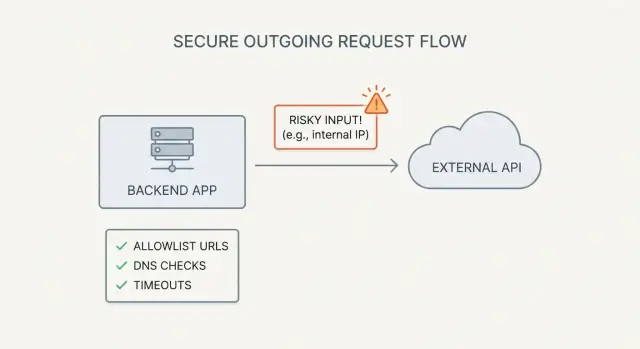
What SSRF is (and why AI-built apps trigger it)
SSRF (server-side request forgery) is what happens when your app can be tricked into making a network request for an attacker.
The attacker doesn't need access to your servers. They just need any feature that accepts a URL (or hostname) and then fetches it from the backend.
A simple example: you add an "Import from URL" button. The browser sends url=https://example.com/data.json to your API, and your server downloads the file. If that same endpoint also accepts http://localhost:3000/admin or http://169.254.169.254/ (cloud metadata), your server can end up exposing internal data.
This shows up constantly in AI-generated prototypes. They often include "fetch anything" endpoints (image proxies, link previews, webhook testers, PDF/screenshot generators) because they make demos feel complete. But they ship without the guardrails that make server-side fetching safe.
SSRF is dangerous because servers usually have access users don't. A successful SSRF can:
- Reach internal admin panels and services on
localhostor private IPs - Read cloud metadata endpoints and steal credentials
- Scan your internal network and find open ports and services
- Bypass IP-based rules (because the request comes from your server)
SSRF isn't the same as a browser making requests. If a user's browser loads a URL directly, that's client-side. SSRF is specifically your backend (or a serverless function) doing the fetch, with your network access and your secrets.
Where SSRF usually hides: endpoints to look for
SSRF tends to hide anywhere the server will fetch a URL a user can influence. These endpoints look harmless because they're "just pulling content," but they can be used to reach internal services, cloud metadata, or other private targets.
Start by listing product features that accept a URL, directly or indirectly. Common hiding spots include link previews, import-from-URL tools (CSV/JSON/templates), webhook testers, file and image proxy downloads, and RSS/feed readers.
Also check admin-only tools. AI-generated apps often include quick "connection tester" pages, health checks that ping dependencies, or integration setup screens that verify a URL. These are high risk because they can run with elevated network access and skip normal validation.
Don't forget delayed fetches. Background jobs, queues, and cron tasks might store a URL now and fetch it later. That gap can make the bug harder to notice.
When you search the codebase (and request logs), watch for parameter names that often carry URLs, even when they sound innocent: url, callback, avatarUrl, webhookUrl, redirect.
A concrete example: a "profile photo from URL" setting might fetch the image server-side to resize it. If the endpoint accepts avatarUrl without strict checks, an attacker can point it at an internal address and use the image fetch as a tunnel.
A quick threat model for server-side fetch abuse
Before you fix anything, get clear on what an attacker is trying to reach.
First, map what your server can reach from its network. That usually includes localhost services (admin panels, debug ports), private IP ranges inside your VPC, and cloud provider metadata endpoints that can hand out credentials. If the app runs in a container, include internal service names and sidecars.
Next, decide what you must protect. The biggest prizes are secrets and tokens (API keys, session secrets), database credentials, internal dashboards, and any service that trusts requests coming from inside your network.
Finally, write down the boundary for each server-side fetch feature:
- Who can trigger it (public, user, admin)
- What it's allowed to fetch (exact domains or a small partner list)
- What must never be reachable (localhost, private IPs, metadata)
- What the response is used for (stored file, parsed data, rendered HTML)
If you inherited a prototype from tools like Bolt or Replit, this quick threat model is a strong first pass before a deeper audit.
Step by step: find every server-side fetch in your codebase
SSRF usually starts with a simple feature: "fetch this URL," "import from link," "preview a webhook," or "check if this site is up." Before adding defenses, you need a full inventory of every place your server makes outbound requests.
1) Hunt for outbound requests (including wrappers)
Start with a plain text search across the repo. Look for common HTTP clients and wrapper helpers, not just fetch.
- JavaScript/Node:
fetch,axios,got,superagent,node-fetch - Python:
requests,httpx,urllib,aiohttp - Ruby:
Net::HTTP,Faraday - Shell wrappers:
curl,wget,exec(,spawn(
Also search for words that often surround these features: "webhook", "callback", "import", "download", "proxy", "scrape".
If the app was generated by tools like Lovable, Bolt, v0, Cursor, or Replit, look for helper modules that hide network calls behind names like getUrlContent() or scrapePage().
2) Trace where the URL comes from
For each call site, follow the variable backward until you hit the source. Common sources include request body fields, query parameters, headers, database rows, environment variables, and template strings that combine user input with a base URL.
Pay attention to indirect control, like a user-controlled subdomain, a per-tenant baseUrl, or an ID that maps to a URL in the database.
3) Check hidden fetch paths
Confirm whether the client follows redirects, resolves short links, or retries with alternate URLs. A request that looks safe can become unsafe after a 302 to an internal host.
4) Confirm behavior and document it
Trigger failures on purpose (bad domain, timeout, large response) and see what happens: what gets logged, what error text is returned, and whether any response data is reflected back to the user.
Document each endpoint with its inputs, outputs, auth requirements, and intended destination domains. This inventory becomes your SSRF fix plan.
Allowlists that work: validate host, scheme, and port
Blocklists fail because URL rules are tricky and attackers are persistent. A strict allowlist of known good destinations is the safest default, especially when a feature lets users fetch or import content from a URL.
Parse and normalize the URL before comparing it to anything. Don't check the raw string. Parse it into scheme, hostname, port, and path. Compare the normalized hostname and the effective port (including defaults like 443 for https).
A practical allowlist flow:
- Parse the URL with a real URL parser (not regex)
- Require the scheme to be https (or http only if you truly need it)
- Require a hostname (avoid bare IPs unless you explicitly allow them)
- Allow only approved ports (usually 443, sometimes 80)
- Match the hostname against your allowlist rules
Schemes and ports are common escape hatches. If you validate only the domain but forget the scheme, an attacker may try unexpected handlers in some environments. If you allow any port, the attacker can probe internal services on odd ports even if the host looks acceptable.
Subdomains also need clear rules. Exact match is simplest (only api.example.com). If you must use wildcards, enforce a real boundary so example.com.evil.com doesn't slip in.
Treat the allowlist as configuration, not scattered code. Keep it in one place and log which rule matched so reviews are easier and exceptions don't quietly stick around.
DNS protections: stop rebinding and internal IP tricks
DNS rebinding is a simple trick with a nasty result. Your app validates a URL like https://example.com/image.png. It looks harmless. But the attacker controls example.com and can change what it resolves to after your checks. By the time your server connects, that hostname may point to 127.0.0.1 or a cloud metadata IP.
That's why basic hostname checks aren't enough.
A safer pattern is to resolve the hostname yourself, check every IP you get back, then connect only if all are safe.
What to block (IPv4 and IPv6)
When you resolve the hostname, reject any address in private or special ranges, including private networks (RFC1918) and IPv6 ULA, loopback (127.0.0.1, ::1), link-local (169.254.0.0/16, fe80::/10), reserved/unspecified ranges (like 0.0.0.0, ::), and IPv4-mapped IPv6 forms.
Check all returned records, not just the first. Attackers often rely on multiple A/AAAA records where one looks public (passes validation) and another is internal.
Re-check close to the connection
If your HTTP client supports it, resolve and validate right before opening the socket, and avoid later DNS lookups during redirects. If you can't control that, keep the time between validation and fetch as small as possible.
Request hardening: timeouts, redirects, and safe defaults
Even with a good allowlist, server-side HTTP clients often stay too permissive by default. The goal is straightforward: fail fast, fetch less, and never follow redirects into places you didn't intend.
Start by setting strict limits on every server-side fetch. If a request is slow, large, or unclear, treat it as suspicious and stop.
Safer defaults for server-side fetch
A baseline that works well in practice:
- Set tight timeouts (separate connect and read) and cap the response size.
- Disable redirects for user-supplied URLs, or allow one redirect only if the final destination is re-validated.
- Restrict methods to GET (and maybe HEAD).
- Strip sensitive headers. Don't attach cookies, API keys, or internal auth tokens to outbound requests.
- Log a short summary (host, path, status, time). Avoid logging full URLs if they can contain secrets.
A common failure pattern: a "preview this URL" feature allows redirects. An attacker submits a URL that 302-redirects to an internal admin panel or a cloud metadata address. Your app follows it and accidentally forwards an Authorization header reused for internal calls.
Errors: keep users safe, keep engineers informed
When a fetch is blocked or fails, show a generic message to the user (for example, "Could not fetch that URL"). Put the detailed reason (timeout vs redirect vs blocked host) only in internal logs. Detailed UI errors often teach attackers which rules you're using.
Common mistakes that still leave SSRF open
SSRF bugs often survive "basic" fixes. The result looks protected, but an attacker can still make your server talk to internal services or metadata endpoints.
Many teams start with string checks like startsWith('https://'). That breaks with tricky URLs, unusual encodings, or URLs that look safe but resolve somewhere dangerous.
Other common misses:
- Allowing redirects without re-checking every hop
- Validating the host, then connecting using a different value later
- Blocking only
127.0.0.1and forgetting IPv6 loopback (::1),0.0.0.0, and private ranges like10.*,172.16.*,192.168.* - Skipping DNS rebinding defenses (validate once, fetch later)
If you return fetched content directly to the browser, you can create a second problem: your server becomes a proxy. Without strict limits, attackers can pull huge files to run up costs, or send unexpected content types that your frontend mishandles.
A quick pre-launch checklist for SSRF defenses
Before launch, assume someone will try to turn any server-side fetch into a tunnel.
Inventory every place a user (or another system) can influence a URL, host, or remote file reference. Include obvious fields like "import from URL," plus webhook testers, image previewers, PDF generators, feed readers, "check my website" features, and integrations that accept callback URLs.
In staging, validate a few essentials:
- Every endpoint and background job that accepts a URL/hostname is listed.
- The allowlist is enforced server-side for every fetch (not just in the UI).
- Scheme, host, and port are validated before the request.
- DNS/IP checks block internal ranges for IPv4 and IPv6, and the check happens close to the connection.
- Timeouts, response size caps, and redirect rules are in place.
For simple "known-bad target" tests, try localhost, a private IP, an internal hostname used in your environment, and the common cloud metadata address. You're not trying to exploit anything, just confirming your app refuses the request and doesn't leak helpful error details.
Example: fixing an "import from URL" feature safely
A common pattern is a convenience feature like "Import avatar from URL." A generator adds a backend endpoint that takes a URL, downloads the image server-side, and stores it.
The exploit path is predictable. An attacker submits a URL that isn't an image host at all, but an internal address like a metadata service, a private admin panel, or a database HTTP port exposed only inside your network. If your server fetches it, the attacker can learn secrets, internal hostnames, or even get HTML back if you store or preview the response.
Make the fetch boring and strict:
- Allowlist only specific image hosts you control or trust.
- Require https and block non-standard ports.
- Resolve DNS yourself and block private, loopback, and link-local IPs before connecting.
- Disable redirects, or allow a single redirect that still passes validation.
- Set tight timeouts and a small max download size, and verify content type and magic bytes.
Add monitoring so you notice probing. It often shows up as many failed requests across different hosts, repeated attempts to hit 169.254.169.254 or localhost, or spikes in blocked DNS results and redirect blocks.
Next steps: simplify fetch features and get a focused review
If you found even one server-side fetch that can hit a user-provided URL, assume there are more. The fastest risk reduction is to shrink the surface area.
Decide which fetch features you truly need. Many apps ship with extras like "import from URL," "preview this link," "fetch Open Graph data," "webhook tester," "image proxy," or "connect to any API." Each one is a potential SSRF entry point. If a feature isn't essential, removing it is often safer than hardening it forever.
Then set a few rules that must be true for every server-side fetch:
- Only approved schemes, ports, and hosts are allowed (no "any URL").
- DNS and IP checks happen at request time, not just once during validation.
- Timeouts, redirect limits, and response size caps are always on.
- Fetching is centralized in one helper so new endpoints can't bypass protections.
If you want a fast outside check for an AI-generated codebase, FixMyMess (fixmymess.ai) does codebase diagnosis and security hardening for prototypes built with tools like Lovable, Bolt, v0, Cursor, and Replit. They also offer a free code audit to quickly identify SSRF-style fetch risks and other high-impact issues before you ship.
FAQ
What is SSRF in plain English?
SSRF is when your backend (or a serverless function) can be tricked into fetching a URL an attacker controls. Because the request happens from your server, it may reach internal services, private IPs, or cloud metadata that a normal user can’t access.
Why do AI-built apps get SSRF bugs so often?
AI-generated prototypes often add “convenience” features that fetch URLs server-side, like link previews, image proxies, import-from-URL, webhook testers, or screenshot/PDF generators. They work for demos, but usually ship without strict allowlists, DNS/IP checks, and redirect controls.
What endpoints should I check first for SSRF?
Look for any endpoint or job that accepts something like url, webhookUrl, callback, avatarUrl, redirect, or an “integration test” address. Also check background workers and cron tasks that store a URL now and fetch it later, because SSRF can hide outside normal request paths.
How do I find every server-side fetch in my codebase?
Start by inventorying every outbound request your server can make by searching for HTTP clients (like fetch/axios/requests) and any internal helpers that wrap them. For each call, trace where the URL originates and verify whether user input can influence any part of it, even indirectly through database fields or per-tenant config.
Should I use an allowlist or a blocklist to prevent SSRF?
Default to an allowlist of exact domains you expect, and reject everything else. Parse and normalize the URL with a real parser, require https, and only allow safe ports (usually 443, sometimes 80) so attackers can’t use odd ports to probe internal services.
How do I protect against DNS rebinding and “it resolves to localhost” tricks?
Because DNS can change after you validate the hostname, you should resolve the hostname yourself, inspect every returned IP, and reject private, loopback, link-local, and other special ranges for both IPv4 and IPv6. Do this check as close to the actual connection as you can, not seen once and reused later.
What are the safest defaults for server-side HTTP requests?
Tighten timeouts, cap maximum response size, and treat redirects as dangerous for user-supplied URLs. The safest default is no redirects; if you must allow them, re-validate the destination after each hop before connecting and never forward internal auth headers or cookies to the remote host.
What are the most common SSRF “fixes” that still leave me vulnerable?
String checks like startsWith('https://') and simple “block localhost” rules miss common bypasses such as IPv6 loopback, private ranges, redirects, and DNS changes between validation and connection. Another frequent mistake is validating one host value but actually connecting using a different, later-derived value.
How can I quickly test whether my SSRF defenses actually work?
Start by attempting known-bad targets like localhost, private IP ranges, and the common cloud metadata IP, and confirm your app blocks them without leaking detailed reasons in user-facing errors. Also test redirect behavior and make sure the final destination is still validated, not just the initial URL.
Can FixMyMess help harden an AI-generated codebase against SSRF?
If your app was generated by tools like Lovable, Bolt, v0, Cursor, or Replit, it’s common to miss one hidden fetch path or background job. FixMyMess can run a free code audit to inventory server-side fetches, then harden the code (allowlists, DNS/IP checks, redirect rules, timeouts) and get you to a production-ready state quickly.