Staging Environment Parity Checklist: Predict Production Issues
Use this staging environment parity checklist to match auth, webhooks, storage, cron, and flags so staging failures mirror production before release.
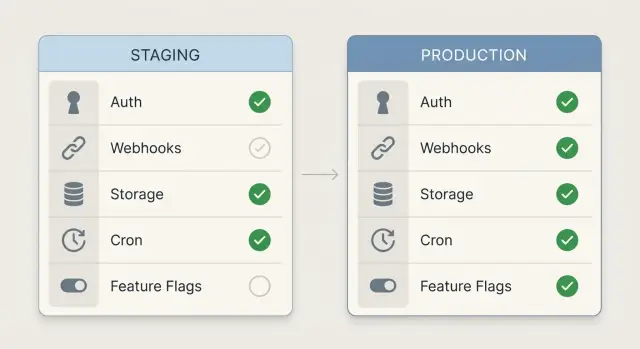
Why staging does not predict production by default
Parity is simple: staging should behave like production in the ways that can break a release. If the same request, user action, or background job runs in staging, it should fail or succeed for the same reasons it would in production.
Staging “passes” when you’re accidentally testing a different world. Maybe staging uses a different OAuth app, relaxed cookie settings, fake webhook senders, a wide-open storage bucket, or background jobs that never run. Everything looks fine until real traffic hits real services with real rules.
Production failures that sneak past staging usually come from a few repeat offenders: domain and redirect differences (OAuth callbacks), webhook signature and retry mismatches, storage permissions and CORS drift, disabled workers, and feature flags that don’t match.
Parity does not mean copying production data into staging. You can keep staging safe by using test users, fake payments, and scrubbed sample records. The goal is matching configuration and behavior, not exposing customer information.
A common example: a team tests login in staging with an OAuth app that allows any redirect URL. Production is strict, so the same login flow fails for real users.
Start with the basics: versions, configs, and domains
Most staging surprises happen for a boring reason: you’re not running the same app.
First, confirm the deployed version and build settings match. Teams often test a fresh commit in staging while production is still on last week’s build, or they ship different build flags that change behavior (debug mode, API base URL selection, minification).
Treat environment variables the same way. You don’t need the same secret values, but you do need the same variable names and formats. A staging-only name like STRIPE_KEY_TEST can hide a missing STRIPE_SECRET_KEY until release day.
Domains are another silent split. If production is on app.example.com and staging is on a random host, redirects and cookies can behave differently, especially with HTTPS and strict security settings. Make sure redirects, TLS, and callback URLs point to the right domain for each environment, with the same rules.
Finally, check runtime differences that change results without changing code: Node/Python versions, base OS images, database versions, and region settings. These can affect date handling, file paths, and latency.
A quick “basics” pass:
- Same git commit (or release tag) and the same build command
- Same env var keys and types (string vs JSON), with different values allowed
- Same domain patterns, HTTPS behavior, and redirect rules
- Same runtime versions and container base image
- Same region settings (time zone, locale) where they matter
Auth parity: providers, redirects, cookies, and sessions
Auth is where “works in staging” falls apart most often. Treat login as a full system, not a button that opens a popup.
Match the identity providers you support. If staging only has Google enabled but production also has GitHub or Auth0, you’re not testing the real app. Provider differences change profile fields, email verification behavior, and token refresh rules.
Then compare OAuth settings one by one. Redirect URIs and allowed origins must match exactly, including protocol and subdomain. Common failures include:
- Staging allows
http://localhostbut production requires HTTPS - A www vs non-www mismatch blocks the callback
- The provider still has old redirect URIs saved from a previous staging domain
Cookies and sessions also need identical security settings. Small flags change everything: Secure, HttpOnly, SameSite, cookie domain, and session lifetime. If staging is on plain HTTP or a different top-level domain, cookie behavior can look “fine” while production breaks after login.
Before a release, run an auth check that looks like real usage:
- Log in with every provider you support, then refresh and confirm you stay logged in
- Complete password reset and email verification end to end (including the email link)
- Test in an incognito window and on mobile Safari (cookie rules differ)
- Confirm logout clears the session and tokens, not just UI state
- Trigger rate limits with repeated attempts and confirm the error is handled
Don’t forget production-only protections: IP blocks, WAF rules, bot detection, and provider rate limits. Staging won’t warn you about these unless you test them.
Webhook parity: endpoints, signatures, and retries
Webhooks are another place where staging can “lie.” In staging, the provider might be pointing at the wrong URL, using a different secret, or sending a different event set than production. Then payments, signups, or notifications fail for real users.
Start by listing every webhook sender and the exact events your app relies on (Stripe, GitHub, Slack, Zapier, internal services). Pull it from provider dashboards and code, not memory.
Make sure each provider has the staging endpoint registered and active. A common mistake is “staging URL added,” but the old endpoint is still selected, disabled, or configured for a different event set.
Treat signatures as a strict contract. Staging should verify signatures the same way production does: same header name, same hashing algorithm, same raw body handling. Many frameworks break verification if they parse JSON before verifying. If staging skips verification “to move faster,” you’re testing a different app.
A practical webhook check:
- Replay a real production payload (with sensitive data removed) into staging and compare HTTP status and response time
- Confirm the signing secret in staging matches what the provider uses for the staging endpoint
- Force a failure (return 500) and confirm the provider retries as expected
- Verify idempotency: the same event delivered twice should not double-charge, double-create, or double-email
- Log a stable request ID so you can trace duplicates across retries
Example: Stripe retries a payment_succeeded webhook after a timeout. The app creates two orders because the handler has no idempotency check. The code change is often small, but the production impact isn’t.
Storage parity: permissions, CORS, and file workflows
If your app touches files, storage is an easy place for staging to mislead you. A build that works with local disk and open permissions can fail the minute it hits a real bucket with stricter rules.
Match the storage type and access model. If production uses S3 or GCS with private objects, staging should too. Differences in bucket policy, IAM roles, or public access settings often show up as “random” 403 errors that look like app bugs.
CORS is the next trap. An upload that works in one environment can fail in the other if allowed origins, headers, or methods differ. Make sure both environments allow the same domains and the same upload flow (direct-to-bucket vs via your API).
Also test the workflow, not just permissions. Use real file sizes and types, not tiny demo images. Many failures come from MIME type handling, server limits, or storage rules that reject certain extensions.
A quick storage check:
- Upload a large file and confirm the UI handles progress and timeouts
- Download it from the same UI path users will use (not a dev shortcut)
- Delete it and confirm the record and the object are both removed
- Generate an expiring link and confirm it expires when it should
- Run any processing (thumbnails, OCR, virus scan) end to end
Cron and background jobs: schedules, runners, and alerts
Scheduled work often fails quietly. A checkout flow can look fine in the browser, but if the nightly invoice job, cleanup task, or email sender behaves differently, production breaks later and it feels random.
Write down every scheduled job and what triggers it: cron schedules, queue workers, and “runs every X minutes” timers inside the app. If a job exists in production but not staging, staging can’t predict the failure.
Time settings are a classic trap. Match time zone, daylight saving behavior, and what “midnight” means. A job that runs at 00:05 in production might run at a different local time in staging, hitting different data and creating edge cases.
Confirm the job runner is actually on in staging. Many teams deploy the web app but forget to enable the scheduler, worker dyno, or container. The result is silent success: no errors, because nothing ran.
Before a release:
- List each job, its schedule, and the time zone it uses
- Confirm the scheduler/worker process is enabled and has the same env vars
- Force-run key jobs in staging with production-like data volume
- Break one job on purpose to confirm retries, backoff, and alerting fire
- Check external dependencies: queues, email/SMS, payment APIs, and rate limits
Feature flags: matching defaults, rules, and fallbacks
Feature flags are helpful until staging and production disagree about what’s “on.” Treat flags like code: same source, same rules, and the same failure behavior.
Inventory every flag your app reads and its intended default. Teams often flip defaults in staging for demos, then forget. That’s how a “safe” release turns into a surprise launch.
Compare how flags are evaluated: user targeting, org targeting, percentage rollouts, and “only enabled for internal emails.” Smaller staging user sets can accidentally bypass important rule paths.
Check the plumbing too. Staging should use the same flag service and SDK version as production. Different SDK versions can change caching, evaluation order, and how anonymous users are handled.
A solid flag check:
- Compare current flag states and defaults in both environments
- Compare targeting rules (users, orgs, segments, percentage rollouts)
- Confirm the same provider and SDK version are deployed
- Simulate an outage (block the flag service) and verify the app behaves safely
- Search the code for hardcoded “if staging then…” overrides
Decide fallback behavior on purpose. For payments, auth, or admin tools, failing open (feature enabled) can be risky.
How to run a parity check step by step
Parity checks work best when staging is a rehearsal, not a guess.
Pick one critical user journey that touches the most systems. For many apps, it’s: sign up, verify email, upgrade, then log out and back in.
Run it in staging with fresh accounts and real browsers. As you go, note every external call you can observe: auth, payments, email, storage, webhooks, analytics, feature flags. Confirm each dependency has a staging equivalent (or a safe sandbox) with matching settings, not “close enough.”
After the run, capture a few specifics while they’re fresh: which auth provider was used, what redirect URLs were hit, whether webhook signature checks ran, and which background jobs fired later.
A typical parity win: staging signup works, but “upgrade” never unlocks features. Notes reveal the payment webhook is pointing to an old staging endpoint, so the event never reaches the app.
Common parity mistakes that cause late-night rollbacks
Most rollbacks start with a small mismatch that looked harmless in staging.
Authentication failures are often “almost the same”: a different OAuth app, missing redirect URLs, cookie domains that don’t match, or a callback path that differs by one character. Everything works locally, staging looks fine, then production fails with a redirect loop or a session that never sticks.
Webhooks cause a different kind of damage. Staging sometimes points at production by accident, sending test events into real data. Even when endpoints are correct, signature secrets or retry settings can differ, so production behaves more aggressively than staging.
Secrets are another release-night classic. A convenient prototype key ends up in client code, build output, or logs. As production traffic increases, those logs get copied around and the blast radius grows.
Five mistakes that slip through reviews:
- Auth redirects and cookie settings differ by one domain or protocol
- Staging hits production webhooks, queues, or databases by accident
- Secret values are printed to logs or bundled into the frontend
- Cron and background jobs are off in staging, so time-based bugs never appear
- Feature flag defaults or targeting rules silently differ between environments
Quick parity checklist you can copy into a release note
Release parity checks (staging matches production):
- Build + runtime match: same runtime versions, same build mode, same env var keys present (values can differ), and the same domain/subdomain pattern.
- Login flows verified end to end: redirects/callback URLs are registered, cookie settings behave the same (Secure, SameSite, domain), sessions survive refresh, and password reset or magic-link emails complete.
- Webhooks behave like production: provider is pointed at the correct staging endpoint, signature verification is on, retries don’t create duplicates, and failed deliveries are visible.
- File storage works under real rules: upload limits match, permissions match (public vs private), CORS allows the exact frontend origin, and download links behave the same.
- Background work is predictable: schedules match, time zone is confirmed, workers are enabled, failures alert someone, and flags have matching defaults/rules with a safe fallback.
A realistic example: the release that broke on day one
A founder ships an AI-generated SaaS prototype (built in Cursor and Replit) that looked perfect in staging. On launch morning, signups spike, and then the first support message lands: “I can’t log in.”
Staging login worked every time, but production users got bounced back to the homepage after the OAuth callback. The bug was simple: production used a different domain, but the auth provider still had the old redirect URI saved from staging. To make it worse, production cookies were set with a stricter SameSite rule, so sessions weren’t sticking after the redirect.
While the team scrambles, a second issue shows up. Payments are “successful,” but no one gets access. The payment provider is sending webhooks, but the app isn’t processing them because the production webhook endpoint was never registered. Staging tests passed because the team used a manual “mark paid” toggle instead of real webhook events.
Then file uploads break only for real customers. In staging, uploads went to a permissive bucket with wide CORS settings. In production, the storage role lacked permission to write, and allowed origins didn’t include the live domain, so browsers blocked the upload request.
A short parity rehearsal would have caught all three by forcing a verification of the exact integrations: auth redirect URIs and cookie behavior, webhook registration and signature checks, and bucket permissions plus CORS.
Next steps to keep staging and production in sync
Parity is easiest to maintain when you write it down, automate a small check, and make someone accountable for fixing drift.
Keep a single source of truth for environment variables and integrations. A simple table is enough: name, purpose, where it’s set, and what “valid” looks like in staging vs production.
Add a repeatable smoke test that runs on every release: log in, trigger one webhook, upload a file, and confirm one background job ran. If one of these fails in staging, stop and fix it before you learn the same lesson in production.
A practical way to decide what should be real vs sandboxed in staging:
- Auth: real provider, separate app/client, staging callback domain
- Payments/email/SMS: sandbox where possible, with clear test accounts
- Webhooks: real signing and retry behavior, pointed at staging endpoints
- Storage: real bucket rules and CORS, but a staging bucket
- Cron/jobs: real schedules, but safe data and safe recipients
If you inherited an AI-generated codebase and parity keeps falling apart, the issue is often deeper than a missed setting: hard-coded URLs, exposed secrets, fragile webhook handlers, or background workers that were never wired correctly. FixMyMess (fixmymess.ai) helps teams turn broken AI-generated prototypes into production-ready software by diagnosing and fixing issues like auth misconfigurations, webhook reliability problems, and insecure defaults.