Replace string status fields with enums to stop workflow typos
Replace string status fields with enums and prevent small typos like canceled vs cancelled from breaking order, approval, and payment workflows.
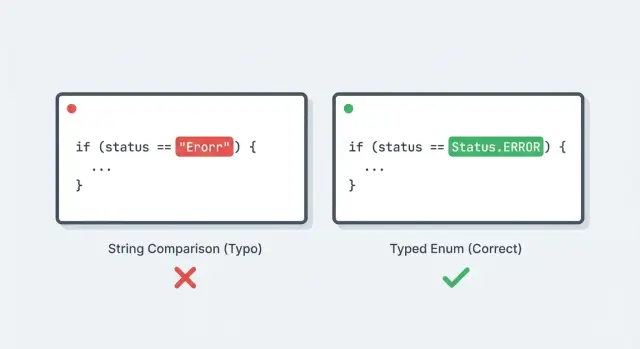
Why string statuses break workflows so easily
String status fields look harmless because they read nicely in logs and databases. The problem is that they’re plain text, so the code can’t protect you from small differences like canceled vs cancelled, Paid vs paid, or even a trailing space.
One typo is enough to skip a critical branch. Imagine a checkout workflow that should refund a payment and stop fulfillment when an order is canceled:
if (order.status === "canceled") {
  refund(order.paymentId)
  stopFulfillment(order.id)
  sendCancelEmail(order.customerEmail)
}
If one part of the app writes cancelled, that condition never runs. Nothing crashes. The order just drifts into the wrong path, and you notice it later when a customer gets charged, the warehouse ships anyway, or an email never goes out.
These bugs slip through reviews for a simple reason: strings don’t show a clear “allowed set.” Reviewers see a status check and assume the value is valid. Even if someone notices the spelling, it’s not obvious whether the rest of the system uses the American or British variant.
Tests often miss it too. Developers tend to copy the same string into both the test and the code, so the test passes even when real data is inconsistent.
The damage usually shows up where workflows have real consequences:
- Payments: refunds don’t trigger, retries run when they should stop
- Approvals: requests get stuck in “pending” forever, or get approved by mistake
- Emails and notifications: the wrong message is sent, or nothing is sent
- Fulfillment and access: shipping continues, subscriptions stay active, accounts aren’t locked
When you replace string status fields with enums, you change who is responsible for correctness. Instead of every developer remembering the exact spelling, the compiler (or at least your type checker) enforces a single list of valid statuses.
This refactor won’t fix bad business logic, race conditions, or missing audit trails by itself. It simply makes “impossible states” harder to write, so the rest of your workflow code is easier to trust.
If you inherited AI-generated code, status strings are one of the most common silent failure points. It’s normal to find typos scattered across UI code, API handlers, and background jobs.
What enums fix (and what they do not)
An enum is a named list of allowed values. Instead of saving a free-form string like "pending" or "cancelled", you pick from a fixed set such as PENDING, PAID, CANCELED. The code treats those as the only valid options.
The biggest win is having one source of truth for what statuses exist. You don’t have to remember whether it’s cancelled, canceled, CANCELLED, or order_cancelled. The enum makes the allowed set explicit, and everything else is invalid.
Enums also help you fail fast. With strings, a typo can ship to production and only break a workflow on a rare path. With enums, many mistakes surface earlier:
- Your editor and compiler can autocomplete and flag unknown values
- Unit tests fail at the exact spot where an invalid status is set
- Switch statements and match expressions can warn you when you forgot to handle a new status
- API schemas and validators can reject bad inputs immediately
What enums don’t do is settle unclear business rules. If the team can’t agree on when an order should be ON_HOLD vs PENDING, an enum won’t resolve that. It also won’t automatically fix a messy lifecycle where multiple parts of the app set status in conflicting ways. Enums make those problems easier to see, but you still need clear rules and ownership.
Stored values vs display labels
A common mistake is mixing what you store with what you show.
Stored values should be stable and boring, because they end up in databases, logs, and integrations. Display labels should be friendly and can change without breaking anything.
For example, store CANCELED as the enum value, but display "Canceled" in the UI. If you later want to show "Cancelled" for UK users, that should be a UI label change, not a database migration.
This distinction matters even more during AI-generated code cleanup, where prototypes often hardcode UI strings as status values. Separating internal enums from human text helps prevent the next typo from turning into a production incident.
Start by mapping your current statuses
Before you switch to enums, get a clean inventory of what you actually have in the wild. Most teams think they have 6 statuses, then find 18 once they look across the database, API payloads, UI labels, and old logs.
Pull status values from every place they can appear: database rows (current and historical), API requests and responses (including webhooks), UI state (filters, badges, button rules), background jobs and integrations (billing, email, shipping), and logs or analytics events.
Then look for duplicates and near-duplicates. The obvious ones are spelling variants like "canceled" vs "cancelled". The sneaky ones are synonyms that almost mean the same thing, like "paid" vs "payment_received", or values that mix state and cause, like "failed" vs "declined".
Next, pick canonical names and write down what each status means in plain language. One sentence is enough, but it must be specific. For example, "paid" could mean "we captured money" or it could mean "we generated an invoice." Those drive different workflows.
A quick sanity check is to answer two questions for each status:
- What events can lead into it?
- What actions are allowed while you’re in it?
If you can’t answer those clearly, you probably have two statuses hiding inside one label.
Finally, decide what to do with legacy values you already store. Common approaches are mapping legacy values to the canonical set (safe and flexible), renaming values in-place during a migration (simpler but riskier), or deprecating values (stop writing them, keep reading them temporarily).
Example: you find "cancelled" in old orders, "canceled" in new orders, and "void" in one integration. You might choose "canceled" as canonical, map both "cancelled" and "void" to it, and keep a separate field for cancellation reason if you need it.
Design a status enum that stays readable
A status enum should do two jobs at once: prevent mistakes in code, and stay easy to read when you’re debugging an incident. If it feels “clever,” people will work around it and you’ll drift back to string chaos.
Decide where the source of truth lives
Pick one place that defines the status values, and treat everything else as a consumer. For many teams, the backend is the safest source of truth because it owns validation and storage.
If you have multiple services, a shared module or schema can work, but only if you can keep it versioned and updated.
A simple rule helps: define statuses once, import them everywhere, and block ad hoc strings in code review. That’s how you avoid creating a second, competing list of statuses.
Naming rules that keep you sane
Statuses should look like stable internal codes, not UI labels. Choose a format and stick to it across the whole app.
Boring rules work best:
- Use a consistent tense, usually past tense for completed states (e.g.,
PAID,CANCELED,FULFILLED) - Avoid synonyms (
CANCELLEDvsCANCELED). Pick one spelling and enforce it - Keep codes short and clear. If you need a sentence to explain it, the state is probably too specific
- Reserve
UNKNOWNfor real migration needs, not as a hiding place for bugs
Keep user-facing text separate. The enum value is for machines and logs. The UI can map CANCELED to “Cancelled by customer” or “Order cancelled,” depending on context, language, and tone.
For any status that can be misunderstood, add a short comment where it’s defined: when it becomes valid, and what must be true before it can happen. Example: “REFUNDED: only after PAID; never set directly from PENDING.” Small notes like this prevent accidental transitions later.
Step-by-step: refactor the application code
Start in the application layer first. You want the code to stop accepting random strings long before you touch every database row.
1) Add the enum (without using it everywhere yet)
Create a single enum type in a central place and make it the source of truth. Keep names consistent.
// Example (TypeScript)
export enum OrderStatus {
  Draft = "DRAFT",
  Submitted = "SUBMITTED",
  Approved = "APPROVED",
  Canceled = "CANCELED",
}
2) Migrate comparisons and branching, then force exhaustiveness
Most workflow bugs live in tiny checks like if (status === "cancelled"). Replace those with enum comparisons so typos can’t compile.
A refactor order that usually works:
- Replace raw string comparisons with enum values (
status === OrderStatus.Canceled) - Make switch statements exhaustive so missing states fail loudly
- Update types so variables communicate the change (
status: OrderStatus, notstatus: string) - Remove “fallback to default” branches that hide missing cases
- Search for status literals and clean them up one by one
If your language supports it, use an “assert never” pattern (or compiler checks) so adding a new status forces you to handle it everywhere.
3) Add validation at boundaries (where strings still enter)
Even after the refactor, inputs still arrive as strings: HTTP requests, webhook events, job payloads, queued messages. Validate and convert at the boundary, then keep enums inside.
Good boundary checks include rejecting unknown statuses early with a clear error, quarantining unexpected event values instead of guessing, validating job payloads before state changes, and restricting admin dropdowns to the enum list.
4) Keep a temporary adapter for legacy strings
During rollout, you may need to read old values like "cancelled" from stored records or third-party callbacks. Add a small adapter that maps legacy strings to the enum, and keep it isolated.
This pattern keeps the messy inputs at the edges, converts once, and makes the core workflow logic hard to break with a single typo.
Update the database without downtime surprises
Database changes are where status refactors often go sideways. The safest approach is to add new structure first, keep old reads working, and only tighten rules once the app is fully writing the new values.
Enum type vs lookup table
You typically have two good options:
- Database enum type: fast, compact, and blocks invalid values, but can be annoying to change later
- Lookup table (statuses table + foreign key): easy to extend and can store metadata, but adds a join and more setup
If you expect the list to change often (new states, retired states, per-tenant variations), a lookup table is often the calmer choice.
A safe migration pattern
To move from strings to enums without downtime, use an expand -> migrate -> contract flow:
- Expand: add a new column (for example,
status_v2) or add the new enum type while keeping the oldstatuscolumn unchanged. Don’t add a strict constraint yet. - Dual write: update the app so any new or updated record writes both
status(old string) andstatus_v2(new enum or FK). Existing reads still use the old field, so nothing breaks. - Backfill: run a one-time job that maps old strings to the new values. Be explicit about messy data: trim whitespace, normalize case, and decide what to do with unknowns (quarantine them or map them to a safe fallback).
- Lock it down: once backfill is complete and dual writes are live, add constraints to stop bad data going forward (enum constraint, foreign key, and possibly
NOT NULL). - Contract (cleanup): switch reads to the new field, monitor for a full release cycle, then drop the old column or keep it temporarily as a compat field for older code.
Before adding NOT NULL, check how many rows are still missing status_v2. If the count isn’t zero, fix the mapping first. That avoids surprise migration failures.
Align the API, UI, and integrations
Once you’ve moved to enums, the biggest wins come from making every entry point agree on the same allowed values. If your API accepts anything, your UI can still send typos, and a webhook can still inject old strings.
Lock down the API contract
Update your API schema and request validation so only known statuses are accepted. If someone sends an unknown value, fail fast with a message a non-technical person can act on.
Practical checks:
- Validate status on every write (create, update, bulk update), not just one endpoint
- Return a clear error like: "Status must be one of: pending, approved, canceled" (and include what was received)
- Make responses consistent: always return the canonical enum value
- Add tests that try common typos (like cancelled) and confirm you reject them
Keep the UI and integrations honest
On the frontend, avoid hard-coded strings in multiple places. Dropdowns, filters, and badges should come from the same allowed values the backend enforces. Otherwise someone “renames a label” and accidentally changes the value sent to the server.
For external integrations, you often can’t change the other side quickly. Use versioning or a translation layer that accepts old values and maps them to the enum. Example: a partner might still send "cancelled" while your enum uses "canceled". Accept it temporarily, map it, and log a warning so you know what still needs updating. Set a date to remove the compatibility mapping.
Also update analytics and reporting so charts don’t split on old vs new strings. Normalize historical values to the enum before dashboards or exports run.
Example: the canceled vs cancelled bug in a real workflow
A common place this bites is an order system where status controls three things at once: refunds, customer emails, and fulfillment. It looks simple until one spelling mistake creates a second “valid” status.
Imagine a checkout flow that sets order.status = "cancelled" (double L) when a buyer cancels. But the refund job checks for "canceled" (single L) because someone copied the spelling from another file. Now you have two branches that never meet.
How it fails in real life:
- The UI shows “Cancelled,” so support assumes the refund is in progress
- The refund worker never picks it up (it filters for
canceled) - Fulfillment may still run if it only blocks
canceled, so a “cancelled” order can ship - Email templates may split too, so the customer gets the wrong message
With an enum, you don’t have two spellings. You have one value, and code that tries to use anything else won’t compile (or will fail validation early, depending on your stack).
Old data and old events still need care. A practical approach is to migrate existing rows by mapping both strings (canceled, cancelled) to the single enum value, keep a temporary fallback when reading legacy events, and add a small audit that counts unknown statuses so you can fix stragglers.
Common mistakes and traps during a status refactor
Status refactors fail less because enums are hard, and more because the old and new worlds overlap for a while. That overlap is where bugs hide.
One common trap is letting enums exist in the backend while the API, UI, or database still accepts free text. You end up with a half-migration where some code uses OrderStatus.Canceled and other code still writes "cancelled". If you must support both during the change, put the conversion in one place and make everything else use the enum.
Another frequent miss is renaming a status without chasing all the “invisible” consumers. Dashboard filters, CSV exports, alerts, or a support view may still look for the old value. The app seems fine until someone says, “the canceled orders report is empty.”
Background jobs and outbound integrations are easy to forget. The UI might stop sending strings, but a nightly reconciliation job, webhook handler, or payment callback can still set a status directly. Treat any external status value as untrusted input and translate it.
Mistakes that cause the most pain:
- Keeping strings and enums active in different layers for weeks, so nobody knows what’s canonical
- Changing status names but not updating saved filters, exports, alerts, and admin dashboards
- Missing non-UI writers like cron jobs, queues, webhooks, and third-party callbacks
- Letting empty or unknown statuses through weak validation (“default to empty string” is a classic)
- Skipping tests for rare states like chargeback, manual review, expired, or dispute
A small but real example: you add an enum and map "cancelled" to Canceled, but you forget one old path that still writes "canceled" as a raw string. Now you’ve got two spellings in the database again, and the “refund on canceled” job only picks up one of them.
To reduce surprises before shipping, reject unknown values at boundaries (API inputs, webhook payloads), log and count fallback mappings so you can see who’s still sending legacy strings, run tests against production-like records that include old spellings, and set a deprecation date for string inputs (then actually remove them).
Quick checklist and practical next steps
The goal is simple: the app should accept only known statuses, store only known statuses, and show only known statuses.
Before you call the refactor done, verify these points:
- Search the codebase for raw status strings. Ideally, you only find them in one place: a small adapter that translates legacy inputs (old DB values, incoming webhooks, older clients) into your enum.
- Make the database reject invalid statuses (native enum type, check constraint, or reference table) and confirm old values were migrated.
- Confirm the API and UI agree on allowed options and use the same source of truth.
- Check logs and analytics. If you track status changes, make sure dashboards don’t silently split into two similar statuses.
A few targeted tests usually pay for themselves:
- Try to parse or set an unknown status (like "cancelled" when the enum only allows "canceled") and expect a clear error
- Run a workflow test end-to-end (create -> pay -> cancel) and assert the stored status is exactly the enum value
- If you have integrations, feed a legacy status into the adapter and confirm it maps correctly (and rejects truly invalid values)
If this mess came from an AI-generated prototype, a quick audit often reveals status writes scattered across handlers, UI state, and background jobs. FixMyMess (fixmymess.ai) focuses on diagnosing and repairing these kinds of production-breaking patterns, and an enum refactor is often one of the fastest ways to stop silent workflow failures before deeper cleanup.
FAQ
Why are string status fields so risky in real workflows?
Strings are easy to type wrong, and the code usually won’t crash when you do. A value like "cancelled" instead of "canceled" can silently skip refunding, stopping fulfillment, or sending the right email.
When should I switch from strings to enums?
Use enums when a status controls important branching, jobs, billing, access, fulfillment, or messaging. If a typo can cause a silent “wrong path” instead of a clear error, you’ll get a lot of value from an enum refactor.
Will enums automatically fix my broken business logic?
No. Enums prevent invalid values and make missing cases easier to catch, but they don’t fix unclear rules or conflicting writers. You still need to define what each status means and which transitions are allowed.
How do I handle display labels without mixing them into the stored status?
Keep stored values stable and boring, like CANCELED, and map them to UI labels like “Canceled” or “Cancelled.” Changing wording for users should not require changing database values or API contracts.
What’s the quickest way to find all the status values my app is actually using?
Pull every distinct value from your database, API payloads, UI logic, background jobs, and logs, then normalize and group near-duplicates. You’ll often discover more variants than you expected, especially in AI-generated code.
How should I deal with legacy values like "cancelled" or weird old synonyms?
Pick one canonical enum value and map all legacy spellings and synonyms to it in a single adapter. Keep the adapter at the boundary, log each fallback mapping, and set a date to remove compatibility once senders are updated.
What’s a safe order of operations for refactoring code to enums?
Replace comparisons first, then tighten types so status can’t be a free-form string in core logic. Add boundary validation where strings enter, and only then do the database migration, so you don’t keep reintroducing typos.
How can I migrate the database without downtime or surprise failures?
Use an expand → dual write → backfill → lock down → contract approach. Add the new column or type first, write both old and new for a while, backfill existing rows, add constraints, then switch reads and remove the old field.
How do I stop bad statuses from entering through APIs, webhooks, or background jobs?
Validate and convert at the boundary, not inside workflow code. Reject unknown statuses with a clear error, and for unavoidable legacy inputs, translate them once in a dedicated layer before any state change happens.
I inherited AI-generated code with messy statuses—what’s the fastest way to get it stable?
AI-generated prototypes often scatter status writes across UI handlers, API routes, and workers, which makes typos and mismatched spellings very common. If you want a fast diagnosis and a production-safe enum refactor (plus fixes like auth, secrets, and workflow logic), FixMyMess can start with a free code audit and typically turn projects around in 48–72 hours.