Synthetic checks for broken signups: catch failures early
Synthetic checks for broken signups catch failed login, onboarding, and checkout from outside your network and alert you before real users churn.
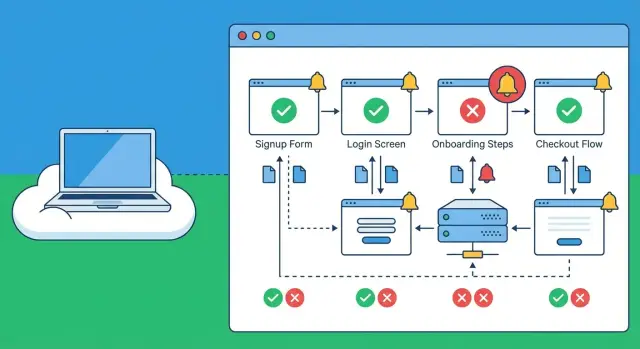
Why broken signups slip through and how users experience it
A broken signup rarely looks like a dramatic outage. To a real person, it feels like the site simply isn’t working: a button that does nothing, a spinner that never ends, a vague “Something went wrong,” or a form that submits and then quietly drops them back on the login screen.
Sometimes the UI says “Check your email,” but the email never arrives. Or it arrives late, the link is expired, and the user gives up. On mobile, a single extra step (like a CAPTCHA that fails to load) can be enough to kill the flow.
These failures slip through because teams usually test the happy path inside their own environment. Internal checks might confirm the server is up and the database responds, but that doesn’t guarantee the journey works from the public internet. Problems that often show up only externally include:
- CDN or caching issues serving an old JavaScript bundle
- Third-party auth or email providers blocked or rate-limited by region
- Misconfigured cookies, redirects, or CORS that behave differently off-network
- A deploy that works for logged-in admins but breaks new accounts
The business impact is direct and fast. A broken signup means paid clicks with no leads, abandoned carts at checkout, and more support tickets that start with “I can’t create an account.” Even worse, many people won’t complain. They’ll just leave.
Synthetic checks for broken signups help because they act like a real customer. They repeatedly run the same steps (signup, verify, first login) and alert when the journey fails. They don’t replace real user feedback, analytics, or customer support reports, but they cut the time between “it broke” and “you know it broke.”
What synthetic checks are (and what they are not)
Synthetic checks are scheduled scripts that act like a real user. They open your site or app, click through key steps, enter data, and confirm a “success moment” (for example, a new account lands on a welcome page, or the first dashboard loads). Think of them as a reliable, repeatable customer who shows up every few minutes and reports what happened.
“From outside your network” means the check runs from the public internet, not from your office Wi-Fi, VPN, or internal cloud network. That matters because many signup failures only appear in the real world: DNS issues, CDN problems, blocked cookies, geo-routing quirks, or third-party scripts that behave differently outside your environment.
Basic uptime checks answer one question: “Does the homepage respond?” Synthetic checks for broken signups go further and follow the whole journey end to end. A site can be “up” while signup is silently broken due to a JavaScript error, a bad API response, or an expired secret.
Synthetic checks are good at catching UI problems (buttons not clickable, forms stuck, pages not loading), API failures (500s, validation bugs, broken auth), third-party outages (payments, captcha, scripts that crash the page), and slow steps that time out.
What they can’t reliably prove on their own is whether a human received and used an email link. You can check that an email was requested, but inbox delivery varies. A common approach is to validate the backend event (“verification email created”) and treat inbox delivery as a separate check.
Choose the journeys that matter: signup, onboarding, checkout
Most teams try to monitor everything and end up monitoring nothing well. Start by choosing the 2 to 4 user journeys that directly affect revenue or support load. For most products, signup checks pay off fastest because small failures (a missing email, a stuck spinner) can quietly cut new users in half.
Pick journeys that represent a real person trying to become a customer, not internal admin paths or rarely used settings screens. A solid starting set is:
- Create account (email or social)
- Log in (including one “wrong password” attempt)
- Onboarding (first meaningful action, like creating a workspace)
- Checkout (from cart to receipt)
- Password reset (request plus confirm)
For each journey, write down one success signal you can verify. Don’t rely on “page loaded.” Use a clear moment that proves the flow worked, like a redirect to a welcome page, a visible “You’re in” message, or a receipt screen with an order number.
Decide where the script stops. The best stop point is the first key success moment, not every edge case. A signup check that confirms the welcome screen is often enough. Save deeper cases (multiple plans, coupons, address formats) for later, or you’ll create noisy alerts.
Make the script behave like a new visitor: fresh browser session, no cookies, and a normal viewport size. That’s where hidden problems appear, like broken auth redirects, third-party cookie issues, or an onboarding step that only fails when local storage is empty.
Example: you test checkout while logged in as a long-time user, but new users must verify email first. Your synthetic script should follow the new-user path, or it’ll miss the failure.
Test data and accounts: keep it realistic without being risky
Synthetic checks only help if they behave like a real customer. That means real screens, real emails, real redirects, and sometimes even a real payment step. But you should never use real customer data to make that happen.
Start with dedicated test users. Make them obvious (like synth_signup_01) and tag them in your database if you can, so support and analytics teams don’t confuse them with real customers. Use test-only email addresses and a test payment method from your payment provider’s sandbox, or a low-risk product and amount if you must run in production.
Email and one-time codes are the biggest pain point. You have a few safe options: keep a test inbox your script can read, allow a known test code only for synthetic users, or add a separate verification path that only works for a synthetic flag. The goal is to test the same flow customers use, without turning your auth system into an easy target.
Staging is good for fast checks, but many teams also run signup checks in production because that’s where real failures happen: rate limits, third-party outages, misconfigured redirects, or an expired secret. If you monitor prod, keep the script low impact: one run, one user, one purchase (or a $0 authorization) and clean up after.
Credentials are part of the product now, so treat them that way:
- Store test credentials in a secret manager, not in the script or repo.
- Use the least access possible (a test role, not an admin).
- Rotate passwords, API keys, and test cards on a schedule.
- Lock test inbox access to the monitoring system only.
- Log every synthetic login so you can spot abuse.
Where and how often to run checks from outside your network
If your synthetic script runs only from your office IP (or the same cloud where your app lives), it can miss the failures real customers see. Run checks from the public internet, from more than one place, so you catch issues caused by routing, DNS, CDN edge problems, or regional third-party outages.
A simple setup is 2 to 4 regions that match where your users are. If most customers are in the US and Europe, run one check from US East, one from US West, and one from Western Europe. This helps you spot “it works for me” problems, like an auth provider timing out only in one region.
Cadence: how often is “often enough”?
Frequency is a tradeoff between speed, noise, and cost. Pick a cadence per journey, not one size for everything:
- Every 1 minute: checkout and payments, or high-traffic signup during a launch
- Every 5 minutes: core signup and login for a steady product
- Every 15 minutes: onboarding steps that rarely change
- After deployments: run an extra round immediately after release
Make failures easy to read by setting timeouts per step. Use separate limits for page load, API response, and the confirmation screen. If “Create account” never shows a success message within 20 seconds, the alert should say that clearly, not just “test failed.”
Capture proof when it breaks
When something fails at 3 a.m., you want evidence, not guesses. Configure your checks to save a screenshot at the failure step, console logs and network errors, the exact step and timeout that triggered, and a short trace of key requests (signup, token exchange, confirmation).
Step by step: build a synthetic script that actually matches reality
A useful synthetic check reads like a real user story. Pretend you’re a first-time visitor on a slow connection, with no cookies, coming from outside your office network. Your script should follow that path, not the path you already know by heart.
A practical build order
Start simple, then tighten it until it catches the failures customers hit.
- Write the journey in plain steps first, then automate it: open the public page, wait for it to load, fill the same fields a user sees, submit, and confirm you land in the expected state (for example, “Welcome” plus a logged-in header).
- Use stable selectors and predictable waits. Prefer attributes you control (like
data-testid) over random IDs or brittle CSS chains. Wait for a specific element that signals the page is ready, not a fixed sleep. - Validate the right outcome, not just “no crash.” A success screen can be faked by front-end bugs. When you can, confirm server-side reality too, like “user record created” or “session cookie set” via an API check.
- Add retries with care. Retrying a page load is fine. Retrying a business action (creating an account, submitting an order, charging a card) can create duplicates and hide real errors.
- Capture evidence on failure. Save a screenshot, console logs, and key network errors so the on-call person can see what broke without reproducing it locally.
Make it resistant to false passes
Synthetic signup checks often fail because they only test the UI. A common example: the form submits, you see a success message, but auth is broken and the next page bounces back to login. Add a final “can I access the account page” step to prove the session really works.
Alerts and triage: catch failures without creating noise
Alerts should answer two questions fast: “Is this real?” and “Who needs to act?” If they don’t, people start ignoring them, and the next real outage gets missed.
Start by setting thresholds that match how flaky the internet can be. A single failed run can be a blip (temporary provider issue, brief network loss). Consecutive failures are usually a real break in your flow.
A simple approach that works for most teams:
- Page on 2 consecutive failures from the same location
- Create a ticket or message on 1 failure if it’s checkout or payment
- Auto-resolve only after 1 to 2 clean passes
- Add a daily summary of “near misses” so you see patterns without noise
Routing matters as much as detection. A broken signup step might be owned by product (copy or consent), engineering (API or auth), or an agency partner (recent release). If you don’t know who owns which step, decide that first and write it down.
Make alerts actionable by including context that answers the first questions people ask: which step failed, what the script expected, what it saw instead, where it ran from, and when it last worked. Include the last success time and a short error snippet (status code, UI text, or validation message). “Signup failed” is noise. “Failed at email verification: code input never appears; last success 03:12 UTC; US-East” is useful.
Keep a short runbook so triage is consistent:
- Re-run once from another location to confirm
- Check recent deploys, feature flags, and third-party status (email or SMS, payments)
- Try the same flow in an incognito window with a test account
- Capture the exact failing step and error text before escalating
- Escalate to the owner with the context attached
Common mistakes that make synthetic checks useless (or dangerous)
Synthetic checks for broken signups only help if they behave like a real customer and fail for the same reasons. A few common shortcuts can make checks look “green” while users are stuck, or worse, can create real damage in production.
One easy miss is testing only the happy path. A signup that ends on “Account created” may still be broken if email verification never arrives, the verify link fails, or the first login after verification errors out. The same goes for password reset. Many teams don’t script it, so they never notice that the reset email template is broken or the token expires instantly.
Another trap is running checks only from inside your own network. If the script runs in your VPC, it can bypass the exact things customers rely on: DNS resolution, CDN behavior, WAF rules, geofencing, or a misconfigured redirect at the edge. The app can look fine internally while real users hit timeouts, blocked requests, or a cached bad asset.
Flaky scripts are also self-inflicted. If the check clicks a button that is moving, waits for a spinner by guessing timing, or targets a selector that changes with every build, you get alert fatigue. Wait on stable page signals (like a clear text header or a known API response), and choose selectors meant for testing.
Be careful with “helpful” retries. Retrying a form submit can quietly create duplicate users, duplicate trial subscriptions, or even duplicate orders if your backend isn’t fully idempotent. If you need retries, retry safe steps (like page load), not purchases or account creation.
A quick safety checklist:
- Cover verification and reset, not just initial signup
- Run from outside your network in at least one real region
- Use stable selectors and reliable waits
- Avoid resubmitting actions that create data
- Keep credentials out of code and logs
Finally, treat secrets like production data. Test accounts should use minimal permissions, and credentials should live in a secret store, not in the script repo or alert payloads.
Quick checklist: does your monitoring cover real user pain?
If your monitoring only checks that the homepage loads, it will miss the failures that actually stop revenue. Use this checklist to sanity-check whether your signup monitoring is tracking what a real new customer does, in the right order, with proof you can act on.
A good check ends on a clear success signal. “200 OK” isn’t enough. You want to see the first screen that confirms the user is truly in (for example, a welcome page, dashboard, or a “check your email” step that appears only after a successful submit).
Here’s a quick pass/fail checklist that matches real user pain:
- A brand-new user can submit the signup form and land on the first success screen (not a generic redirect).
- Login works right after signup in a fresh session (close and reopen the browser context so you’re not relying on cached auth).
- Onboarding actually changes app state (for example: a profile field is saved, or the first workspace/project is created and visible after refresh).
- Checkout reaches a confirmation state without retries, and it doesn’t trigger a second charge when the page is refreshed.
- When anything fails, the alert includes a screenshot and the exact step that broke (which button, which URL, what error text).
A simple reality check: imagine your signup form succeeds, but the next page crashes only for first-time users because a missing “default team” record wasn’t created. Local testing might never see it because your account already has data. A synthetic run that creates a new user each time will catch it fast.
Example scenario: the signup works for you but fails for customers
A founder launches on a Monday. Traffic is healthy, but new accounts drop to almost zero. The team checks uptime, and everything looks fine: the homepage loads, the API responds, and there are no server errors.
The problem is simple: the founder (and their team) keeps testing signup from the office network in one country, on one browser, while real users are coming from multiple regions and devices.
They add synthetic checks for broken signups that run from outside their network. One check runs from the US, one from the EU, and one from Asia. The US and EU pass, but the Asia run fails every time right after the “Continue with Google” button.
The alert is useful because it includes what a real person would see:
- A screenshot of a redirect loop that bounces between the app and the identity provider
- A short console error like “redirect_uri_mismatch” and the final URL that keeps repeating
- The exact step that failed (after auth, before account creation)
It turns out the auth callback URL was misconfigured. The app was set up with a callback that worked for the primary domain, but a regional edge or alternate domain path in Asia produced a slightly different redirect URL. From the founder’s laptop, it never showed up.
The fix is small: update the allowed callback URLs in the auth provider and ensure the app always returns a consistent redirect target. Then rerun the synthetic script from all regions, confirm every run reaches the “Account created” screen, and close the incident.
Before moving on, add one regression check: run the same signup script after every deploy, from at least one external location, and alert only if it fails twice in a row.
Next steps: ship your first checks and stabilize the underlying app
Start small and get something running this week. One script for signup and one for checkout is enough to catch most “nothing works” moments. Pick the simplest happy path first, then add variations later (different plans, promo codes, payment methods, new user vs returning).
Run your first two scripts like a product release:
- Write one signup journey and one checkout journey that match what a real customer does, from outside your network.
- Record a baseline: success rate and average time to finish each journey.
- Add clear pass/fail rules (for example: account created, welcome screen shown, payment confirmed).
- Set one alert per journey, and route it to the person who can act.
- Review results weekly and expand coverage only after the basics stay stable.
Once the checks are live, watch the numbers for a few days. A small drop in success rate can be as important as a full outage. Also track time-to-complete. If your signup suddenly takes twice as long, something is often half broken (slow API, stuck spinner, email delivery lag) before it fully fails.
If failures are frequent, pause and stabilize the app before adding more monitoring. The usual culprits are authentication edge cases, brittle onboarding steps, and missing error handling (a single bad response or empty field breaks the whole flow). Fix the root cause, then tighten the script so it checks the right screen messages and status changes.
If you inherited an AI-generated codebase and can’t tell whether the script is wrong or the app is, a targeted remediation pass can save a lot of time. FixMyMess (fixmymess.ai) focuses on diagnosing and repairing issues like broken authentication, messy routing, exposed secrets, and security gaps so your signup monitoring reflects real user health instead of constant false alarms.
FAQ
Why does signup work for us but fail for real users?
Because most teams test the “happy path” in their own environment, where DNS, CDN edges, cookies, and third-party providers behave differently. Real users hit the public internet version, so issues like cached old JavaScript, mis-set cookies, or regional rate limits can break signup without showing up internally.
What’s the difference between uptime monitoring and a synthetic signup check?
An uptime check only tells you a page responds. A synthetic signup check clicks through the full flow and confirms a real success moment, like reaching a welcome screen or loading the first dashboard after creating a new account.
Which user journeys should we monitor first?
Start with the 2–4 journeys that directly affect revenue or support load. For most products that means create account, first login, password reset, and checkout, because those are the paths users abandon fast when anything feels off.
What’s a good success signal for a signup synthetic check?
Pick a single “proof” that the journey truly worked, not just that a page loaded. A good default is verifying the user can access an authenticated screen in a fresh session, so you don’t get a false pass from a front-end-only success message.
How do we test email verification if inbox delivery is unreliable?
The simplest approach is to verify the backend event that an email was generated and queued, then treat inbox delivery as a separate check. If you must validate the link end-to-end, use a dedicated test inbox the script can read, and keep that access locked down.
What’s the safest way to handle test accounts and credentials?
Use dedicated test users that are clearly labeled and separate from real customers, and avoid real customer data entirely. Store test credentials in a secret manager, keep permissions minimal, and rotate anything the script depends on so it doesn’t become a long-lived weak point.
Where should synthetic checks run from to catch real-world failures?
Run from the public internet and from more than one region, otherwise you’ll miss DNS/CDN edge problems and geo-specific third-party failures. A practical default is 2–4 regions that match where your users are, so you can catch “works in one place, fails in another.”
How often should we run signup checks without creating alert noise?
For steady products, every 5 minutes for signup and login is a solid baseline, with an extra run right after deployments. Increase frequency during launches or for checkout, and set clear per-step timeouts so the alert tells you exactly where it got stuck.
How do we prevent flaky scripts and false passes?
Use stable selectors you control, like test IDs, and wait for specific ready signals instead of fixed sleeps. Also avoid retrying actions that create data (like “Create account” or “Place order”), because retries can hide real issues and create duplicates.
What if our app is AI-generated and signup is already unstable?
If you’re seeing repeated breaks and can’t tell whether the script is wrong or the app is, fix the underlying flow first. FixMyMess can audit an AI-generated codebase, repair broken auth, routing, and security issues, and help you get to a stable signup flow quickly so your monitoring becomes reliable instead of noisy.