Outage alerts: 3 simple checks for early failures
Set up three outage alerts that catch most early failures: site down, signups failing, and payments or webhooks failing. Simple checks, clear routing.
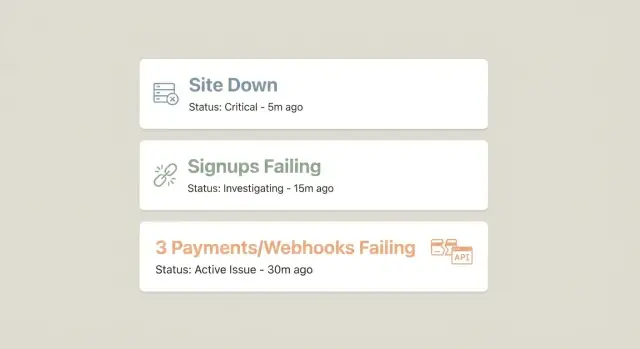
Why these three alerts catch most early outages
Most outages are first discovered by customers, not by your team. Someone tries to load your site, can’t sign up, or pays and never gets access. By the time support emails arrive or someone notices revenue dropping, you’re already in the middle of an incident.
“Early” is usually the first 5 to 30 minutes. That’s when a small problem is still easy to reverse: roll back a deploy, restart a stuck worker, renew an expired secret, or fix a bad config before hundreds of users hit it.
That’s why fewer outage alerts often beat a long, noisy list. If you have ten monitors firing all the time, people stop trusting them. A small set of signals that are almost always meaningful gets attention fast, even at 2 a.m.
These three checks cover the most common ways a product fails in the real world:
- Can anyone reach the site at all?
- Can a new user complete signup?
- Can money and fulfillment events flow (payments and webhooks)?
Together, they form a simple “front door, growth, revenue” safety net. If any one of them breaks, you likely have an outage users feel.
What they don’t cover: slow performance, partial feature bugs after login, data correctness issues, and “it works in the US but not in Europe” problems. They also won’t catch quiet failures like a background job building a backlog before it affects signups.
A concrete example: a deploy accidentally breaks an environment variable. Your homepage might still load, but signup requests start failing, and payment webhooks stop processing. With just these alerts, you find it in minutes instead of waiting for a complaint.
Alert 1: Site down (simple uptime check)
If you only set up one alert, make it an uptime check that answers one question: can a real person load your product right now?
A practical setup uses three targets. Check your homepage to catch DNS, CDN, and basic hosting failures. Check an app shell page (a logged-out app route that loads JavaScript and CSS) to catch broken builds and asset issues. Then check a lightweight API health endpoint that returns a fast 200 with a tiny payload, which catches backend crashes even when the homepage still loads.
Uptime checks can lie if you rely on a single location. Use at least two regions (or two independent checks) and only treat the site as “down” when both fail in the same short window. That avoids paging someone because one data center or ISP had a hiccup.
When an alert fires, it should be immediately actionable. Include the exact URL that failed, first failure time and most recent failure time, where it failed (region/location), what kind of failure it was (status code, timeout, DNS, TLS), and the last known success time.
For paging vs chat notifications, keep a simple rule. Page when the app shell or API health check fails twice in a row (for example, over 2-3 minutes). Send chat-only for a single failed check, or for a homepage failure when the app shell still works.
Alert 2: Signups failing (your growth stops silently)
If your site is up but people can’t create accounts, you can lose a whole day of growth without noticing. Signup monitoring is one of the highest-value alerts you can add.
Pick one critical path and test it end to end: open the signup page, submit the form, verify the user is created, and confirm the app can log in (or reaches the “check your email” step if you use email verification). The point is to catch real breakage, not just “page returned 200 OK.”
What to monitor (stay outcome-focused)
Aim for a few signals that match how the flow actually works. Watch the success rate of the full signup journey, plus error rates and latency for the signup and login endpoints. Add one business backstop too: alert if new user count drops to zero (or near zero) over a window that makes sense for your traffic.
That backstop matters because some failures slip past synthetic checks. An endpoint might still return “success,” but email delivery fails, or a country gets blocked, and real signups quietly stop.
Set the alert to fire on sustained failures, not one blip. For many products, “3 failed signup checks in 5 minutes” is a stronger trigger than a single failure.
Alert 3: Payments or webhooks failing (money and fulfillment)
Payments are where small bugs turn into real damage fast. This alert is less about “is the site up?” and more about “did we take money and deliver what we promised?”
Two breakpoints show up most often. The first is checkout/payment creation failing (bad config, broken redirects, provider issues). The second is webhook handling failing: the payment succeeds, but your app never processes the event that grants access, credits an account, starts fulfillment, or sends confirmation.
A strong signal is straightforward: monitor webhook processing success rate and backlog age. If events are piling up, something is stuck even if customers can still pay. If success rate drops, the handler is failing, signature verification broke, or a deploy changed payload parsing.
Keep the monitoring tied to outcomes. Payment success events and entitlements created should track closely. Watch for repeated webhook retries, rising 4xx/5xx responses, and the age of the oldest unprocessed event. If you have a support channel, “paid but no access” reports are also a useful secondary signal.
If your provider supports it, add a scheduled canary in a safe environment to confirm the full path: create payment, receive webhook, grant entitlement, send confirmation.
How to set these alerts up step by step
Think like a first-time user. The goal isn’t to monitor everything. It’s to catch early breakage with three small, repeatable checks.
1) Define the exact actions you will simulate
Write down the smallest actions that prove your product still works: load the home page, create an account, and complete the payment or webhook loop. Be specific (for example, “submit signup form with a new email”), because vague checks are hard to automate and easy to misread during an incident.
2) Keep each alert minimal: 1-2 endpoints
For each alert, pick one primary endpoint and one backup signal if needed. “Site down” might be the app shell plus a lightweight health endpoint. “Signups failing” might be the signup POST plus a quick check that the user record exists. “Payments/webhooks failing” might be a webhook receive endpoint plus a check that fulfillment started.
3) Set schedule and retries to reduce false alarms
Run checks often enough to notice trouble quickly (every 1-5 minutes is common), but retry before paging. A simple pattern is 2-3 attempts over 1-2 minutes, then alert only if all fail. Set timeouts so slow services trigger warnings before they become full outages.
4) Decide who gets notified and how
Pick one owner per alert so it doesn’t become “someone will handle it.” Notify the on-call person first, and also send a copy to a shared channel so others can help if the incident lasts.
5) Add a one-line runbook to every alert
Put the first action inside the alert message itself:
- Site down: check hosting status and the latest deploy, then roll back if needed.
- Signups failing: try a manual signup, then check auth provider logs and database writes.
- Payments/webhooks failing: confirm provider status, then inspect webhook logs and queue/backlog.
Thresholds, timing, and who gets paged
Good outage alerts are fast, but not jumpy. You want to catch real failures early without waking someone up for a one-minute blip.
Simple starting thresholds (safe defaults)
Start here, then adjust after you’ve seen real data for a week:
- Site down (uptime): check every 1 minute, page after 2 failed checks in a row, ideally from 2 locations.
- Signups failing: run a synthetic signup test every 5 minutes, warn after 2 consecutive failures, page after 3 failures (about 15 minutes).
- Payments/webhooks failing: warn if failure rate > 2% for 10 minutes (or 10 failures in 5 minutes); page if failure rate > 5% for 10 minutes or any sustained run of hard failures.
These numbers aren’t magic. They’re just a solid starting point so your alerts are useful on day one.
Use a “two strikes” rule to cut noise
Most teams get flooded because they alert on the first error. A simple fix is to require confirmation.
Example: if your uptime check fails once, send a warning. If it fails twice in a row, page the on-call person.
Route alerts to the right owner
Who gets paged should match who can fix it fastest:
- Site down: engineering on-call (backend or infra).
- Signups failing: backend on-call, plus product as a warning.
- Payments/webhooks failing: backend on-call, plus the payments owner as a warning.
If these alerts fire constantly, don’t mute them. Treat it as a sign that a core path is fragile and needs work.
Make alerts actionable (what the message must contain)
An alert is only useful if someone can take a first step in under a minute. Most bad alerts say what broke, but not what to do next, or who owns it.
Keep the payload consistent across all three checks so each alert reads like a tiny incident ticket. At minimum, include: what failed (and user impact in plain words), where it failed (environment/region and exact URL), when it started and how long it’s been failing, evidence (status code, error snippet, request or trace ID), and the owner (service/team and on-call rotation).
Add a bit of context that often explains incidents quickly: current deploy version and time, relevant feature flag state, and recent config changes like secrets rotation, webhook URL updates, or payment provider key changes.
For instructions, keep it short: one verification step, one likely first fix (rollback or disable a new flag), and a clear escalation path.
Quick checks: a 60-second outage checklist
When something feels off, you don’t need a full investigation to confirm it. You need a fast sequence that answers: is the site reachable, can a new user join, and do money or fulfillment events still work?
Run these in order:
- Confirm uptime from two locations (one local, one remote). If one fails and the other passes, suspect DNS or a regional issue.
- Create a fresh test user and complete the signup flow, including email verification if you use it.
- Trigger a webhook event (or a test purchase) and confirm processing is keeping up. Look for a backlog that keeps growing.
- Make one small real payment end to end and confirm access is granted or the order is marked fulfilled. If payment succeeds but access doesn’t, users will notice fast.
- Scan key error signals: spikes in 401/403, 500s, or timeouts often point to a bad deploy, expired secret, or misconfigured auth.
If any step fails, pause deploys and roll back the most recent change if you can. Capture what you saw (timestamp, endpoint, error text, user or order ID) so whoever fixes it isn’t guessing.
Example: one bad deploy and how the three alerts help
A small SaaS ships a “quick” change late Friday: new middleware that checks headers before requests hit the app. It passes local tests, gets deployed, and the team closes their laptops.
Ten minutes later, the first signal shows up. Not a flood of logs, just three user-facing checks.
The site check fails first: the homepage still loads, but key app routes return 500s, so the uptime check catches it. The signup check fails next: accounts stop being created, confirming it’s not just “traffic is down.” Then the payments/webhook check starts showing retries and backlog growth, revealing that money events aren’t being processed.
Within 15 minutes, the team narrows it down by comparing what still works (static pages) with what fails (anything behind the new middleware). They spot a header requirement that blocks auth callbacks and payment provider requests.
They roll back to restore signups and payments, then ship a hotfix: allow known webhook routes and auth callbacks, and log blocked requests with a clear reason. Afterward, they switch signup and webhook checks to dedicated canary accounts and test events so failures are easy to confirm without touching real customers.
Common mistakes that make these alerts useless
The fastest way to lose trust in outage alerts is to make them noisy, vague, or blind to real user pain. Most teams don’t need more alerts. They need fewer alerts that point to a specific failure and a clear next step.
Common failure modes:
- Only checking “server is up.” A 200 OK on the homepage can hide broken login, broken signup, or a stuck checkout.
- Paging on every error with no threshold. One timeout is normal. Page on sustained rates over a short window.
- Assuming webhook delivery means success. Providers may say “delivered” even if your endpoint returns 500, times out, or drops data after parsing. Test receive, validate, store, and trigger the next step.
- Ignoring how often auth and secrets change. Rotated keys, expired OAuth apps, and mis-set env vars can break signups silently.
- No owner and no runbook. If the alert doesn’t say who owns it and how to verify recovery, you waste the first 15 minutes.
Keep alert text practical: what failed, where (endpoint or flow), how many users are affected if you can estimate it, and one verification step.
Next steps: keep it simple and make it reliable
If you do nothing else, keep these three checks: site down, signups failing, and payments or webhooks failing. They usually tell you something is wrong before users pile into your inbox.
After that, add only one alert at a time, and only if you can answer two questions: what action will you take when it fires, and how often should it fire in a normal week? If you can’t answer both, it’s probably noise.
A simple way to keep alerts trustworthy is a monthly 10-minute test. Pick a quiet moment and force each alert to fire once so you know it still works.
If you inherited an AI-generated codebase and these alerts keep pointing to the same fragile spots (auth, secrets, webhook handlers), it’s usually faster to fix the underlying flow than to keep tuning thresholds. FixMyMess (fixmymess.ai) focuses on diagnosing and repairing those production paths so your monitoring goes quiet for the right reason: the app actually holds up under real traffic.
FAQ
Why only three alerts—won’t I miss problems?
Start with three because they cover the most common ways users experience an outage: the site isn’t reachable, new users can’t join, or payments/fulfillment stops. More monitors often add noise and slow your response because people stop trusting alerts.
What’s the difference between checking the homepage and checking the “app shell” and API health?
A basic homepage check can return 200 while the app is broken behind it. Add an app shell route (a real logged-out app page that loads assets) and a lightweight API health endpoint so you catch broken builds, backend crashes, and misconfigurations faster.
How do I avoid false alarms from one bad region or ISP?
Run checks from at least two regions or independent locations, and only mark “down” when both fail in the same short window. Also use a two-strikes rule so a single hiccup creates a warning, not a page.
When should I page someone versus just posting in chat?
Page on repeated failures over a short window, not on the first error. A practical default is “page after 2 consecutive failures” for uptime, and “page after 3 failures” for signup tests, so you catch real incidents without waking someone for one blip.
What should a signup monitor actually do?
Test one critical path end to end: load the signup page, submit the form, confirm the user is created, and verify you can reach the post-signup step (login or “check your email”). The goal is to detect real breakage, not just an endpoint returning 200 OK.
Why track real signup counts if I already run synthetic signup tests?
Synthetic checks can pass even when real signups fail due to email delivery, geo blocks, or provider issues. Add a business backstop like “new user count dropped to zero (or near zero) over a reasonable window” so you catch silent failures.
What’s the simplest way to monitor payments and webhooks without overcomplicating it?
There are two common failures: checkout/payment creation breaks, or the payment succeeds but your webhook handler fails and users don’t get access. Monitoring webhook processing success rate and backlog age helps you detect “paid but no access” issues quickly.
What information should every alert message include?
A strong alert includes what failed in plain words, the exact URL or flow, first and latest failure times, where it failed (region/environment), and evidence like status code or error snippet. Add the owner and a one-line first step so someone can act in under a minute.
What are good default thresholds and timing to start with?
Use safe starting points and tune after a week of real data. For example, check uptime every minute and page after two consecutive failures; run a synthetic signup every five minutes and page after three failures; for webhooks, warn on small sustained failure rates and page on higher sustained failure rates or a growing backlog.
If my app was generated by tools like Lovable/Bolt/v0 and keeps breaking, what should I do?
If these alerts keep firing because core paths are fragile—like broken auth, exposed secrets, failing webhook handlers, or messy AI-generated architecture—it’s usually faster to fix the underlying flow than keep tweaking monitors. FixMyMess helps diagnose and repair AI-generated codebases so these critical paths become stable and alerts go quiet for the right reason.