Turn user feedback into a fix list that teams can ship
Learn how to turn user feedback into a fix list by extracting reproducible steps, tagging impact, and choosing what to fix first without guesswork.
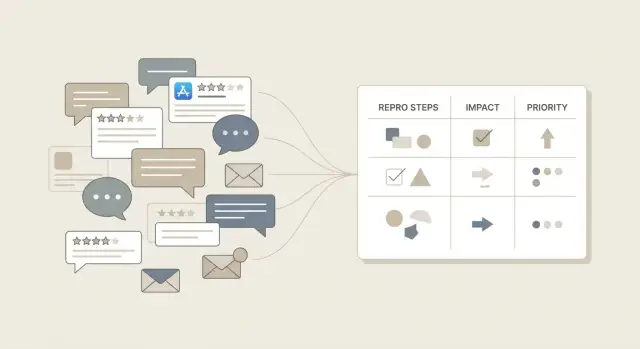
Why vague complaints stall fixes
"It doesn't work" signals pain, but it's not a bug report. A team can't fix what it can't reproduce, and it can't confirm a fix without a clear before-and-after.
Vague feedback usually strips out the details that matter: what the person tried, what they expected, what actually happened, and what changed recently. It also blurs the boundaries. Is it one button, one account type, one device, or the whole product?
Unclear reports slow everything down and make fixes risky. Engineers guess, patch the wrong thing, and ship changes that break something else. Product teams can't compare issues consistently, so the loudest complaint wins instead of the most important one.
A good fix list is the opposite of vague. It's made of small, testable items that anyone on the team can follow and confirm. Each item should read like a tiny experiment with a clear pass/fail.
"Shippable" usually means:
- One problem per item (no bundles like "checkout is broken")
- A short title that names the screen and action
- Repro steps a teammate can follow in under 2 minutes
- Expected result vs actual result
- A simple success check that proves it's fixed
If you're dealing with an AI-generated app, vague complaints cost even more. Fragile logic, exposed secrets, and tangled flows can hide behind symptoms. Getting specific early keeps the fix small, safer to ship, and faster to verify.
Capture feedback in one place (without losing context)
If feedback lives in five places, fixes get slow and messy. Pick one home for every report (a spreadsheet, a shared doc, or a tracker) and treat it as the source of truth. The goal is to preserve what the user meant while making it usable for the team.
Start by collecting the raw message from wherever it arrives: support emails, DMs (founder, sales, community), app store reviews, in-app chat transcripts, and call notes from demos or onboarding.
Don't rewrite the complaint as the first step. Copy the original wording into the record, including screenshots, timestamps, and any detail they shared (plan, device, account type). Then add structure in separate fields (like area, severity, and suspected cause). That split keeps you honest: the user's words stay intact, but your team still gets organized data.
Give every report a single ID (even if it's just FDBK-00123). The ID follows the issue through duplicates, comments, and fixes, so you can merge reports instead of spawning five tasks for the same bug.
Before writing tasks, group similar complaints. "Login keeps looping," "can't stay signed in," and "auth randomly fails" may be one cluster with multiple examples. When a prototype is breaking in production, teams often start exactly here: gather the raw reports first, then diagnose patterns. (This is also how FixMyMess typically begins with AI-generated apps: collect everything, then investigate the common failure points.)
Keep a small "unknown" bucket, too. When a message is too vague, log it anyway and note what's missing (device, steps, account type). It won't get lost, and you can follow up when you have time.
Translate complaints into useful facts
A complaint like "it's broken" usually points to a real problem, but it still doesn't tell you what to fix. Your job is to turn the emotion into a short set of facts a teammate can act on.
Start with who the user is. A new user may be stuck in onboarding; a returning user might be blocked by a recent change. Role and plan matter as well: an admin might see screens a basic user never will. Device is often the hidden clue, especially when a flow works on desktop but fails on mobile.
Next, pin down the goal. What were they trying to do right before it failed? Then rewrite the core issue as expected vs actual in one sentence. Example: "Expected checkout to confirm payment, but it spins forever after clicking Pay." That single line becomes the anchor for the ticket.
Time patterns are a shortcut to the root cause. "Always" suggests a deterministic bug. "Sometimes" points to timing, network issues, race conditions, or edge cases. "First time only" often involves caching, permissions, or account state.
Capture environment details, but only the ones that help reproduce:
- User type and role (new or returning, admin or member, plan)
- User goal (the outcome they wanted)
- Expected vs actual (one sentence)
- Frequency (always, sometimes, first attempt only)
- Environment (browser, OS, app version, and account state like trial, invited, or 2FA enabled)
If you're working with an AI-built app that changes quickly, add one more fact: which build or deployment they were on. The same complaint can refer to different bugs two days apart.
Step-by-step: turn one message into reproducible steps
When someone says, "Your app is broken," treat it like raw material. Your job is to turn it into something a teammate can follow without guessing.
1) Title it with the outcome
Write a one-line title that names what failed for the user, not your theory about why.
Good: "Checkout button does nothing after entering a promo code."
Not: "Promo code bug."
2) Capture the shortest path (3-7 steps)
Repro steps should be the minimum route from a fresh start to the problem. If a setup detail matters (like being logged out), state it at the top.
A simple structure:
- Start state: device/browser, account type, logged in or out
- Steps 1-7: the fewest clicks to reach the issue
- Stop the moment the bug appears
3) Add exact inputs
Replace "I filled the form" with exact fields, buttons, and values.
Example: "Email: [email protected]", "Password: 8+ chars", "Clicked: Create account".
This is where most vague complaints become actionable.
4) Write expected vs actual
Two short lines:
Expected: what should happen.
Actual: what happened instead (include the exact message text if there is one).
5) Define "done" as pass/fail
Make completion unarguable. "Done when a new user can submit the form 5 times in a row without error on Chrome and Safari." If it can't be tested, it can't be closed.
6) Add evidence if you have it
Screenshots, screen recordings, console logs, and timestamps help. If the app is AI-generated and messy, evidence matters even more. Teams like FixMyMess often use this material during a free code audit to diagnose broken flows quickly.
Simple questions that clarify fast
When a user says "it's broken," they're usually describing a moment, not a complete report. Ask only what you need to reproduce it once.
Get them back to the exact point of failure. One small detail (the last click, a pasted value, the error text) can save hours of guessing, especially in AI-generated apps where tiny logic gaps hide behind "it worked yesterday."
Five questions that clarify most reports in under two minutes:
- What was the last thing you did right before it failed?
- What exactly did you click, and what did you type? If you can, copy/paste what you entered.
- What did you expect to happen, and what happened instead?
- Did you see an error message? Share the exact wording.
- Does it work on another browser or device (one quick check)?
After the basics, ask one business question so you can triage correctly: "How urgent is this, and what were you trying to achieve?" Someone trying to submit a payment is different from someone changing a profile photo.
Example:
"Login is broken" becomes: "On iPhone Safari, after entering email and password and tapping Log in, it loops back to the login screen. No error text. Works on Chrome desktop. Urgent because I can't access my account."
That's enough to move from frustration to a fix list the team can ship.
Tag each issue so you can compare apples to apples
When feedback piles up, everything sounds urgent. Tags turn messy messages into consistent data so you can sort, group, and decide what to fix first without arguing.
Give every item a few simple labels. Keep the options limited so people actually use them:
- Type (bug, missing feature, confusing UX, performance, data)
- Severity (blocks the task, needs a workaround, annoying but possible)
- Frequency (one user, some users, most users)
- Surface area (one screen, one flow, many flows)
- Owner (web, backend, mobile, infra, content)
Once you tag a week of feedback, patterns show up fast. Ten "confusing UX + most users + many flows" items often matter more than one dramatic complaint.
Add "risk flags" as a separate label set. Keep it short, but make it loud:
- Auth or session issues
- Payments or checkout
- Data loss or data corruption
- Security exposure (secrets, injection, permissions)
- Compliance or privacy risk
Example: "Login keeps failing" might be tagged as bug + blocks task + some users + many flows + auth risk. That single line tells you it's not just a UI nit. If you're dealing with an AI-generated prototype, risk flags also help you spot the dangerous stuff early (broken authentication, exposed secrets) before you waste time polishing lower-impact issues.
Prioritize by business impact, not loudness
The loudest user isn't always pointing at the most important problem. A useful fix list starts with impact: what happens to the business if this stays broken for a week?
Pick 2-3 impact metrics that fit your product and use them consistently. Common choices include revenue (blocked checkout, failed upgrades), retention (users churn after hitting the bug), trust (security, data loss, broken login), and support load (how many tickets this creates).
Now score each issue in plain language: High, Medium, or Low. Add one sentence explaining why: "High: prevents new users from signing up, affects about 30% of attempts."
Do the same for effort, but keep it rough if you don't know yet. Small, Medium, Large, or a range like S-M is enough. This matters even more for AI-generated codebases, where sizing is hard until you inspect the code.
A simple rule set keeps you honest:
- High impact + Small effort: do first
- High impact + Large effort: schedule and break into steps
- Low impact + Small effort: do when you need quick wins
- Low impact + Large effort: park or drop
Separate "must fix" risk items from "nice to have" requests. Anything involving security, exposed secrets, broken auth, or data corruption is a must fix even if only a few users noticed. If you need a fast second opinion on an AI-built app, FixMyMess can audit it and flag the true risk items before you commit to a week of guesswork.
Turn the fix list into shippable work
A fix list only helps if someone can pick it up, build it, and confidently say "done." This is where notes become real work.
Keep the batch small. A good starting point is 6-10 fix items for the week (or sprint). With 30, you'll context-switch and ship nothing. With 2, you're probably avoiding the hard stuff.
For each item, add the details that make it buildable:
- Acceptance criteria: what a user can do after the fix, in plain words ("User can reset password and receive an email within 2 minutes.")
- Owner and due window: one accountable person and a rough deadline ("by Wed", "this week")
- Dependencies: what it touches (auth, database, payment provider, email service)
- How you'll confirm: rerun repro steps, watch a metric drop, or get a reply from the reporting user
- Scope note: what you will not do in this pass, so the fix doesn't balloon
Example: "Login fails" becomes: "Fix auth redirect loop on mobile Safari. Done when a new user can sign up, verify email, and land on dashboard on iPhone. Owner: Sam. Due: Fri. Depends on auth provider settings and session cookie config. Confirm: run repro steps and watch login error rate for 24 hours."
If the codebase is AI-generated and fragile (spaghetti auth, exposed secrets, weird DB access), teams often spend more time guessing than fixing. A quick outside diagnosis like FixMyMess' free code audit can turn a fuzzy backlog into tasks you can actually ship in 48-72 hours.
Example: from one angry message to a clear fix plan
User message: "Login is broken and I got charged. Fix this." It feels urgent, but it still isn't actionable. Pull out the facts without arguing, then write a test anyone on the team can run.
Extract what you already have:
- Who: existing customer vs new user, which plan, which device/browser
- Goal: log in to manage the account (and avoid being billed twice)
- Expected: login succeeds, billing matches the plan, one charge per period
- Actual: login fails, a charge still happened (or happened twice)
Turn it into reproducible steps with a pass/fail test:
- Use a test account on the same plan (or create one).
- Open the app in the reported browser/device.
- Attempt login with correct credentials.
- Observe result: error message, redirect loop, blank page.
- Check billing status: was a charge created? Is there a duplicate invoice?
Pass: user reaches dashboard and no unexpected charge exists.
Fail: login blocks access or billing shows an incorrect charge.
Now tag it so you can compare it to other reports: payments risk (high), trust hit (high), churn risk (high). The fix list should reflect business impact, not just how angry the message sounded.
A prioritized list from the same thread might be:
- Stop incorrect charges immediately (disable the problematic billing path or add a guard)
- Fix the login failure (root cause plus a test for the exact error state)
- Add alerting for charge creation without successful signup/login
- Improve the error message and support path so users can recover
If this comes from an AI-generated codebase with tangled auth or exposed billing logic, teams often bring in FixMyMess for a fast audit before pushing changes.
Common mistakes that waste days
The fastest way to lose time is to turn feedback into work that nobody can verify. You "fix" something, users stay unhappy, and the team argues about what changed.
One trap is writing tickets that describe feelings instead of behavior. "The app is unusable" is real feedback, but it's not a task. Capture the moment it breaks: what the user did, what they saw, and what happened next.
Another time sink is the mega-ticket: one report that mixes login, billing, and a slow screen into a single blob. It feels efficient, but it blocks progress because each part needs different owners, tests, and urgency. Split issues when they have different causes or different "done" criteria.
Skipping the expected result is how teams ship the wrong fix. If you only write what went wrong, someone may "fix" it by masking an error, changing UI text, or altering behavior users didn't want. A good ticket makes the target clear: what should happen.
Duplicates aren't waste, they're a signal. Treat them as frequency data. Close the copy, tie it to the original, and note how many users it affects. That count is often more useful than another long description.
Prioritizing by who shouted loudest also burns days. Volume, revenue impact, and blocked workflows matter more than tone.
Don't ignore "rare" reports that hint at security or data loss. A single exposed secret, SQL injection risk, or account takeover path can outweigh ten minor UI complaints. If you inherited AI-generated code, these issues are common and easy to miss until it's too late. FixMyMess often starts with a quick audit to surface high-risk problems before you spend time on lower-impact bugs.
Quick checklist before you commit to fixing
Before anyone starts coding, do a quick quality check on the report itself. A messy report turns into a messy fix. A clean report is easy to estimate, assign, and verify.
Use this to decide if the issue is ready to work on or needs one more round of questions:
- Can someone else reproduce it using only the steps you wrote (on a fresh account, in a normal browser)?
- Is expected vs actual behavior stated in plain words, with the exact screen or action where it goes wrong?
- Do you know who is affected and how often (one customer, a segment, or most users; every time or only sometimes)?
- Is business impact captured in one line ("new users can't sign up" or "checkout fails on mobile")?
- Is the success check clear: what exactly proves it's fixed?
Finally, scan for issues that should jump the line. If there's any chance it involves security, authentication, or payments, escalate it. Examples: exposed secrets, login bypass, account takeover risk, double charges, missing receipts.
If you inherited an AI-generated prototype and reports keep failing this checklist (unclear flows, inconsistent behavior, weird auth bugs), it can be faster to get a code audit first. Teams like FixMyMess do this in a focused way so you know what's truly broken before you commit time to fixes.
Next steps (and when to bring in help)
Once you can turn user feedback into a clear fix list, protect that progress by keeping scope small. Start with the top five issues by business impact (lost signups, failed payments, blocked logins, data loss, broken core flows). For each one, write clean repro steps so anyone on the team can verify the bug the same way.
A simple rhythm keeps the backlog from rotting: one short weekly triage. Keep it to 20-30 minutes, decide what moves forward, and close or park everything else.
A practical next-7-days plan:
- Pick the top 5 issues by impact and rewrite each into clear repro steps and expected vs actual behavior.
- Confirm each issue once, then stop re-litigating it in chat.
- Assign an owner and a deadline, even if it's small.
- Ship fixes in small batches so you can spot regressions fast.
- After each batch, rerun the original repro steps and mark done only when they pass.
Bring in help when the same fixes keep breaking or when you keep finding "surprise" problems under the surface. This is common with apps generated by tools like Lovable, Bolt, v0, Cursor, and Replit, where hidden logic, exposed secrets, and security holes can sit behind what looks like a simple UI bug.
If you're patching symptoms every week, pause and do a deeper diagnosis and refactor before adding more features. FixMyMess (fixmymess.ai) can start with a free code audit and help turn a broken AI-generated prototype into production-ready software with expert-verified repairs.
FAQ
What should I include so a report is actually fixable?
Write a one-sentence title that names the screen and what failed, then add the shortest repro path a teammate can follow. Include start state, exact inputs, expected vs actual, and a clear pass/fail check so the team can confirm the fix.
What’s the fastest way to clarify “it doesn’t work”?
Ask for the last action they took, what they expected, what happened instead, and whether they saw any exact error text. Then confirm their device/browser and whether it happens every time or only sometimes.
Should I rewrite user complaints into my own words?
Keep the user’s original message as-is in the record, then add structured fields separately. This preserves context for later and prevents the team from accidentally changing the meaning while “summarizing.”
How do I keep feedback from getting scattered across chats and emails?
Pick one source of truth, like a tracker, shared doc, or spreadsheet, and log every report there. Give each report a simple ID so duplicates, comments, and fixes stay tied together.
How do I handle duplicate bug reports without wasting time?
Start by clustering similar complaints into one issue with multiple examples, instead of creating separate tasks for each message. Track how many people reported it so the cluster’s frequency is visible.
What tags help most when the backlog is messy?
Use a small set of consistent labels like type, severity, frequency, and surface area so you can sort issues quickly. Add explicit risk flags for things like authentication, payments, data loss, and security exposure so they can jump the line.
How do I prioritize fixes without chasing the loudest complaint?
Default to business impact first: does it block payments, signups, login, or trust? Then add a rough effort size and do the high-impact, small-effort items early while breaking high-impact, large-effort work into smaller shippable pieces.
What evidence is worth attaching to a bug report?
Include the minimum evidence that speeds up reproduction, like a screenshot, screen recording, timestamp, and any console or network errors you can capture. Evidence is most useful when it’s tied to a specific repro attempt, not a general “it failed.”
How do I write acceptance criteria that prevent “fixed but not really”?
Define “done” as a test someone else can run and get the same result, such as completing the flow multiple times on the affected devices. If it can’t be tested clearly, it’s easy to ship a change that looks fixed but still fails for users.
Why are AI-generated apps harder to debug from vague feedback?
Be extra strict about environment details and build/version, because small changes can create different bugs with the same symptom. If the codebase feels fragile or risky, a focused outside diagnosis like FixMyMess’ free code audit can turn vague reports into safe, testable fixes quickly.