Validate environment variables at startup with an env schema
Validate environment variables at startup to catch missing or invalid config early, show clear errors, and stop bad deploys before users see failures.
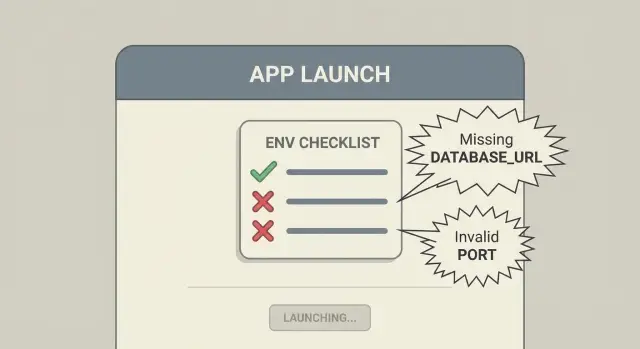
Why env var problems show up after deployment
Environment variables (env vars) are settings your app reads when it starts. They usually include the database URL, API keys, the app’s base URL, and which environment you’re running in (development vs production). Keeping them outside the code lets you ship the same build to different environments with different settings.
Most env var bugs follow the same story: everything works locally, then breaks after deploy. On your laptop, a .env file has been accumulating for months, or your framework quietly supplies defaults. In production, you have to re-enter those values in a hosting dashboard or CI system. That’s where typos, missing keys, and “staging values in prod” mistakes happen.
These failures also show up late. Many apps only touch certain variables on specific pages or background jobs. A missing EMAIL_API_KEY might not fail until the first password reset. A bad DATABASE_URL might not show up until load increases and the connection pool is under stress. It feels random, but it’s still just configuration.
The fix is to fail fast. When the app boots, validate the env vars you need, print a clear error (without exposing secrets), and exit with a non-zero code. A bad deploy should fail immediately and loudly, not half-work and break in front of real users.
What to validate (and what not to)
Startup validation isn’t meant to prove everything works. It’s meant to catch bad configuration early, with clear errors, before the app handles traffic.
Start by splitting variables into two groups:
- Required: the app can’t safely run without them (database URL, auth secret, base URL).
- Optional: feature flags or tuning knobs where a sensible default is acceptable.
What’s worth validating on every boot:
- Presence and non-empty values for required keys (treat whitespace and
""as missing). - Types: strict parsing for numbers and booleans, plus URL validation where relevant.
- Allowed values and bounds: enums like
ENV=production|staging|development, ports 1-65535, timeouts greater than 0. - Cross-field rules: if
FEATURE_X=true, requireFEATURE_X_KEY. - Environment-specific rules: production often needs stricter requirements (HTTPS URLs, stronger secrets,
DEBUG=false).
What not to validate at startup: anything that turns boot into a slow, flaky integration test. Don’t block startup by calling external APIs, sending email, or running heavy migrations. Keep boot checks focused on configuration shape and safety.
Also, never validate secrets by printing them. It’s fine to report that JWT_SECRET is missing or too short. Don’t echo the value back.
Schema vs scattered checks
If you only have a few env vars, if (!process.env.X) throw can work, until it doesn’t. Over time, new features add new variables, and checks end up scattered across routes, jobs, and helper files. That leads to:
- inconsistent names (
DB_URLin one file,DATABASE_URLin another) - checks that run too late (only when a rare route is hit)
- vague errors (“cannot read property of undefined”) instead of “you forgot to set X”
A schema-based approach keeps all config rules in one place: what’s required, what’s optional, expected types, allowed values, and any cross-field rules. When validation fails, you get one clear error summary that points to the exact missing or invalid setting.
Run validation as early as possible: before connecting to the database, before initializing third-party SDKs, and before the server starts listening for requests.
Step by step: add startup validation that fails fast
Treat configuration like required input to your app, not something you discover after the first request fails.
1) Load env vars once, in one place
Pick a single module that runs on boot (often config or startup). Read env vars there, and pass the parsed config around. This avoids different parts of the app interpreting values differently.
2) Define an env schema
Write down what the app needs to start: required keys, expected type, and format rules (URL, email, integer range). Decide which values can have defaults and which must be provided.
A simple approach in code looks like this (example in Node):
const schema = {
  DATABASE_URL: { required: true, format: 'url' },
  JWT_SECRET: { required: true, minLen: 32 },
  PORT: { required: false, type: 'int', default: 3000 },
};
3) Validate everything and collect errors
Don’t fail on the first problem. It’s frustrating to fix one missing key, redeploy, then hit the next one. Validate the whole schema and return a summary of all issues.
Keep checks strict:
- required vs optional
- type parsing (int, bool)
- format rules (URL, minimum length)
- apply defaults only for clearly safe values
4) Print clear, actionable errors
Your error output should be easy to fix in minutes:
- which keys are missing
- which keys are invalid, and what format you expected
- which environment you think you’re running in
Do not print secret values.
5) Exit with a non-zero code
If validation fails, stop the process (for example, process.exit(1) in Node). That forces the deploy to fail fast instead of going live and breaking auth, payments, or jobs at runtime.
Defaults, optional values, and environment-specific rules
Defaults help only when they don’t hide real problems. A safe default keeps behavior predictable. An unsafe default makes a broken deploy look fine until users hit the wrong path.
As a rule, default only values that are non-sensitive and have an obvious fallback (like PORT in local dev). Don’t default secrets. For secrets, missing or empty should always fail startup.
If a variable is truly optional, make that explicit in the schema and document what happens when it’s absent.
A common edge case is the empty string. Many platforms allow you to set a secret to an empty value by mistake. For secrets, treat "" as missing.
For environment-specific rules, you usually don’t need separate schemas. Use one base schema and add a few conditional rules:
- development: allow local defaults and optional integrations
- staging: require most settings, allow test credentials
- production: require all secrets and stricter formats (for example, enforce HTTPS URLs)
Helpful errors without leaking secrets
Startup checks only help if people can act quickly. But config errors are also a common way secrets end up in logs, screenshots, and support tickets.
Good error messages include the variable name, what’s wrong (missing, empty, wrong type, invalid format), and a safe hint about what’s expected (for example, “must start with postgres://”). If you ever need to show “what was received,” redact it.
Treat names containing SECRET, TOKEN, KEY, PASSWORD, PRIVATE, SESSION, or COOKIE as sensitive by default.
Also watch client-side bundling rules. Some frameworks expose env vars to the browser based on a prefix. Add a rule that forbids secret-looking names from being included in client-exposed config.
Common mistakes that still cause runtime failures
Most runtime config bugs happen because validation exists, but it runs too late, checks too little, or reports too vaguely.
Watch out for these patterns:
- validating after the server starts (traffic can hit half-initialized code)
- validating only “the one that broke last time” instead of the full required set
- weak type handling (treating any non-empty string as
true, allowingNaN) - generic errors like “Config invalid” with no field-level detail
Keep the schema updated whenever you add a feature. New features almost always add new configuration.
Quick checks before you ship
Configuration is a feature you can test. Before deploying:
- remove a required variable and confirm the error names the exact key
- provide an invalid value (like
"abc"for a number) and confirm the message explains the expected type or format - confirm secrets are redacted in logs, even on failure
- confirm validation runs before migrations, workers, queues, or network calls
- confirm the process exits non-zero so your platform marks the deploy as failed
Example: catching a bad deploy before users notice
A common production failure is a missing DATABASE_URL. Without startup checks, the server boots and only fails when the first request tries to read or write data. The logs show a deep stack trace from the database client, and you end up guessing whether it’s networking, permissions, or queries.
With an env schema in place, the app refuses to start and prints a plain error:
- Missing required environment variable:
DATABASE_URL - Expected format: URL (for example,
postgres://...)
Fix the value, redeploy, done. Users never hit a broken app.
The same idea applies to auth callback URLs. If AUTH_CALLBACK_URL is missing, blank, or not HTTPS in production, it’s better to fail startup than to let users discover a login loop later.
Next steps: keep config reliable as the app grows
Once you add an env schema, make it part of the app’s normal startup in every environment: local dev, staging, preview builds, and background workers. Consistent behavior matters. If a variable is required, the app should refuse to start everywhere.
A short handoff doc also helps: which variables exist, where they’re set (hosting dashboard, CI secrets, container config), and how to rotate them.
If you inherited an AI-generated prototype, env var handling is often one of the fastest stability wins because config tends to be scattered and inconsistent. FixMyMess (fixmymess.ai) helps teams turn broken AI-built apps into production-ready software, and a quick codebase diagnosis can pinpoint missing config validation and risky secret handling before it becomes a deploy-day fire drill.
FAQ
Why does my app work locally but break right after deployment?
Because your laptop often has a long-lived .env file and framework defaults that quietly fill gaps. In production you usually re-enter values in a dashboard or CI, so missing keys, typos, and wrong environment values show up only after the deploy.
What does “fail fast” env var validation actually mean?
Validate required env vars as early as possible during boot, print a clear error that names the missing or invalid keys (without showing secret values), and exit with a non-zero code. That makes a bad deploy fail immediately instead of half-working until a user hits the broken path.
Which env var checks are worth doing at startup?
Validate the shape and safety of configuration: required presence, non-empty values, type parsing (int/bool), basic URL format, and allowed values like production|staging|development. Skip slow checks like calling third-party APIs or running heavy migrations during boot.
When should I use defaults for env vars, and when should I avoid them?
Defaults are fine for non-sensitive values with an obvious fallback, like a local PORT. Avoid defaulting anything security-related (secrets, tokens, passwords) because it can hide a broken deploy and create unsafe behavior.
How should I handle empty strings in env vars?
Treat "" and whitespace-only strings as missing for required variables, especially secrets. Many hosting tools let you save an empty value by accident, and it will look “set” even though it’s unusable.
Do I need a separate env schema for development, staging, and production?
Keep one schema for all environments, then add conditional rules for production. Common production rules are requiring HTTPS URLs, enforcing stronger secret lengths, and making sure debug flags are off.
What’s the benefit of a schema instead of scattered `if (!process.env.X)` checks?
Put all rules in one place (a config or startup module), validate once, and pass the parsed config around. This prevents mismatched names like DB_URL vs DATABASE_URL and avoids checks that only run when a rare route is hit.
How do I show helpful errors without leaking secrets into logs?
Don’t echo secret values in errors or logs, even on failure. Report the variable name and what’s wrong, and if you must show what was received, redact it so support tickets and log screenshots don’t leak credentials.
Where should env var validation run in the startup flow?
Make sure validation runs before the server listens for requests, before database connections, and before initializing third-party SDKs or workers. If you validate after startup, traffic can hit half-initialized code and fail in confusing ways.
Can FixMyMess help if my AI-generated prototype keeps failing due to config issues?
If you inherited an AI-generated app, env vars are often inconsistent across routes, jobs, and build steps, which leads to unpredictable runtime failures. FixMyMess can run a free code audit to find missing config validation, exposed secrets, and broken deploy assumptions, then fix or rebuild the setup so releases fail loudly and safely instead of breaking for users.