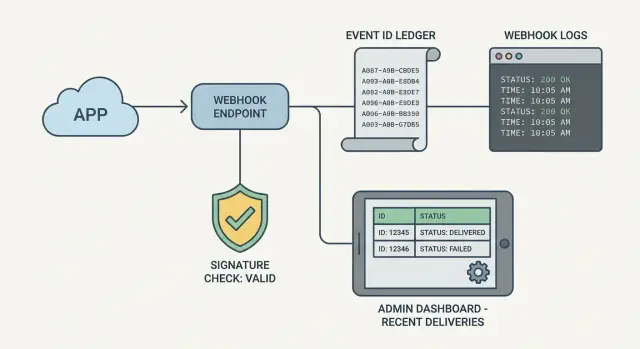
Webhook handler observability: logs, event IDs, admin view
Webhooks fail silently without the right visibility. Learn webhook handler observability with logged signature checks, stored event IDs, and a simple admin view.
Why webhook handlers feel invisible when they break
Webhooks are harder to debug than normal API calls because you aren't the one clicking the button that sends the request. A provider sends an event when it wants to, from infrastructure you don't control, and you often only find out something is wrong after a customer complains.
With a typical API endpoint, you can reproduce the call, watch the response, and iterate. With webhooks, failure can be quiet: the provider retries in the background, your app returns a generic 500, and you're left guessing whether the request was authentic, whether your code ran, and where it stopped.
The most frustrating part is the gap once retries start. You might see a spike in traffic, then nothing useful: no clear event identifier, no trace of what happened on each attempt, and no record of whether you already processed it. That's how you end up double-charging, missing a subscription update, or creating duplicate records.
Webhook handler observability is simply being able to answer a few questions quickly, without reading raw payloads or enabling noisy debug mode:
- Who sent this request, and did it pass signature checks?
- What event was it (ID, type, timestamp), and have we seen it before?
- What did our handler do, and why did it fail (if it failed)?
Good observability stays small, safe, and easy to maintain. You don't need a complex monitoring system. A few structured logs, a stored event ID, and a tiny admin view can turn an invisible webhook into something you can understand in minutes.
What "observable" means for a webhook endpoint
"Observable" means that when a delivery fails (or looks fine but causes the wrong result), you can answer what happened without guessing, re-sending blindly, or adding one-off print statements.
For any delivery, you should be able to answer:
- Did we receive the request, and when?
- Did signature verification pass or fail, and why?
- Which event was it (event ID), and have we already processed it?
- How long did processing take, and where did time go?
- What did we return to the sender (status code and error type)?
That is the core: a clear trace from "arrived" to "done," with enough context to debug retries, duplicates, and partial failures.
A solid baseline is to capture a small set of request headers (not all of them), the signature check result (pass/fail plus a short reason), a stable event identifier, timestamps (received/started/finished), and a final outcome (processed, skipped as duplicate, rejected as invalid).
Be careful with privacy. Don't log secrets, raw signatures, auth tokens, or full payloads by default. If you need payload visibility, store a minimal, redacted snapshot (for example: event type, customer ID hash, amount) and keep any raw body only for short-lived debugging in a protected location.
If payloads may contain personal data (names, emails, addresses, health or financial details), treat webhook logs like user data. Set retention limits, restrict access, and document who can view it. That's often the difference between "useful logging" and a compliance incident.
Log signature checks without leaking secrets
Signature verification is your webhook's "are you really who you say you are?" test. It stops random callers from hitting your endpoint and pretending to be your payment provider, email service, or any other system.
For observability, you want enough detail to answer two things fast: did verification run, and why did it fail? The trick is to log outcomes and context, not secret material.
A safe pattern is one verification record per request, with fields that are useful for support and debugging but harmless if copied into a ticket.
Log things like:
- Result:
verified=true/falseand a clearreasonsuch asmissing_signature,bad_format,timestamp_out_of_window, ormismatch - What you expected: the algorithm name (for example
hmac-sha256) and which header you looked for (header name only) - Timing context: server timestamp, request age (seconds), and whether replay protection was applied
- Identifiers: your generated
request_idand, if present, the provider's event ID
Do not log the secret key, the raw signature value, the full raw payload, or unredacted headers.
When verification fails, avoid "dump the request" logging. Instead, log a small redacted summary: payload size, content type, and which required headers were present.
Add simple counters so failures show up even when no one is watching logs. At minimum, track totals for verified, failed, and missing signature (optionally broken down by provider). If a deploy accidentally changes the expected header name, your logs should show reason=missing_signature spiking, rather than a vague 401 with no clue why.
Store event IDs so you can dedupe and trace retries
Most webhook providers retry the same event if your endpoint times out, returns a 500, or hits a network issue. If you don't store a stable event identifier, you can charge twice, provision twice, or send duplicate emails. Saving the event ID is the simplest path to idempotency: the same event can hit you 1 time or 10 times, but you only apply its effects once.
Start by storing a small record for every incoming webhook, even if you do nothing else yet. You can keep it in a database table, a key-value store, or a queue plus a small audit table.
A minimal record usually includes provider, event ID, received timestamp, status (received/processed/failed/ignored), and an optional short error message.
Then, for each request, do this in order: extract the event ID, insert it with a unique constraint on (provider, event ID), and if it already exists, return 200 quickly and skip the business action. That one check turns retries from guesswork into a timeline you can trust.
Some providers don't send a clear event ID, or your handler can't read it until after signature verification. In that case, derive your own from stable parts of the request, such as a hash of provider + request path + a stable header + raw body bytes. Avoid timestamps or anything that changes across retries.
Retention matters because webhook payloads often contain personal data. A practical rule is to keep summaries longer and raw data shorter (or not at all). Keep the event row (provider, event ID, timestamps, status) for 30 to 90 days, keep any raw body for a short window (like 24 to 72 hours) if you keep it at all, and cap error message length to reduce the chance of leaking secrets.
Example: a payment provider retries the same invoice.paid event three times. With event IDs stored, you see one record marked processed and later deliveries marked duplicate, so you know the customer wasn't charged twice and why the provider kept trying.
Record the lifecycle: received to processed to responded
A webhook can look "fine" because the sender got a 200, while your app failed after that. To make observability real, separate delivery receipt (what you return to the sender) from business processing (what your app actually did).
When possible, acknowledge fast, then do heavier work in the background. Even if you process inline, record both parts as distinct steps so you can tell whether the problem is verification, parsing, database work, or a timeout.
A simple lifecycle model you can query
Pick a small set of states and stick to them. The point isn't perfect detail. It's quick answers.
Record one row (or document) per incoming event with:
- Timestamps: received, verified, processing started, processing finished, responded
- Durations: verification time, processing time, total time
- State: received, verified, processed, failed, ignored
- Response: status code, handler version (optional), error class (no secrets)
- Correlation: provider event ID plus your internal correlation ID
With this in place, patterns show up quickly. If most failures happen after verification and take 25 seconds, you're likely looking at a slow database call, a stuck queue worker, or a missing index.
Correlation IDs connect the webhook to the rest of your system
A webhook rarely ends at the endpoint. It creates a user, marks an invoice paid, emails a receipt, or updates access.
Store the provider's event ID, and generate a correlation ID you pass into logs and downstream jobs. Then one search can show the chain: request received, signature verified, job enqueued, payment marked paid, email sent.
This matters in codebases where the handler mixes "respond to the webhook" and "do all the work" in one function. Making the lifecycle explicit turns a mystery into a timeline.
Step by step: add observability to an existing handler
Every webhook request should leave a trail you can follow later, even if it fails halfway through.
A practical order that works well on an existing endpoint:
- Add structured logs with a consistent set of fields on every request (provider, event ID, request ID, signature checked, outcome, duration).
- Verify the signature early, then log only the result (pass/fail) and why it failed. Never log the secret or raw signature.
- Persist the provider's event ID as soon as you have it and dedupe on it. If it's a retry, return a safe response and record that it was deduped.
- Wrap business logic so you always capture status, error type, and timing, even when an exception is thrown.
- Add a tiny admin view that shows recent webhook events and the details needed to answer "what happened?"
After the first step, keep the log schema stable. When fields change every week, searching turns into guesswork. If you can, generate a request ID at the edge and carry it through logs and the event record.
For signature checks, make failure messages human. "Signature failed: missing header X" is actionable. "Invalid signature" isn't. This is also where teams leak sensitive data by accident, so be strict about what you record.
For the admin view, you don't need a full dashboard. A table of the last 50 events plus a detail page is enough. The detail page should show received time, event ID, processing status, response code, duration, and last error class (for example: ValidationError vs DatabaseError).
A small admin view that answers "what happened?"
You don't need a full dashboard to debug webhooks. The smallest useful admin view is one screen with a recent events table and a detail panel. When someone asks why a payment, signup, or shipment didn't update, you should be able to answer in two minutes.
A good recent events table shows enough to spot patterns like repeated retries, a provider outage, or your handler returning 500s. Keep it consistent so it's easy to scan.
Include:
- Event ID (provider's ID, plus your internal ID if you have one)
- Provider and event type, received time
- Status (received, verified, processed, failed, ignored)
- Attempts and last attempt time
- Last error message (short, trimmed)
In the detail panel, focus on what someone needs next: did signature verification pass, which handler version ran, what response was sent, key timestamps (received/verified/processed), and the correlation ID that ties into your logs.
Actions can help, but only if they're safe: reprocess (only if your handler is idempotent), mark ignored (for known bad events or test noise), add an internal note, and copy a support summary (event ID, status, last error).
Lock this view down to admins only, and log every admin action (who did it, when, why).
Common mistakes that make webhook debugging harder
A webhook can be "working" and still be impossible to understand when something goes wrong. Most pain comes from small choices that hide the real failure or create noisy side effects.
One big mistake is logging full raw payloads. Many webhook bodies include emails, addresses, tokens, or secrets by accident. Instead, log a safe summary: event type, provider, event ID, request timestamp, and a short hash of the body. If you need deeper detail, store an encrypted copy with short retention and tight access.
Retries can also become self-inflicted. If an event was already processed, returning a non-2xx response often triggers endless retries and duplicate downstream actions. Make "already processed" an explicit outcome and return 2xx with a clear log entry that it was deduped.
Another common trap is mixing verification failures with processing failures. If signature verification fails, that's a security signal. If business logic fails after verification, that's an app bug or data issue. If both look like "500 error," you lose the ability to act quickly.
Operational issues that show up often:
- No timeout on database or API calls, so the handler hangs until the provider gives up
- Errors logged without provider name, event type, event ID, and internal request ID
- Only logging exceptions, not the decision made (ignored, queued, processed, deduped)
- Different log formats between environments, making comparisons hard
Example: a payment provider retries an event 12 times. Your logs show 12 "500" lines but no hint whether the signature failed, the database timed out, or the event was already processed. With observability, the first entry would show "verified ok," the next would show "DB timeout after 3s," and later retries would be deduped once the event is stored.
Quick checks before you call it done
Test webhook observability like a person who is stressed, sleepy, and on a deadline. If you can't answer basic questions fast, future you will suffer when the provider retries the same event for hours.
Start with a simple benchmark: pick a real provider event ID and time yourself. You should be able to find that single event (and its delivery history) in under 30 seconds, without guessing which server handled it.
A short pre-flight checklist catches most gaps:
- Search works: pasting the provider event ID shows one clear record, not five near-duplicates
- Signature status is obvious: logs show verified yes/no, plus the reason when it fails
- Retries are visible: attempt count and last attempt time are easy to find
- Failure type is clear: you can tell exception vs timeout vs validation failure
- Data is safe: secrets and personal data are excluded or redacted in logs and storage
Run one realistic drill. Trigger an event you know will fail (for example, a payload missing a required field). Confirm you can answer: did it reach you, did verification pass, what did you return, was it slow, and was it retried?
Finally, scan for accidental leakage. Webhooks often contain emails, addresses, tokens, or full card metadata. Logs should store only what you need to debug: event ID, provider name, timestamps, signature result, status, and a short error message.
Example: a failed payment webhook and how you trace it
A common support ticket looks like this: your payment provider sends an invoice.paid webhook, the customer's card is charged, but they still can't access the paid plan.
With observability in place, you stop guessing. You open your admin view and search by the time window. You find the exact webhook call.
The first questions get answered immediately: signature verification is "pass," the provider event ID is saved (for example, evt_01H...), and the request timestamp matches what the provider shows. You know it's real and it reached your server.
In the event details, the lifecycle shows:
- Received: 2026-01-20 14:03:12
- Verified: pass
- Processing: failed
- Responded: 500
The error field points to the cause, such as "Cannot insert subscription row: missing user_id." That tells you the bug is in your own code, not the provider.
Now retries start coming in. This is where idempotency matters. Because you store the event ID and treat it as unique, the handler doesn't grant access twice. Later deliveries are recorded as duplicates and skipped, or re-run safely depending on your design.
After you fix the bug, you can reprocess the failed event from the admin view. The state flips to processed, the response becomes 200, and the customer gets access.
For support, you now have clean facts to share: the timestamp of the original event, the event ID, and the current state (received, verified, processed, failed).
Next steps if your webhook code still feels brittle
If your webhook handler still feels like a black box, start with the smallest change that gives you signal: log the signature verification result (pass or fail) and store the provider's event ID. That alone usually turns "it didn't work" into a clear path to a fix, without changing business logic.
Keep those first logs boring and safe. Record outcomes and timing, not secrets. Log that verification failed, which provider it was, and which event ID was included, but never log raw headers or signature values.
Once you reliably capture event IDs and statuses, add a tiny admin view. Don't build a full dashboard yet. A simple table that answers "did we receive it, did we verify it, did we process it, what error happened, and what did we return?" is enough.
If the webhook code was generated by an AI tool and feels unreliable, plan a cleanup pass. Common warning signs are broken auth assumptions, messy retry behavior (double charges, duplicate emails), and secrets scattered in configs or logs.
A practical order of work:
- Add structured logs for signature result and request ID
- Store webhook event IDs and dedupe on them
- Record a clear status lifecycle (received, verified, processed, failed)
- Add a small admin view for recent events and errors
- Do a targeted refactor for retries, idempotency, and secret handling
If you're dealing with a broken AI-generated prototype and need to get it production-ready, FixMyMess (fixmymess.ai) focuses on diagnosing and repairing AI-generated code, including webhook handlers with flaky auth, retry bugs, and unsafe logging.
FAQ
What’s the simplest way to make my webhook handler observable?
Start by logging three things on every request: whether signature verification passed, the provider’s event ID, and a clear outcome like processed, failed, or deduped. Add timings (received and finished) so you can spot timeouts. That small baseline usually turns a mystery 500 into something you can act on quickly.
Why do webhook bugs feel so hard to debug compared to normal API calls?
Webhooks fail quietly because you don’t control when they’re sent or from where, and providers often retry in the background. Without stored event IDs and structured logs, each retry looks like a fresh request, and you can’t tell if it’s a duplicate, a signature problem, or a real processing bug.
What should I log for signature verification without leaking secrets?
Log the result and the reason, not the secret material. A good record is verified=true/false plus a short reason like missing_signature or timestamp_out_of_window, along with which header you checked and the algorithm name. Do not log the signing secret, raw signature, or full headers.
How do I stop retries from causing duplicate charges or duplicate records?
Save the provider’s event ID as early as you can and enforce a unique constraint on (provider, event_id). If you’ve already seen it, return a safe 2xx response and skip the business action, while recording that it was deduped. This prevents double-charges, duplicate provisioning, and repeated emails during retries.
What if my webhook provider doesn’t include a reliable event ID?
Use a stable derived ID from parts that won’t change across retries, such as a hash of provider name plus request path plus the raw body bytes, or a stable header plus body. Avoid including timestamps or anything that differs per attempt. After you derive it, treat it like a normal event ID for dedupe and tracing.
What lifecycle fields should I record so I can trace where it failed?
Separate “delivery receipt” from “business processing.” Record when the request arrived, when verification finished, when processing started and ended, and what status code you returned. This makes it obvious when you replied 200 but your actual work failed later, or when slow processing caused provider timeouts.
How do I log webhook data without creating a privacy or compliance problem?
Keep only safe summaries by default: provider, event ID, event type, timestamps, status, and a short error class/message that doesn’t contain secrets or personal data. If you store raw bodies at all, encrypt them, restrict access, and keep them for a short window. Treat webhook logs like user data because they often contain emails, addresses, or financial metadata.
What should a minimal admin view for webhooks include?
A recent-events table plus a detail view is enough. Show event ID, provider, type, received time, status, attempts/last attempt, signature result, response code, duration, and the last error class. If you add a reprocess button, make sure your handler is idempotent so reprocessing can’t apply effects twice.
What are the most common mistakes that make webhook debugging worse?
Don’t dump raw payloads and don’t log raw headers, tokens, or signatures. Don’t treat every failure as a generic 500; separate “signature failed” from “processing failed.” Don’t forget timeouts on database and external calls, and don’t skip storing event IDs, or you’ll lose the ability to see duplicates and retries clearly.
My webhook code was generated by an AI tool and keeps breaking—what should I do?
If the handler is AI-generated and flaky, start with a quick audit of signature verification, idempotency, secret handling, and logging safety. If you need it fixed fast, FixMyMess can diagnose and repair broken webhook handlers, harden security, and make retries safe, typically within 48–72 hours after a free code audit.