When to add a read replica: signs, routing, and pitfalls
When to add a read replica: clear signs, safe read routing, and how to avoid surprises from replication lag and broken assumptions.
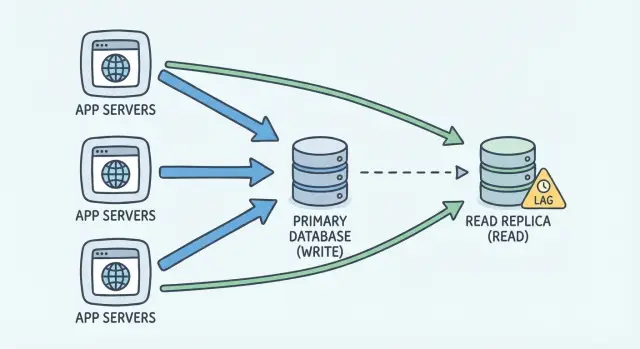
What problem a read replica actually solves
A read replica helps when your database spends so much time answering reads that writes start to suffer. This isn’t only about making pages feel faster. It’s about protecting the primary database so it can keep accepting updates instead of getting stuck behind heavy SELECT queries.
This usually shows up in a familiar pattern: one or two popular screens (or API endpoints) drive most of the database work. A dashboard that refreshes often, a search page, or a “list everything” admin view can chew through CPU and I/O. Then the parts of the app that create orders, update profiles, or write logs start timing out or feeling unpredictable.
A replica does one main thing: it gives you another copy of the data to read from. Your app can send some SELECTs to the replica so the primary has more breathing room for INSERT/UPDATE/DELETE.
What it does not fix:
- Slow queries that are slow because they’re badly written or missing indexes
- Locking problems caused by long transactions on the primary
- Too many writes (a replica doesn’t increase write capacity)
- App logic that assumes every read is instantly up to date
That last point is why the decision is about correctness, not just speed. A replica is usually a little behind the primary. If you read from it at the wrong moment, a user might not see their just-updated settings, a “payment succeeded” page might still look unpaid, or a support agent might think an action didn’t happen.
A good rule of thumb: add a read replica when you have clearly read-heavy traffic that’s hurting write responsiveness, and you can name which endpoints are safe to serve with slightly stale data.
Read replica basics (no jargon)
A read replica is a second database server that holds a copy of your main database. You keep one “primary” database as the source of truth. All writes go there, because it’s the only place guaranteed to have the latest data.
The replica is mainly for reads. Instead of every page load, report, or dashboard chart hitting the primary, some read-only queries can go to the replica so the primary stays responsive for writes and critical requests.
How the copy stays updated
Most setups use asynchronous replication. In plain terms: the primary records changes first, then the replica receives and applies those changes a little later. That delay is replication lag. Sometimes it’s tiny (milliseconds). Under load, or during spikes, it can grow to seconds or more.
That one fact explains most surprises people run into.
The tradeoff you’re choosing
A replica can make your app feel faster, but you’re paying with freshness. Reads from the replica might be slightly behind the primary.
A simple mental model:
- Primary: correct right now, handles writes
- Replica: scales reads, might be behind
- Lag: the gap between what you just wrote and what the replica can see
Example: a user updates their email address and immediately refreshes the profile page. If that page reads from the replica, it might still show the old email for a moment. That’s not permanently wrong, but it’s confusing unless you route those reads carefully.
Signs you’re ready to consider a replica
A read replica helps when your database spends most of its time on reads (SELECTs), not writes. If database CPU is high and your top queries are mainly SELECTs, that’s a strong signal.
Another common sign is “read traffic hurts writes.” You see write latency spike exactly when read traffic peaks, even though write volume hasn’t changed. Reads and writes compete for the same CPU, memory, and disk, so heavy reporting pages can slow down checkout, sign-ups, or any update.
Look closely at what’s slow. List pages, dashboards, admin tables, search results, and exports are often good candidates. These endpoints tend to scan lots of rows and get called many times by real users (or background jobs).
Connection pool pressure is another practical trigger. If you’re hitting max connections mainly due to read-heavy endpoints, a replica can reduce contention. It won’t fix inefficient queries, but it can buy room.
Caching can delay the need for a replica, but it’s not always enough. You’re often ready for a replica when:
- Cache hit rate stays low because data changes frequently or keys are hard to design
- Caching causes user-facing “wrong numbers” problems
- You need fresh-ish data, but not perfectly instant
- Exports and ad-hoc filters don’t cache safely
- Your cache layer is already a major source of bugs
A decision process you can follow
Treat adding a replica like a small experiment with a clear success metric. The goal isn’t “add more databases.” It’s “reduce pain without breaking correctness.”
Start by getting specific. “The app feels sluggish” isn’t enough. You want a short list of endpoints and queries you can measure before and after.
A decision process that works for most teams:
- Identify your top read endpoints by query count and total time (dashboard, search, feed, reports).
- Confirm the database is the bottleneck (not app server CPU, slow code, missing cache, or chatty API calls).
- Split reads into two buckets: must-be-fresh (balances, permissions, checkout) vs can-be-slightly-stale (analytics, activity lists, public pages).
- Set a target you can verify, like “reduce primary read load by 40%” or “cut p95 dashboard load time from 3s to 1s.”
- Define a rollback plan: how you’ll switch reads back to primary quickly if anything looks wrong.
Then decide where you’ll route reads. A good first move is to route only “can-be-slightly-stale” endpoints to the replica and keep all writes on the primary. Avoid mixing reads and writes inside the same request at first. That’s where lag hurts.
Before you flip anything in production, do a quick safety check:
- Can you tell which DB served a request (logs, tags, or tracing)?
- Can you detect lag and temporarily fall back to primary?
- Do you have a short test plan for user-visible correctness (login, payments, permissions)?
If you can’t measure improvement and can’t roll back fast, pause. A replica adds complexity, so you want the upside to be obvious.
Which endpoints benefit (and which should stay on primary)
A read replica helps most when you have lots of reads that don’t need to be perfectly up to date. The goal isn’t to move everything. It’s to take pressure off the primary while keeping the app correct.
Great candidates for a replica
These are usually safe because they’re read-heavy and not tied to money or access:
- Public pages (marketing pages, blog, public product pages)
- Search and browse (filters, category listings)
- Analytics and reporting (charts, trends, exports)
- Admin lists (tables of users, orders, logs) where clicks drill into details on primary
- Read-only APIs used by partners or internal tools
User profile views and product catalogs are often OK with care. Most users won’t notice if an avatar or bio takes a moment to catch up.
Endpoints that should stay on the primary
If it affects money or access, keep it on the primary. That includes checkout, payments, subscription status, and anything that decides what a user can see or do.
Also watch for endpoints that look read-only but quietly write. Teams often add small writes like updating last_seen, incrementing view counters, refreshing sessions, or recording “recently viewed” items. If you route that endpoint to a replica, it can fail (replicas are often read-only) or behave inconsistently.
A simple rule: send only idempotent, read-only queries to replicas. Keep anything that changes state, or decides access, on the primary. If you’re not 100% sure, treat it as primary until you verify the queries.
How to route reads without making the app fragile
Routing reads sounds simple: send SELECTs to the replica and keep writes on the primary. In practice, the fragile part is everything around it: connection handling, “read your own write” moments, and what happens when the replica falls behind.
Two practical routing approaches
You usually route in one of two places.
If you route in application code, you choose the database per endpoint (or per query). It’s straightforward because it’s explicit: “browse products” can use the replica while “update profile” stays on primary. The downside is that routing rules can spread across the codebase and become hard to reason about.
If you route via a database proxy or router, policies live in one central place, which can make rollbacks faster. The risk is that it can hide surprises: a query you assumed was safe might get routed to a replica and suddenly show stale results.
Make it resilient (and easy to undo)
Treat primary and replica as different resources, not interchangeable hosts. Use separate connections and separate pools so a slow replica doesn’t clog the pool used for writes.
A small set of safety rules prevents most incidents:
- After a user writes, keep them “sticky” to the primary for a short window (often seconds).
- Default to primary for anything involving money, auth, permissions, or user-generated content right after creation.
- Add a kill switch that sends all reads back to primary instantly (config flag, env var, feature flag), and test it.
- Time out replica reads aggressively and fall back to primary instead of failing the request.
Example: a dashboard loads 12 widgets. Route slow, non-critical widgets (weekly charts, top pages) to the replica, but keep “current plan” and “latest invoice” on primary. If the replica lags, the page still works; only the charts are a bit behind.
How to handle replication lag safely
Replication lag is the time it takes for new data written to the primary to show up on the read replica. If your app reads from the replica too soon, users can see old information and assume something broke.
Start by defining what “safe stale” means for your product. For a dashboard, being 5 to 30 seconds behind might be fine. For billing, passwords, or permissions, even 1 second can be too much.
Practical rules that prevent surprises
A few rules cover most real-world cases:
- Use read-after-write: after a user updates something, route the next few requests to primary for that user (or record).
- Keep critical screens on the primary: payments, login, access control, and anything that can lock someone out.
- If you must show replica data on a critical screen, show an “updating” state and avoid claiming something is final.
- Detect lag and stop using the replica when it gets too high.
- Avoid mixing primary and replica results in the same response (it creates impossible combinations).
Concrete example: a user changes their email address and lands on their profile page. If that page reads from the replica, it may still show the old email. With read-after-write, you route that profile page to the primary for 30 to 60 seconds after the update. After that window, normal replica reads are fine.
Lag-aware routing also matters during spikes and deploys. Replicas often fall behind when the primary is busy or a long-running query appears. If your app can measure replica lag (or uses a simple threshold check), you can switch reads back to the primary until the replica catches up.
What breaks first when you add a replica
The first breakages are usually the ones users notice immediately: “I saved it, but it didn’t change.” A small delay can turn into a big trust problem.
Support tickets often spike when people edit a profile, change settings, or post a comment, then refresh and see the old data. Plan for “read your own write” moments, not just more capacity.
Auth and permissions checks fail early too. If a user just upgraded a plan, got added to a team, or had access revoked, a replica read can return the previous state. That leads to “why am I still locked out?” or worse, “why can I still see this?”
Background jobs can misbehave as well. Many job systems read a row to decide whether work is needed. With stale reads, two workers might both think the job is pending and run it twice, or they might miss it because the replica hasn’t caught up.
Even when nothing is truly wrong, the UI can look inconsistent. Pagination and sorting can jump around if one request hits primary and the next hits a replica that’s behind. You’ll see duplicates, missing items, or page counts that change between clicks.
Counters drift faster than people expect: rate limits, view counts, unread badges, notification totals. If one request increments on primary but the next reads from a lagging replica, numbers can bounce backward.
If you want a simple default, keep these primary-only unless you’ve tested them carefully:
- Screens right after a write (save, checkout, settings)
- Login, permission checks, and session-related reads
- Work-queue style tables used by background jobs
- Anything that depends on exact ordering or counts
- Rate limits, quotas, and badge counters
Common mistakes and traps
The biggest trap is sending every SELECT to the replica because it’s “just reads.” Many reads are part of a flow that expects the latest write: “create account” then “load profile,” or “add to cart” then “show cart.”
Another common issue is hidden read-after-write dependencies. A settings page might save preferences and then immediately re-fetch them. A login endpoint might read a session record right after it was written. If those reads hit the replica during lag, the app looks broken even though the write succeeded.
Connection handling is a quiet source of pain. If you share one connection pool for both primary and replica, the app can accidentally send writes to the replica (or run replica-only settings on the primary). Even when it “works,” debugging gets harder because logs and metrics don’t clearly show which database handled the query.
Monitoring is often added too late. Track lag, replica query errors, and slow queries separately, and alert on sudden changes after deploys.
A few traps worth calling out:
- Routing by endpoint name instead of by freshness needs
- Forgetting admin tools and background jobs also run queries
- Not testing failure behavior (replica down, lag spikes)
- Caching laggy reads and making them stale for longer than intended
- Having no quick toggle to send all traffic back to primary
Plan a rollback before you ship. A feature flag that forces all reads to the primary can save hours.
Quick checklist before you flip the switch
Don’t start with infrastructure. Start with a safety check so you don’t trade slow pages for confusing “why didn’t my change save?” bugs.
- List your top read-heavy screens and label how fresh they must be.
- Define a read-after-write rule (who sticks to primary, for how long, and which screens are covered).
- Measure replica lag and decide a threshold where you stop using the replica.
- Prove you have a kill switch and that it works.
- Roll out gradually and watch timeouts, error rates, and user-visible inconsistencies.
A simple example: speeding up a dashboard without breaking UX
Picture a small SaaS app. The dashboard has charts, “top customers,” and date-range filters that trigger heavy reporting queries. Meanwhile, the settings area handles billing details, team members, and permissions. Traffic grows, the dashboard starts to drag, and writes begin to feel slower during peak hours.
That’s a good time to consider a read replica: not because you want a new database, but because you want expensive reads to stop competing with important writes.
A clean split usually looks like this:
- Dashboard reports, exports, and analytics widgets read from the replica.
- Settings, permissions, invites, and anything that must reflect a change immediately stays on the primary.
- Mixed endpoints (for example, dashboard cards that also show the user’s current plan) either read the plan from primary or accept a short delay.
Then add short-lived stickiness after writes. If a user changes a role from “Viewer” to “Admin” and is redirected back to the dashboard, reading from the replica can show the old role for a few seconds. Tag the session with “read from primary until time X” (often 30 to 60 seconds) after a successful save. During that window, route reads to the primary. After the window expires, go back to the replica.
If you’re dealing with an inherited AI-generated codebase where read/write routing is already scattered or brittle, FixMyMess (fixmymess.ai) focuses on diagnosing and repairing issues like unsafe read write splitting and missing lag fallbacks so replicas improve performance without creating correctness bugs.
FAQ
What problem does a read replica actually solve?
A read replica helps when read traffic is so heavy that it slows down writes on your primary database. The goal is to keep the primary responsive for updates by offloading safe, read-only queries to another copy of the data.
If your app feels slow but the database isn’t actually the bottleneck, a replica won’t fix the real problem.
When should I add a read replica instead of just optimizing queries?
Use a replica when your busiest queries are mostly SELECTs and you see write latency get worse during read spikes. A common sign is that a few screens (dashboards, search, admin lists) consume most of the database time.
If the pain is caused by slow query design or missing indexes, fix that first before adding more moving parts.
Which endpoints are usually safe to send to a replica?
Start by routing endpoints that can tolerate slightly stale data, like analytics widgets, activity feeds, search results, and large admin tables. These usually create lots of read load without needing perfect freshness.
Keep the first rollout narrow so you can measure impact and quickly undo it if users report confusing results.
What should always stay on the primary database?
Keep anything tied to money, access, or immediate user confirmation on the primary database. That includes checkout, payments, subscription status, login, permission checks, and pages users hit right after saving changes.
These flows often require “read your own write,” and replica lag can make the app look broken or inconsistent.
What is replication lag, and why does it matter?
Replication lag is the delay between writing to the primary and seeing that change on the replica. With asynchronous replication, the replica is usually a little behind, and under load it can fall seconds behind.
That’s why a replica decision is about correctness, not just speed.
How do I prevent “I just updated it, but I still see the old data”?
A simple default is: after a user writes, route their reads to the primary for a short window (often seconds). This avoids the “I saved it but it didn’t change” experience.
You can implement this as session-based stickiness or request routing rules for specific endpoints that follow writes.
What tends to break first after adding a replica?
The most common failure is user-visible inconsistency: someone updates settings, refreshes, and sees the old value because the read hit the replica. Another common break is access control, where a recent role change hasn’t reached the replica yet.
Background jobs can also misbehave if they make decisions from stale reads and accidentally run work twice or miss work.
What are the biggest mistakes teams make with read replicas?
Avoid mixing primary and replica reads inside the same response at first, because you can create contradictory results. Also avoid routing “everything that is a SELECT” to the replica, since many reads are part of a write flow.
Keep routing rules easy to reason about, and make rollback easy so you’re not stuck during an incident.
How do I make replica routing safe to roll back?
Have a kill switch that sends all reads back to the primary instantly, and test it before you need it. Also set aggressive timeouts for replica reads and fall back to the primary rather than failing the request.
Monitor replica lag and stop using the replica when lag exceeds a threshold you consider safe for your product.
What if my codebase is messy (or AI-generated) and routing reads sounds risky?
If the codebase has scattered database access, hidden writes inside “read” endpoints, or no clear way to enforce read-after-write rules, adding a replica can create confusing bugs. In that case, it’s often worth fixing routing, connection pooling, and lag fallback behavior first.
FixMyMess helps teams repair AI-generated or inherited code where read/write splitting is brittle, so replicas improve performance without breaking correctness.