Zero-downtime database changes with expand-contract
Learn zero-downtime database changes using expand-contract: add safe fields, migrate data in stages, keep old code working, then remove legacy parts.
Why database changes cause outages
Most outages from database work happen when code and schema change at the same time, but don’t roll out in the same order everywhere. App servers, background jobs, and scheduled tasks don’t update instantly. For a while, old code and new code run side by side. If either version expects something the database no longer provides, users feel it.
The classic mistake is thinking “just run a migration” is one safe step. A migration can lock tables, rewrite lots of rows, or remove a column that some still-running process reads. Even “small” changes like renaming a column can break production if any request still expects the old name.
Downtime usually shows up as:
- 500 errors when code reads a column or table that no longer exists
- Missing or wrong data when old and new code read and write different shapes
- Timeouts when a migration blocks writes or triggers slow queries
- “Works for me” bugs when only some servers are updated
- Background jobs that fail, retry, and pile load onto the system
“Backwards-compatible” means old code can keep running safely while the database is changing. In practice, you avoid removing or changing anything the old code depends on. You add new fields or tables in a way both versions can understand, then move data gradually.
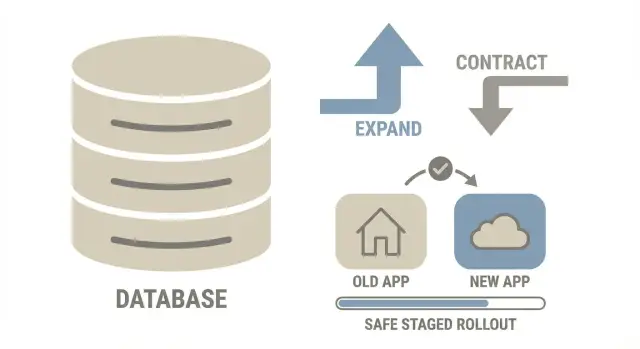
Zero-downtime database changes are hard because databases are shared state. One risky migration can affect every request, every write, and every job at once. The expand-contract approach reduces that risk by removing the all-at-once moment: expand the schema first, run both versions safely, migrate data in the background, then clean up only after the new path proves stable.
The expand-contract idea in one picture
Think of expand-contract like renovating a kitchen while still cooking every day. You don’t rip out the old sink first. You add the new sink, move usage over, and only then remove the old one.
Time ->

1) EXPAND      2) MIGRATE (gradual)        3) CONTRACT
Add new parts  Copy/backfill data safely   Remove old parts
Keep old path  Run both paths for a while  After new path is proven
- Expand: Add what you need (new column, new table, new index) without breaking old code.
- Migrate: Move data in small batches while the app stays live. For a while, old and new shapes exist together.
- Contract: Remove the old pieces only after the new code path has been stable in production.
This reduces risk because each step is smaller, easier to pause, and easier to reason about than a single big migration.
Designing a backwards-compatible schema update
A backwards-compatible schema change means both old and new versions of the app can run against the same database.
Start with additive changes. Add a new column, a new table, or a join table, but keep the old shape until you’re sure nothing depends on it. If you need to rename something, add the new name first and keep the old one working (for example with a view or a duplicated column), then remove the old name later.
During the expand phase, choose defaults that won’t surprise old code. Nullable fields are usually safer than required fields on day one. If a field must be non-null, introduce it with a safe default that matches existing behavior, then enforce stricter rules after the app has been updated.
A few rules prevent most breakages:
- Don’t drop columns or change meanings until the contract phase.
- Avoid renames as your first step. Add first, migrate, then clean up.
- Add constraints gradually (NOT NULL, UNIQUE, foreign keys) after data is in place.
- Plan index changes to avoid long write locks (use online options where supported).
- Make sure every new field has a story for old rows.
Decide early how reads and writes will work while both versions are live. Common approaches are:
- New code writes both old and new during the transition (dual-write).
- New code writes only the new shape, and a compatibility layer keeps the old shape updated.
- Reads move first, with a fallback to the old source until the backfill is complete.
Example: if you split users.full_name into first_name and last_name, don’t remove full_name yet. Add the new columns, let the new app write all three, and keep old reads pointed at full_name until you’re confident.
Step-by-step: the expand-contract workflow
Zero-downtime database changes work best when you plan for a temporary “in-between” state. That bridge lets old and new code coexist while you move data.
Expand: add new paths without breaking old ones
Pick the target model, then design a bridge model that can represent both versions (often old columns plus new columns).
Expand the schema safely: add columns or tables first, keep old fields, and make new fields nullable or give them safe defaults. If you need indexes, add them in a way that won’t block writes.
Deploy dual-compatible code: ship code that can read from both old and new places and write in a way that keeps data consistent.
Migrate and switch: move data, then change traffic
Backfill data in small batches. Make the job restartable and safe to run twice.
Switch reads before writes. Reads are easier to observe and roll back because they don’t change data. Once reads are stable, move writes in phases (often via dual-write), then remove the fallback.
Only contract after verification. Define “verification” ahead of time (row counts match, spot checks pass, error rate and latency stay normal).
How to migrate data gradually without breaking writes
The safest approach is to backfill old rows while your app keeps serving traffic. The key is small batches and making sure new writes don’t miss the new shape.
Run the backfill in batches small enough to finish quickly, with brief pauses between batches so normal traffic stays smooth.
Track progress so you can resume: a migrated_at timestamp, a boolean flag, or a “last processed id” marker. Pair it with a simple “how many left” query so you can tell whether you’re actually moving forward.
While the backfill runs, new records keep arriving. Handle that by having the application write the new fields for all new or updated rows. If you can’t do that everywhere yet, dual-write for a short period, then read from the new fields with a fallback to the old.
Keep the job idempotent. It should be safe if it runs twice on the same row:
- Update only rows that aren’t migrated yet
- Use deterministic transforms (same input, same output)
- Avoid append-style updates that can duplicate data
- Log per-row failures and continue instead of stopping the whole job
Also inventory every writer, not just the main API: workers, webhooks, admin tools, imports, and scripts. One missed writer can silently undo your plan.
Rollout strategy: keep old code working while you change data
Assume old and new data shapes will exist at the same time. Ship code that can read both and doesn’t crash when a field is missing, duplicated, or not fully backfilled.
A controlled switch (feature flag or config) helps you change behavior in small steps. A simple rollout sequence:
- Deploy code that can read old and new columns (or tables).
- Turn on new reads for a small slice (one environment, one tenant, or a small percent of traffic).
- Watch error rates and slow queries, then expand.
- Once reads are stable, start dual-writing or switch writes in phases.
- Keep the old path available until you’re confident the migration is complete.
Rollback should be boring. Ideally you can flip reads back to the old source and stop new writes without losing data. With dual-write, rollback often means continuing to write the old shape while you investigate.
Before contracting (dropping columns or tables), look for stability signals: no unexpected nulls in new fields, consistent row counts, no growing migration backlog, and normal support volume.
Common mistakes that create downtime
Most outages during expand-contract come from two problems: the database gets blocked, or different parts of the app disagree about what the data means.
The mistakes that bite hardest:
- Long locks. Changing a column type on a big table or adding an index the “simple” way can block reads or writes for minutes.
- Silent drift during dual-write. Miss one code path and old and new shapes diverge. Users see “random” failures.
- Renames that break everything else. The app might work while exports, dashboards, and ad-hoc scripts start failing.
- Forgetting non-request code paths. Cron jobs, workers, admin panels, and scripts need the same compatibility plan.
- Contracting too early. Drop the old column too soon and you lose your rollback option.
A simple example: you switch reads to profile_json, but an email worker still uses last_name and starts sending “Hi ,” to users. No outage, but still a production incident.
Quick checklist before, during, and after the change
Zero-downtime database changes fail for boring reasons: the table is bigger than expected, traffic spikes, or one code path still expects the old schema.
Before you start, confirm scope and timing (table size, churn, low-load window) and confirm compatibility (both old and new code can run safely).
During the rollout, watch the app (error rates, latency) and the database (CPU, locks, replication lag, slow queries). Slow down or pause the backfill if timeouts rise.
Afterward, prove it’s safe to contract: no reads or writes hit the old schema anymore, dashboards stay clean for a full business cycle, and temporary flags are removed.
One practical way to smoke out hidden dependencies: in staging, temporarily make the old columns return null and run normal flows (signup, checkout, profile edit). If anything breaks, you’re not ready to remove legacy pieces.
Example: changing a user profile schema without downtime
Say your users table has a single name column ("Ada Lovelace"), but you now need first_name and last_name for search, sorting, and personalized emails.
Expand
Add first_name and last_name as nullable columns. Keep name. Don’t add NOT NULL yet.
Update the app so every write sets both: it still fills name, and it also fills first_name and last_name. Reads can keep using name for now.
Migrate and roll out
Backfill existing rows with a background job. Keep it simple: split on the first space, and for messy cases (“Prince”, “Mary Jane Watson-Parker”), do a best-effort first_name and leave last_name empty.
A practical sequence:
- Deploy 1: add
first_name,last_namecolumns - Deploy 2: dual-write (update old and new fields)
- Backfill: migrate existing users in batches
- Deploy 3: read
first_name/last_namefirst, fall back toname - Verify: confirm new fields are filled for active users and new signups
Once the new code is stable, switch UI and exports to use the new fields (with a safe fallback for display name).
Contract
After you confirm nothing depends on name (including scripts and workers), stop writing to it and drop it in a later release.
Contract phase: clean up safely and avoid lingering complexity
The contract phase removes the temporary scaffolding that made the change safe. Skipping it leaves you with permanent complexity and future migrations get riskier.
“Done” means the old schema is truly unused. A simple team definition:
- No app code reads or writes old columns or tables
- No workers, cron tasks, or scripts reference them
- No dual-write logic remains
- No feature flags exist only to support the old path
- Monitoring shows only the new path is being used
Before deleting anything, do a focused sweep: search the codebase for old names, review scheduled jobs, check query logs for reads against old objects, and verify dashboards and runbooks don’t reference the legacy fields.
After removal, delete the helpers too: backfill scripts, temporary metrics, and any special-case validation that only existed during the transition.
Write down what changed and why: old vs new schema, how data moved, and when you declared the old path dead. Next time, you’ll move faster.
Next steps: plan your change and get a second set of eyes
Expand-contract is worth it when a schema change touches a hot table, authentication, payments, or anything your app writes to all day. If you can’t afford even a short maintenance window, treat it like a release, not a “quick migration.” For low-traffic internal tools or one-off reporting tables, a planned quiet-window change can be enough.
To estimate risk, look at blast radius and reversibility. Blast radius is how many code paths read or write the data (including jobs and admin tools). Reversibility is whether you can roll back the app and still work with the database.
If your project started as an AI-generated prototype, migrations often break for predictable reasons: hidden raw SQL, missed background writers, half-finished dual-write logic, and schema assumptions scattered across the codebase. If you need help untangling that before a production change, FixMyMess (fixmymess.ai) can review the code and migration plan and point out the risky spots that typically cause outages.
FAQ
Why do database migrations break production even when the change looks small?
Because your fleet rarely updates all at once. For a while, old code and new code run together, and if either expects a column, table, or constraint that isn’t there yet (or is already removed), requests start failing or writing the wrong shape of data.
What does “backwards-compatible” mean for a database change?
It means you can change the schema while old code is still running without crashes or corrupted data. Practically, you avoid dropping or changing the meaning of anything old code depends on until you’re sure the new code path is fully live and stable.
What is the expand-contract approach in plain terms?
Expand-contract is a safer rollout pattern: first you add new schema pieces, then you migrate data gradually while both old and new paths can work, and only then you remove the old pieces. It reduces the single “big bang” moment where one migration can take everything down.
What should I do first in the expand phase?
Start by adding new columns or tables without touching the old ones. Make new fields nullable or give them safe defaults so existing writes don’t fail, and deploy code that won’t crash if the new fields are missing or empty.
When is it safe to drop an old column or table?
Dropping or renaming columns that old code still reads is the fastest way to create 500s. Even if the main API is updated, background jobs, cron tasks, admin tools, and scripts may still reference the old names for hours or days.
How do I migrate existing data without blocking live traffic?
Run a restartable backfill that moves rows in small batches and can be safely re-run. At the same time, make sure new writes populate the new shape (often via dual-write or a compatibility layer) so you don’t end up with a moving target that never finishes.
What is dual-write, and when should I use it?
It’s when new code writes both the old and new representations during the transition. It’s useful for safety and rollback, but it can create drift if you miss even one write path, so you need to inventory every writer and keep the transform deterministic.
Should I switch reads or writes first during the rollout?
Switch reads first, because you can observe errors and roll back without changing data. Once reads are stable and backfill is mostly complete, shift writes in controlled steps, and only remove the fallback after you’ve verified the new path is consistently correct.
What should I monitor to catch problems early?
Look for database locking, slow queries, and replication lag during schema and index changes, and watch app error rate and latency during the rollout. If timeouts rise, slow down or pause the backfill and fix the query plan or batch size before continuing.
How can FixMyMess help if my AI-generated app keeps breaking during migrations?
If your codebase was generated by tools like Lovable, Bolt, v0, Cursor, or Replit, schema assumptions can be scattered across raw SQL, jobs, and half-finished migrations. FixMyMess can do a free code audit to find risky writers, broken auth, exposed secrets, and migration hazards, then help ship a safe expand-contract rollout quickly.